What is Customer Retention Automation & How to Do It?
Customer retention automation delivers personalized engagement, lowers churn, fuels sustainable growth and saves time and operational resources efficiently.
Customer retention automation delivers personalized engagement, lowers churn, fuels sustainable growth and saves time and operational resources efficiently.
Manual follow-ups miss at-risk accounts; churn compounds before your team can respond. Acquiring new customers costs 5–7x more than retaining existing ones, making early automated intervention critical.
Customer retention automation is the use of software-triggered workflows to monitor engagement, detect churn signals and deliver timely personalized interventions without manual effort. This guide covers eight scalable strategies, practical tools and best practices for implementing effective customer retention automation.
Customer retention automation uses software to keep your existing customers engaged without manual intervention from your team. It triggers personalized actions based on customer behavior and milestones. This approach helps B2B SaaS companies maintain relationships at scale while reducing churn.
The system monitors customer activity and health scores continuously throughout their journey. When specific conditions are met—like decreased usage or an approaching renewal date—it automatically sends targeted communications or alerts your team. This ensures customers receive timely support before problems escalate into cancellations.
Types of Automated Workflows in Customer Retention:
Automated retention strategies transform how companies maintain customer relationships and reduce churn rates.
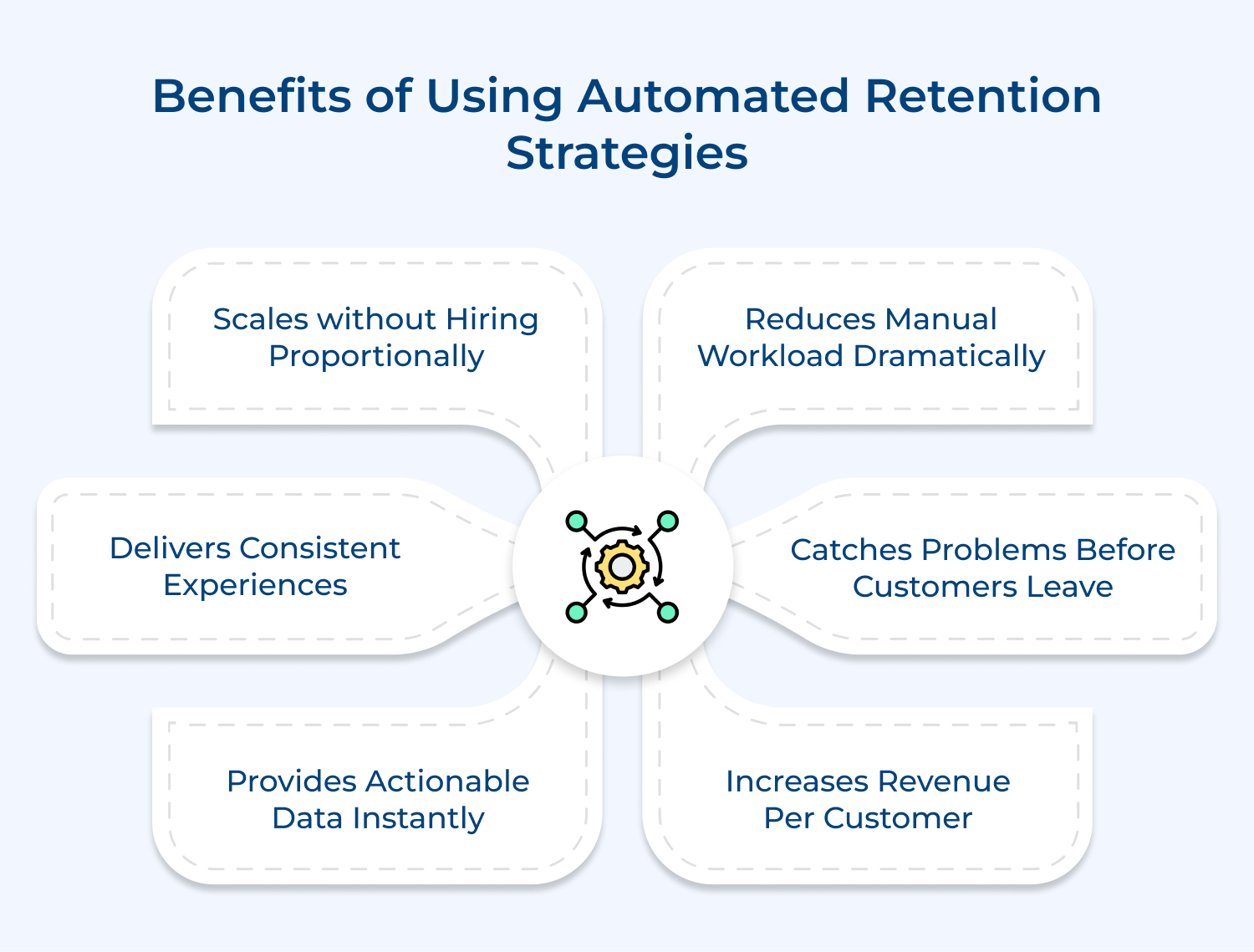
1. Reduces Manual Workload Dramatically
Your team stops spending hours on repetitive tasks and focuses on high-value customer interactions instead. Automation handles routine check-ins and notifications while your people tackle complex relationship issues.
2. Catches Problems Before Customers Leave
The system identifies warning signs like declining usage and triggers immediate interventions. This proactive approach prevents churn rather than reacting to cancellation requests after it’s too late.
3. Scales Without Hiring Proportionally
You can support thousands of customers with the same team size through intelligent automation. This efficiency becomes critical as your customer base grows faster than your operational budget allows.
4. Delivers Consistent Experiences
Every customer receives the same quality of communication and support regardless of which team member they’re assigned to. Automation eliminates the variance that comes from different individual working styles or busy periods.
5. Provides Actionable Data Instantly
You get real-time visibility into customer health scores and engagement patterns across your entire base. These insights let you refine strategies quickly rather than waiting for quarterly reviews to spot trends.
6. Increases Revenue Per Customer
Automated workflows identify upsell opportunities at the right moments based on usage patterns and customer milestones. This targeted approach generates expansion revenue without feeling pushy or sales-driven to customers.
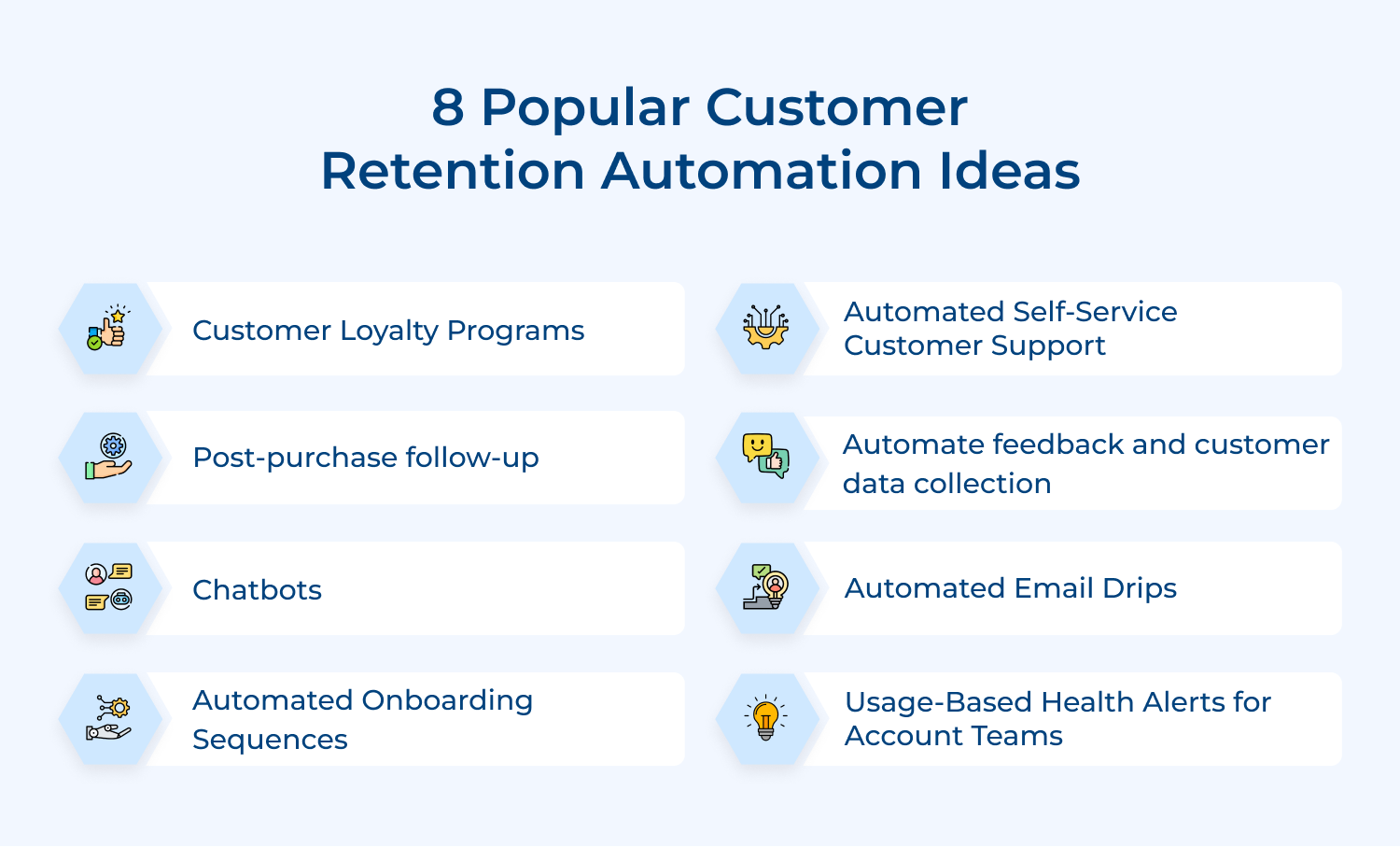
Here are eight automation ideas that can transform the way you nurture and retain your customer base.
New customers need clear direction from day one to realize value quickly. Automation ensures every user receives consistent guidance without overwhelming your team. This systematic approach prevents the confusion that often leads to early churn.
Automation tracks user progress and sends targeted messages at optimal moments based on their actions. When someone completes a task the system automatically introduces the next logical step.
Here’s how automated onboarding creates better customer experiences:
Onboarding automation transforms an overwhelming experience into a manageable journey that keeps customers engaged. The right sequence turns confused newcomers into confident users who stick around long-term.
Behavioral email drips send relevant messages based on what customers actually do in your product. Automation makes personalization possible at scale because manually tracking every user action would consume impossible amounts of time. Generic mass emails ignore individual needs and drive people away.
Automated email drips help you achieve these retention goals:
The system monitors user behavior patterns and automatically segments customers into relevant campaigns. When someone stops logging in for two weeks the automation triggers a re-engagement sequence without any manual intervention.
Different types of personalization improve email campaign effectiveness:
Chatbots handle customer questions immediately without human agents needing to be online constantly. This instant availability matters because customers expect quick answers and delayed responses create frustration. Automation fills the gap between when customers need help and when your team can provide it.
Here are three ways automated chatbots improve retention:
Watch out for chatbots that feel robotic or give wrong answers because they damage trust. Overcome this by regularly updating your bot’s knowledge base and making the handoff to humans seamless when needed.
Post-purchase campaigns check in with customers after they buy to ensure smooth implementation and continued satisfaction. Automation handles these touchpoints systematically because manual follow-ups get forgotten during busy periods. Consistent communication shows customers you care beyond just closing the deal.
The automation works by scheduling strategic check-ins at predetermined intervals after purchase milestones. For example it sends an implementation survey three weeks after deployment and a value assessment at the 90-day mark.
How to maximize post-purchase automation effectiveness:
Feedback collection gathers customer opinions at strategic points to identify satisfaction issues before they escalate. Automation ensures consistent insight capture across your entire customer base without manual tracking. This reveals patterns that would otherwise remain hidden.
Why trigger NPS surveys at usage milestones instead of random timing? Because asking for feedback when customers achieve meaningful results captures sentiment at moments of genuine value realization. Someone who just generated their first report feels accomplished and their feedback reflects actual product experience.
Here are four questions commonly asked in NPS surveys:
Feature request forms appear after customers complete specific interactions that might reveal unmet needs. When someone uses a workaround the system detects this friction point and presents a quick form asking what additional functionality would help.
Exit intent surveys activate when the system notices cancellation warning signs like decreased logins. These surveys appear when intervention still matters and you can address concerns. The automation asks targeted questions and often presents retention offers that resolve the underlying issue.
Self-service knowledge bases let customers find answers independently without waiting for support responses. AI-powered automation makes these resources helpful by understanding natural language questions and surfacing relevant solutions. This speeds up problem resolution while reducing support burden.
Here are effective ways AI-powered knowledge bases improve retention:
Smart knowledge bases reduce ticket volume while improving satisfaction because people get immediate answers. The automation continuously improves by learning from every customer interaction.
Loyalty programs reward customers for continued usage and advocacy to strengthen their connection with your product. Automation tracks qualifying actions and distributes rewards without manual monitoring. This recognition makes customers feel valued beyond their subscription payments.
The system automatically awards points when customers hit milestones like completing training or referring new users. These points unlock benefits such as extended features or priority support that make staying more attractive.
Best practices
Health alerts notify your customer success team when accounts show concerning patterns or promising opportunities. Automation monitors thousands of data points continuously because humans cannot track usage metrics for every customer. These timely notifications enable proactive intervention before issues become cancellations.
The system analyzes login frequency and feature adoption to calculate health scores automatically. When scores drop or usage spikes suggest expansion potential the automation alerts the appropriate team member with relevant context.
Pro tips:
Automation promises efficiency but implementing it for customer retention comes with real obstacles that you need to anticipate.

Your automation is only as good as the data feeding it. When customer information lives in disconnected systems or contains errors the automated workflows trigger at wrong times. This fragmentation creates poor experiences that damage retention.
Customers can tell when they’re receiving generic templated messages. Too much automation without human touch makes communication feel cold and transactional. This lack of genuine connection pushes people away instead of building loyalty.
Deciding when automation should activate requires careful calibration that many companies get wrong initially. Alert too early and teams waste time on false alarms while waiting too long misses the intervention window.
Automated messages quickly become outdated as your product evolves or customer needs shift. Stale content creates confusion when it references old features or doesn’t match current practices.
Customer retention automation isn’t limited to SaaS companies. Businesses across diverse sectors use these strategies to maintain relationships and reduce churn.
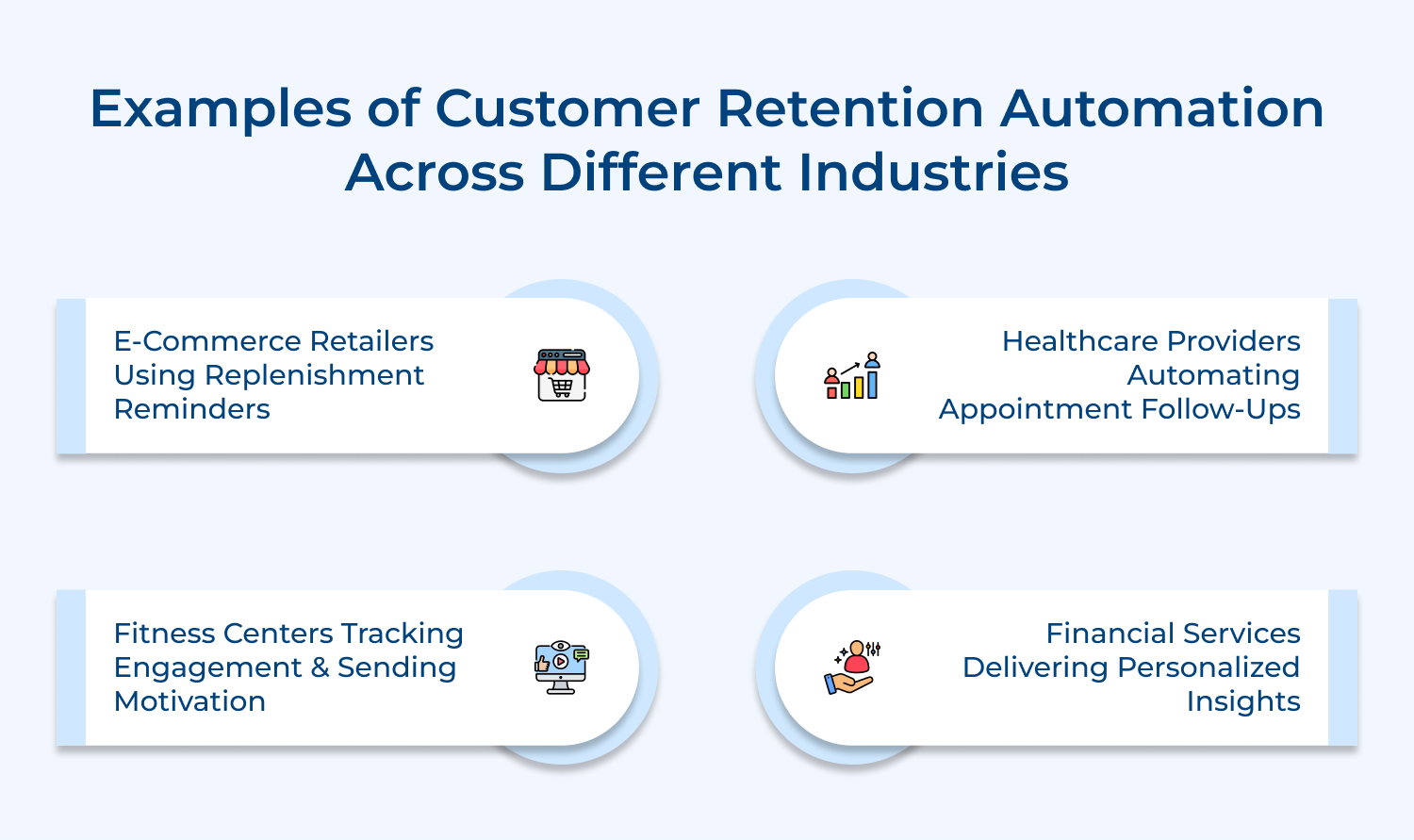
E-commerce Retailers Using Replenishment Reminders
Online retailers track purchase patterns and automatically remind customers when they’re likely running low on consumable products. The system sends timely reorder notifications before they run out. This convenience keeps customers returning instead of shopping elsewhere.
Healthcare Providers Automating Appointment Follow-Ups
Medical practices use automation to send appointment reminders and post-visit care instructions that improve patient adherence. The system schedules follow-up messages based on treatment plans and automatically books next appointments for preventive screenings. This proactive outreach reduces missed appointments and helps patients stick with their provider.
Fitness Centers Tracking Engagement and Sending Motivation
Gyms monitor member check-in frequency and automatically reach out when someone stops visiting regularly with personalized workout suggestions. The automation celebrates milestones like workout streaks and offers complimentary sessions to members showing declining engagement. These timely interventions address drop-off that typically leads to cancellations.
Financial Services Delivering Personalized Insights
Banks along with investment platforms analyze spending patterns and automatically send customized financial tips or savings opportunities to account holders. The system triggers alerts about unusual transactions while recommending relevant products based on life events. This value-added communication strengthens relationships beyond basic account management and reduces customer switching.
Effective automation requires thoughtful implementation that balances efficiency with genuine customer care. These practices ensure your automated systems enhance rather than diminish the customer experience.
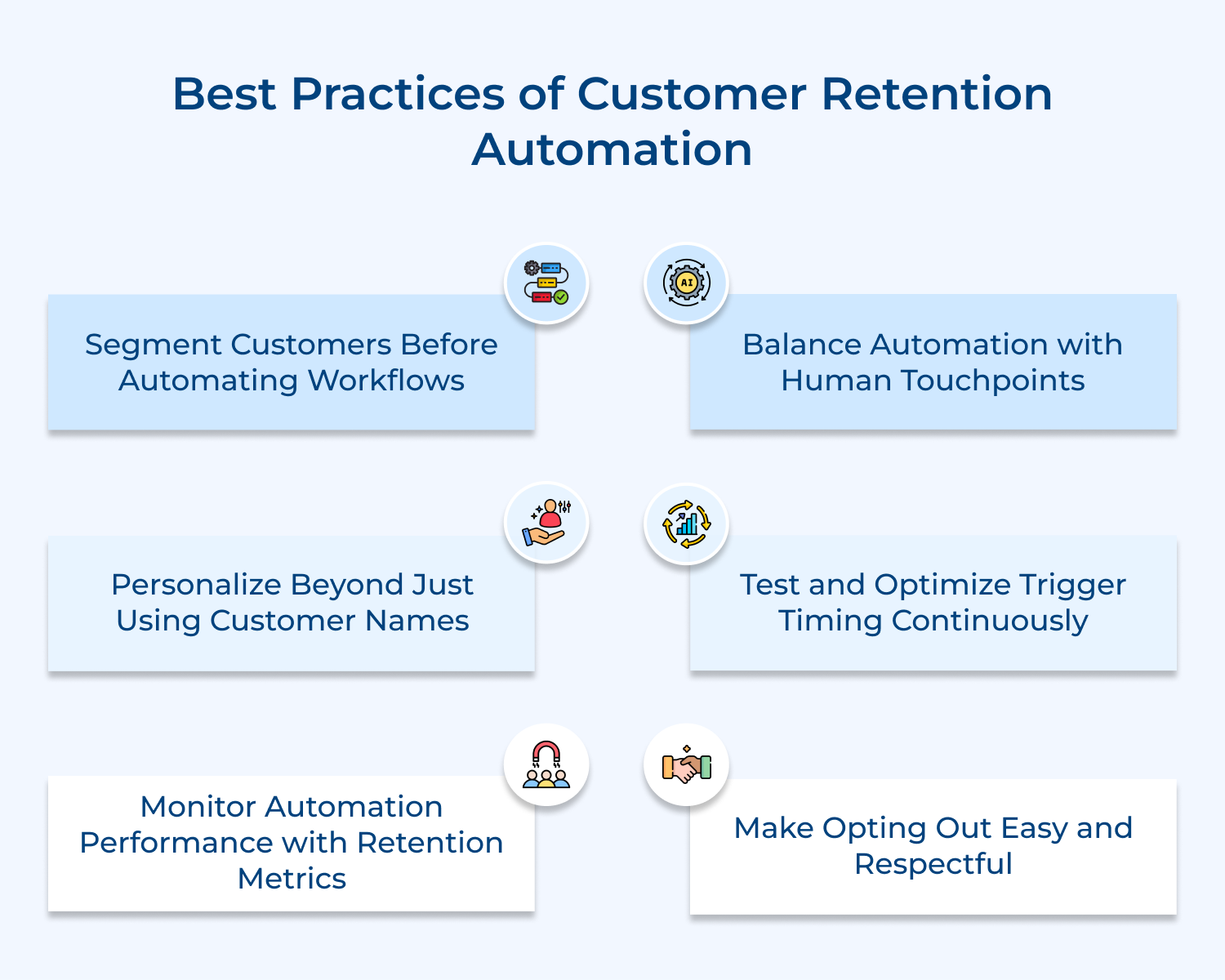
Customer retention automation is the strategic advantage that turns one-time buyers into long-term brand advocates without overwhelming your team. Businesses that automate retention workflows consistently outperform those relying on manual outreach alone.
Keep these three takeaways in mind as you build your strategy:
The brands that win on retention don’t just automate more; they automate smarter. Customer retention automation, when built around real customer behavior, reduces churn and compounds loyalty at scale.
Next Read: What is Proactive Customer Engagement?

What’s the right time to start customer retention automation for a new business?
Start implementing basic retention automation once you have at least 50-100 active customers and can identify clear patterns in their behavior. Focus first on simple workflows like onboarding sequences before building complex health scoring systems that require extensive data.
Is Customer Retention Automation suitable for small businesses?
Small businesses benefit significantly from retention automation because it lets tiny teams compete with larger companies on customer experience. Many affordable tools offer core automation features that prevent churn without requiring enterprise-level budgets or technical expertise.
How does Customer Retention Automation personalize customer interactions?
Automation personalizes by tracking individual customer behaviors and tailoring messages based on their specific actions within your product. The system pulls data like feature usage to determine which content each person receives without manually customizing every communication.
Can Customer Retention Automation improve loyalty program engagement?
Automated loyalty programs dramatically increase engagement by instantly rewarding actions and reminding customers about available benefits they’re not using. This immediate feedback loop keeps the program top-of-mind instead of being forgotten after initial signup.
Can Customer Retention Automation increase customer lifetime value?
Retention automation directly increases lifetime value by identifying expansion opportunities and reducing churn at critical moments. The system spots when satisfied customers are ready for upsells while intervening before at-risk accounts cancel their subscriptions.
 https://omni24.io/wp-content/uploads/2026/08/AI-Customer-Service-Agents.png
1256
2400
Webvision Solution
https://omni24.io/wp-content/uploads/2023/04/Omni-Logo-1.svg
Webvision Solution2026-09-21 04:48:512026-09-21 04:48:51How to Build an AI Customer Service Agents: 8 Key Steps
https://omni24.io/wp-content/uploads/2026/08/AI-Customer-Service-Agents.png
1256
2400
Webvision Solution
https://omni24.io/wp-content/uploads/2023/04/Omni-Logo-1.svg
Webvision Solution2026-09-21 04:48:512026-09-21 04:48:51How to Build an AI Customer Service Agents: 8 Key Steps https://omni24.io/wp-content/uploads/2026/08/Omnichannel-Conversational-AI.png
1256
2400
Tushar Joshi
https://omni24.io/wp-content/uploads/2023/04/Omni-Logo-1.svg
Tushar Joshi2026-09-16 03:51:072026-09-16 03:51:07How to Build Omnichannel Conversational AI Strategy
https://omni24.io/wp-content/uploads/2026/08/Omnichannel-Conversational-AI.png
1256
2400
Tushar Joshi
https://omni24.io/wp-content/uploads/2023/04/Omni-Logo-1.svg
Tushar Joshi2026-09-16 03:51:072026-09-16 03:51:07How to Build Omnichannel Conversational AI Strategy https://omni24.io/wp-content/uploads/2026/08/Customer-Service-Teams.png
1256
2400
Tushar Joshi
https://omni24.io/wp-content/uploads/2023/04/Omni-Logo-1.svg
Tushar Joshi2026-09-15 04:01:522026-09-15 04:02:16How to Build Customer Service Teams: 6 Key Steps
https://omni24.io/wp-content/uploads/2026/08/Customer-Service-Teams.png
1256
2400
Tushar Joshi
https://omni24.io/wp-content/uploads/2023/04/Omni-Logo-1.svg
Tushar Joshi2026-09-15 04:01:522026-09-15 04:02:16How to Build Customer Service Teams: 6 Key Steps
Whether it’s about acquire, engage or support – Omni24 covers all your customer engagement needs in one complete platform.

Copyright ©2026 Veemo All rights reserved.
CA, Los Angeles, Hall Ave, 19011