The Ultimate Guide to Team Email Management
Elevate team efficiency by implementing smart team email management, building seamless communication and preventing crucial messages from slipping through the cracks.

Elevate team efficiency by implementing smart team email management, building seamless communication and preventing crucial messages from slipping through the cracks.
Are you tired of drowning in a cluttered inbox and missing important messages? Does your team have to deal with inefficient team email management? If you work on a team and deal with a high volume of emails every day, you know how overwhelming it can be to stay organized. It’s time to master the art of team email management.
Proper team email management promotes efficient collaboration within teams, maintains a smooth workflow as well as prevents miscommunications. Although, it also depends on how you adopt the right techniques and tools. Appropriate email management solutions alleviate email overload, increase efficiency as well as improve collaboration. We will discuss some common email management mistakes that teams make and provide tips on how to overcome them.
Team email management refers to the process of collectively handling while also organizing emails within a team or organization. It involves strategies, tools and practices that streamline email communication, ensure timely responses as well as enhance collaboration.
The key objectives of team email management as follows:
Businesses can streamline their customer service efforts and ensure a seamless experience for both customers as well as support teams by implementing a comprehensive email management system. Let’s discuss why team email management is beneficial to customer service.
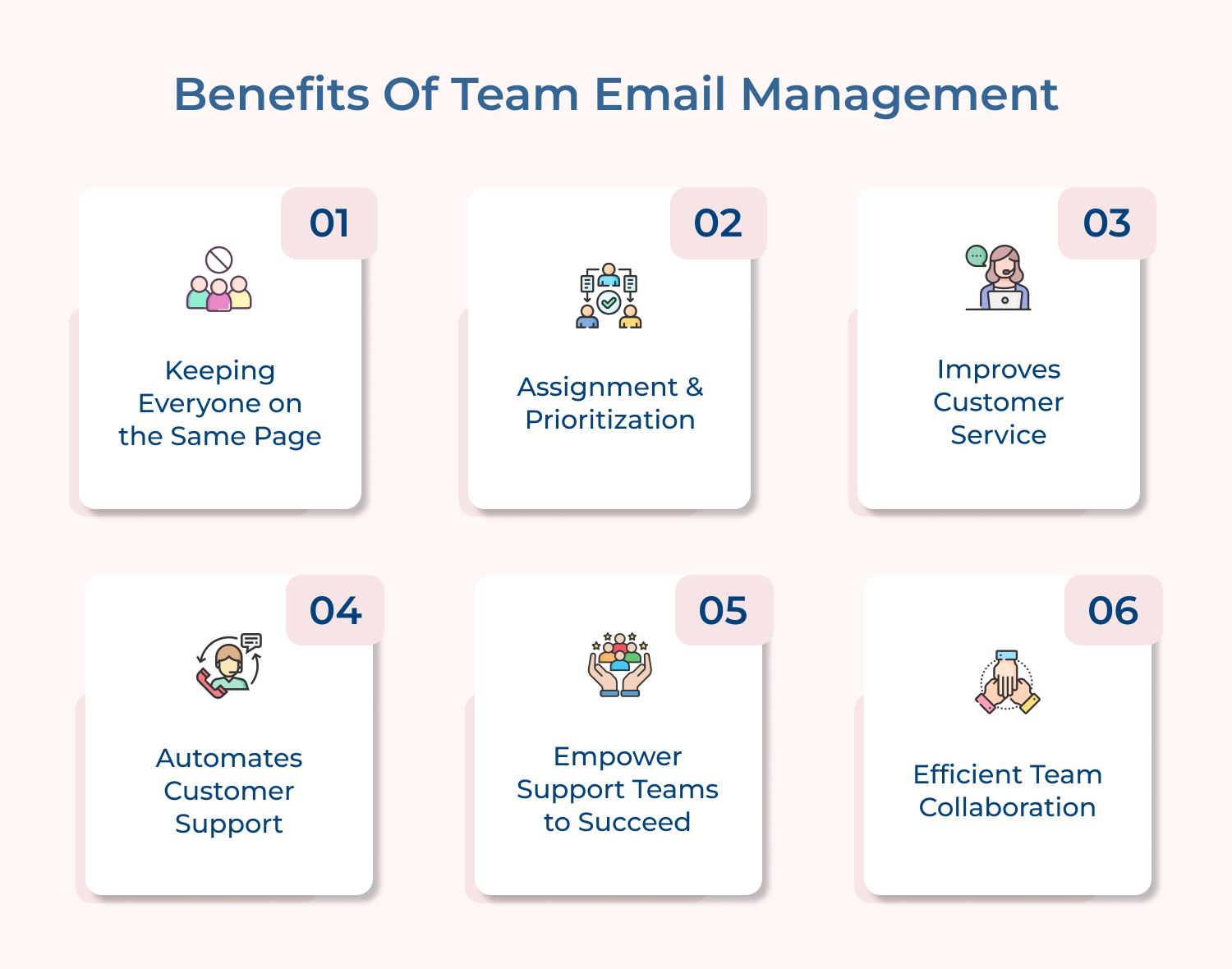
Effective team email management allows for improved communication and collaboration within the customer service team. By centralizing the email inbox as well as providing access to multiple team members, everyone stays informed about ongoing conversations, customer inquiries and important updates. It eliminates instances of miscommunication or duplicate responses and ensures that valuable information is shared amongst the entire team.
One of the key benefits of team email management is the ability to assign emails to specific team members and prioritize them based on urgency or importance. With a shared inbox, team members get to see which emails have been assigned to them and efficiently handle their workload. It ensures that customer inquiries are addressed in a timely manner improving response times and overall customer satisfaction.
Prompt customer service is crucial for any business and team email management platforms play a vital role in achieving it. When you streamline email workflows as well as assign emails to the appropriate team member, you ensure that customer inquiries are addressed promptly and efficiently. It enhances the customer experience while building trust and loyalty, ultimately leading to increased customer satisfaction.
Team email management tools often come equipped with automation features, such as canned responses and email templates. These time-saving features enable customer service representatives to respond quickly to common inquiries without sacrificing the personal touch. By automating certain aspects of these customer support emails, teams can handle a larger volume of emails without compromising the quality of their responses.
Implementing team email management not only improves customer service but also empowers support teams to be successful. By providing them with the necessary tools and resources, companies can ensure that their teams are well-equipped to handle customer inquiries, resolve issues and provide exceptional service. It boosts employee morale, leading to a more efficient and effective customer support team.
Effective email management builds collaboration among team members, allowing for seamless information sharing and knowledge transfer. Enable your team members to access past email conversations so any team member can step in and provide assistance when needed. The collaborative approach minimizes downtime, eliminates bottlenecks and ensures that customers receive consistent as well as accurate responses.
Team email management helps streamline communication, improve productivity and enhance collaboration within a team. Here are the key features of team email management.
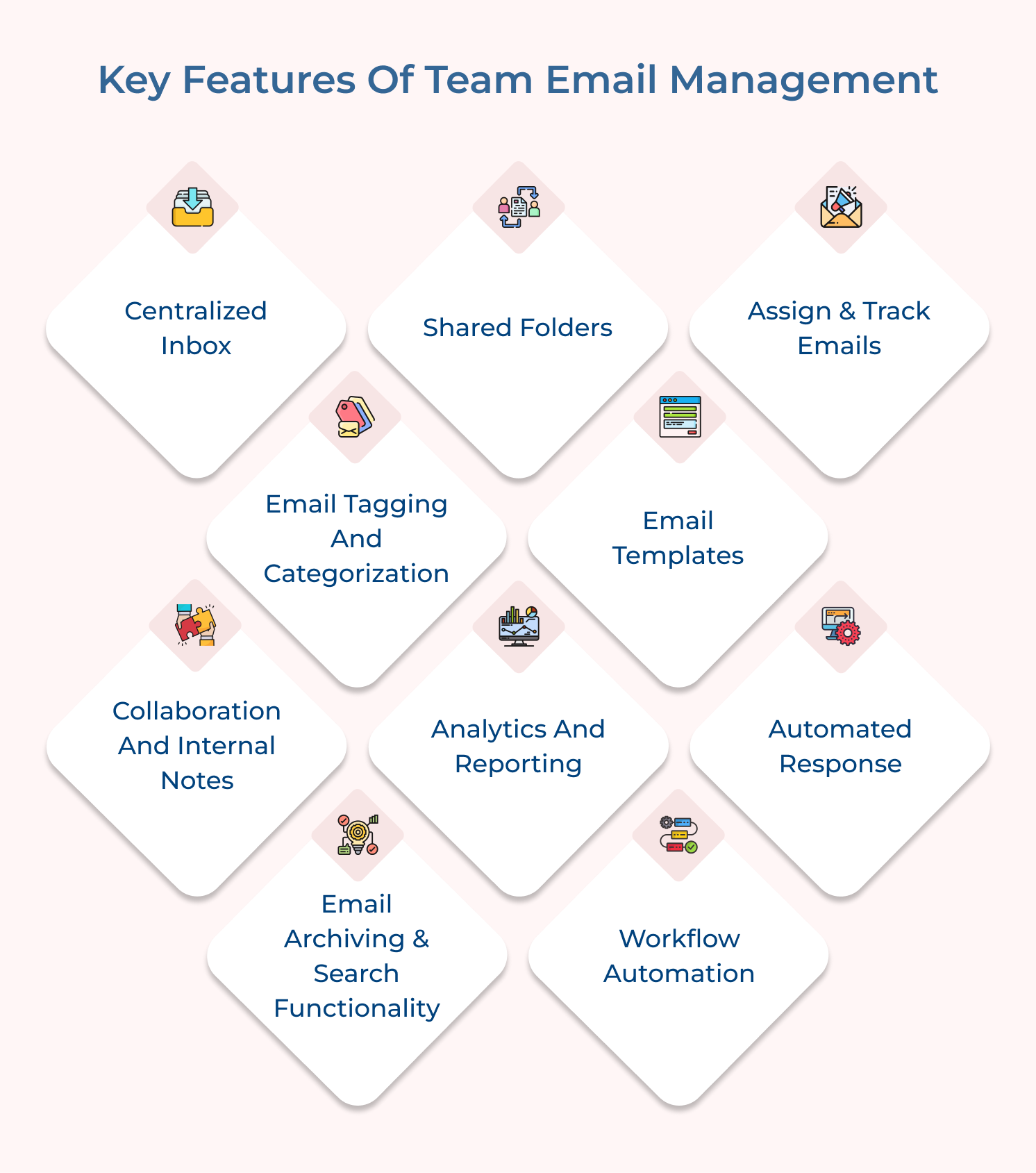
A centralized inbox is a feature that allows team members to access and manage emails from a single platform. Instead of each team member having their own individual email account, a shared inbox tool consolidates all team emails into one location.
Shared inbox improves efficiency by reducing the need to switch between different email accounts and ensures that everyone is on the same page. It also enables easy supervision by team leaders or managers.
Here are a few best practices to follow:
Shared folders are an essential component of team email management. They allow team members to organize emails in a structured manner and provide easy access to important information.
Team members can create folders based on projects, clients, or any other relevant categories with shared folders. It enables seamless collaboration, as team members can easily locate and reference the emails they need, even if they were not directly involved in the communication.
Here are a few best practices to follow:
Assigning and tracking emails is a key feature in team email management. It allows team members to delegate specific emails to individuals or teams and track their progress. The feature ensures accountability as well as avoids emails getting lost or overlooked in a busy inbox.
Team members can easily monitor the status of different tasks, follow up on pending actions and ensure timely responses by assigning emails. It also promotes transparency within the team as well as streamlines workflow.
Here are a few best practices follow:
Tagging & categorizing emails based on different criteria such as priority or topic helps in organizing as well as finding specific emails quickly in a unified inbox setting. The feature simplifies the email management process and reduces the chances of important emails getting lost in the clutter.
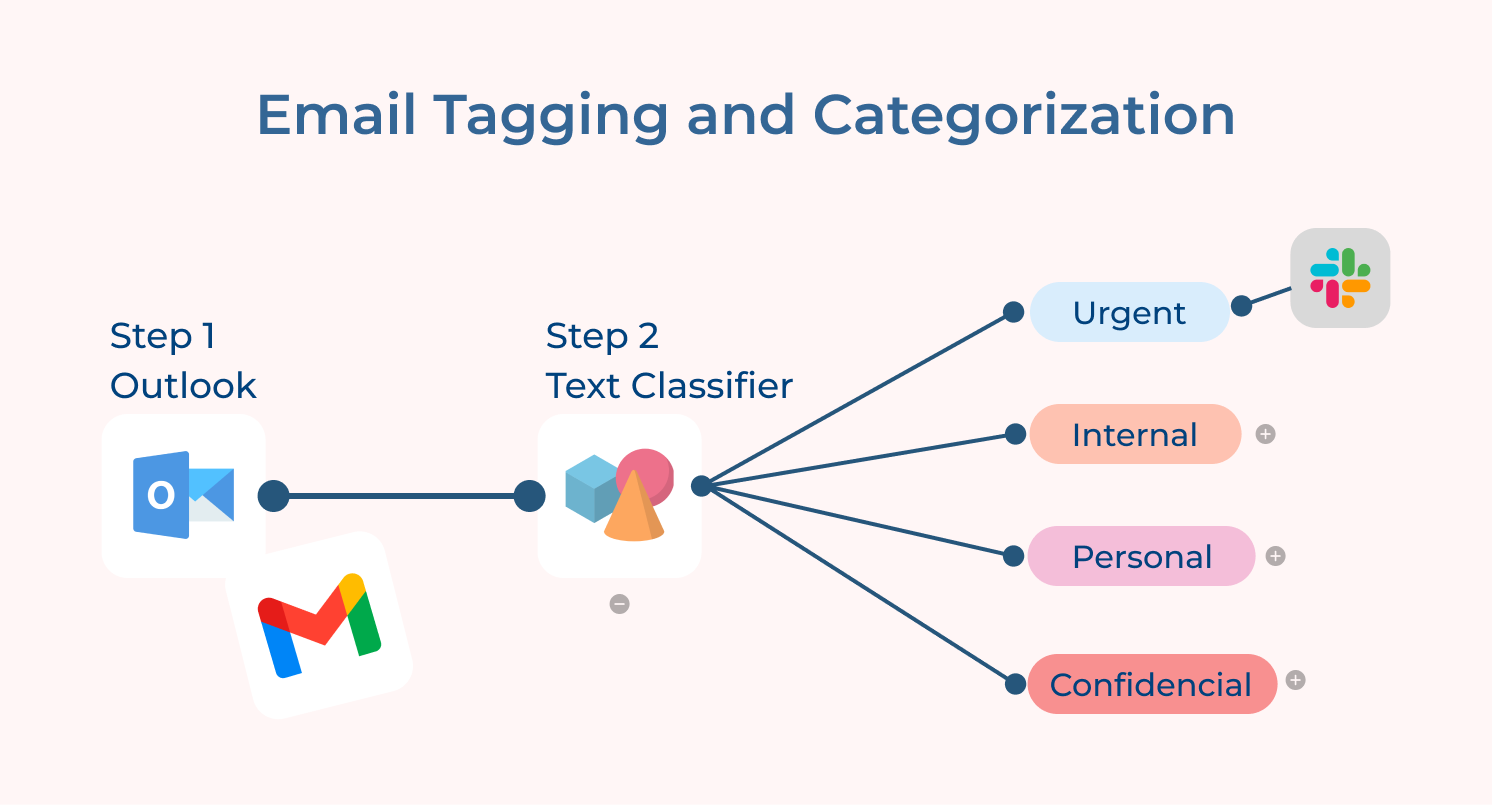
Here are a few best practices for email tagging and categorization:
Team email management tools often provide pre-designed email templates that can be easily customized and used for various common purposes such as customer support, sales inquiries or internal announcements. It saves time and ensures consistency in communication.
Here are some best practices for using email templates effectively:
Collaboration features allow team members to add internal notes or comments to an email thread, facilitating communication and knowledge sharing within the team. It improves team collaboration while reducing the need for back-and-forth communication.
Here are some best practices for collaboration and internal notes in email:
Measure the effectiveness of team communication while identifying areas for improvement team email management software should offer analytics and reporting features. These features provide insights into response times, email volume and team performance.
Here are some best practices to follow:
When you receive a high volume of emails, it’s important to set expectations and manage responses efficiently. Team email management software should allow for automated responses, such as acknowledging receipt of an email or providing an estimated response time.
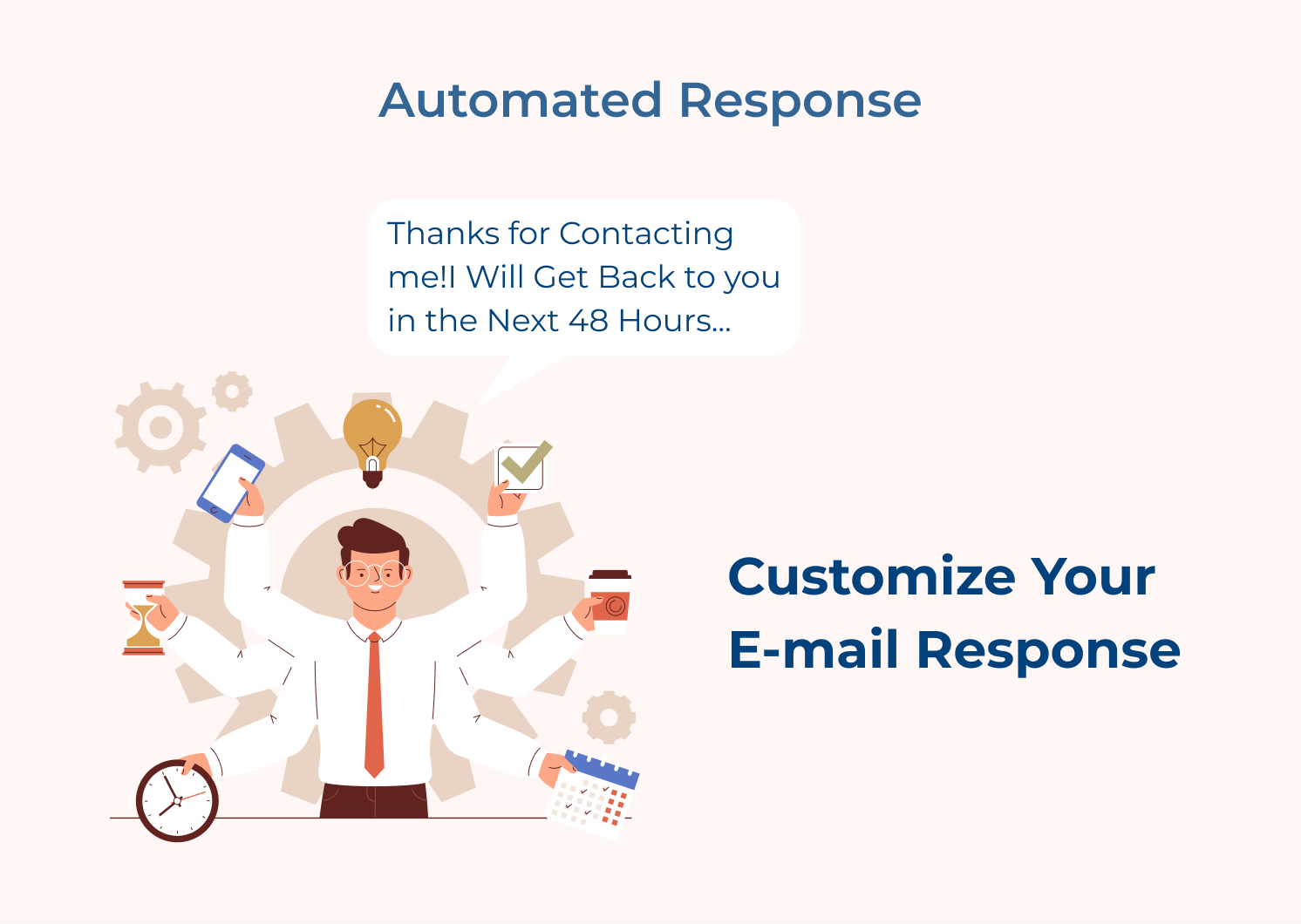
Here are some best practices for implementing automated response systems:
Archiving emails is essential for compliance as well as record-keeping purposes. A robust search functionality enables team members to quickly find specific emails from the archive. The feature saves time and helps in retrieving critical information when needed.
Here are some best practices to follow:
Automation features such as automated email responses, email routing, or email scheduling can significantly reduce manual effort and streamline email management processes. It ensures timely responses as well as improves overall productivity.
Here are some best practices to keep in mind:
Effective communication among team members is essential for remote work and having reliable team email management software has become essential. Here are the examples of team email management software that can greatly benefit your business:
The best email management software for every business
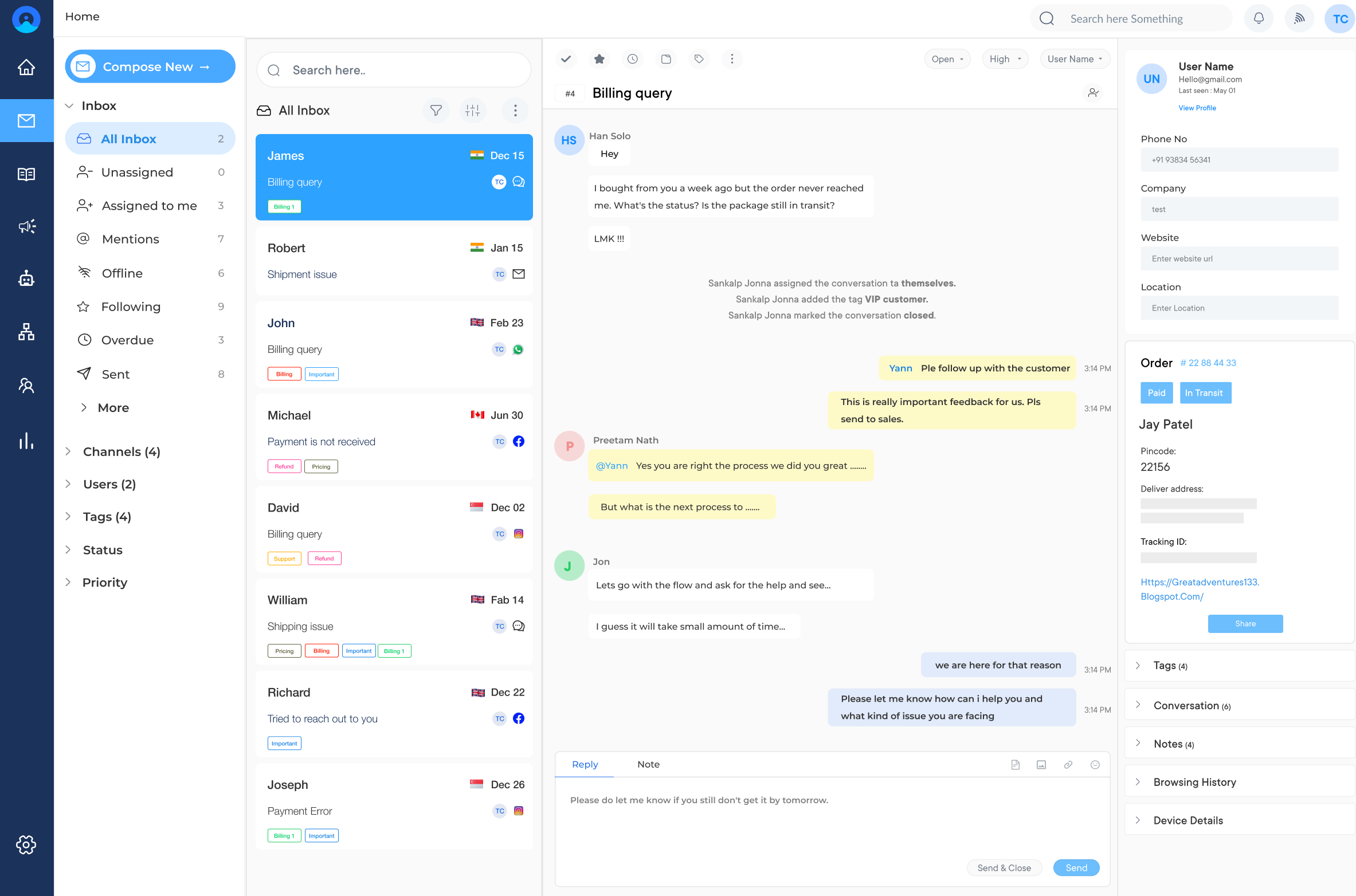
Omni24 is a comprehensive team email management software that offers a wide range of features to enhance customer support and communication. Multiple team members can access and manage the same email account simultaneously with its shared inbox functionality. It eliminates the need for manual forwarding or Caching emails, saving time and minimizing confusion.
Provides tools for tracking and classifying emails, allowing teams to prioritize as well as respond to messages more effectively.
Key features include:
Pricing: They offer a range of plans from a basic free plan to Enterprise level plans starting at $29/month. Higher tier plans include additional features such as access analytics, reporting and integrations into many leading platforms like Salesforce, Zippier, HubSpot etc. for SMBs as well as larger ones too!
The top shared inbox management software for easy collaboration
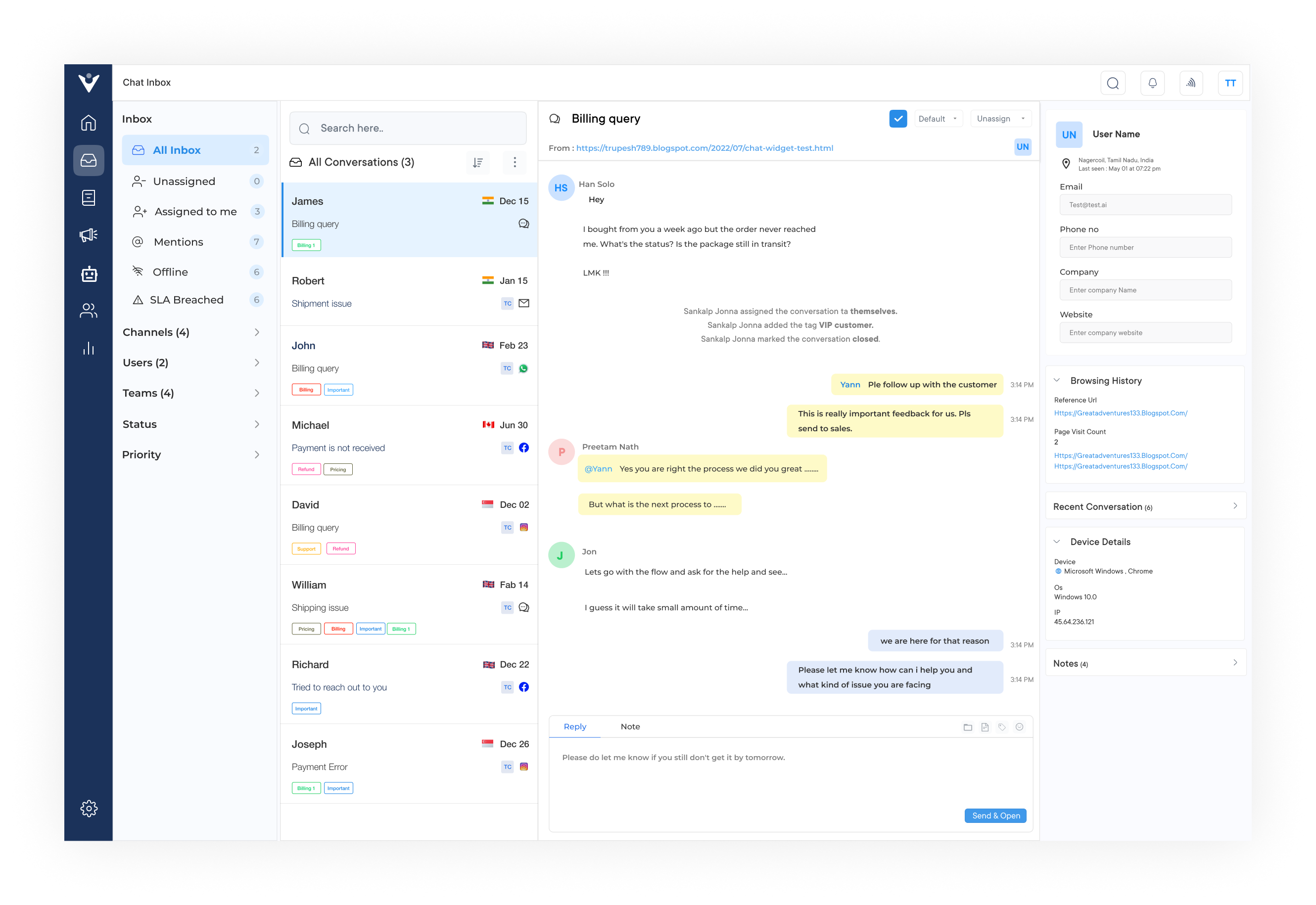
Veemo is a widely popular shared team inbox management software known for its robust features and user-friendly interface. Its shared inbox functionality enables teams to collaborate seamlessly on customer inquiries and support tickets.
Features like email forwarding, tagging and ticket assignment, team members can efficiently handle incoming emails as well as ensure nothing falls through the cracks. It also offers integration with other platforms, such as chat and social media, making it a versatile solution for managing customer communication across various channels.
Key features include:
Pricing: There are three pricing tiers based on the number of staff users, so companies can choose whichever works best for them – ranging from $19-299/month depending on the size of your business. Additional add-ons are included in a few packages at different costs, if necessary.
Comm Box is a team email management software specifically designed for customer communication and support. Its shared inbox feature allows multiple team members to access and manage incoming emails simultaneously, ensuring prompt as well as efficient responses. Comm Box also offers advanced features like email routing and automation allowing businesses to streamline their email workflows.
Its key features include providing real-time collaboration tools, such as internal notes and file attachments, facilitating effective collaboration among team members. Comm Box also integrates with other communication channels like live chat and social media, providing a unified platform for managing customer interactions.
Team email management can be a time-consuming and overwhelming task. Here are ten ways AI and automation can help teams effectively manage their email communications:
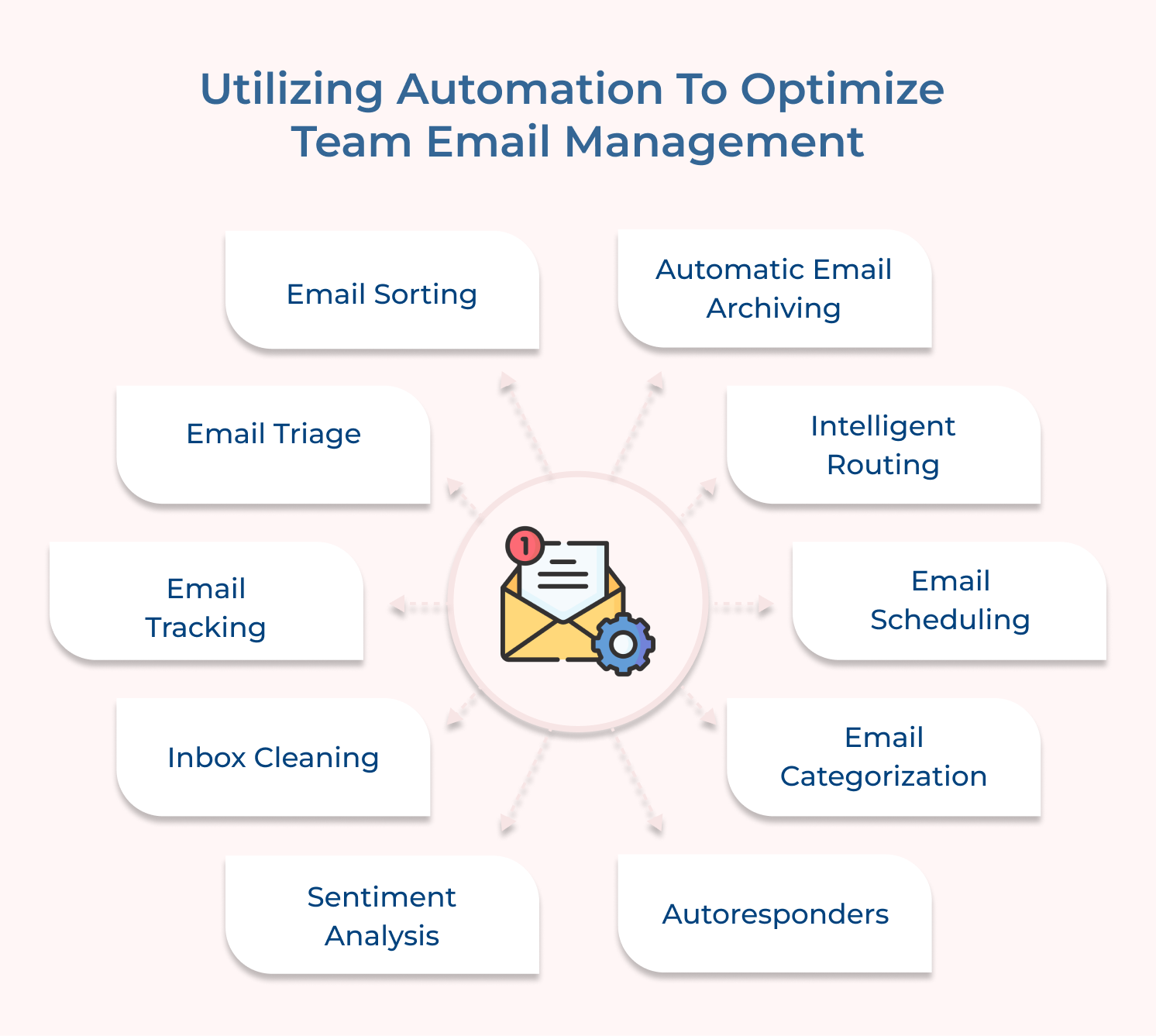
Implementing AI and automation for team email management involves a few key steps:
The benefits of utilizing AI and automation for team email management are numerous. By reducing manual intervention and streamlining processes, teams can focus on more important tasks, ultimately improving productivity. AI-powered systems can learn from user interactions and continuously improve their accuracy, ensuring that email management becomes even more effective over time.
Implementing team email management can pose several challenges. We will discuss the challenges that arise while implementing team email management and provide solutions to overcome them.
1. Email Overload
One of the primary challenges of team email management is dealing with the overwhelming influx of emails. With multiple team members involved in email communication, it can quickly become difficult to stay organized and keep track of important messages.
Solution: Implement Email Filtering and Organization Systems
Setting up email filtering and organization systems to tackle email overload. Create folders or labels to categorize emails based on their priority or topic. Utilize filters to automatically sort emails into these folders based on sender, subject, or keywords. Encourage team members to set up rules to manage their emails effectively. Essential messages can be easily identified and responded to in a timely manner.
2. Difficulty in Tracking and Managing Email Assignments In team environments, it can be challenging to keep track of email assignments, leading to delayed responses and potential customer dissatisfaction.
Solution: Implement Email Management Tools
Utilize email management tools that allow you to assign emails to specific team members, set deadlines and track progress. These tools provide a centralized platform to manage email assignments, ensuring that no emails slip through the cracks and enabling efficient task management.
3. Maintaining Email Etiquette and Professionalism
When multiple team members are dealing with emails, maintaining consistent email etiquette and professionalism can be challenging. Inconsistent tone, formatting or response times can reflect poorly on the team and the organization as a whole.
Solution: Establish Email Guidelines and Templates
Create and communicate clear email guidelines to ensure a consistent along with professional approach. Provide email templates for common scenarios to streamline responses and maintain a unified tone. Regularly review email communication to identify areas for improvement and provide constructive feedback to team members.
4. Inefficient Follow-Up Process
Following up on emails is crucial to maintaining relationships with clients, partners, or other stakeholders. Important follow-ups can fall through the cracks without an efficient process in place.
Solution: Implement Email Tracking and Reminders
Utilize email tracking and reminder features to stay on top of important follow-ups. Many email platforms offer read receipts or notifications when recipients open emails, allowing you to gauge their interest or prompt a response. Set reminders or flags for emails that require follow-up actions, ensuring nothing gets overlooked.
Team email is one of the most commonly used communication tools in the professional world. It allows individuals and teams to easily exchange information, collaborate on projects, as well as stay updated on important matters. It involves implementing strategies and tools to effectively manage while also organizing emails within a team. It improves efficiency and ensures that important messages are never missed.
Utilizing the right tools and implementing effective strategies, teams can streamline their email workflows while ensuring that no important message or task is overlooked. Embracing team email management is a solution to the challenges posed by high email volumes and a step towards optimizing team performance as well as achieving organizational goals.

How can team email management improve productivity?
Effective team email management can significantly enhance productivity by streamlining email workflows. By implementing strategies such as email categorization, prioritization and automation, teams can easily identify critical emails while efficiently managing their workload. Proper email management ensures that important emails are not buried amidst an avalanche of clutter, allowing team members to focus on essential tasks and projects, ultimately boosting productivity.
Why is effective email management important for teams?
Effective email management is essential for teams as it builds efficiency, collaboration and organization. When team members have a structured approach to handling their emails, they can quickly locate relevant information, respond promptly to critical issues and stay updated on project progress. It also reduces the risk of missing deadlines, assignments, or important communications, promoting seamless teamwork and preventing unnecessary confusion or delays.
How can team email management enhance communication within an organization?
Team email management plays a crucial role in enhancing communication within an organization by facilitating transparent and efficient information sharing. With a team-wide approach to email management, everyone has visibility into relevant email threads, minimizing the chances of miscommunication or misunderstandings. Team email management tools or platforms provide collaboration features like shared mailboxes, comments and task assignments, allowing teams to work together seamlessly on email-related tasks.
How can team email management help in reducing email overload?
Email overload is a common challenge that teams face, leading to decreased productivity and increased stress levels. Team email management can help address the issue by implementing strategies such as email filtering, automated responses and setting clear email communication guidelines. By using filters to sort emails based on priority, urgency, or specific criteria, teams can quickly identify and address essential messages while reducing the time spent on less critical ones. Automated responses as well as predefined email templates can also streamline communication and manage expectations, reducing the influx of unnecessary emails.
 https://omni24.io/wp-content/uploads/2026/07/Web-Self-Service.png
1257
2400
Webvision Solution
https://omni24.io/wp-content/uploads/2023/04/Omni-Logo-1.svg
Webvision Solution2026-07-23 05:39:582026-07-23 05:39:58Web Self Service: What it is, Features and its Benefits
https://omni24.io/wp-content/uploads/2026/07/Web-Self-Service.png
1257
2400
Webvision Solution
https://omni24.io/wp-content/uploads/2023/04/Omni-Logo-1.svg
Webvision Solution2026-07-23 05:39:582026-07-23 05:39:58Web Self Service: What it is, Features and its Benefits https://omni24.io/wp-content/uploads/2026/07/Knowledge-Base-SEO-1.png
1396
2400
Webvision Solution
https://omni24.io/wp-content/uploads/2023/04/Omni-Logo-1.svg
Webvision Solution2026-07-22 09:44:572026-07-23 06:16:41What is Knowledge Base SEO & How to Create it?
https://omni24.io/wp-content/uploads/2026/07/Knowledge-Base-SEO-1.png
1396
2400
Webvision Solution
https://omni24.io/wp-content/uploads/2023/04/Omni-Logo-1.svg
Webvision Solution2026-07-22 09:44:572026-07-23 06:16:41What is Knowledge Base SEO & How to Create it? https://omni24.io/wp-content/uploads/2026/07/customer-experience-benefits.png
1257
2400
Tushar Joshi
https://omni24.io/wp-content/uploads/2023/04/Omni-Logo-1.svg
Tushar Joshi2026-07-20 06:28:322026-07-20 06:28:32What are the Benefits of Customer Experience for Business?
https://omni24.io/wp-content/uploads/2026/07/customer-experience-benefits.png
1257
2400
Tushar Joshi
https://omni24.io/wp-content/uploads/2023/04/Omni-Logo-1.svg
Tushar Joshi2026-07-20 06:28:322026-07-20 06:28:32What are the Benefits of Customer Experience for Business?
Whether it’s about acquire, engage or support – Omni24 covers all your customer engagement needs in one complete platform.

Copyright ©2026 Veemo All rights reserved.
CA, Los Angeles, Hall Ave, 19011