What is Email Automation & How Does it Work?
Master email automation to send timely, personalized messages that boost engagement and drive conversions efficiently.
Master email automation to send timely, personalized messages that boost engagement and drive conversions efficiently.
In a world where inboxes are overflowing, it’s tougher than ever to really connect with your audience. Deadlines, manual email blasts and generic messaging often get buried while you miss chances to build trust.
But there’s good news: email automation is changing the game. Automated workflows deliver the right message at the right time, so your prospects feel heard. For example, automated campaigns generate 320% more revenue than manual ones. Global average email open rates have increased to 42% in 2026.
If you integrate segmentation, behavior triggers or even AI tools, you work smarter and get real results.
Email automation is a marketing strategy that uses software to send targeted, personalized emails to subscribers based on predefined triggers, schedules, or user behaviors. This technology allows businesses to create and dispatch emails automatically, without manual intervention for each message sent.
Email automation can save your team countless hours, but for more personalized customer interactions, consider using a customer service email management software to streamline responses and improve satisfaction.
Automation helps businesses nurture leads, retain customers and drive conversions more effectively than traditional email marketing methods by delivering relevant content to the right audience. It enables companies to maintain consistent communication with their audience at scale.
Key objectives:
An email automation workflow is a series of pre-planned, triggered email messages sent to subscribers based on specific actions, timeframes or conditions. This system allows businesses to deliver timely, relevant content to their audience without manual intervention, creating a personalized journey for each recipient.
The importance of email automation workflows lies in their ability to nurture leads, engage customers and drive conversions efficiently at scale. By delivering the right message at the right time, these workflows help maintain consistent communication, improve customer relationships and increase the overall effectiveness of email marketing campaigns.
Key objectives:
Email automation offers numerous advantages for businesses, enhancing communication and efficiency. Here are some key benefits to consider:
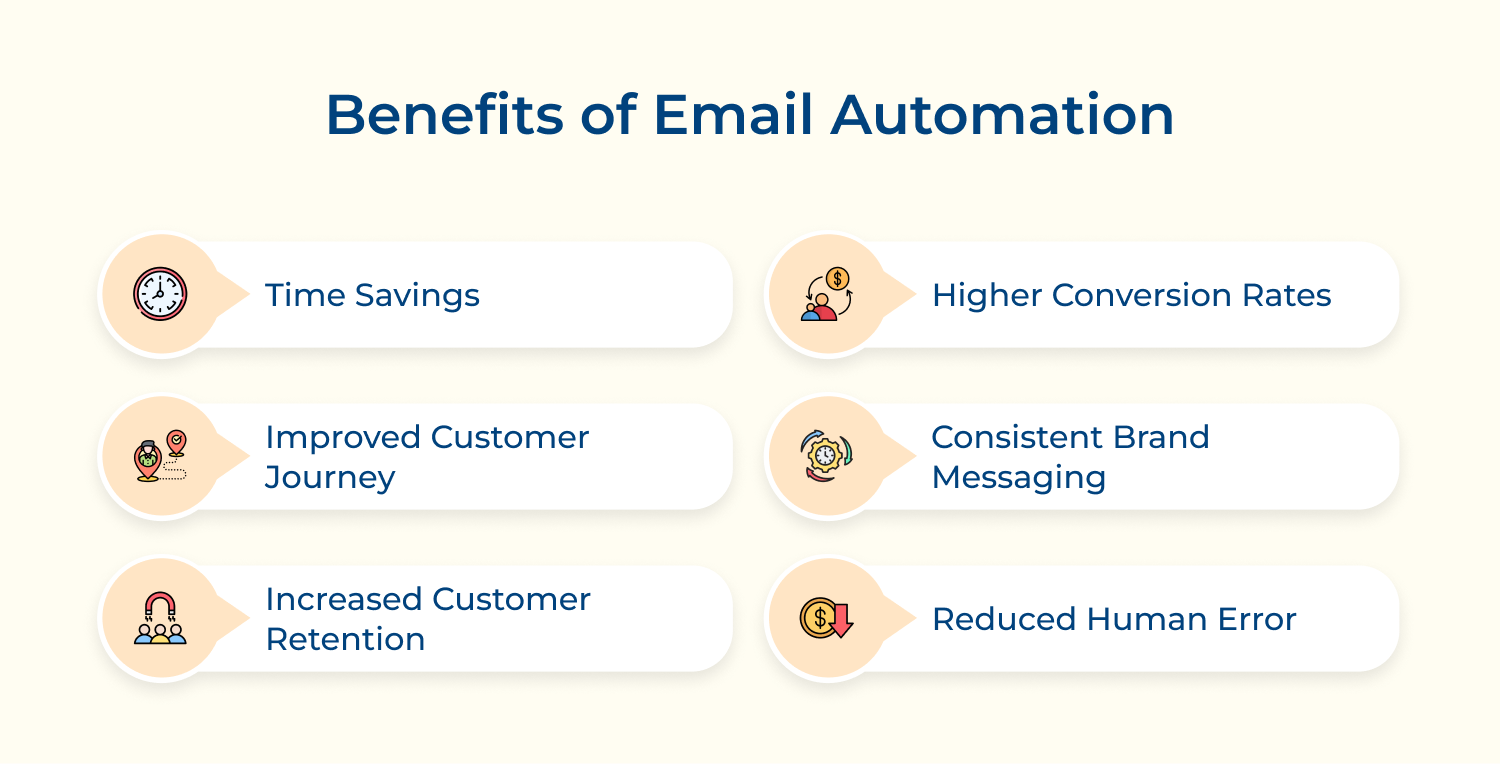
Time Savings
Email automation cuts down the hours spent on repetitive work. Instead of manually sending welcome emails, reminders, or follow-ups, workflows do it for you. This frees up your team to focus on strategy and creative ideas that really move the needle.
Higher Conversion Rates
Automated emails land at just the right moment. By sending targeted, personalized content, you can guide leads more effectively. When people get messages that match their needs, they’re far more likely to take action—like making a purchase.
Improved Customer Journey
Automation makes the customer journey smoother. Emails triggered by behavior or interest feel more relevant. Customers get timely info and offers that fit them, creating a better experience while building loyalty.
Consistent Brand Messaging
Your brand voice should feel the same everywhere. Automation helps by using templates and workflows to keep messages on-brand. That way, every touchpoint reinforces trust and recognition.
Increased Customer Retention
Automated follow-ups, re-engagement emails and personalized offers keep your brand top of mind. This not only encourages repeat business but also turns customers into loyal advocates.
Reduced Human Error
Manual processes can lead to mistakes—like sending the wrong message. Automation reduces these risks with data-driven triggers and standardized steps. Hence, ensuring the right message reaches the right person every time.
Automating email workflows saves time and delivers timely, relevant content to your audience. Here’s a step-by-step guide on how to automate your email workflows effectively.
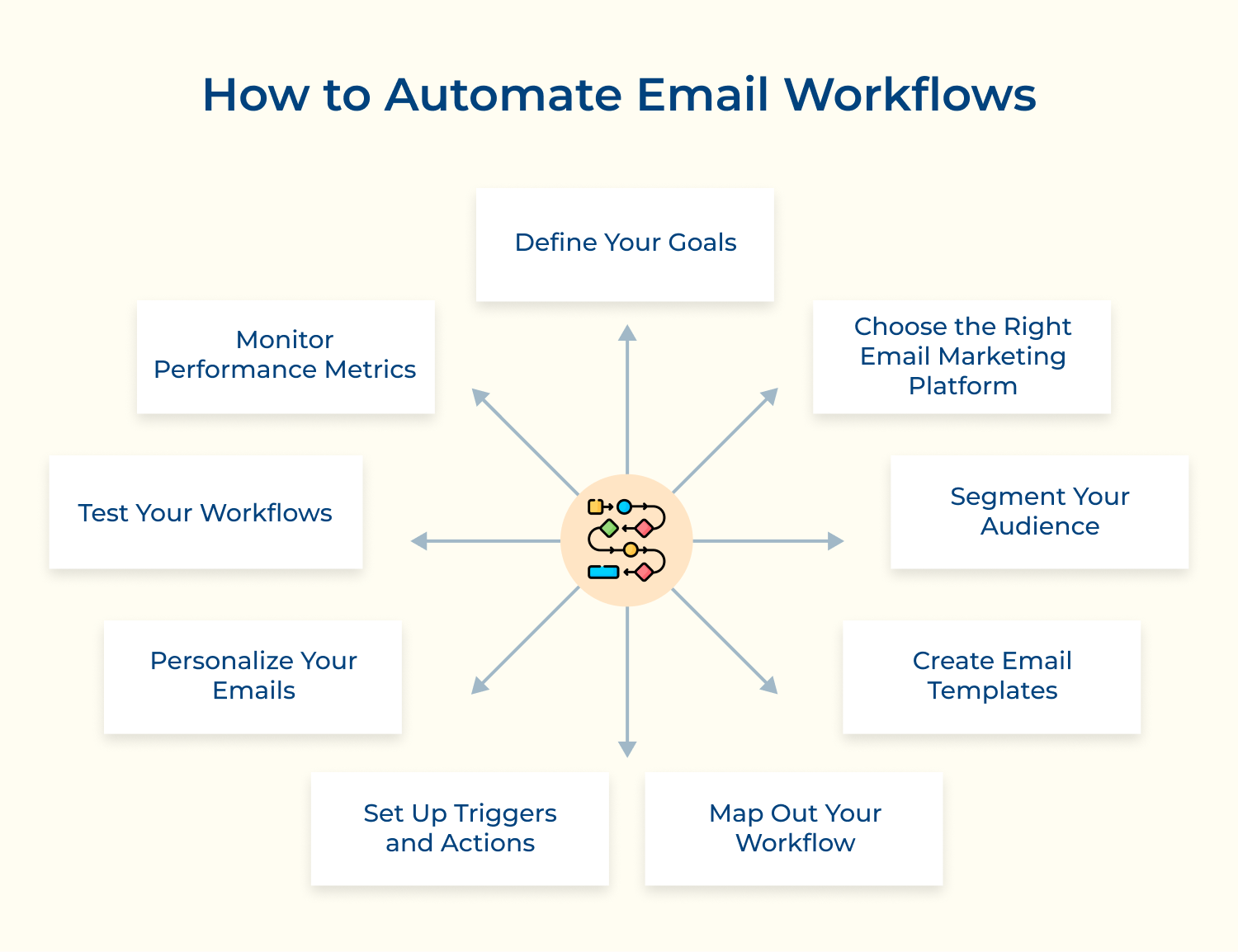
Setting clear goals is the first step to a strong email automation strategy. Goals give your campaigns direction and make it easier to measure success. Without them, it’s tough to know what’s working or where you need to adjust.
Start by asking yourself what you want to achieve. Do you want to boost conversions? Keep customers coming back? Or drive more traffic to your website? Once your goals are clear, they’ll guide everything else – from the content you write to how you segment your audience and design your workflows.
Actionable Tips:
Choosing the right email marketing platform is key to making automation work for you. Each tool comes with different features, integrations and designs. The right one can make your workflows smoother, improve deliverability and give you insights that help campaigns perform better.
Do you need strong automation options? An easy-to-use interface? Or seamless integration with your existing tools? Also, look for features like detailed segmentation, A/B testing and clear reporting. These will help you fine-tune your campaigns and get better results over time.
Actionable Tips:
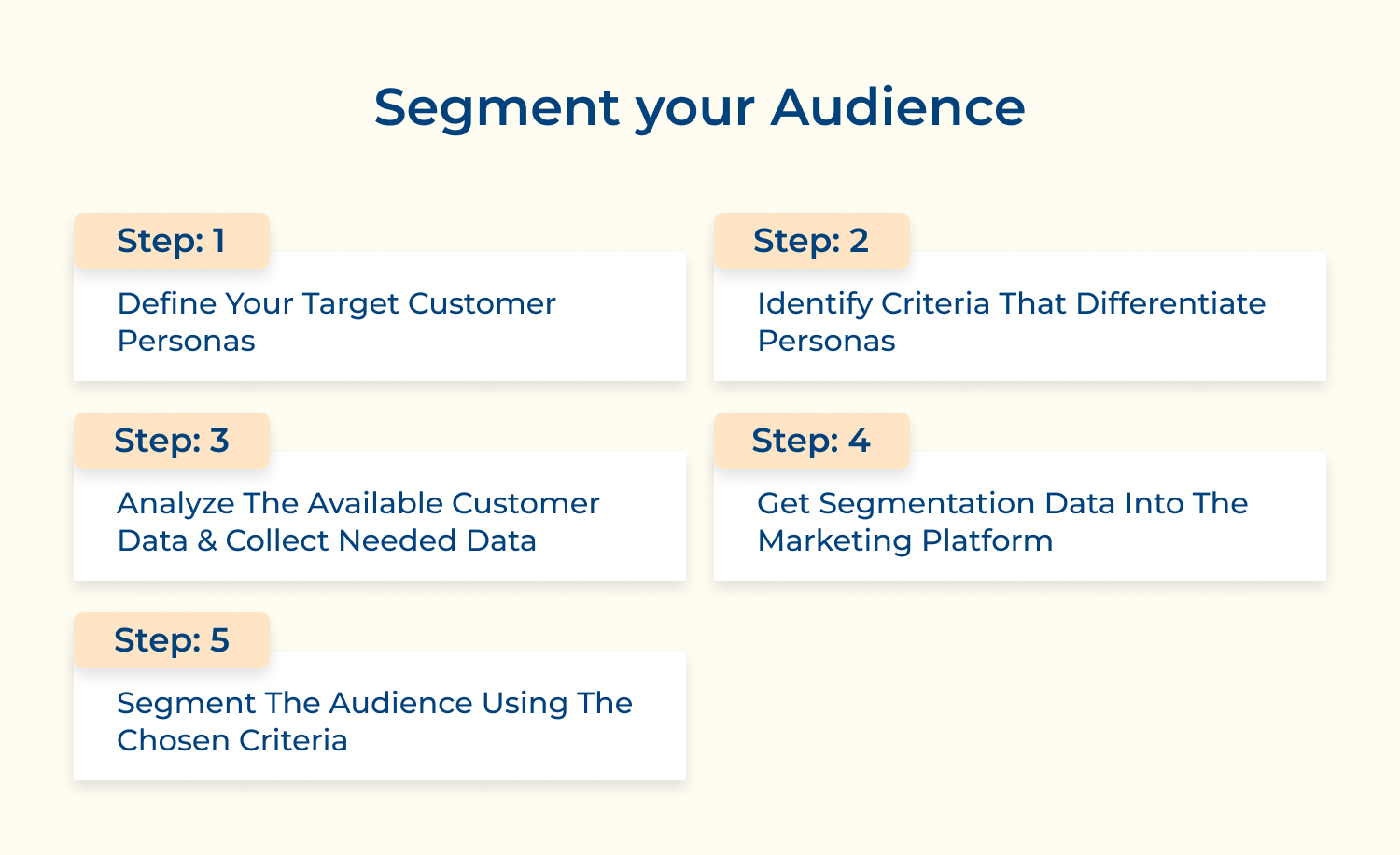
Audience segmentation makes emails more relevant and effective. By grouping customers based on data like demographics, behavior or past purchases, you can tailor messages to their needs.
This boosts engagement, improves conversions and builds stronger relationships, since recipients feel understood rather than receiving generic, one-size-fits-all content.
Actionable Tips:
Email templates make your automation faster and keep your branding consistent. A good template improves readability and creates a better user experience, leading to higher engagement.
Design templates that match your brand style, look great on mobile and include key elements like headers, footers, call-to-action buttons, etc. Customizing campaigns become quick and easy.
Actionable Tips:
Mapping out your workflow ensures a clear understanding of the steps involved in your email automation process. This clarity helps identify potential bottlenecks and opportunities for improvement, making your campaigns more efficient.
Visualize the customer journey from the initial email to subsequent interactions. Create a flowchart that outlines triggers, actions and sequences, ensuring all team members understand the process.
Actionable Tips:
Triggers and actions are the backbone of your email automation. They determine when specific emails are sent and what actions are taken based on user behavior. Hence, ensuring timely as well as relevant communication.
Define triggers such as user sign-ups, purchases, or website visits. Establish corresponding actions, like sending a welcome email or a follow-up after a purchase, to keep users engaged throughout their journey.
Actionable Tips:
Personalization increases email engagement by making recipients feel valued. Tailored messages that address individual needs and preferences are more likely to resonate. Thus, leading to higher open as well as conversion rates.
Utilize customer data to personalize elements such as subject lines, content and offers. Incorporating the recipient’s name or recommending products based on past purchases can create a more engaging experience.
Actionable Tips:
Testing your workflows is crucial for identifying issues and optimizing performance. Regular testing allows you to refine your processes while ensuring that your emails achieve the desired results.
Conduct A/B tests on various elements of your automated emails, such as subject lines, content and timing. Analyze the results to determine which variations drive higher engagement and conversions.
Actionable Tips:
Monitoring performance metrics is essential for evaluating the effectiveness of your email automation efforts. Understanding key metrics helps you make informed decisions and optimize future campaigns.
Track metrics such as open rates, click-through rates, conversion rates and unsubscribe rates. Use this data to assess how well your emails resonate with your audience and where improvements can be made.
Actionable Tips:
Email automation is a powerful strategy for optimizing communication with customers. Choosing the right tool can streamline your marketing efforts and enhance engagement.
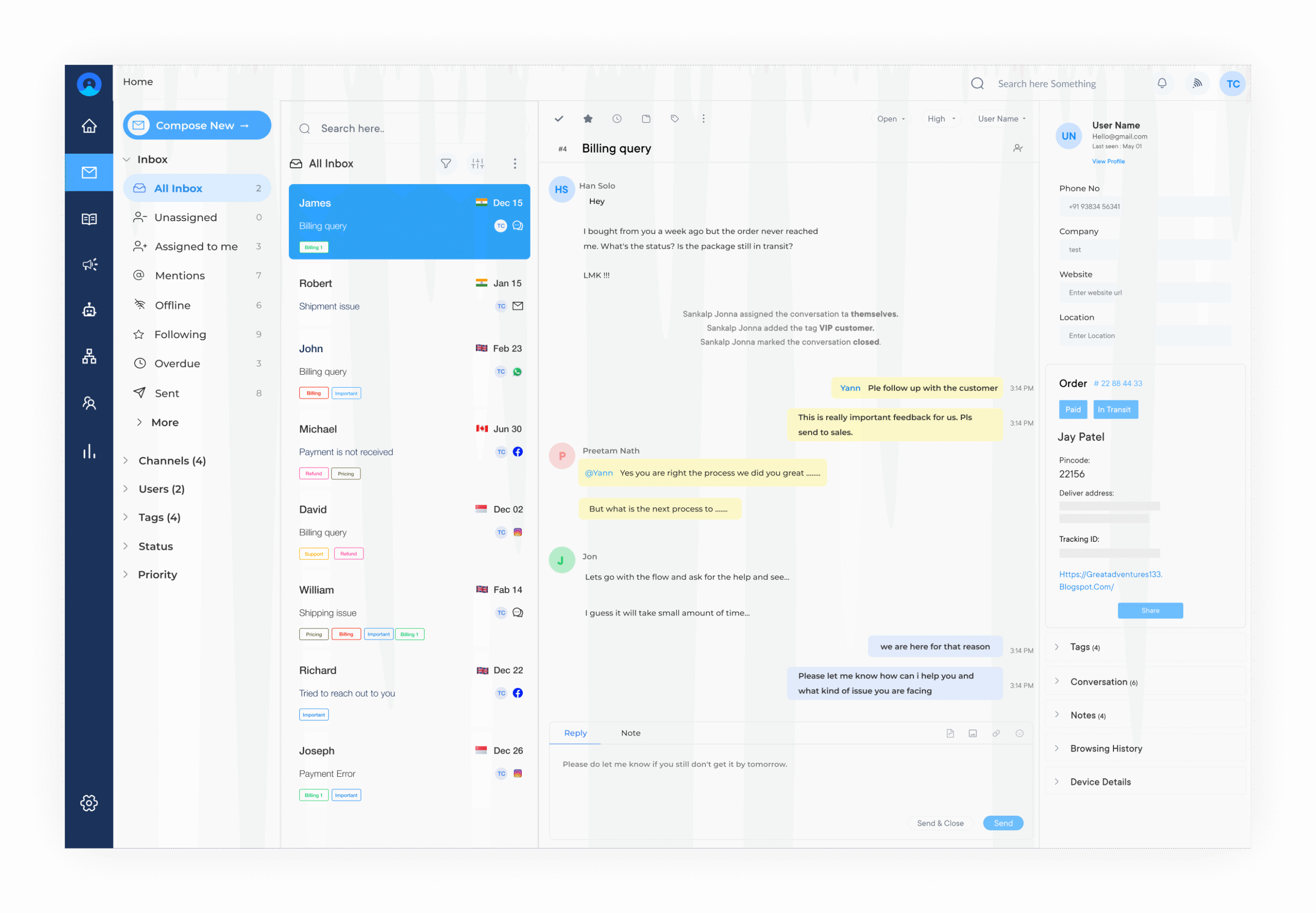
Omni24 is an omnichannel customer experience platform, ideal for businesses of all sizes. It offers a user-friendly interface that makes setting up email campaigns simple. It features a self-service knowledge base and detailed performance analytics. Hence, enhancing efficiency and providing insights to improve customer service as well as satisfaction.
Key features:
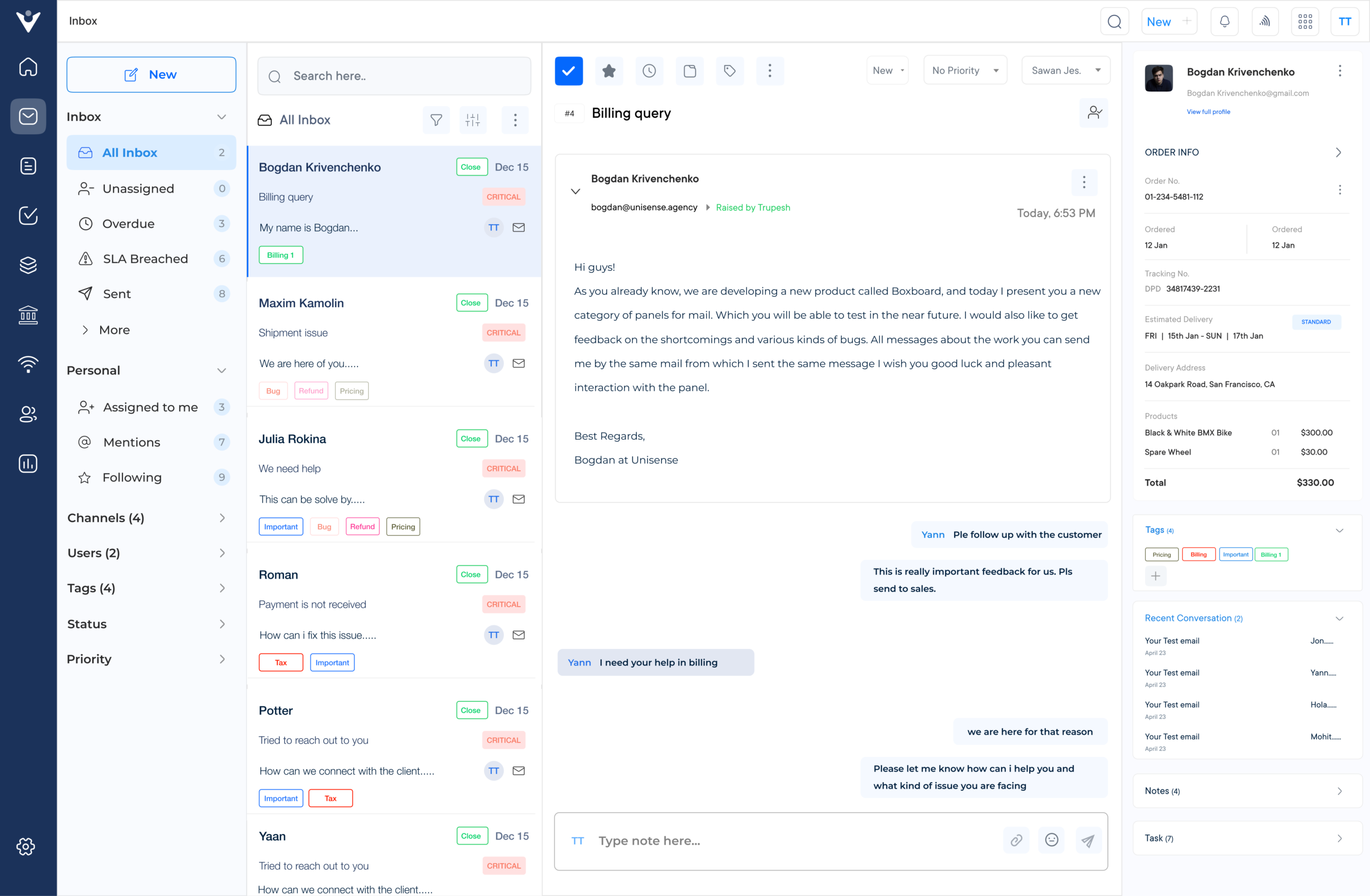
Veemo Support is an omnichannel help desk software that streamlines support operations into a centralized interface. The software is a part of Veemo’s customer engagement suite of products designed to streamline and enhance various aspects of business operations.
Veemo Support offers a range of tools to email, automate workflows, manage tickets efficiently and provide self-service options to customers.
Key features:
HubSpot offers an all-in-one marketing platform that includes email automation as a core feature. Designed to integrate easily with other HubSpot services, it provides a cohesive marketing solution that enhances lead management and customer relationship efforts.
HubSpot features customizable email templates, marketing automation workflows, lead tracking and in-depth analytics. The platform allows users to monitor the performance of their emails and optimize campaigns in real time.
Sendinblue is a versatile email marketing platform that caters to businesses of all sizes. With a focus on transactional emails and SMS marketing, it provides a unique approach to automation, allowing for multi-channel marketing strategies. Its SMS marketing feature allows for direct communication with customers, further expanding marketing capabilities beyond email.
Sendinblue offers a drag-and-drop email design, advanced segmentation, marketing automation workflows as well as real-time analytics. Users can create targeted campaigns based on user behavior, enhancing engagement and conversion rates.
GetResponse is a comprehensive marketing platform that combines email automation with landing pages, webinars and e-commerce features. It’s suitable for businesses looking for an all-in-one solution to enhance their marketing efforts and connect with customers across multiple touchpoints.
GetResponse provides a user-friendly email builder, autoresponders, list segmentation and comprehensive analytics. These features help businesses create effective email campaigns that are easy to manage and optimize.
Implementing email automation can enhance marketing efforts, but it also comes with several challenges. Here are some key obstacles to consider:
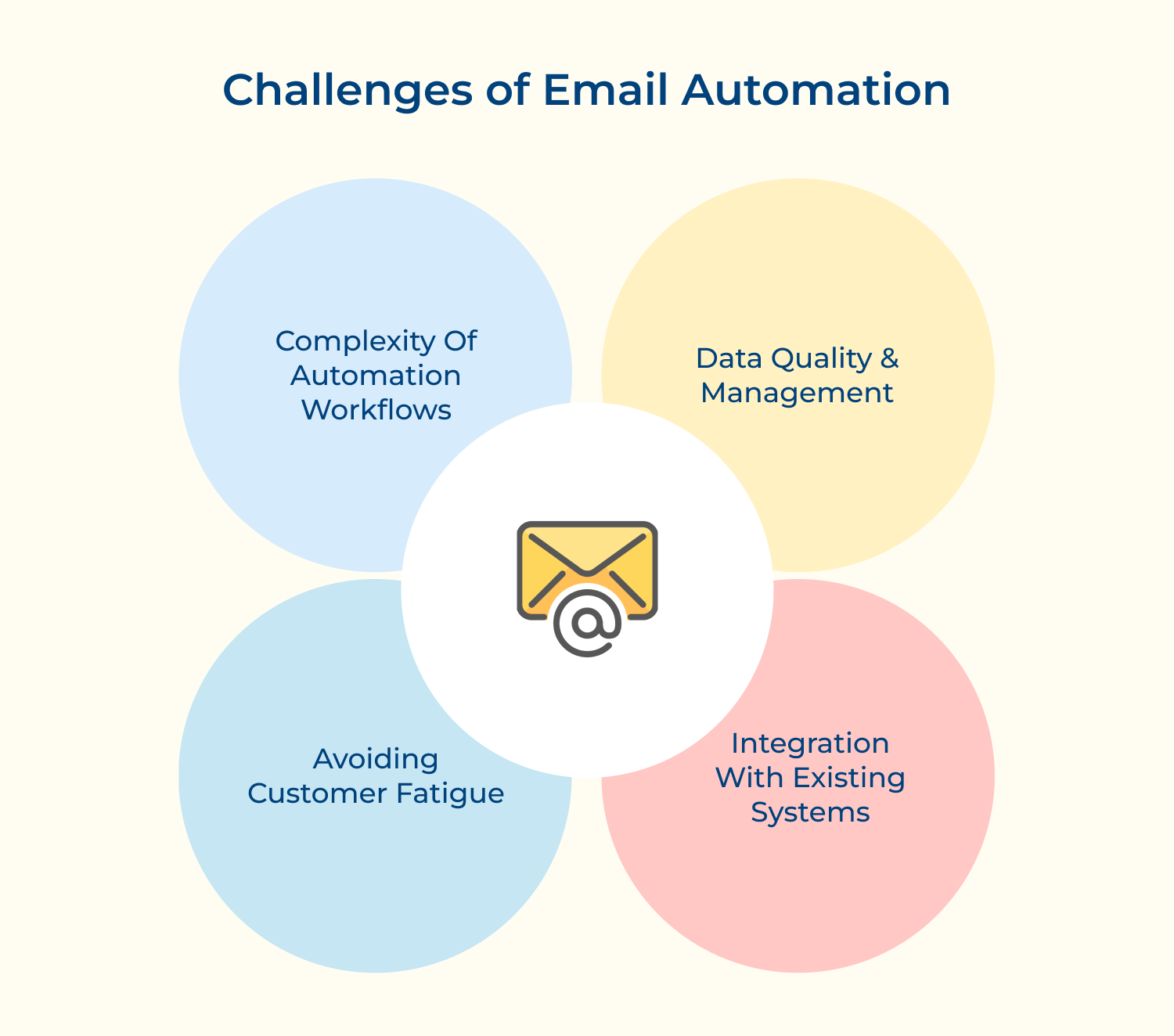
Data Quality and Management
High-quality data is the foundation of effective email automation. Poor data management can lead to incorrect segmentation and irrelevant messaging, resulting in disengaged customers as well as reduced campaign effectiveness.
Solution:
Invest in data cleaning tools and regular audits to ensure your contact lists are up to date as well as accurate. Implement forms with validation checks to capture high-quality data from the start. Additionally, segment your audience based on behavior and preferences to tailor your messaging effectively.
Complexity of Automation Workflows
Designing automation workflows can be complex, especially if your customer journeys involve multiple touchpoints. Misunderstanding customer behavior can lead to ineffective automation.
Solution:
Start with a clear mapping of your customer journeys. Use visual workflow tools offered by many automation platforms to design and visualize these workflows. Begin with simple automations and gradually incorporate more complexity as your understanding of customer behavior improves.
Integration with Existing Systems
Integrating email automation tools with existing CRM systems and other marketing platforms can be technically challenging. Incompatibilities may create data silos and hinder effective communication.
Solution:
Choose email automation tools that offer robust integrations with your existing systems. Work with your IT team or a third-party consultant to ensure a smooth integration process. Regularly review and update your integration processes to adapt to any changes in your technology stack.
Avoiding Customer Fatigue
Email fatigue can lead to unsubscribes and disengagement with customers receiving numerous emails daily.
Solution:
Implement a thoughtful email cadence that respects your audience’s preferences. Use automation to segment your audience and tailor the frequency as well as content of emails to match their interests. Regularly solicit feedback from your subscribers to understand their preferences better.
Email automation empowers businesses by streamlining communication and enhancing customer engagement. With the ability to deliver personalized messages at scale, companies can build stronger relationships and improve customer loyalty.
Automated workflows eliminate manual tasks, freeing up valuable time for marketing teams to focus on strategy and creativity. Data-driven insights from automated campaigns enable businesses to make informed decisions and optimize their marketing efforts continuously.
Email automation boosts efficiency and supports business growth. It helps companies stay competitive, build stronger customer relationships and deliver consistent value with less effort.

What is single email automation?
Single email automation is a process where a specific email is automatically sent to recipients based on predetermined triggers or conditions. This could be a welcome email when someone signs up, a birthday greeting, or a confirmation after a purchase. It allows businesses to send timely, relevant messages without manual intervention, improving efficiency and customer engagement.
What are some examples of automated email use cases?
Common automated email use cases include welcome series for new subscribers, abandoned cart reminders, order confirmations, shipping updates, re-engagement campaigns for inactive customers, post-purchase follow-ups and subscription renewals. These automated emails help maintain customer communication, boost engagement and drive conversions throughout the customer lifecycle.
How do I prevent my automated emails from going to spam folders?
Use a reputable email service provider, authenticate your domain, maintain a clean email list, avoid spam trigger words, balance text/images while personalizing content. Encourage recipients to add you to their address book and maintain consistent sending volumes as well as frequency. Regularly monitor your sender reputation and engagement metrics to adjust your strategy as needed.
How does automated email sending work?
Automated email sending works by setting up predefined triggers and corresponding email templates in an email marketing platform. When a trigger event occurs (e.g., a new signup or a specific date), the system automatically sends the appropriate email to the recipient. This process involves email creation, list management, trigger setup and delivery tracking, all managed by the email automation software.
 https://omni24.io/wp-content/uploads/2026/09/Social-commerce-scaled.png
1340
2560
Webvision Solution
https://omni24.io/wp-content/uploads/2023/04/Omni-Logo-1.svg
Webvision Solution2026-10-23 12:18:272026-10-23 12:18:27What is Social Commerce and Why Does It Matter?
https://omni24.io/wp-content/uploads/2026/09/Social-commerce-scaled.png
1340
2560
Webvision Solution
https://omni24.io/wp-content/uploads/2023/04/Omni-Logo-1.svg
Webvision Solution2026-10-23 12:18:272026-10-23 12:18:27What is Social Commerce and Why Does It Matter? https://omni24.io/wp-content/uploads/2026/08/AI-Customer-Service-Agents.png
1256
2400
Webvision Solution
https://omni24.io/wp-content/uploads/2023/04/Omni-Logo-1.svg
Webvision Solution2026-09-21 04:48:512026-09-21 04:48:51How to Build an AI Customer Service Agents: 8 Key Steps
https://omni24.io/wp-content/uploads/2026/08/AI-Customer-Service-Agents.png
1256
2400
Webvision Solution
https://omni24.io/wp-content/uploads/2023/04/Omni-Logo-1.svg
Webvision Solution2026-09-21 04:48:512026-09-21 04:48:51How to Build an AI Customer Service Agents: 8 Key Steps https://omni24.io/wp-content/uploads/2026/08/Omnichannel-Conversational-AI.png
1256
2400
Tushar Joshi
https://omni24.io/wp-content/uploads/2023/04/Omni-Logo-1.svg
Tushar Joshi2026-09-16 03:51:072026-09-16 03:51:07How to Build Omnichannel Conversational AI Strategy
https://omni24.io/wp-content/uploads/2026/08/Omnichannel-Conversational-AI.png
1256
2400
Tushar Joshi
https://omni24.io/wp-content/uploads/2023/04/Omni-Logo-1.svg
Tushar Joshi2026-09-16 03:51:072026-09-16 03:51:07How to Build Omnichannel Conversational AI Strategy
Whether it’s about acquire, engage or support – Omni24 covers all your customer engagement needs in one complete platform.

Copyright ©2026 Veemo All rights reserved.
CA, Los Angeles, Hall Ave, 19011