What is Conversational Ticketing? Examples & Best Practices
Conversational ticketing is the future of internal support, with professionals across IT, DevOps, legal, and SalesOps embracing real-time help on conversational platforms.

Conversational ticketing is the future of internal support, with professionals across IT, DevOps, legal, and SalesOps embracing real-time help on conversational platforms.
Have you ever felt frustrated when trying to reach customer support?
Navigating through automated phone menus or waiting for hours for a response can be incredibly frustrating.
But what if we told you there’s a solution that makes interacting with customer support as easy as having a friendly conversation? Introducing the conversational ticketing system, a revolutionary approach that uses Gen AI and natural language processing to completely rethink user support/service.
80% of customer support agents will be managed by AI by 2026, indicating that AI-powered user support is just around the corner.
The technological advancement in the customer service landscape is leading to the development of conversational ticketing systems. These innovative systems focus on creating a more personalized engaging experience for both customers and support teams.
Let us delve deeper into what conversational ticketing entails.
A conversational ticketing system is a software tool or platform that allows businesses to manage and respond to customer inquiries, issues through conversational interfaces such as live chat, messaging apps, or chatbots. It replaces the traditional ticketing system, which relies on email or phone communication with a more efficient and customer-centric approach.
Key objectives of a conversational ticketing system:
Companies are improving their customer service through the use of conversational ticketing systems. But how do these systems differ from traditional helpdesk approaches and which one is right for your business?

Let’s dive into the details.
Conversational Ticketing involves using chatbots or AI-powered systems to communicate with customers conversationally. It mimics human conversation and can provide a more personalized experience for the customer.
Traditional helpdesk typically involves customers submitting a ticket or email and waiting for a response from a customer service representative, which may feel more formal & less engaging.
Conversational Ticketing tends to provide quicker responses to customer inquiries due to the use of automation and AI. Chatbots can instantly provide answers to common questions and resolve simple issues without the need for human intervention.
Traditional Helpdesk may have longer response times as customer service representatives need to manually handle each ticket.
Conversational Ticketing heavily relies on automation to streamline and improve customer service processes. Chatbots can handle a large volume of customer inquiries simultaneously, freeing up human agents to focus on more complex issues.
Traditional Helpdesk, while it may use some automation tools, often requires more manual intervention from customer service representatives.
Conversational Ticketing allows for more personalized interactions with customers by using data analytics and customer profiles to tailor responses and recommendations. Chatbots can remember past interactions and preferences, providing a more customized experience for each customer.
Traditional Helpdesk can provide personalized service but may not have the same level of data-driven personalization as Conversational Ticketing.
Conversational Ticketing often includes self-service options that allow customers to find answers to their questions or resolve issues on their own. Chatbots can guide customers through troubleshooting steps or provide links to helpful resources.
Traditional Helpdesk may not offer as many self-service options, leading to longer wait times for customers seeking assistance.
Conversational ticketing has become increasingly popular as more businesses recognize its benefits. It helps businesses to increase customer satisfaction as well as overall business ROI.
Here are five of the benefits of implementing conversational ticketing for your business:

Setting up a conversational ticketing system can be a game-changer for business. There are certain steps involved in launching the ticketing system.
Here are steps to set up a conversational ticketing system for your business:

Before diving into conversational ticketing, it’s important to assess your specific needs and goals. Identify the types of customer inquiries you receive, the volume of requests, and the desired outcomes. It will help you select the right chatbot platform and customize it accordingly.
Pro Tips:
The first step in setting up conversational ticketing is selecting a messaging platform that fits your business needs. Look for a platform that allows for seamless integration with your existing systems and provides features like automation, tagging, or team collaboration.
Pro Tips:
Before you start implementing conversational ticketing, it’s crucial to define your ticketing workflow.
Assess how you currently handle customer queries and identify the key stages involved. It will help you determine how the conversation should flow within your messaging platform and how tickets should be categorized.

Pro Tips:
Automation is a key component of conversational ticketing. Configure your messaging platform to send automated responses based on predefined triggers like keywords or time-based rules. These automated responses can acknowledge receipt of the message, provide status updates, or provide links to relevant resources. Customize these responses to ensure they align with your brand’s tone and voice.
Pro Tips:
Canned responses are pre-drafted templates that can be used to respond to frequently asked questions or common issues. These save time and ensure consistency in your responses.
Identify the common queries your customer support team receives and create canned responses for them. Make sure to regularly update and refine these responses to address evolving customer needs.
Pro Tips:
Conversational ticketing allows you to categorize and tag tickets based on different criteria such as issue type, customer segment or urgency.
Set up a systematic tagging system that makes it easy to group and prioritize tickets. Establish clear rules for ticket assignment to ensure that each query is directed to the appropriate team member or department.
Pro Tips:
Conversational ticketing works best when it enables effective collaboration among support teams. Choose a messaging platform that offers features like internal notes, shared inboxes and team assignment capabilities. It allows for seamless communication, knowledge sharing and a unified approach to customer support.
Pro Tips:
Once conversational ticketing is live, it’s essential to track and analyze your ticket performance. Establish key performance indicators (KPIs), such as response time, resolution time and customer satisfaction rates.
Regularly review these metrics to identify areas of improvement and fine-tune your ticketing workflow accordingly.
Pro Tips:

Digital technologies and customer expectations evolve rapidly. To stay ahead, continuously invest in optimizing and enhancing your conversational ticketing system.
Regularly update your chatbot’s knowledge base, expand its capabilities and adapt to changes in customer behavior.
Pro Tips:
Implementing Conversational Ticketing can come with its fair share of challenges.
Let us explore these challenges and provide solutions to overcome them.

1. Lack of understanding: Customers may be wary of interacting with chatbots instead of human agents, fearing that their issues will not be resolved adequately. At the same time, employees may worry about job security as they see the rise of automation in their roles.
Solution:
2. Language barriers and misinterpretations: Conversational ticketing relies on natural language processing to understand and respond to customer queries. The technology may struggle with understanding slang, regional dialects, or complex sentences, leading to misinterpretations and improper responses. It can result in frustration for customers and potentially damage the company’s reputation.
Solution:
3. Limited customization and personalization: Conversational ticketing systems may struggle with providing personalized experiences, such as addressing customers by their names or understanding their individual preferences. The lack of customization can make interactions feel robotic and impersonal, leading to a poor customer experience.
Solution:
4. Technical issues and system downtime: Like any technology-driven solution, conversational ticketing systems are not immune to technical glitches and system downtime. These unexpected issues can disrupt customer support operations and result in dissatisfaction among customers.
Solution:
Businesses are continually looking for ways to improve customer support experiences. We will discuss the best practices for implementing conversational ticketing to enhance customer satisfaction and streamline support operations.
Let us discuss the tips and best practices that can make the conversational ticketing system more effective.

Businesses can handle customer inquiries in a conversational manner and mimic human-like interactions using the platform.
Here are seven key features of conversational ticketing systems:

Automatic ticket generation based on customer queries is the primary feature of a conversational ticketing system. Instead of manually creating tickets for each request, businesses can rely on the system to categorize and prioritize tickets, ensuring that all customer queries are addressed promptly.
Key benefits:
Businesses can provide real-time responses to customer queries, eliminating the need for customers to wait for long periods.
Chatbots integrated into the system can provide instant answers to frequently asked questions, saving time for both customers and support agents.

Key benefits:
Conversational ticketing systems can be seamlessly integrated across various channels, including websites, messaging apps and social media platforms.
The integration allows customers to choose their preferred channel of communication, making it convenient for them to reach out for support.
Key benefits:
Conversational ticketing systems rely heavily on AI-powered chatbots to handle customer inquiries. These chatbots can understand natural language processing and possess the ability to learn.
Key benefits:
Conversational ticketing systems offer comprehensive ticket management and workflow capabilities. Support agents can easily monitor, assign, and track tickets through a centralized dashboard, ensuring that all inquiries are attended to promptly.
The feature enables efficient collaboration among support teams, improving response times and customer satisfaction.

Key benefits:
Advanced conversational ticketing systems can capture and analyze customer data, providing valuable insights into customer behavior.
Leveraging these insights helps businesses to personalize their support interactions, delivering a tailored experience to each customer. It improves customer engagement and fosters long-term loyalty.
Key benefits:
Conversational ticketing systems offer robust analytics and reporting features, allowing businesses to measure various customer support metrics.
From response times to ticket resolution rates, these systems provide valuable data for businesses to optimize their support processes and identify areas for improvement.
Key benefits:
Artificial intelligence (AI) has impacted various industries and one area where it is making a significant impact is in conversational ticketing.
So, what role does artificial intelligence play in conversational ticketing?

Let’s find out.
Conversational ticketing systems are revolutionizing customer support and helpdesk services. We have summarized a few notable examples of conversational ticketing systems that businesses can implement to enhance their customer service.
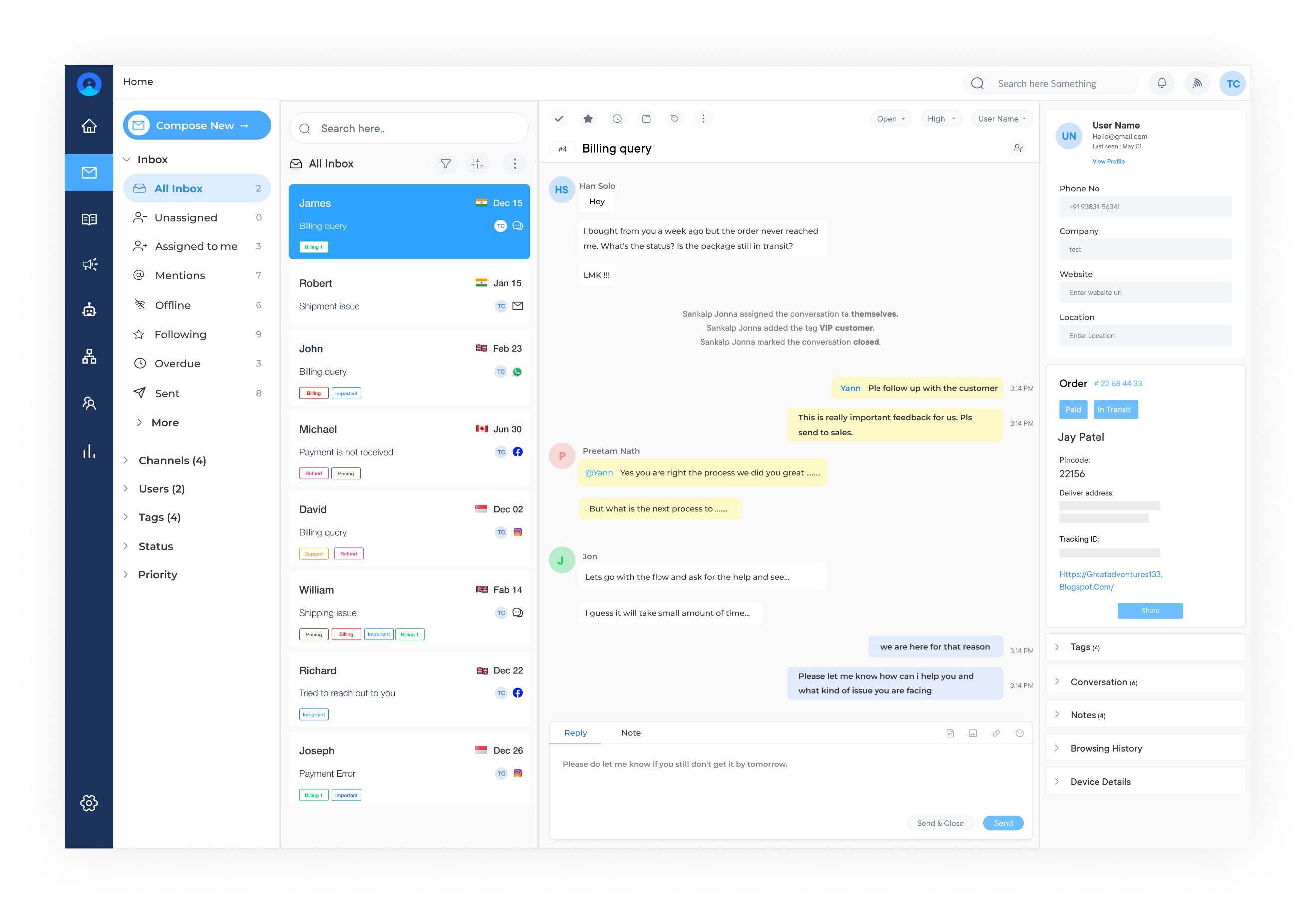
Omni24 is a popular customer service software that incorporates conversational ticketing into its platform. It allows businesses to centralize customer inquiries from multiple channels, such as email, live chat, and social media, into one intuitive system.
The AI capabilities of the software enable the system to understand customer inquiries and provide relevant solutions or suggestions.
Key features:
Pricing: Omni24 offers flexible pricing options based on the number of agents and channels. The basic plan starts at $29 per user per month, while the enterprise plan is custom-priced based on specific business needs. Businesses can also opt for a free trial before committing to the software.
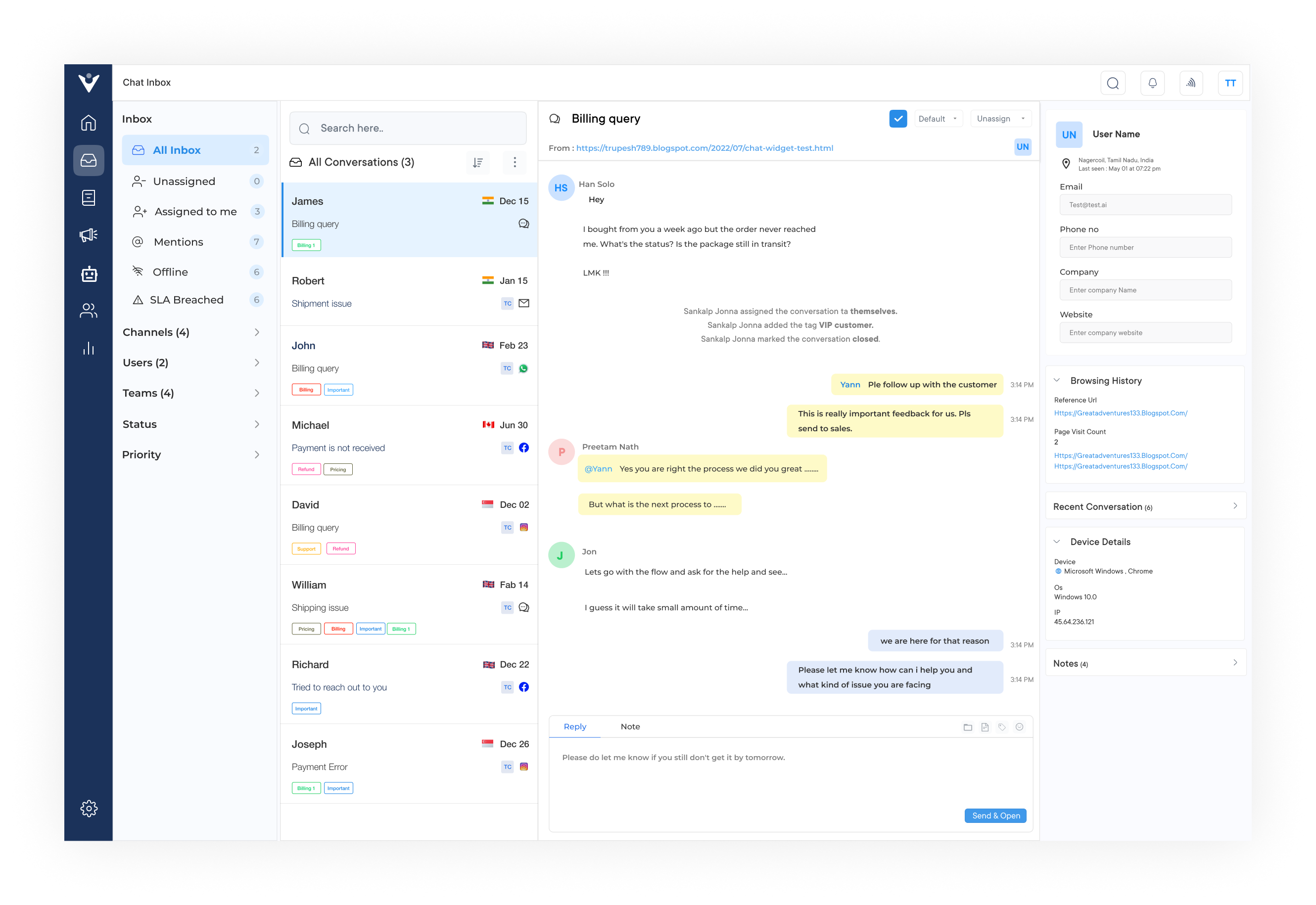
Veemo is a messaging platform that enables businesses to communicate with customers across various channels, including in-app messages, emails, and chats.
The software also offers conversational ticketing capabilities, allowing businesses to capture and resolve customer issues efficiently. It also provides automation features, such as triggered messages and chatbot support, to streamline support processes.
Key features:
Pricing: Veemo offers a range of pricing plans to suit businesses of all sizes, ranging from $29 per month per user for up to $149 per month per user including advanced features such as automation, integrations, and custom branding. The software also offers a 14-day free trial for businesses to test the features before committing to a paid plan.
Freshdesk is a helpdesk software that incorporates a conversational ticketing system called Fresh chat. It enables businesses to engage with customers through chat windows on their websites or mobile apps.
The helpdesk tool offers AI-powered chatbots, real-time notifications, and integration with other tools like CRM and helpdesk software for efficient ticket management.
Key features: The KPI dashboard provides a holistic view of your help desk operations, helping you to optimize efficiency and deliver exceptional customer service.
Drift is a conversational marketing platform that focuses on personalized customer interactions. Its conversational ticketing system allows businesses to capture and assign customer inquiries effectively.
The conversational software uses chatbots and automated playbooks to provide instant support, qualifying leads, and routing tickets to the right team members for resolution.
Key features: The software’s automation capabilities help streamline repetitive tasks, enabling your team to focus on more complex customer issues.
Help Scout is a customer service software that emphasizes teamwork and collaboration. Its conversational ticketing system enables businesses to manage customer conversations from multiple channels in a shared inbox.
The software offers features like saved replies, email automation, and integration with popular business tools to streamline the support process and provide personalized responses.
Key features: The KPI dashboard enables teams to identify trends, identify bottlenecks, and make data-driven decisions to enhance customer service.
Businesses are always looking for innovative ways to improve their customer service experiences. One such innovation that has gained popularity is conversational ticketing. Conversational ticketing is transforming the way businesses handle customer service.
Businesses can improve customer satisfaction, enhance issue resolution, and build long-term relationships by leveraging technology. Whether you are an e-commerce giant or a healthcare provider, implementing conversational ticketing can be a game-changer in today’s competitive market. So why not embrace this innovative approach and take your customer service to the next level?

1. How does conversational ticketing differ from traditional ticketing systems?
Traditional ticketing systems often involve lengthy forms or automated responses, leading to a disconnected customer experience. Whereas conversational ticketing utilizes chatbots or live chat platforms to offer a more conversational and interactive experience. It allows customers to communicate in real-time, providing instant solutions to their queries.
2. How can conversational ticketing improve customer service experiences?
Conversational ticketing offers several benefits in terms of customer service experiences. it provides instant responses, eliminating the waiting time associated with traditional ticketing systems. Customers can receive real-time assistance, resulting in a faster and more efficient problem-resolution process. The conversational nature of the system allows businesses to cater to individual needs and preferences, enhancing the overall customer experience.
3. How does conversational ticketing facilitate faster issue resolution?
Conversational ticketing streamlines the communication process between businesses and customers, leading to faster issue resolution. With real-time chat capabilities, customers can explain their problems directly to the support team, providing all necessary details promptly. It reduces the back-and-forth emails or phone calls often required with traditional ticketing systems. Moreover, conversational ticketing allows businesses to automate certain responses or actions, enabling immediate solutions for common queries.
4. What industries can benefit from using conversational ticketing?
Conversational ticketing can benefit a wide range of industries, including e-commerce, telecommunications, hospitality, and healthcare. Any industry that requires prompt customer support and personalized assistance can benefit from implementing conversational ticketing systems. From answering product queries to resolving technical issues, conversational ticketing enhances the customer experience across various sectors.
5. How does conversational ticketing contribute to building long-term customer relationships?
Conversational ticketing plays a crucial role in building long-term customer relationships. By providing instant and personalized support, it establishes trust. Customers feel valued when their queries are promptly addressed, leading to increased satisfaction and repeat business. Conversational ticketing allows businesses to gather valuable customer data, enabling them to understand their audience better and tailor their future interactions accordingly.
6. What is the difference between conversational ticketing and email ticketing?
The primary difference between conversational ticketing and email ticketing lies in the mode of communication. Conversational ticketing occurs in real-time through chat platforms, allowing for instant responses and issue resolution. Whereas email ticketing involves asynchronous communication, where customers send an email and wait for a response. Conversational ticketing offers a more interactive experience, while email ticketing may be more suitable for non-urgent or lengthy conversations.
 https://omni24.io/wp-content/uploads/2026/07/Web-Self-Service.png
1257
2400
Webvision Solution
https://omni24.io/wp-content/uploads/2023/04/Omni-Logo-1.svg
Webvision Solution2026-07-23 05:39:582026-07-23 05:39:58Web Self Service: What it is, Features and its Benefits
https://omni24.io/wp-content/uploads/2026/07/Web-Self-Service.png
1257
2400
Webvision Solution
https://omni24.io/wp-content/uploads/2023/04/Omni-Logo-1.svg
Webvision Solution2026-07-23 05:39:582026-07-23 05:39:58Web Self Service: What it is, Features and its Benefits https://omni24.io/wp-content/uploads/2026/07/Knowledge-Base-SEO-1.png
1396
2400
Webvision Solution
https://omni24.io/wp-content/uploads/2023/04/Omni-Logo-1.svg
Webvision Solution2026-07-22 09:44:572026-07-23 06:16:41What is Knowledge Base SEO & How to Create it?
https://omni24.io/wp-content/uploads/2026/07/Knowledge-Base-SEO-1.png
1396
2400
Webvision Solution
https://omni24.io/wp-content/uploads/2023/04/Omni-Logo-1.svg
Webvision Solution2026-07-22 09:44:572026-07-23 06:16:41What is Knowledge Base SEO & How to Create it? https://omni24.io/wp-content/uploads/2026/07/customer-experience-benefits.png
1257
2400
Tushar Joshi
https://omni24.io/wp-content/uploads/2023/04/Omni-Logo-1.svg
Tushar Joshi2026-07-20 06:28:322026-07-20 06:28:32What are the Benefits of Customer Experience for Business?
https://omni24.io/wp-content/uploads/2026/07/customer-experience-benefits.png
1257
2400
Tushar Joshi
https://omni24.io/wp-content/uploads/2023/04/Omni-Logo-1.svg
Tushar Joshi2026-07-20 06:28:322026-07-20 06:28:32What are the Benefits of Customer Experience for Business?
Whether it’s about acquire, engage or support – Omni24 covers all your customer engagement needs in one complete platform.

Copyright ©2026 Veemo All rights reserved.
CA, Los Angeles, Hall Ave, 19011