What is Chatbot Design & How it Increases User Interaction
Effective chatbot design blends strong UI/UX, clear flows and smart AI to deliver human-like conversations that boost customer satisfaction.
Effective chatbot design blends strong UI/UX, clear flows and smart AI to deliver human-like conversations that boost customer satisfaction.
Many chatbots end up annoying users — robotic responses and confusing menus push people away instead of helping them. Around 60% of customers report feeling disappointed or frustrated after interacting with a chatbot and 30% abandon a brand after a poor chatbot experience.
Poor experiences often involve generic answers, inability to handle context or complexity, and no easy path to a human agent.
But smartly designed, human-centered chatbots can change that. By using clear conversation flows, understanding user intent, and offering easy handoffs to humans when needed, an automation platform can turn frustration into satisfaction.
Chatbot design is the strategic process of creating conversational interfaces that feel natural and helpful to users. It involves crafting dialogue flows that guide conversations smoothly while ensuring the bot understands user intent and responds appropriately. Good chatbot design balances technical functionality with human-centered interaction patterns to create meaningful digital conversations.
Chatbot design works by mapping out conversation paths that anticipate what users might say and need. Designers create decision trees and response templates that help the bot understand context while maintaining conversation flow. The process combines user research with technical constraints to build interactions that feel intuitive rather than robotic.
Key principles:
Excellent chatbot UX design transforms digital interactions into meaningful conversations. Let’s explore the compelling data behind why thoughtful design makes all the difference.
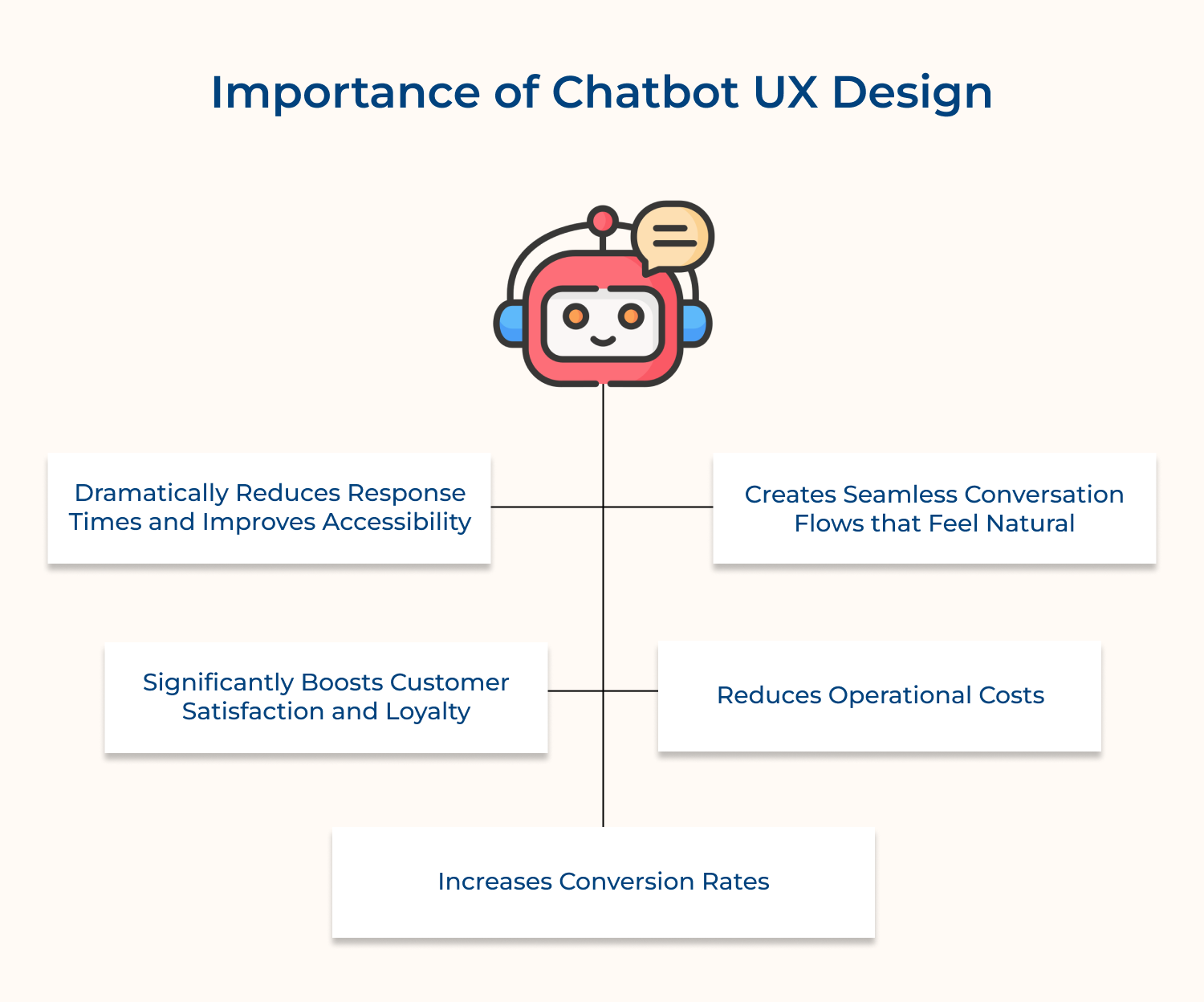
Dramatically Reduces Response Times and Improves Accessibility
AI chatbots give quick responses anytime, so users don’t wait hours for help. They deliver answers within seconds, improving reliability and making support accessible beyond business hours.
Creates Seamless Conversation Flows that Feel Natural
Strong chatbot interfaces follow how people naturally speak. Instead of rigid menus, they guide users with intuitive, predictable paths that reduce effort and keep conversations smooth.
Significantly Boosts Customer Satisfaction and Loyalty
When bots understand context and offer accurate solutions fast, customers feel supported. This leads to higher satisfaction and repeat engagement.
Reduces Operational Costs
By automating routine questions, chatbots let human agents handle complex issues. This cuts costs while improving service quality.
Increases Conversion Rates
Good design helps users find products, compare options, or complete purchases with less friction—leading to more successful conversions.
Conversational UI/UX serves as the bridge between human communication patterns and digital interactions. Here are all the reasons why it is important for chatbot design:
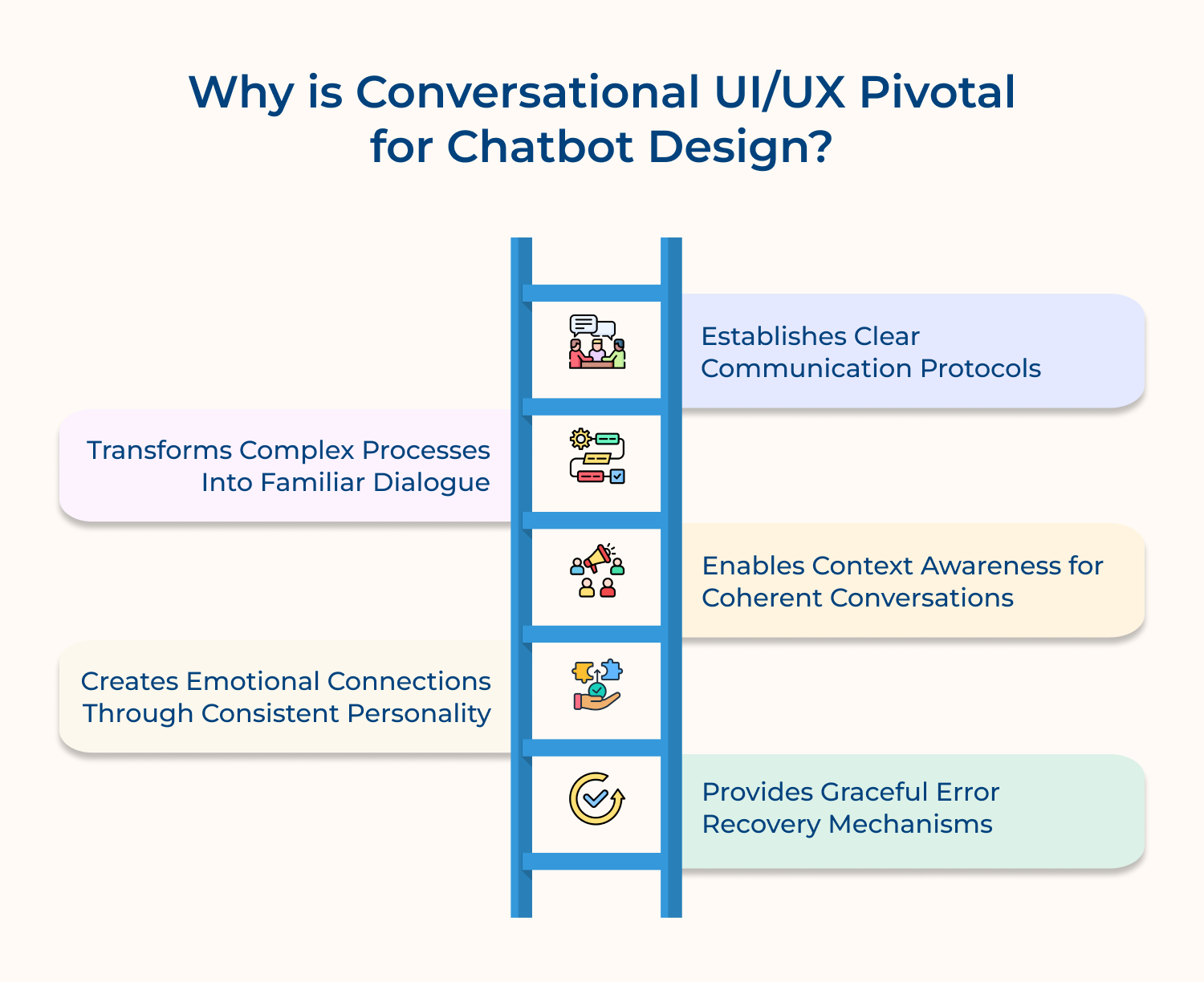
Conversational UI/UX creates a shared language between humans and machines by establishing consistent patterns for how information gets exchanged. When users know what to expect from each interaction, they can focus on solving their problems rather than figuring out how to communicate with the system.
Just as a skilled teacher breaks down complicated subjects into digestible conversations, good conversational design translates backend complexity into natural exchanges. Users don’t need to understand databases or APIs – they simply express their needs in plain language and receive responses that make sense within the context of normal conversation.
Conversational UI/UX gives chatbots a distinct voice and personality that users can relate as well as trust. This isn’t about making bots seem human, but rather about creating a consistent character that feels reliable and approachable. When tone remains steady across interactions, users develop familiarity as well as comfort with the digital assistant.
Effective conversational design ensures that chatbots remember what was discussed earlier and build upon previous exchanges naturally. The context awareness prevents users from repeating themselves and creates the sense of an ongoing relationship rather than a series of disconnected transactions. Each interaction feels like a continuation of the previous one.
Conversational UI/UX anticipates misunderstandings and communication breakdowns, then provides smooth paths to get back on track. Instead of dead ends or confusing error messages, well-designed systems offer clarifying questions or alternative approaches that keep the dialogue flowing. This resilience prevents frustration from derailing productive conversations.
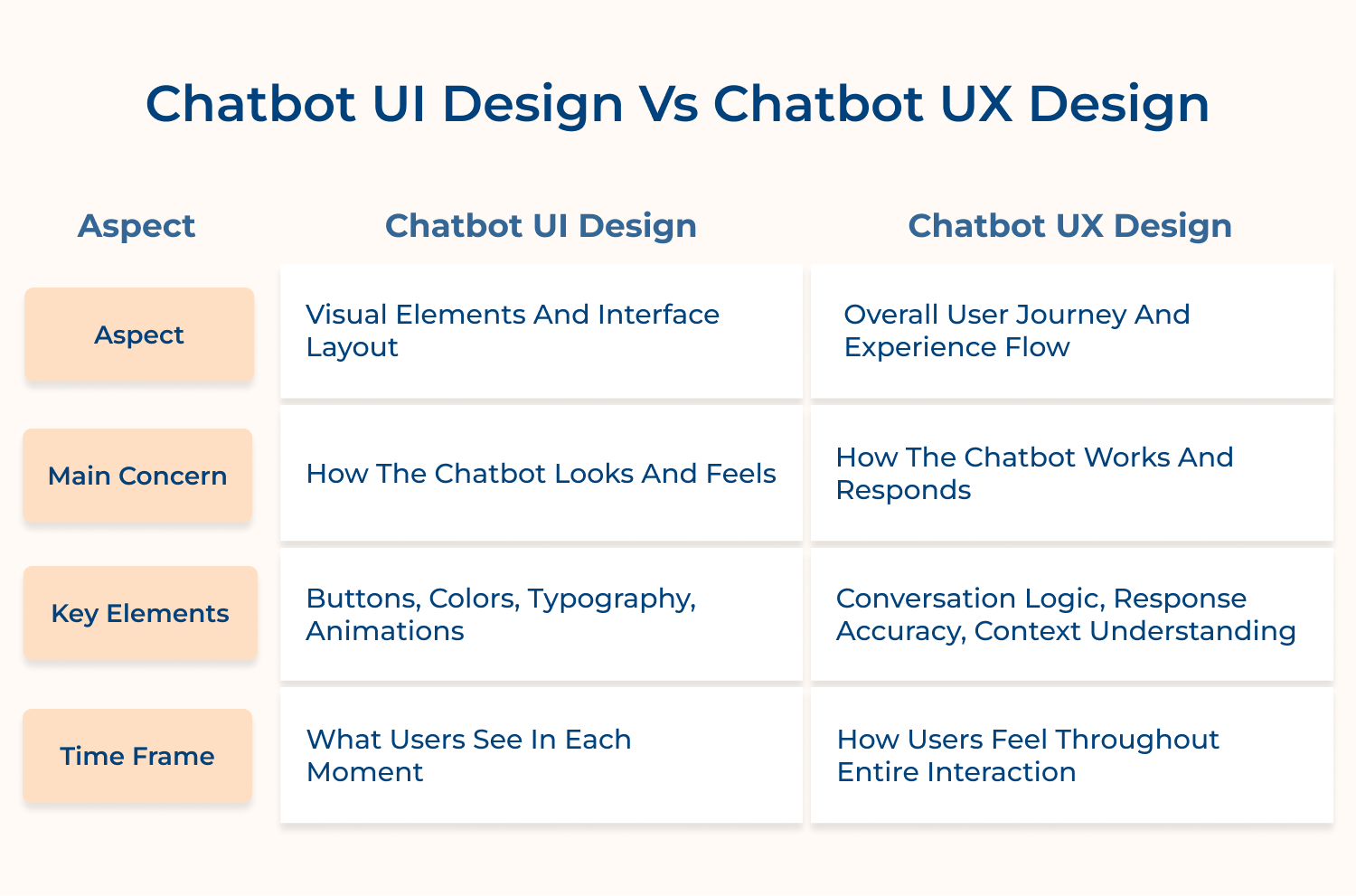
Chatbot UI design and UX design work hand in hand but focus on completely different aspects of the user experience.
1. Scope of Responsibility
UI design concentrates on the immediate visual presentation that users encounter when they first see the chatbot interface. This includes designing chat bubbles, button styles, color schemes, while ensuring everything looks polished and professional.
UX design encompasses the entire conversational journey from initial greeting to problem resolution, focusing on information architecture and flow. It maps out how conversations should progress logically as well as ensures users can accomplish their goals efficiently.
2. Design Elements and Components
UI design handles tangible interface components like message formatting, quick reply buttons, carousel layouts and visual indicators. These elements must align with brand guidelines while maintaining readability and accessibility across different devices as well as screen sizes.
UX design works with abstract conversation elements like dialogue trees, response timing, error handling strategies and escalation protocols. It defines how the chatbot should interpret user intent and structure responses to guide conversations toward successful outcomes.
3. User Interaction Focus
UI design prioritizes the immediate visual feedback and micro-interactions that occur when users click buttons or type messages. It ensures that every visual element communicates clearly and provides appropriate feedback for user actions like loading states.
UX design focuses on the broader conversation dynamics, including how the chatbot maintains context, handles interruptions and adapts responses. It ensures that users feel heard as well as understood throughout multi-turn conversations, even when topics shift unexpectedly.
4. Problem-Solving Approach
UI design solves visual communication problems by making information scannable, buttons discoverable and text readable across devices. It addresses challenges like information hierarchy, visual clutter and ensuring users can quickly identify actionable elements within conversations.
UX design tackles deeper behavioral and cognitive challenges by structuring conversations that match user mental models as well as expectations. It solves problems related to conversation repair, ambiguity resolution and helping users articulate their needs when they struggle to express themselves clearly.
In this article, we’ll explore the critical tips and best practices that will guide you toward creating a chatbot that not only meets but exceeds user expectations.
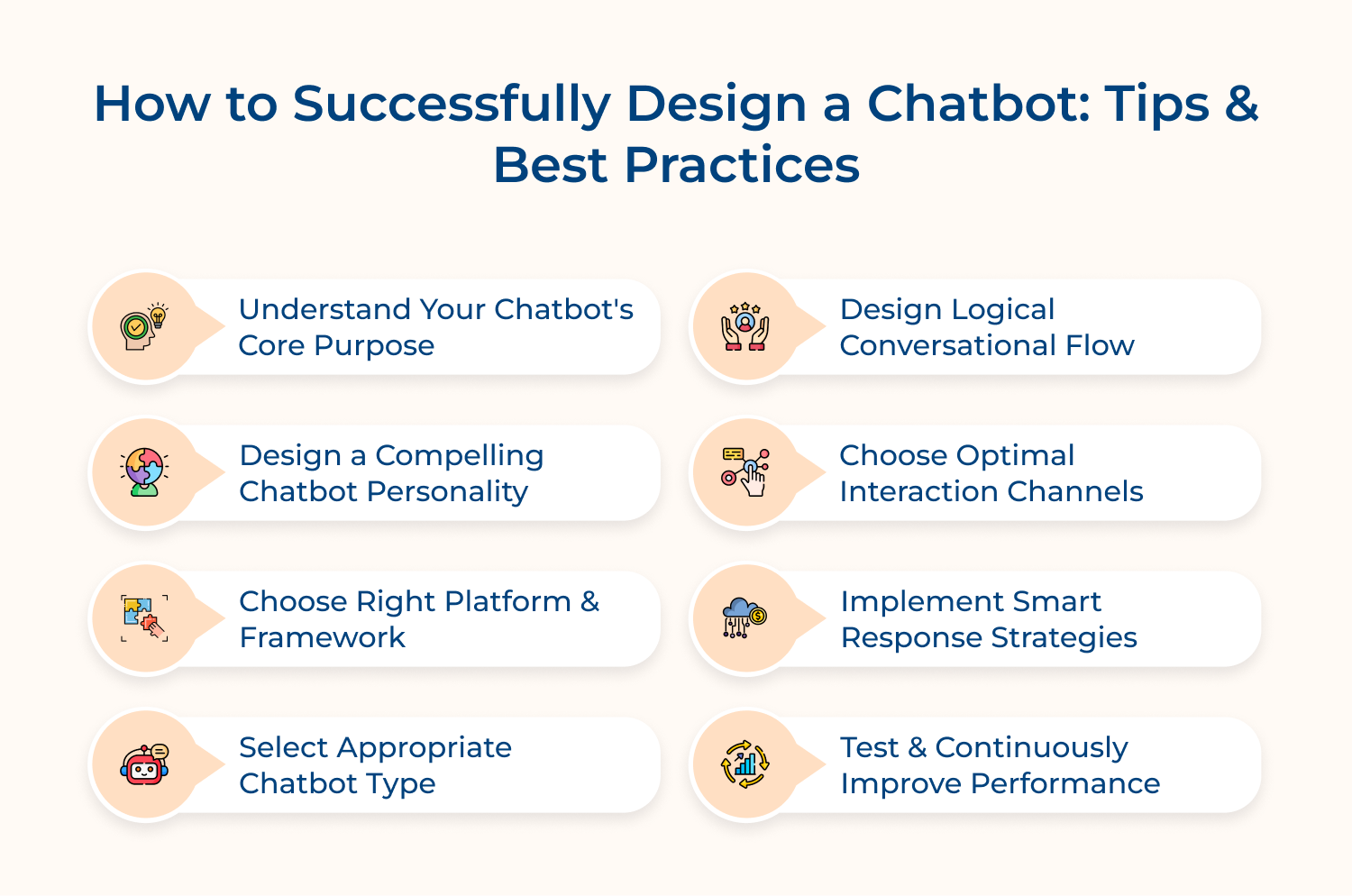
Defining your chatbot’s core purpose creates the foundation for every design decision that follows. Without clear purpose, chatbots become confusing tools that frustrate users rather than help them accomplish specific goals.
Here are four essential questions that guide you toward understanding your chatbot’s true mission:
These questions help you avoid building a chatbot that tries to do everything but excels at nothing. Each question forces you to make concrete decisions about scope and functionality instead of creating vague multipurpose tools.
The implementation process begins with stakeholder interviews where you ask: “What customer pain points keep you awake at night?” Then you survey actual customers asking: “What information do you struggle to find on our website?” Finally you analyze support tickets to identify the most common inquiry patterns.
The five most popular chatbot purposes that consistently deliver value across industries include:
Chatbot personality shapes whether users enjoy the interaction or feel like they’re talking to a robot. A well-defined personality builds emotional connection and turns basic exchanges into meaningful experiences.
Three methods help you design a personality that fits your audience.
For example, a financial services chatbot adopted a knowledgeable yet friendly voice that simplifies complex terms, helping users feel more confident about money decisions.
When shaping your bot’s personality, consider four questions:
— What emotional tone should it maintain in stressful moments?
— How formal or casual should it sound?
— What level of humor fits your brand?
— How should it respond when it can’t solve an issue?
Selecting the appropriate platform and framework determines your chatbot’s technical capabilities as well as long-term success potential. The wrong choice can limit functionality and create expensive migration headaches down the road.
Five key factors deserve careful consideration when evaluating chatbot platforms and frameworks:
Making the right platform choice early prevents costly rebuilds later while ensuring your chatbot can grow alongside your business needs and customer expectations.
Choosing the right chatbot type ensures you meet user needs without over-engineering the experience. Picking the wrong approach can lead to clunky interactions or limited functionality that frustrates customers.
The key is matching complexity to real user expectations. If most queries are predictable—like step-by-step instructions or basic FAQs—a rule-based system is often enough. But if customers need personalized guidance or bring variable situations, AI capabilities are a better fit.
Two practical methods help you choose wisely:
Conversational flow architecture determines whether users can accomplish their goals efficiently or get lost in confusing dialogue loops. Poor flow design creates frustration that drives customers away from your support channels.
Effective conversational flow guides users through structured dialogue paths while maintaining flexibility for unexpected turns or clarification requests. Well-designed flows anticipate user needs and provide clear navigation options at every conversation stage.
Pro tips:
Selecting the right interaction channels ensures your chatbot meets customers where they naturally communicate and expect support. Channel choice directly impacts user adoption rates because people resist switching to unfamiliar platforms just to get help with simple questions.
These five strategic questions help businesses identify the most effective channels for their chatbot implementation:
Here’s an additional consideration worth exploring: “How do you ensure consistency across multiple channels without overwhelming your team?” The answer lies in creating unified conversation templates that work across platforms while adapting to each channel’s unique interface constraints and user expectations.
Smart response strategies bridge the gap between automated efficiency and personalized assistance by providing contextually relevant options that guide users toward successful outcomes. These strategies prevent conversations from stalling while maintaining the natural flow of helpful dialogue.
Why does this matter so much for customer experience? Smart responses eliminate the frustration of typing long explanations by offering relevant shortcuts that still feel conversational rather than robotic.
Essential techniques can dramatically improve your chatbot’s response intelligence:
An e-commerce chatbot demonstrates this perfectly by offering product recommendations based on previous browsing behavior while providing quick buttons for “Check shipping status” and “Return policy information” during purchase discussions.
Testing and continuous improvement transform initial chatbot deployments into refined customer service tools that actually solve problems effectively. Without ongoing optimization, even well-designed chatbots gradually become less useful as customer needs evolve and new interaction patterns emerge.
Key performance metrics that reveal chatbot effectiveness and user satisfaction include:
Beyond quantitative metrics, conducting regular user testing and feedback collection provides qualitative insights that numbers alone cannot capture. Essential feedback questions that uncover actionable improvement opportunities include:
Start by categorizing responses into themes like “understanding issues” or “missing information” then prioritize changes based on frequency and impact. Create specific conversation updates that address the most common pain points.
Understanding these common pitfalls helps you build digital assistants that truly serve your customers rather than frustrate them.
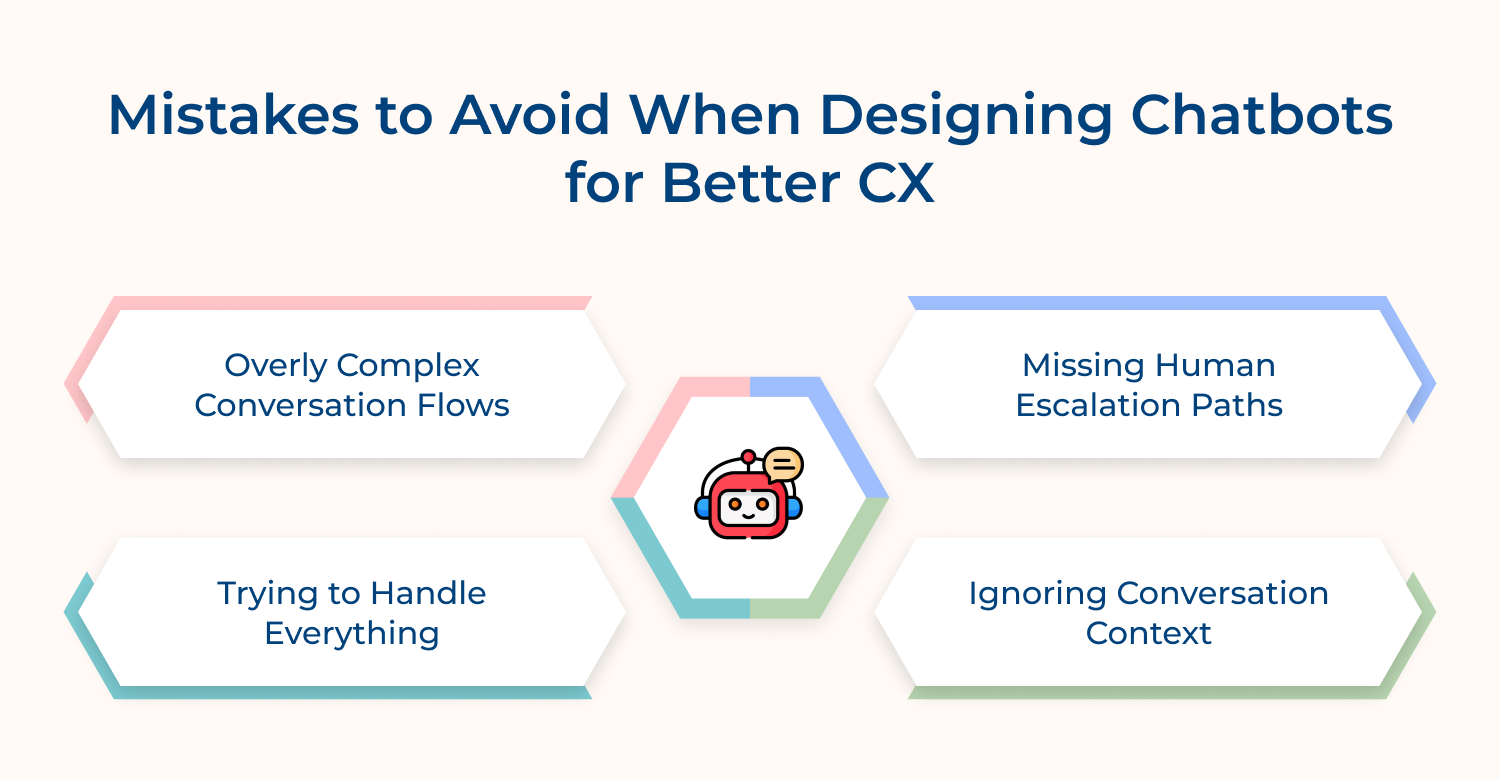
Overly Complex Conversation Flows
Complex branching paths with too many options overwhelm users who just want simple answers to straightforward questions. When conversation trees become maze-like, people abandon interactions feeling more frustrated than when they started seeking help.
Missing Human Escalation Paths
Users become trapped in conversation loops when chatbots lack obvious ways to connect with human agents for complex problems. This creates the dreaded experience of talking to a wall that keeps repeating unhelpful responses without offering genuine assistance.
Trying to Handle Everything
Jack-of-all-trades chatbots master nothing and disappoint everyone by providing mediocre responses across too many topics. Attempting universal functionality dilutes effectiveness and creates inconsistent experiences that damage user trust as well as confidence.
Ignoring Conversation Context
Context-blind chatbots force users to repeat information and explain their situations multiple times during single conversations. This robotic behavior makes interactions feel impersonal and inefficient compared to talking with knowledgeable human representatives.
Here are proven strategies that transform problematic chatbots into valuable customer service tools.
This comprehensive checklist that genuinely enhances customer experiences rather than creating digital frustration. Use these targeted questions to evaluate your chatbot design:
Essential Design Validation Questions
Effective chatbot design transforms customer interactions from frustrating digital encounters into meaningful conversations that genuinely solve problems. When you prioritize user needs over technical complexity, chatbots become valuable extensions of your customer service team.
The key lies in understanding that great chatbot design mirrors excellent human customer service principles: clear communication, contextual awareness and knowing when to escalate. This approach creates digital experiences that customers actually appreciate rather than merely tolerate.RetryClaude can make mistakes. Please double-check responses.

What is the best practice for chatbot design?
The most effective chatbot design practice centers on understanding your users’ specific needs before building any technical features. Start by mapping out the exact problems your chatbot will solve, then design conversation flows that guide users naturally toward those solutions while maintaining consistent personality and providing clear escalation paths to human support when needed.
How to create an effective chatbot design?
Creating effective chatbot design begins with defining clear objectives and understanding your target audience’s communication preferences. Follow a structured approach that includes conversation flow mapping, personality development, platform selection, user testing and continuous improvement based on real usage data as well as customer feedback to ensure genuine helpfulness.
What are the key elements of chatbot UI design?
Key chatbot UI elements include intuitive conversation bubbles that clearly distinguish user messages from bot responses, strategically placed quick reply buttons that reduce typing effort, consistent visual branding that aligns with your company identity, readable typography across devices and accessible color schemes that support users with various visual needs.
How do I test the effectiveness of my chatbot’s UI design?
Test chatbot UI effectiveness through user testing sessions where real customers complete actual tasks while thinking aloud about their experience. Monitor completion rates, time-to-resolution metrics, user satisfaction scores and conversation abandonment points. Combine quantitative analytics with qualitative feedback to identify specific interface elements that help or hinder user success.
How do I handle multi-platform chatbot UI design (e.g., web, mobile, messaging apps)?
Multi-platform chatbot design requires creating flexible conversation templates that adapt to each platform’s unique interface constraints while maintaining consistent personality and functionality. Design responsive layouts that work across screen sizes, leverage platform-specific features like rich cards or quick replies and ensure seamless conversation continuity when users switch between channels.
 https://omni24.io/wp-content/uploads/2026/09/Social-commerce-scaled.png
1340
2560
Webvision Solution
https://omni24.io/wp-content/uploads/2023/04/Omni-Logo-1.svg
Webvision Solution2026-10-23 12:18:272026-10-23 12:18:27What is Social Commerce and Why Does It Matter?
https://omni24.io/wp-content/uploads/2026/09/Social-commerce-scaled.png
1340
2560
Webvision Solution
https://omni24.io/wp-content/uploads/2023/04/Omni-Logo-1.svg
Webvision Solution2026-10-23 12:18:272026-10-23 12:18:27What is Social Commerce and Why Does It Matter? https://omni24.io/wp-content/uploads/2026/08/AI-Customer-Service-Agents.png
1256
2400
Webvision Solution
https://omni24.io/wp-content/uploads/2023/04/Omni-Logo-1.svg
Webvision Solution2026-09-21 04:48:512026-09-21 04:48:51How to Build an AI Customer Service Agents: 8 Key Steps
https://omni24.io/wp-content/uploads/2026/08/AI-Customer-Service-Agents.png
1256
2400
Webvision Solution
https://omni24.io/wp-content/uploads/2023/04/Omni-Logo-1.svg
Webvision Solution2026-09-21 04:48:512026-09-21 04:48:51How to Build an AI Customer Service Agents: 8 Key Steps https://omni24.io/wp-content/uploads/2026/08/Omnichannel-Conversational-AI.png
1256
2400
Tushar Joshi
https://omni24.io/wp-content/uploads/2023/04/Omni-Logo-1.svg
Tushar Joshi2026-09-16 03:51:072026-09-16 03:51:07How to Build Omnichannel Conversational AI Strategy
https://omni24.io/wp-content/uploads/2026/08/Omnichannel-Conversational-AI.png
1256
2400
Tushar Joshi
https://omni24.io/wp-content/uploads/2023/04/Omni-Logo-1.svg
Tushar Joshi2026-09-16 03:51:072026-09-16 03:51:07How to Build Omnichannel Conversational AI Strategy
Whether it’s about acquire, engage or support – Omni24 covers all your customer engagement needs in one complete platform.

Copyright ©2026 Veemo All rights reserved.
CA, Los Angeles, Hall Ave, 19011