What is Customer Experience (CX) Knowledge Management & Why it Matters?
Effective customer experience knowledge management is vital for delivering consistent, personalized service. It drives faster issue resolution and strengthens long-term loyalty.

Effective customer experience knowledge management is vital for delivering consistent, personalized service. It drives faster issue resolution and strengthens long-term loyalty.
Effective Knowledge Management (KM) plays a crucial role in empowering organizations to harness valuable insights in the competitive business landscape.
Companies with mature KM systems experience 30% higher revenue growth rates.
Streamlining information allows businesses to anticipate customer needs, resolve issues swiftly, and build lasting relationships.
Explore the essential role of KM in enhancing customer experiences, exploring strategies, tools, and best practices that can transform how companies engage with their customers.
Understand the keys to creating a informed customer journey, ensuring satisfaction and loyalty in an ever-evolving market.
Customer experience knowledge management (CXKM) refers to the systematic process of collecting, organizing, and utilizing information related to customer interactions. The approach integrates customer data and employee insights to create a comprehensive understanding of the customer journey.
CXKM is crucial for businesses aiming to deliver exceptional customer experiences consistently. By analyzing customer-related information, companies can identify patterns, anticipate needs and make data-driven decisions. The proactive approach increases customer loyalty, reduces churn and enhances brand reputation.
Key objectives:
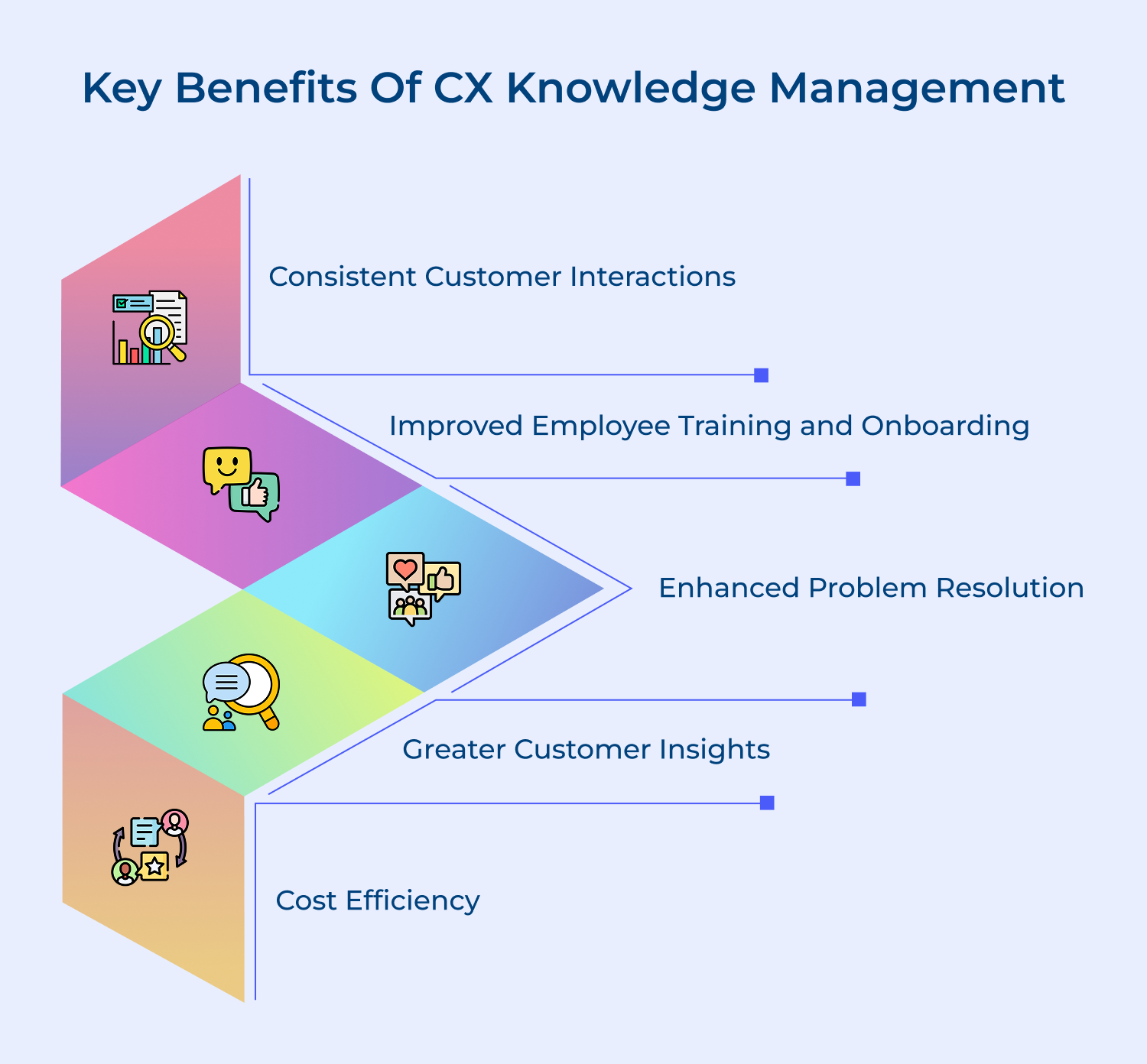
Discover how effective Knowledge Management enhances customer satisfaction, streamlines operations and builds stronger relationships. Here are the key benefits.
Explore actionable strategies to leverage Knowledge Management for optimizing customer experience, driving engagement and addressing needs effectively. Here are the methods.
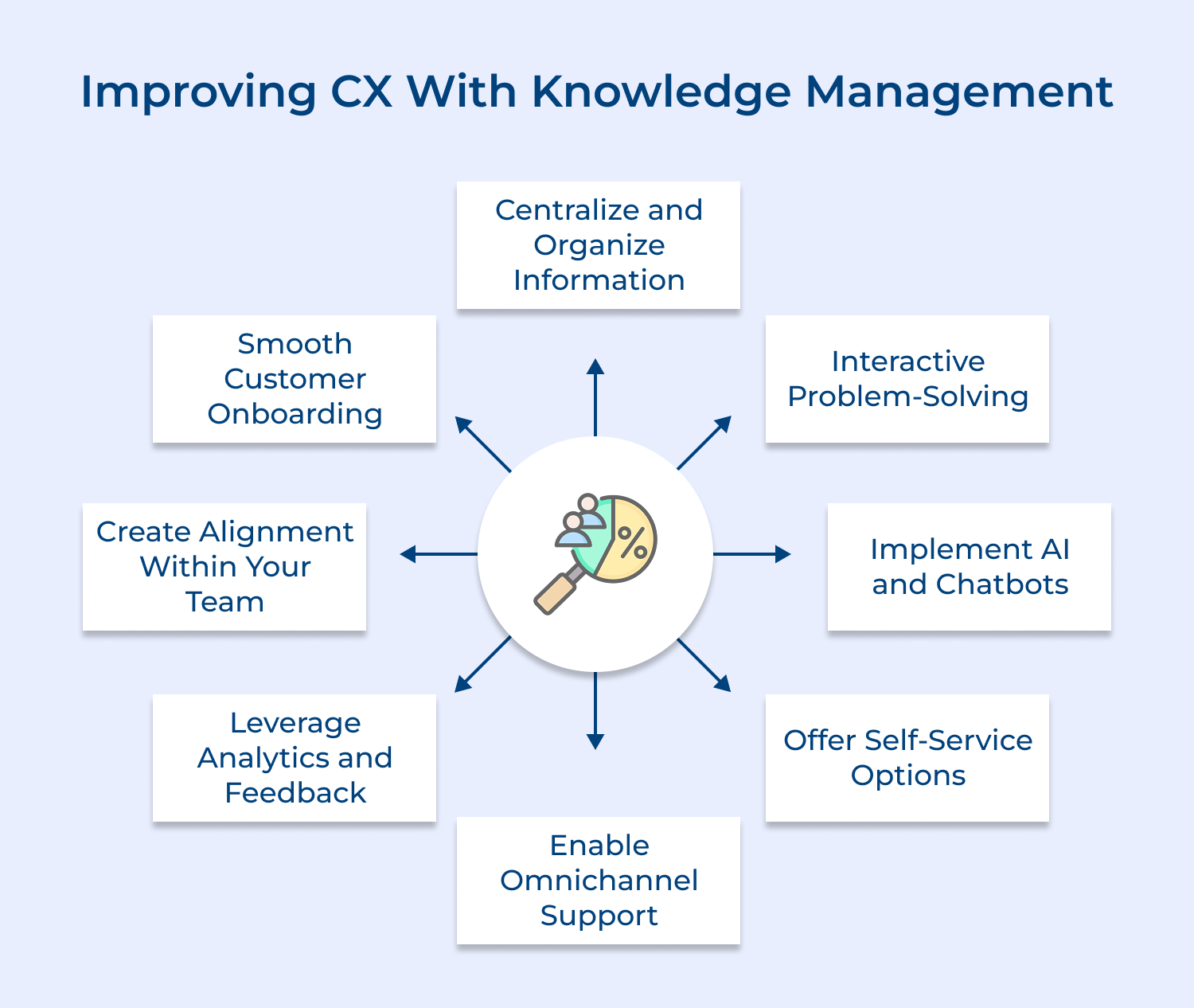
Centralizing information eliminates data silos and ensures consistency across all customer touchpoints. It prevents conflicting information, speeds up issue resolution and empowers employees to provide accurate responses. This centralization is crucial for maintaining a unified customer experience across the organization.
Implement a comprehensive knowledge management system that consolidates information from various departments. Organize content using categories and search functionality for easy retrieval. Ensure regular updates and version control. Make this central repository accessible to all customer-facing teams, enabling quick and accurate information dissemination.
Pro tips:
Interactive problem-solving engages customers actively in finding solutions, leading to better understanding and retention. It empowers customers to learn and solve issues independently, reducing support ticket volume. The approach also provides valuable insights into common customer challenges, guiding future product improvements and support strategies.
Develop interactive troubleshooting guides, decision trees or wizards that walk customers through step-by-step problem-solving processes. Incorporate visual aids, such as diagrams or videos, to enhance understanding.
Pro tips:
AI and chatbots provide instant, 24/7 customer support, handling routine queries efficiently. The technology reduces wait times, frees up human agents for complex issues and offers consistent responses. It also scales easily to handle high volumes of inquiries without compromising on quality or speed.
Integrate AI-powered chatbots into your website, mobile app and messaging platforms. Train them using your knowledge base to answer FAQs, guide users through simple troubleshooting, and direct complex queries to human agents.
Pro tips:
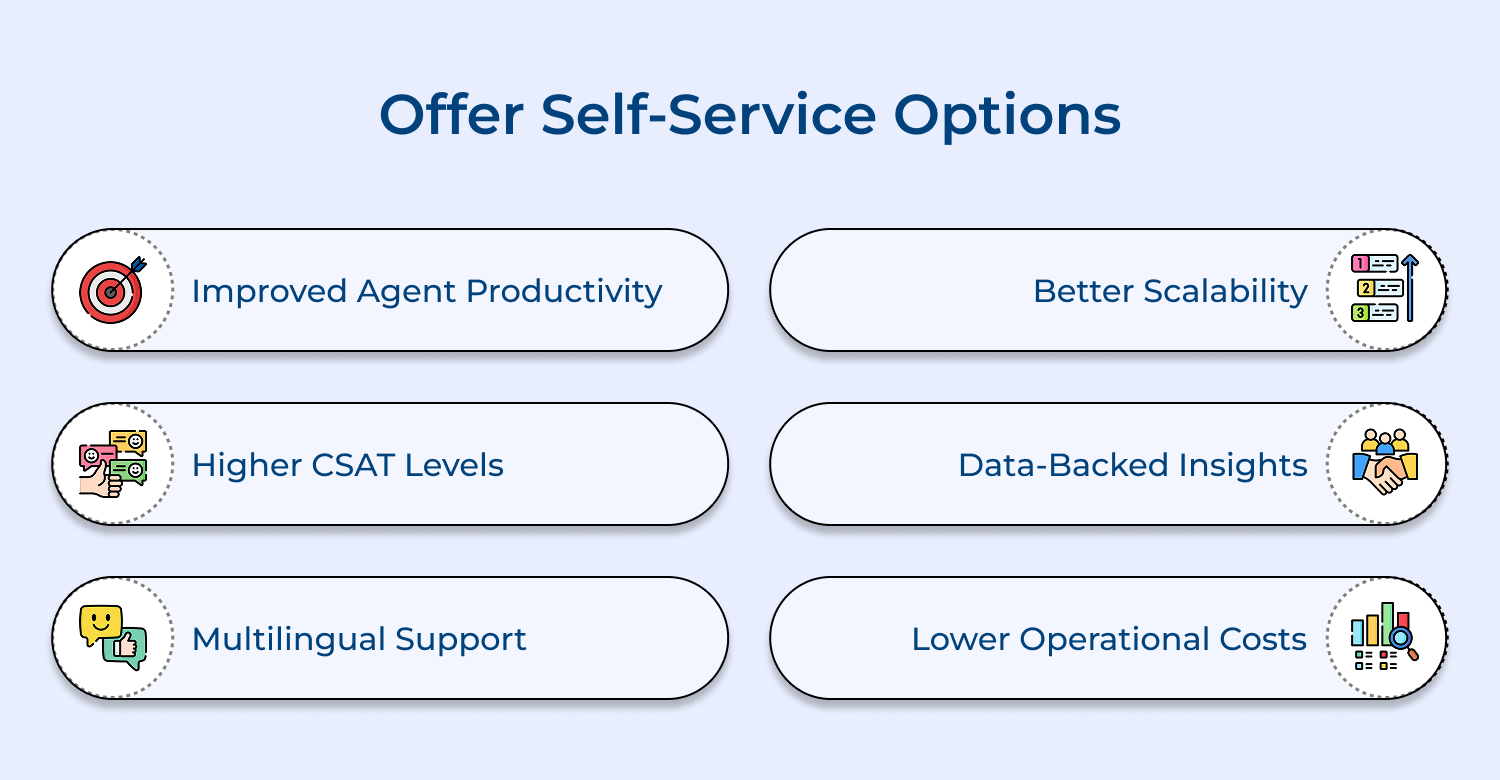
Self-service options cater to customers who prefer finding solutions independently. They reduce support costs and improve customer satisfaction. Self-service empowers customers to solve issues at their convenience, fostering a sense of control and efficiency in their experience with your brand.
Create a comprehensive, easy-to-navigate knowledge base with FAQs, how-to guides and troubleshooting resources. Implement a user-friendly search function and organize content logically. Offer video tutorials, community forums and downloadable resources. Integrate self-service options across all digital touchpoints, including your website and mobile app.
Pro tips:
Omnichannel support provides a seamless, consistent experience across all customer touchpoints. It acknowledges that customers may start an interaction on one channel and continue it on another.
Implement a unified customer relationship management (CRM) system that integrates all communication channels. Ensure that customer information, interaction history and preferences are accessible across channels. Train support teams to handle queries across multiple platforms and provide consistent responses regardless of the communication medium.
Pro tips:
Analytics and feedback provide crucial insights into customer behavior. This data helps identify areas for improvement in products, services, or support processes. By leveraging this information, companies can make data-driven decisions to enhance customer experience and anticipate future needs.
Implement robust analytics tools to track customer interactions, support ticket trends and knowledge base usage. Regularly collect and analyze customer feedback through surveys, ratings. Use this data to identify knowledge gaps, update content, improve products and refine support processes to better meet customer needs.
Pro tips:
Team alignment ensures consistent customer experiences across all touchpoints. It prevents conflicting information, reduces internal confusion and improves overall service quality. Aligned teams can collaborate effectively, share insights and work towards common goals, leading to improved customer satisfaction.
Establish clear communication channels and regular cross-departmental meetings to share customer insights and align on strategies. Implement a shared knowledge management system accessible to all teams. Develop standardized processes and guidelines for customer interactions. Encourage collaborative problem-solving and knowledge sharing through team-building activities.
Pro tips:
Smooth customer onboarding sets the tone for the entire customer relationship. It reduces early churn, accelerates time-to-value and increases customer satisfaction. A well-designed onboarding process helps customers understand and utilize your product or service effectively, leading to long-term loyalty.
Create a structured onboarding program with clear milestones and checkpoints. Develop welcome kits, video tutorials and interactive guides tailored to different customer segments. Implement a proactive support system during the onboarding phase. Use automation to send timely, relevant information and check-in with customers regularly during their onboarding journey.
Pro tips:
Identify common hurdles organizations encounter in implementing Customer Experience Knowledge Management and the importance of addressing these challenges.
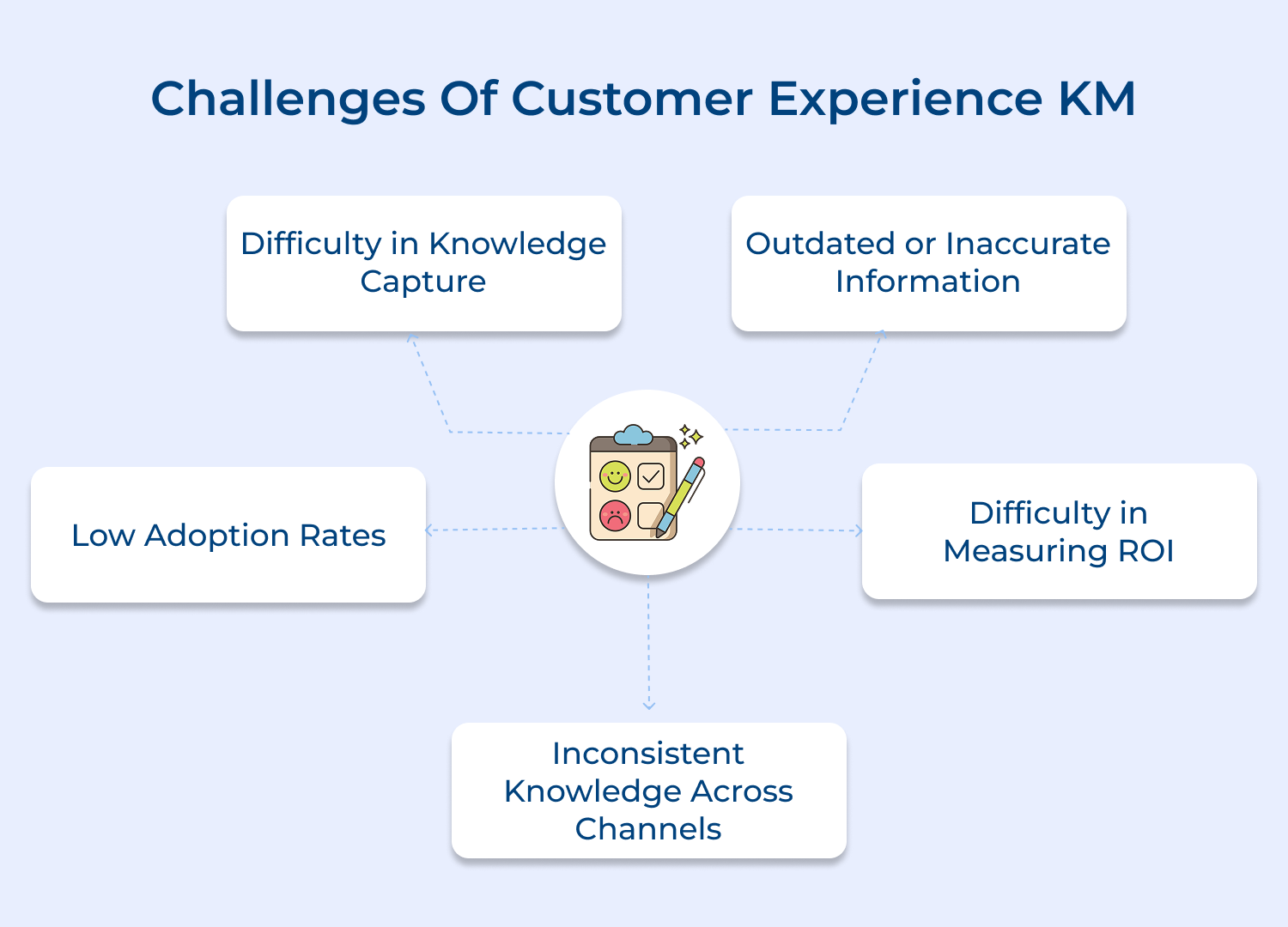
1. Difficulty in Knowledge Capture
Capturing tacit knowledge from experienced employees can be challenging. Often, valuable insights remain unshared or undocumented. To address this, implement a structured knowledge capture process. Encourage regular knowledge-sharing sessions, create mentorship programs, and use tools like video interviews or storytelling platforms.
Incentivize employees to contribute their expertise by recognizing and rewarding knowledge sharing. Implement user-friendly content creation tools and templates to make documentation easier. Use AI-powered tools to automatically categorize information from various sources like emails, chat logs and support tickets, ensuring comprehensive knowledge capture.
2. Outdated or Inaccurate Information
Knowledge bases can quickly become outdated, leading to misinformation and poor customer experiences. To combat this, establish a regular review and update cycle for all content. Assign content owners responsible for maintaining specific areas of the knowledge base. Implement version control systems and set expiration dates for content to prompt timely reviews.
Encourage user feedback on content accuracy and relevance, creating a simple mechanism for reporting outdated information. Utilize AI and machine learning algorithms to flag potentially outdated content based on usage patterns and feedback. Integrate your knowledge base with product development and customer support workflows to ensure updates are reflected in real-time.
3. Low Adoption Rates
Employees may resist using new knowledge management systems due to habit, complexity, or lack of awareness. To increase adoption, focus on user experience and intuitive design. Provide comprehensive training and ongoing support for the knowledge management system.
Demonstrate clear benefits of using the system, such as time saved and improved customer satisfaction. Integrate the knowledge base into existing workflows and tools to make it a natural part of daily operations. Use gamification techniques to encourage usage, such as leaderboards or badges for active contributors. Regularly gather user feedback and make continuous improvements based on user needs.
4. Difficulty in Measuring ROI
Quantifying the return on investment for knowledge management initiatives can be challenging. To address this, establish clear, measurable objectives tied to business outcomes. Track key performance indicators such as reduced handling time, improved first contact resolution rates, and increased customer satisfaction scores.
Monitor the usage of the knowledge base and correlate it with these metrics. Implement customer feedback mechanisms to directly assess the impact of knowledge-driven interactions. Use advanced analytics to measure the cost savings from reduced training time and increased agent productivity. Track the reduction in repeat calls or tickets for issues addressed in the knowledge base, demonstrating tangible cost savings and efficiency gains.
5. Inconsistent Knowledge Across Channels
Maintaining consistency across various customer touchpoints can be difficult, leading to conflicting information and customer confusion. To solve this, implement a centralized knowledge management system that serves as a single source of truth. Ensure all customer-facing channels draw information from this central repository.
Use technology to synchronize information in real-time across all platforms. Regularly audit content across channels to identify and rectify inconsistencies. Train all customer-facing teams on the importance of consistency and how to access the centralized knowledge base effectively.
Review leading platforms that provide essential tools for managing customer experience, knowledge, and improving accessibility. Here are the top options.
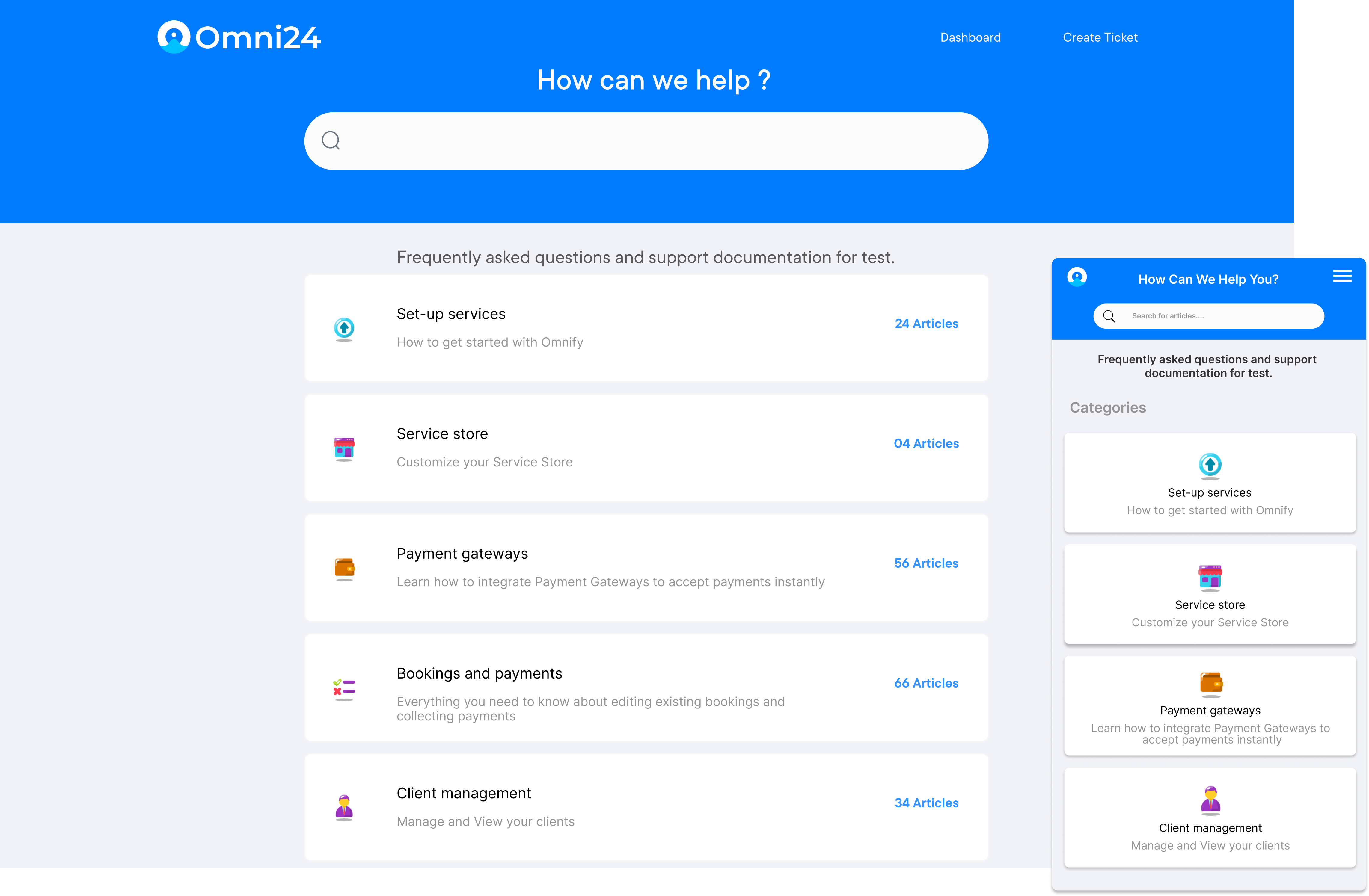
Omni24 is a customer experience software that offers a knowledge base to help businesses create, organize and share support content. It allows teams to build a self-service help center, reducing ticket volume and improving customer satisfaction by providing easy access to information.
Key features:
Pricing: Omni24’s pricing starts from $29/user/month and goes up to $149/user/month based on the features and add-ons. All plans come with 14 days free trial and include a shared inbox, known base and omnichannel support.
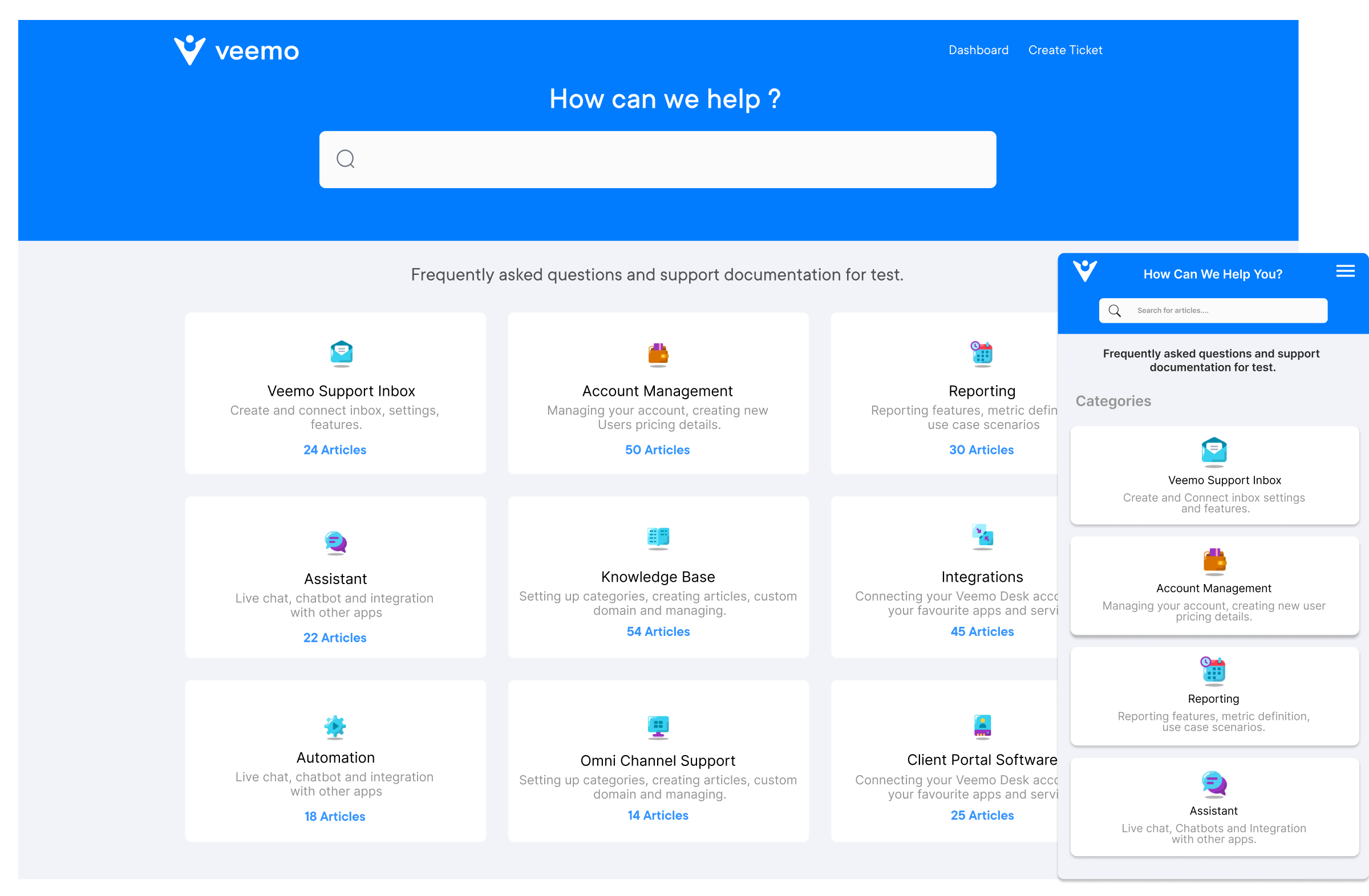
Veemo Support is an omnichannel help desk software to streamline support operations into a centralized interface. The software is a part of Veemo’s customer engagement suite of products designed to streamline and enhance various aspects of business operations. Veemo Support offers a range of tools to automate workflows, manage tickets efficiently, and provide self-service options to customers.
Key capabilities:
Pricing: Veemo’s pricing plans start from $29/user/month and go up to $129/user/month based on the features and add-ons. The software pricing is also customizable as per business requirements.
Help Scout is a customer support platform tailored for small to medium-sized businesses. It focuses on providing a personalized experience by combining email, live chat and a knowledge base, allowing teams to manage customer interactions effectively.
Key Features:
Notable features include a shared inbox, integrated knowledge base and customer management tools. Help Scout’s simplicity and focus on collaboration enhance team efficiency, ensuring consistent responses to customer needs.
Confluence, developed by Atlassian, is a collaborative workspace that helps teams create, share and manage knowledge. It supports documentation, project management and knowledge sharing, making it ideal for organizations looking to enhance their internal resources.
Key Features:
Key features include real-time collaboration, customizable templates and integration with other Atlassian products. Confluence’s powerful search functionality allows users to quickly find relevant information, improving overall efficiency and fostering a culture of knowledge sharing.
Learn from real-world case studies that showcase successful Customer Experience Knowledge Management implementations and their impact. Here are the examples.
1. Adobe
2. Cisco
3. Apple
4. Microsoft
Effective customer experience knowledge management is crucial for organizations seeking to enhance service delivery and foster customer loyalty. Creating a centralized knowledge base, leveraging real-time insights and encouraging collaboration empowers both customers as well as employees to access relevant information quickly.
As customer expectations evolve, investing in knowledge management remains key to staying competitive. Ultimately, a well-executed KM strategy transforms customer interactions into meaningful experiences, driving long-term success and deeper connections with the brand.

Why is customer experience knowledge management important?
Customer experience knowledge management is crucial because it organizes information, ensuring consistent and accurate customer interactions across all touchpoints. It empowers employees with instant access to relevant information, enhances self-service options for customers, reduces response times and improves overall customer satisfaction. This systematic approach to managing customer-related knowledge drives efficiency, loyalty and ultimately, business growth.
What are the challenges of customer experience knowledge management?
Key challenges include capturing tacit knowledge from experienced staff, keeping information up-to-date and accurate, ensuring adoption across the organization, measuring ROI and maintaining consistency across multiple channels. Companies often struggle with organizing vast amounts of data, making it easily searchable and accessible. Overcoming these challenges requires a strategic approach, robust systems and a culture that values knowledge sharing.
What are the examples of customer experience in knowledge management?
Examples include self-service portals like Amazon’s Help Center, community forums like Apple’s Support Communities and internal knowledge bases like Spotify’s Zendesk Guide for support agents. Other examples are AI-powered systems like IBM’s Watson for customer service, personalized content recommendations by Netflix, employee wikis like Zappos’ Family Library, and learning platforms like Salesforce’s Trailhead. These systems manage and utilize customer knowledge to enhance experiences.
How does a knowledge management system work for customer experience?
A knowledge management system for customer experience works by collecting, organizing and distributing information across the organization. It typically includes a centralized database, search functionality and integration with customer service tools. The system captures knowledge from various sources, including customer interactions, product updates and employee insights. It then makes this information readily available to both employees and customers, often using AI to suggest relevant content. This ensures consistent, accurate and timely responses to customer queries across all touchpoints.
 https://omni24.io/wp-content/uploads/2026/08/AI-Customer-Service-Agents.png
1256
2400
Webvision Solution
https://omni24.io/wp-content/uploads/2023/04/Omni-Logo-1.svg
Webvision Solution2026-09-21 04:48:512026-09-21 04:48:51How to Build an AI Customer Service Agents: 8 Key Steps
https://omni24.io/wp-content/uploads/2026/08/AI-Customer-Service-Agents.png
1256
2400
Webvision Solution
https://omni24.io/wp-content/uploads/2023/04/Omni-Logo-1.svg
Webvision Solution2026-09-21 04:48:512026-09-21 04:48:51How to Build an AI Customer Service Agents: 8 Key Steps https://omni24.io/wp-content/uploads/2026/08/Omnichannel-Conversational-AI.png
1256
2400
Tushar Joshi
https://omni24.io/wp-content/uploads/2023/04/Omni-Logo-1.svg
Tushar Joshi2026-09-16 03:51:072026-09-16 03:51:07How to Build Omnichannel Conversational AI Strategy
https://omni24.io/wp-content/uploads/2026/08/Omnichannel-Conversational-AI.png
1256
2400
Tushar Joshi
https://omni24.io/wp-content/uploads/2023/04/Omni-Logo-1.svg
Tushar Joshi2026-09-16 03:51:072026-09-16 03:51:07How to Build Omnichannel Conversational AI Strategy https://omni24.io/wp-content/uploads/2026/08/Customer-Service-Teams.png
1256
2400
Tushar Joshi
https://omni24.io/wp-content/uploads/2023/04/Omni-Logo-1.svg
Tushar Joshi2026-09-15 04:01:522026-09-15 04:02:16How to Build Customer Service Teams: 6 Key Steps
https://omni24.io/wp-content/uploads/2026/08/Customer-Service-Teams.png
1256
2400
Tushar Joshi
https://omni24.io/wp-content/uploads/2023/04/Omni-Logo-1.svg
Tushar Joshi2026-09-15 04:01:522026-09-15 04:02:16How to Build Customer Service Teams: 6 Key Steps
Whether it’s about acquire, engage or support – Omni24 covers all your customer engagement needs in one complete platform.

Copyright ©2026 Veemo All rights reserved.
CA, Los Angeles, Hall Ave, 19011