How to Implement Omnichannel CRM Strategy: 7 Key Steps
Omnichannel CRM unifies customer touchpoints, breaks silos and delivers consistent experiences with deeper insights.

Omnichannel CRM unifies customer touchpoints, breaks silos and delivers consistent experiences with deeper insights.
Customers expect seamless experiences whether they contact you via email, chat, phone or social media today. Yet most businesses struggle with fragmented systems that force customers to repeat themselves constantly.
84% of leaders say AI accelerates resolutions 25% faster enabling proactive personalization.
Disconnected channels create frustration and lost sales as your team lacks complete customer context during interactions. Omnichannel CRM solves this by unifying every customer interaction into one connected platform for your entire team.
Explore the guide that explains what it is, how it works and why your business needs it now.
Omnichannel CRM is a customer relationship management system that unifies all your communication channels into one platform. It lets customers reach you through email, phone, chat, social media or any other channel while maintaining context. Every interaction is tracked and connected so your team sees the complete customer journey in one place.
An omnichannel CRM pulls data from every touchpoint into a central hub. When a customer contacts you through any channel, your team instantly sees their full history and previous conversations. The system automatically updates records and ensures seamless handoffs between channels without making customers repeat themselves.
Key Objectives:
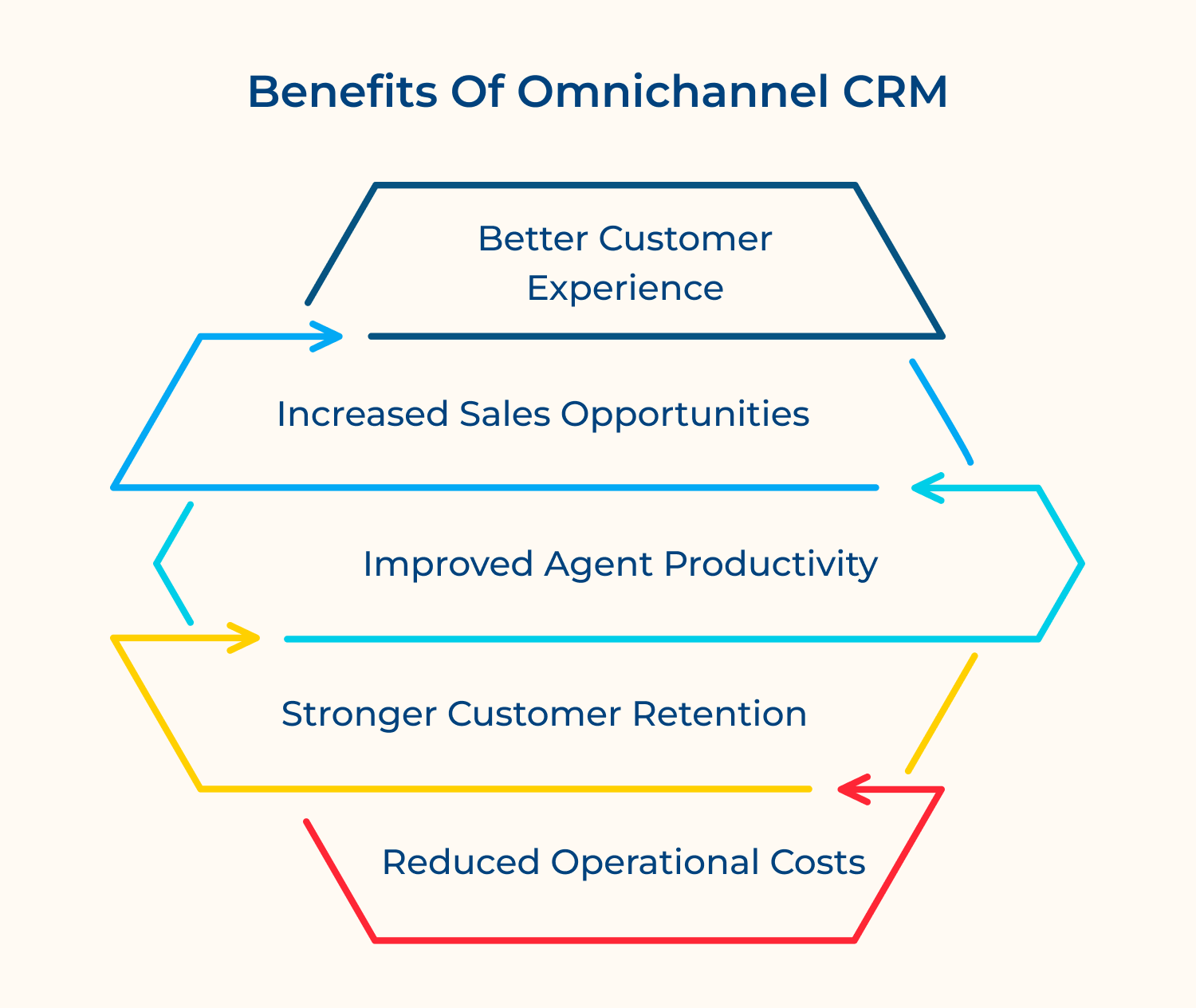
An omnichannel CRM transforms how you connect with customers. Here’s what your business gains when you adopt this unified approach.
Better Customer Experience
Customers get consistent service across every channel without repeating their story. They can start a conversation on chat and continue it via email seamlessly. This convenience builds trust and satisfaction.
Increased Sales Opportunities
Your team spots buying signals faster when all customer data lives in one place. Cross-selling and upselling become easier because you understand complete customer needs. More context means more conversions.
Improved Agent Productivity
Agents spend less time searching for information and more time helping customers. They switch between channels effortlessly without losing context. This efficiency lets them handle more cases with better quality.
Stronger Customer Retention
Personalized interactions make customers feel valued and understood throughout their journey. You can address issues proactively before they escalate. Happy customers stick around longer and spend more.
Reduced Operational Costs
Managing one integrated system costs less than juggling multiple disconnected tools. Automation handles routine tasks so your team focuses on complex issues. You get better results while spending less on infrastructure.
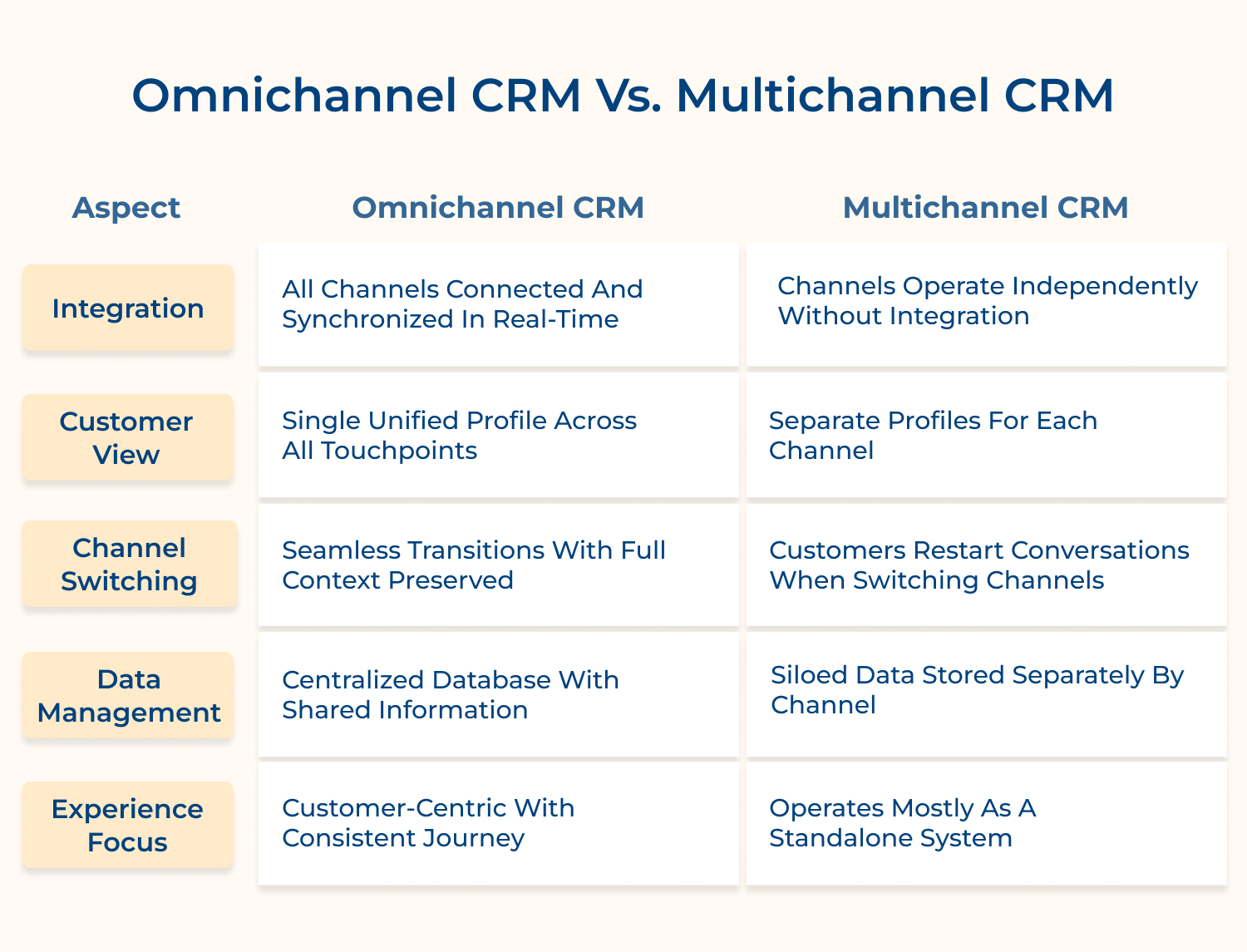
While both approaches use multiple channels, they work very differently. Understanding these differences helps you choose the right strategy for your business.
1. Integration
Omnichannel CRM creates a connected ecosystem where every channel talks to each other automatically. When a customer interacts on one platform, all other channels instantly reflect that activity and updated information.
Multichannel CRM treats each channel as a separate entity without connections. Email, phone and chat systems run independently, so updates in one place don’t appear elsewhere automatically.
2. Customer View
Omnichannel CRM builds one comprehensive customer profile that consolidates every interaction and piece of data. Your team sees the complete picture regardless of which channel they’re using to engage.
Multichannel CRM maintains different customer records for different channels without linking them together. A customer might have one profile in email and another in chat with no connection.
3. Channel Switching
Omnichannel CRM lets customers move freely between channels while maintaining conversation continuity and history. They can start on social media and finish via phone without explaining everything again.
Multichannel CRM forces customers to restart their journey when changing channels since context doesn’t transfer. This creates frustration as customers must repeat their issues and information repeatedly.
4. Data Management
Omnichannel CRM stores all customer information in one central database accessible across every touchpoint. Updates happen instantly and everyone works with the same accurate, current data.
Multichannel CRM keeps data trapped in separate systems that don’t communicate with each other. This fragmentation leads to outdated information and conflicting records across different channels.
The right features make all the difference in customer relationship management. Here are the essential capabilities that power effective omnichannel CRM systems.
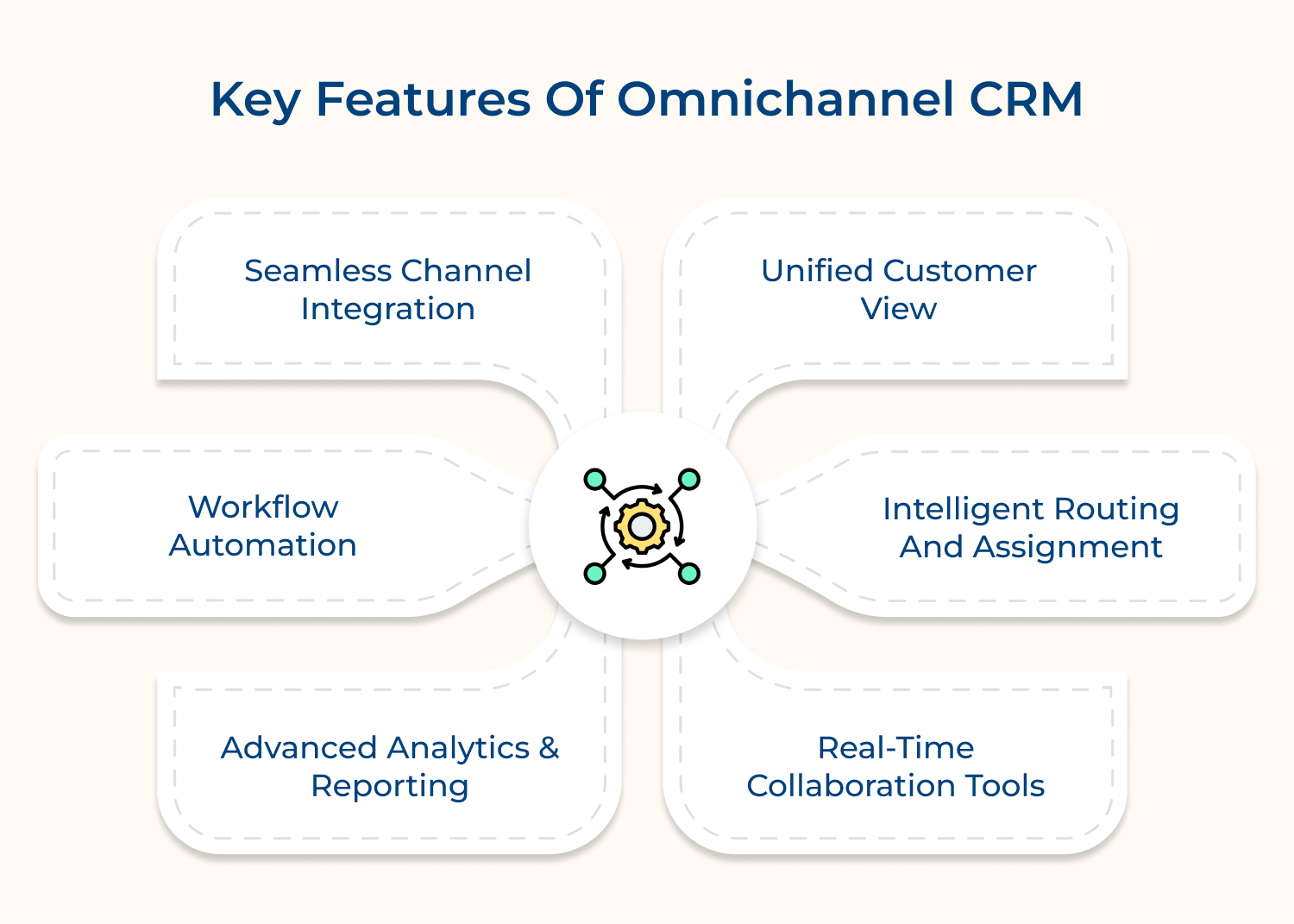
Every customer interaction and data point converges into one comprehensive profile that’s accessible across your organization. Your team sees purchase history, support tickets, preferences and communication records in a single dashboard.
This unified view enables teams to:
No more jumping between systems or asking customers to repeat themselves during interactions. Everyone works with the same accurate information, which speeds up resolution times and improves satisfaction.
All your communication channels connect and work together through one platform without technical complexity. Email, chat, phone, social media and SMS sync automatically so context flows between them.
Integration brings these advantages:
When a customer starts on chat and continues via email, your team picks up exactly where they left off. This continuity eliminates frustration and creates smooth experiences that customers appreciate.
The system directs incoming queries to the most qualified agent based on skills, availability and priority levels. Smart algorithms consider language preferences, expertise areas and current workload when making assignments.
Customers reach the right person faster because routing happens automatically based on predefined rules you set. This reduces wait times and ensures issues get resolved by agents with relevant knowledge & experience.
Repetitive tasks run automatically so your team focuses on complex customer needs that require human attention. The system handles routine follow-ups, data entry, ticket creation and status updates without manual intervention.
Automation streamlines these common workflows:
You can build custom workflows that match your specific business processes and customer journey stages. This efficiency lets agents handle more cases while maintaining quality and reducing operational costs significantly.
Team members communicate, share information instantly through built-in chat, notes and @mentions within the platform Agents can loop in specialists or managers without leaving the customer conversation or switching applications.
Internal collaboration happens seamlessly alongside customer interactions so everyone stays aligned and informed. This feature prevents miscommunication and ensures customers receive accurate answers even for complex multi-department issues.
Comprehensive dashboards visualize performance metrics across all channels so you spot trends and bottlenecks quickly. Track response times, resolution rates, customer satisfaction scores and agent productivity in real time.
Analytics provide actionable insights on:
Custom reports help you understand the complete customer journey from first contact to resolution and beyond. Data-driven decisions become easier when you see exactly what’s working and what needs adjustment across channels.
Rolling out an omnichannel CRM requires careful planning and execution. Follow these seven steps to transform your customer relationship management approach successfully.
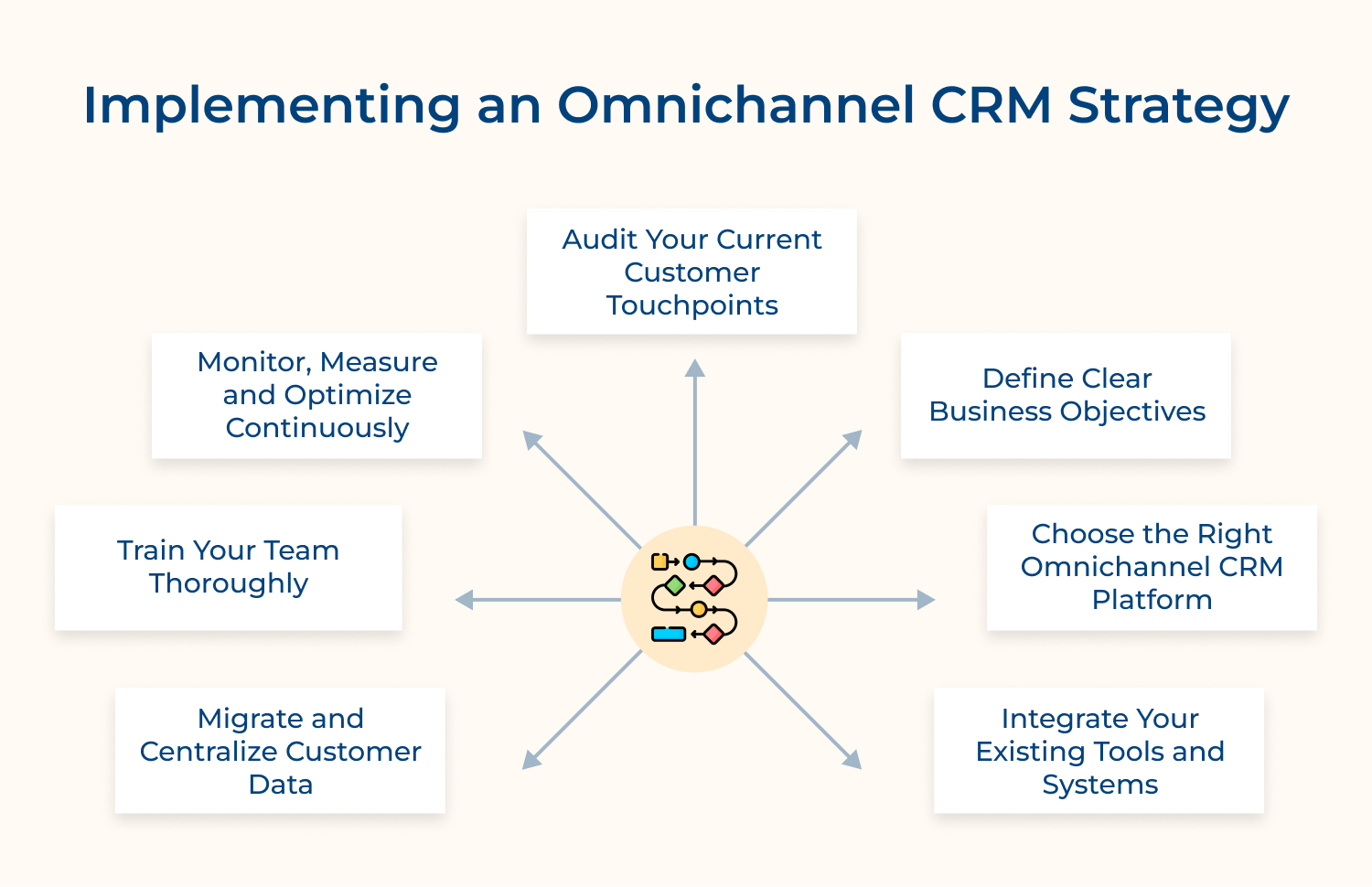
An audit is a comprehensive review of every platform where your business connects with customers today. This step involves documenting each channel’s performance, capabilities and how data flows between systems currently.
Start by mapping every channel where customers interact with your business including email and social media. Document how each channel operates, what data it collects and where that information gets stored.
Your audit should identify these critical elements:
Why is this audit so important? Because implementing an omnichannel system without understanding your current state leads to wasted resources. For example, a retail company might discover customers abandon purchases when switching from mobile to desktop because payment information doesn’t transfer. Understanding your baseline helps you measure improvement once the omnichannel system goes live with clear metrics.
Setting objectives means identifying specific outcomes you want from your omnichannel CRM beyond just having connected channels. This step transforms vague aspirations into measurable targets that guide your entire implementation process effectively.
Establish specific measurable goals for what you want to accomplish within defined timeframes. Set realistic targets like reducing average resolution time by 30% or improving customer satisfaction scores significantly.
Ask yourself these strategic questions before moving forward:
Clear objectives prevent feature bloat and keep teams focused on what truly matters. For instance, if your goal is reducing customer effort, you’d prioritize seamless channel switching over fancy dashboards. Use your goals to evaluate every decision during implementation and prioritize features that directly support outcomes.
Platform selection involves evaluating software solutions that can unify your channels and meet your specific business requirements. This decision determines what’s technically possible and how easily your team can adapt to new workflows.
Research platforms that match your business size and technical capabilities without overcomplicating your tech stack. Compare features, pricing models and integration options to find the best fit for growth.
Evaluate platforms based on these essential criteria:
How do you know which platform is right for you? Request demos and trial periods to test platforms with real scenarios before committing to long-term contracts. Involve team members who’ll use the system daily in evaluation to ensure user-friendliness.
Integration is the technical process of connecting your CRM with other business systems so data flows automatically. This step creates the unified infrastructure that makes true omnichannel customer experiences actually possible in practice.
Connect your new CRM with existing software like marketing automation and e-commerce platforms seamlessly. APIs and native connectors enable data flow between systems so information syncs automatically without manual entry.
Consider these questions when planning your integration approach:
Without proper integration, your team still faces the same data silos and fragmented customer views you had before. Start with your most critical integrations first and add others gradually to minimize disruption during transition. Test each connection thoroughly because a failed integration discovered after launch creates chaos and forces your team to work around broken workflows.
Data migration is the process of moving customer information from multiple scattered sources into your new centralized system. This step consolidates years of customer interactions and history into one accessible, reliable database.
Transfer customer information from scattered databases into your new CRM system carefully to avoid data loss. Clean, deduplicate records before migration to ensure accuracy and eliminate outdated or conflicting information.
Data migration requires attention to these critical steps:
What happens if you skip proper data cleaning? Imagine a bank migrating customer data and accidentally losing transaction history for premium account holders. The result would be frustrated customers and damage to the bank’s reputation. Validate migrated data by comparing sample records between old and new systems to catch errors early.
Training is the educational process that equips your team with skills to use the new system effectively. This step transforms technology investment into actual performance improvement by ensuring everyone knows how to leverage capabilities.
Conduct comprehensive training sessions that cover both technical features and best practices for omnichannel customer engagement. Create role-specific tutorials since sales teams need different skills than support agents when using the system.
Effective training programs should include these components:
Will your team actually use the new system? Not without proper training that shows them how it makes their jobs easier rather than adding complexity. Address concerns openly and create safe spaces for questions because resistance often stems from fear of change. Gather feedback during training to identify confusion points and adjust your approach for better understanding.
Monitoring involves tracking system performance and user behavior to ensure your omnichannel CRM delivers expected results. This ongoing process identifies what’s working well and where adjustments are needed to improve outcomes continually.
Track key performance indicators against the objectives you defined in step two to measure actual impact. Use built-in analytics to identify what’s working well and where customers or agents struggle with transitions.
Regular optimization focuses on these performance areas:
Why can’t you just set it and forget it? Because customer preferences and business needs evolve constantly over time together. Gather feedback from both customers and team members to uncover issues that metrics alone might miss.
Selecting the right omnichannel CRM requires careful evaluation of multiple factors. Here are six critical considerations that will help you make an informed decision.
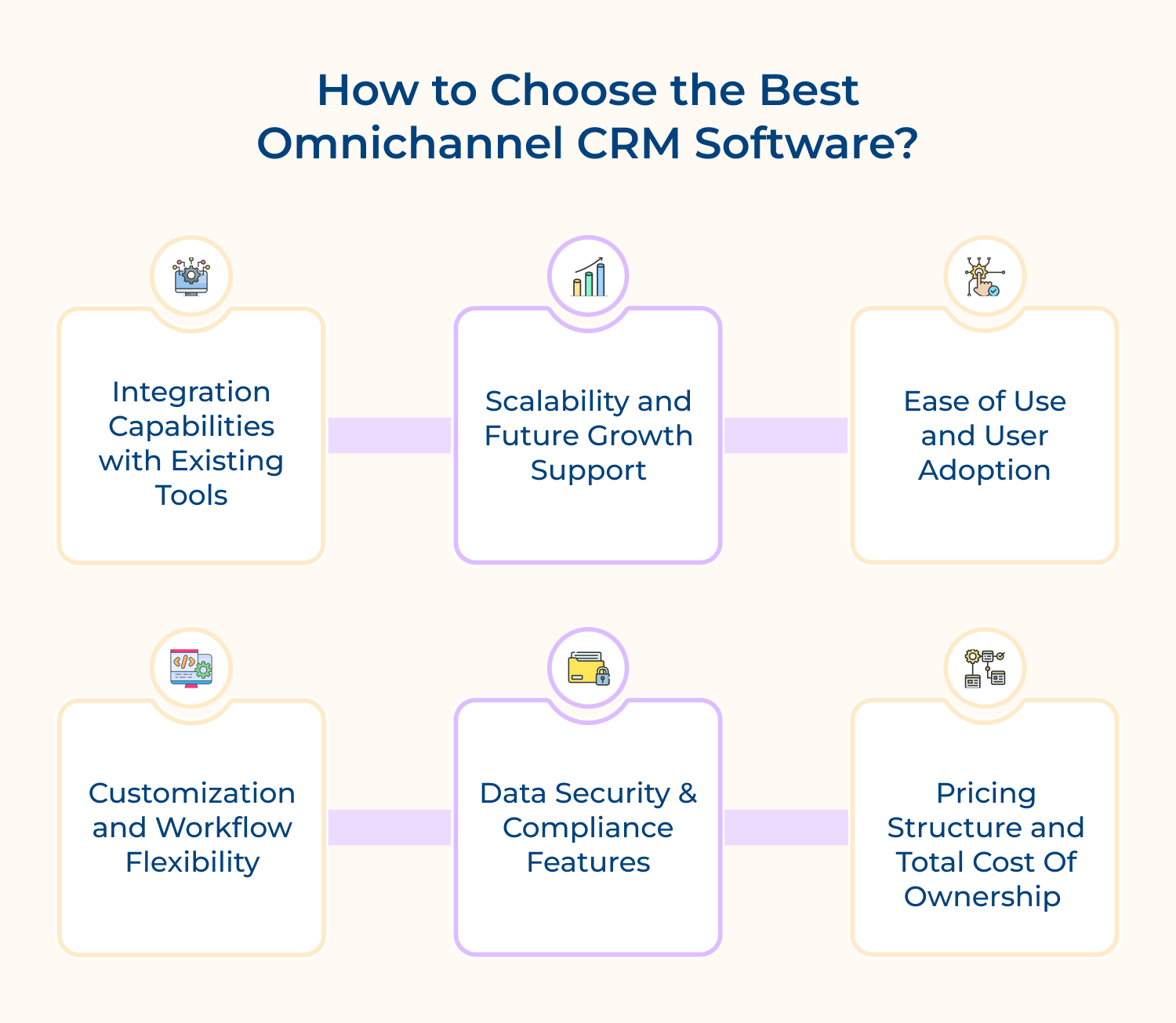
1. Integration Capabilities with Existing Tools
Your CRM should connect seamlessly with the tools and platforms you already use daily in operations. Check if it offers native integrations or robust APIs for custom connections with your email, marketing automation and support systems.
Poor integration forces manual data entry and creates the silos you’re trying to eliminate with an omnichannel approach. Look for platforms that sync data automatically in real time across all your business applications without technical complications.
2. Scalability and Future Growth Support
The platform should grow alongside your business without requiring complete system overhauls or costly migrations later. Evaluate whether it can handle increasing customer volumes, additional channels and expanding team sizes as you scale.
Consider your three-year growth projections when making this decision to avoid outgrowing the system too quickly. A scalable CRM adapts to your evolving needs through flexible pricing tiers and expandable feature sets.
3. Ease of Use and User Adoption
Complex systems discourage team adoption regardless of how powerful their features are in theory or practice. Choose a platform with intuitive navigation that requires minimal training for agents to become productive quickly.
Request trial access and let your actual team members test the interface before committing to purchase. The best CRM balances powerful capabilities with simplicity so your team embraces it rather than resisting change.
4. Customization and Workflow Flexibility
Every business operates differently so your CRM should adapt to your unique processes rather than forcing standardization. Look for platforms that allow custom fields, personalized dashboards, automated workflows and tailored reporting to match needs.
Pre-built templates help you start quickly but true flexibility lets you modify everything as requirements evolve. Evaluate how easily you can adjust the system without needing expensive developer resources for every change.
5. Data Security and Compliance Features
Customer data protection isn’t optional so your CRM must meet industry-specific regulatory requirements like GDPR or HIPAA. Verify the vendor’s security certifications, encryption standards, backup protocols and compliance track record before making decisions.
Ask about data ownership, storage locations and access controls to ensure you maintain full control over information. A security breach damages customer trust permanently so prioritize platforms with proven security infrastructure and regular audits.
6. Pricing Structure and Total Cost of Ownership
Look beyond the monthly subscription fee to understand the complete cost including implementation, training and ongoing support. Hidden charges for extra users, additional channels or premium features can quickly inflate your actual expenses.
Compare pricing models across vendors, calculate ROI based on efficiency gains and customer satisfaction improvements expected. Choose transparent pricing that aligns with your budget while delivering the functionality necessary for omnichannel success.
Certain industries gain exceptional advantages from omnichannel CRM due to their customer interaction patterns. Here are four sectors where unified customer experiences deliver the most significant impact.
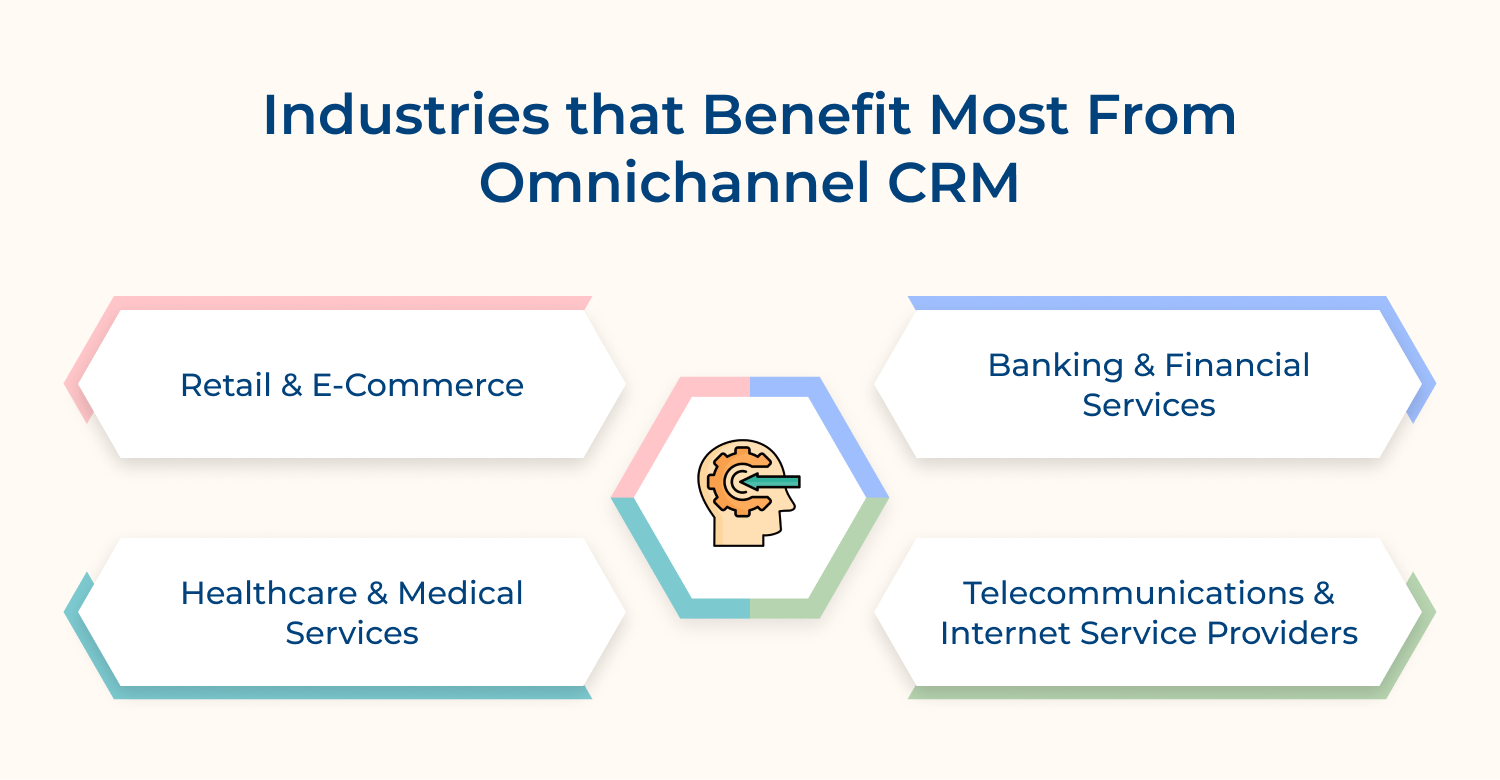
Retail customers frequently switch between online browsing, mobile apps, in-store visits and customer service across their buying journey. An omnichannel CRM tracks preferences and purchase history so sales associates provide personalized recommendations regardless of touchpoint.
Financial institutions handle sensitive transactions across multiple channels including branches, ATMs, mobile apps and phone support daily. Omnichannel CRM ensures customers receive consistent service while maintaining security and compliance across every interaction point seamlessly.
Patients interact with healthcare providers through appointments, patient portals, telehealth visits and billing inquiries requiring coordinated communication. An omnichannel CRM consolidates medical history and preferences so providers deliver informed care across all touchpoints efficiently.
Telecom customers contact providers frequently for billing questions, technical support, plan changes and service issues through various channels. Omnichannel CRM reduces frustration by maintaining context when customers switch from chat to phone without repeating information.
Following proven best practices ensures your omnichannel CRM delivers maximum value and customer satisfaction. Here are six essential strategies to implement for optimal results.
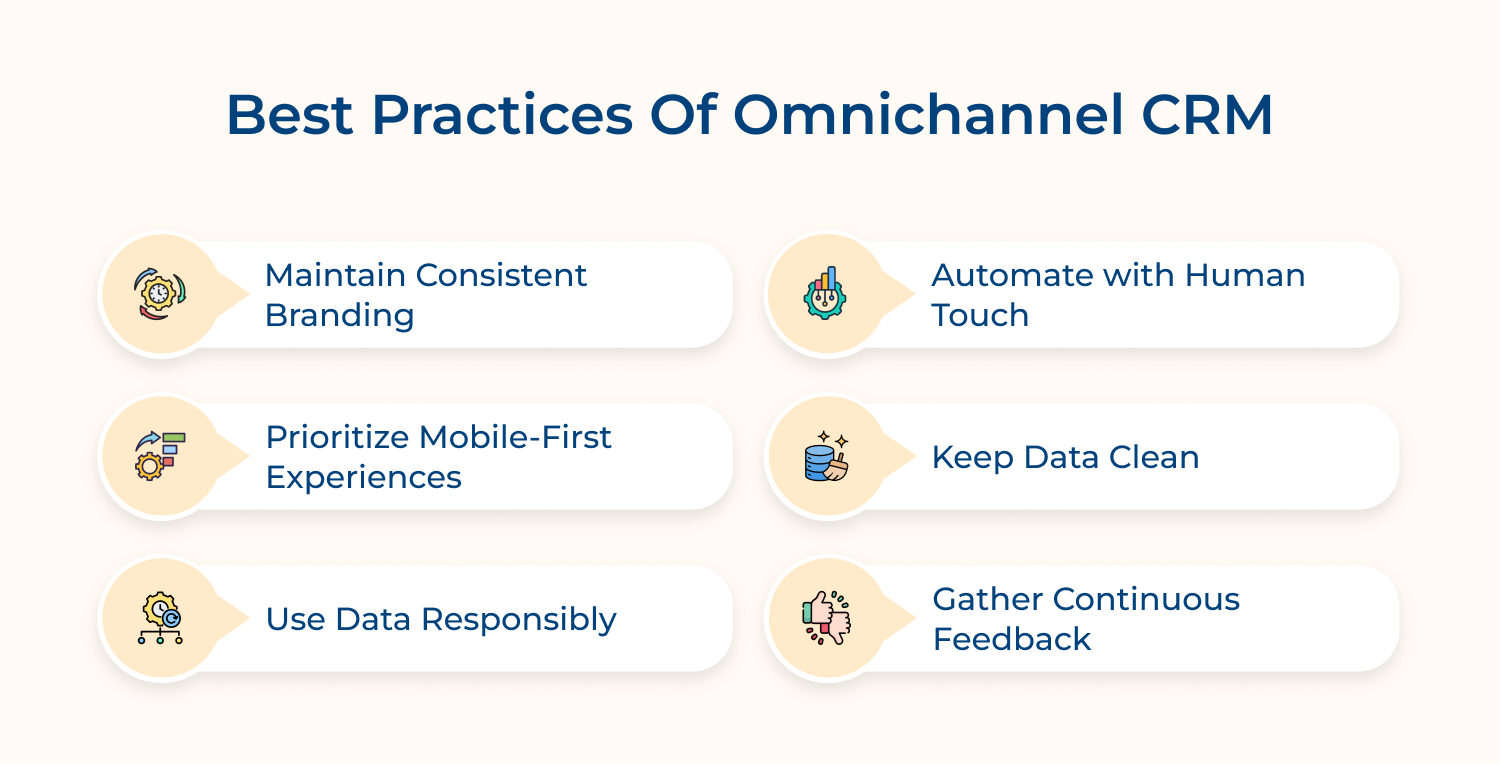
Omnichannel CRM transforms customer relationships by unifying every interaction into one seamless experience across all touchpoints. Your team gains complete visibility while customers enjoy effortless communication.
Start small with clear objectives and scale gradually as your team adapts to the new system. The right strategy paired with continuous optimization creates lasting competitive advantages and exceptional customer loyalty.

What channels are supported by an Omnichannel CRM?
Most omnichannel CRMs support email, phone, live chat, social media platforms, SMS, mobile apps and website interactions seamlessly. Advanced systems also integrate video calls, messaging apps and in-person touchpoints for complete coverage.
Can Omnichannel CRM unify customer data across channels?
Yes, omnichannel CRM consolidates all customer interactions and data from every channel into one centralized profile automatically. This unified view eliminates silos and gives teams complete context for every customer conversation.
How is Omnichannel CRM different from a traditional CRM?
Traditional CRM manages customer data but treats channels separately without real-time integration or seamless context transfer. Omnichannel CRM connects all channels so customers switch between them without losing conversation history or repeating information.
What are the Challenges in Implementation of Omnichannel CRM?
Common challenges include integrating legacy systems, migrating fragmented data, training teams on new workflows and managing initial costs. Resistance to change and technical complexities during setup can also slow down adoption, impacting early results.
How do you measure the success of an Omnichannel CRM?
Track metrics like customer satisfaction scores, response times, resolution rates, channel usage patterns and agent productivity improvements. Compare these against your initial objectives to determine ROI and identify areas needing further optimization efforts.
 https://omni24.io/wp-content/uploads/2026/09/Social-commerce-scaled.png
1340
2560
Webvision Solution
https://omni24.io/wp-content/uploads/2023/04/Omni-Logo-1.svg
Webvision Solution2026-10-23 12:18:272026-10-23 12:18:27What is Social Commerce and Why Does It Matter?
https://omni24.io/wp-content/uploads/2026/09/Social-commerce-scaled.png
1340
2560
Webvision Solution
https://omni24.io/wp-content/uploads/2023/04/Omni-Logo-1.svg
Webvision Solution2026-10-23 12:18:272026-10-23 12:18:27What is Social Commerce and Why Does It Matter? https://omni24.io/wp-content/uploads/2026/08/AI-Customer-Service-Agents.png
1256
2400
Webvision Solution
https://omni24.io/wp-content/uploads/2023/04/Omni-Logo-1.svg
Webvision Solution2026-09-21 04:48:512026-09-21 04:48:51How to Build an AI Customer Service Agents: 8 Key Steps
https://omni24.io/wp-content/uploads/2026/08/AI-Customer-Service-Agents.png
1256
2400
Webvision Solution
https://omni24.io/wp-content/uploads/2023/04/Omni-Logo-1.svg
Webvision Solution2026-09-21 04:48:512026-09-21 04:48:51How to Build an AI Customer Service Agents: 8 Key Steps https://omni24.io/wp-content/uploads/2026/08/Omnichannel-Conversational-AI.png
1256
2400
Tushar Joshi
https://omni24.io/wp-content/uploads/2023/04/Omni-Logo-1.svg
Tushar Joshi2026-09-16 03:51:072026-09-16 03:51:07How to Build Omnichannel Conversational AI Strategy
https://omni24.io/wp-content/uploads/2026/08/Omnichannel-Conversational-AI.png
1256
2400
Tushar Joshi
https://omni24.io/wp-content/uploads/2023/04/Omni-Logo-1.svg
Tushar Joshi2026-09-16 03:51:072026-09-16 03:51:07How to Build Omnichannel Conversational AI Strategy
Whether it’s about acquire, engage or support – Omni24 covers all your customer engagement needs in one complete platform.

Copyright ©2026 Veemo All rights reserved.
CA, Los Angeles, Hall Ave, 19011