What is Live Chat Reporting and Why Does it Matters?
Live chat reporting provides essential insights, improves support performance, enhances customer experience and helps businesses make smarter decisions.

Live chat reporting provides essential insights, improves support performance, enhances customer experience and helps businesses make smarter decisions.
In the realm of customer service, many organizations struggle with inefficiencies in communication, leading to frustrated customers and missed opportunities. Live chat reporting addresses this problem through comprehensive analysis of chat interactions, identifying issues like long response times and low satisfaction rates.
In fact, the average first response time for chat is just 35 seconds, highlighting how quickly customers expect to be acknowledged. Utilizing key metrics uncovers insights that drive improvements in service quality.
Explore how adopting this approach can resolve existing challenges as well as build a more responsive and effective customer service strategy for your organization.
Live chat reporting involves the systematic analysis of data collected from live chat interactions between customer service agents and clients. This reporting captures various metrics, including response times, chat duration, customer satisfaction and resolution rates. Hence, providing valuable insights into the effectiveness of customer service operations.
Live chat reporting enhances customer experience and improves service efficiency. Analyzing chat data allows organizations to identify trends and areas for improvement, ensuring that customer needs are met promptly.
Key objectives:
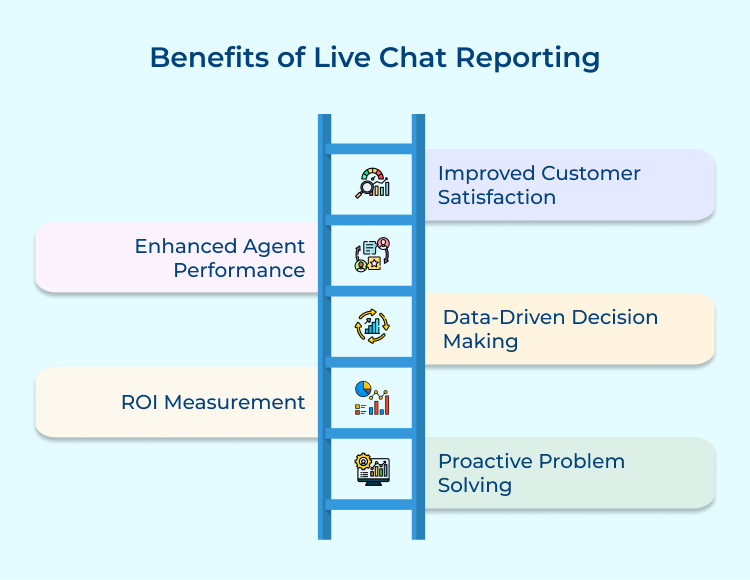
Live chat reporting offers organizations valuable insights that enhance customer interactions and ultimately boost overall business performance. Here are the benefits to consider.
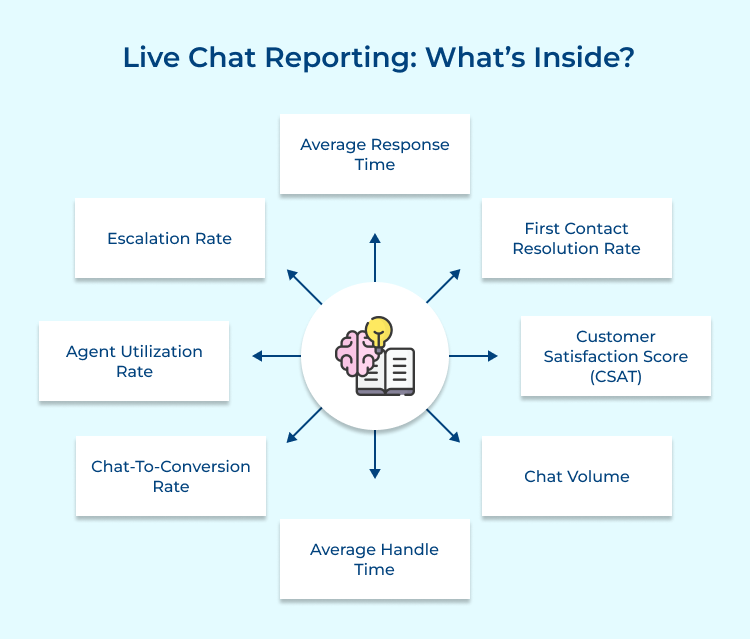
Exploring the components of live chat reporting reveals essential metrics and tools that can significantly improve customer support strategies. Here are the key elements included.
Average Response Time is crucial because it directly impacts customer satisfaction. Quick responses show that the company values customers’ time and is attentive to their needs. Slow response times can lead to frustration and potentially lost business, making this metric essential for maintaining high-quality customer service.
Organizations can use Average Response Time to set performance benchmarks for support teams, identify periods of high demand requiring additional staffing and compare performance across different agents or teams. It can also help in identifying bottlenecks in the support process that need improvement.
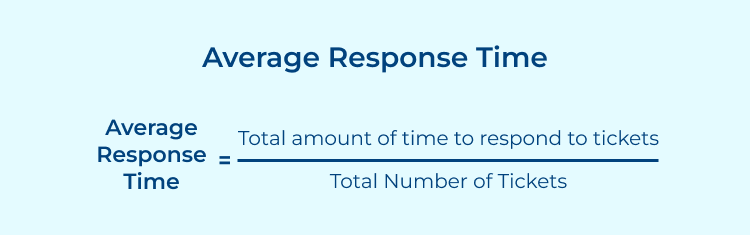
Sum up the time taken to respond to each chat, then divide by the total number of chats. For example: (Response Time 1 + Response Time 2 + …) / Total Number of Chats.
Pro tips:
1. Implement an automated routing system to direct chats to available agents quickly, reducing wait times.
2. Create pre-written responses for common queries to help agents respond more quickly while maintaining quality.
First Contact Resolution (FCR) matters because it shows how efficiently your support team can solve issues the first time around. When customers get answers without follow-ups or escalations, they’re happier — and your support costs stay lower.
FCR also helps you understand how well your agents are trained, which problems need clearer documentation or product fixes and how strong your overall support quality is. It’s a great way to spot top-performing agents and uncover best practices you can apply across the team.
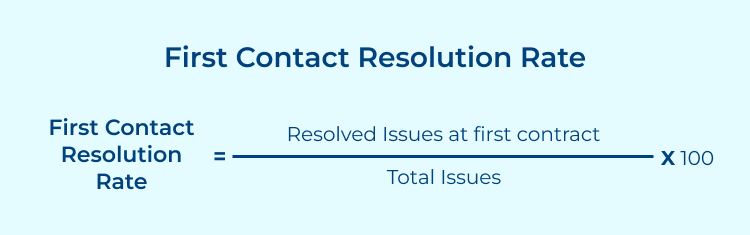
(Number of chats resolved on first contact / Total number of chats) x 100. For example, if 80 out of 100 chats were resolved on first contact, FCR = 80%.
Pro tips:
1. Develop a comprehensive knowledge base for agents to quickly access information needed to resolve issues.
2. Implement regular training sessions focused on improving agents’ problem-solving skills and product knowledge.
CSAT measures how happy customers are with the support they receive, giving you a clear view of service quality from their perspective. It shows where you’re meeting expectations and where you might be falling short. Higher CSAT scores usually mean stronger loyalty and more positive word-of-mouth.
You can use CSAT to track support quality over time, compare how different teams or agents are performing and pinpoint areas that need improvement. It also pairs well with other metrics, helping you see how things like response time or first-contact resolution affect customer satisfaction.
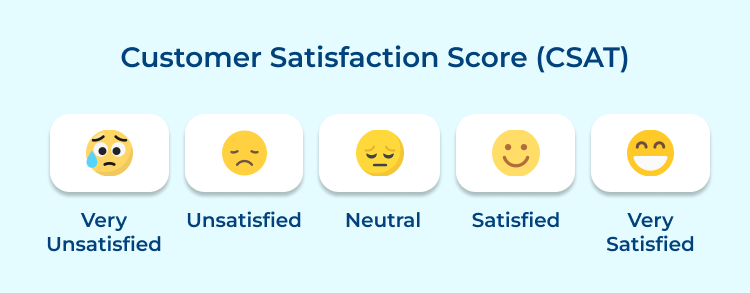
(Number of satisfied customers / Total number of survey responses) x 100. For example, if 85 out of 100 customers rated their experience as satisfactory, CSAT = 85%.
Pro tips:
1. Implement a post-chat survey that’s short and easy to complete to encourage higher response rates.
2. Regularly review low-scoring interactions to identify common issues and develop targeted improvement strategies.
Chat Volume shows how many customers are reaching out through live chat, making it essential for understanding demand and planning resources. It helps you spot peak hours, gauge how heavily the channel is being used and track trends in customer behavior over time.
By analyzing Chat Volume, organizations can staff teams more efficiently, identify seasonal patterns and decide whether to expand or reduce chat support hours. It also helps measure how marketing campaigns or product launches impact support demand.
Simply count the total number of chat interactions within a given time period (e.g., per hour, day, week, or month).
Pro tips:
1. Use historical chat volume data to create predictive models for more accurate staffing forecasts.
2. Implement a chatbot to handle basic queries during high-volume periods, freeing up agents for more complex issues.
Average Handle Time (AHT) shows how long agents take to resolve customer issues, making it a key metric for understanding efficiency. It’s useful for planning resources and spotting where agents might need extra training or better tools. At the same time, AHT should always be balanced with quality metrics so speed doesn’t come at the expense of good service.
Organizations can use AHT to set realistic performance benchmarks, identify high-performing agents and uncover issues that consistently take too long to resolve. It also helps evaluate whether current tools and processes are truly supporting agents or slowing them down.
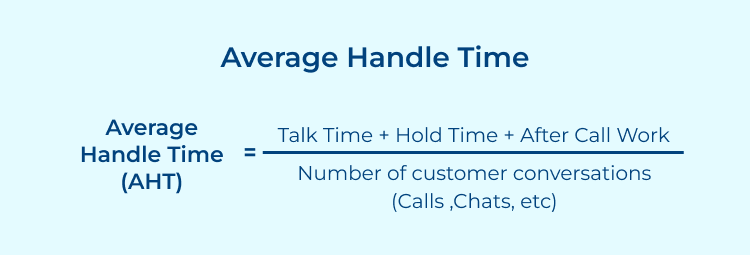
(Total time spent on chats + After-chat work time) / Total number of chats. For example: (500 minutes + 100 minutes) / 100 chats = 6 minutes AHT.
Pro tips:
1. Develop a library of canned responses for common queries to help reduce typing time for agents.
2. Regularly analyze long-duration chats to identify complex issues that might benefit from improved documentation or training.
Chat-to-Conversion Rate shows how effectively live chat turns conversations into sales or other meaningful actions. It’s a key metric for understanding the ROI of chat support and proving its value to the business.
Teams can use this metric to compare different chat strategies, evaluate how well agents drive conversions and spot opportunities to streamline the chat-to-sale journey. It also guides decisions on where to place chat on the website and when to use proactive chat prompts.
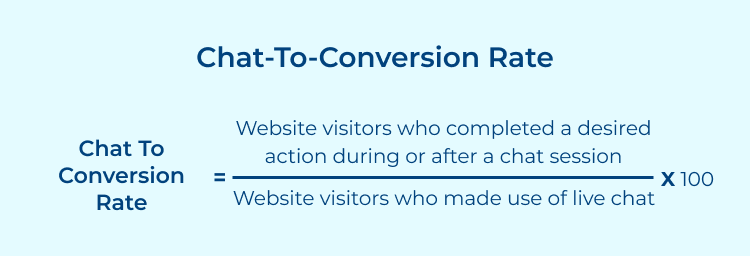
(Number of chats that resulted in a conversion / Total number of chats) x 100. For example, if 20 out of 200 chats led to a sale, the rate is 10%.
Pro tips:
1. Implement targeted chat invitations based on user behavior to engage high-potential customers.
2. Train agents on soft selling techniques to better identify and act on sales opportunities during support interactions.
Agent Utilization Rate shows how efficiently your support staff is being used. It’s key for smart workforce management because it ensures agents aren’t overloaded or sitting idle. When this balance is right, you improve cost efficiency without compromising service quality or agent well-being.
Organizations can use this metric to fine-tune staffing levels, spot periods of over- or under-staffing and make better hiring decisions. It also helps evaluate how well workloads are distributed and highlights opportunities to improve processes.
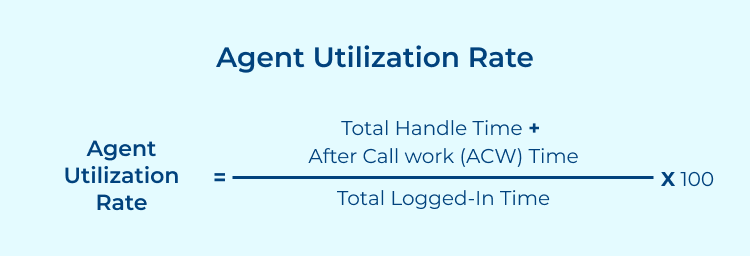
(Time spent on chats and related tasks / Total time available) x 100. For example, if an agent spends 6 hours on chat-related work in an 8-hour shift, utilization is 75%.
Pro tips:
1. Implement a workforce management system to dynamically adjust agent schedules based on predicted chat volumes.
2. Cross-train agents to handle multiple types of inquiries, increasing flexibility in managing workload during peak times.
Escalation Rate measures how often chats need to be transferred to higher-level support or specialized teams. It’s important for understanding the complexity of issues customers face, the effectiveness of first-line support and identifying areas where additional training or resources might be needed.
Organizations can use Escalation Rate to assess the effectiveness of agent training, identify common complex issues that may require better documentation or product improvements and evaluate the overall structure of the support team. It can also help in planning staffing for different levels of support.
(Number of chats escalated / Total number of chats) x 100. For example, if 15 out of 200 chats were escalated, the rate is 7.5%.
Pro tips:
1. Analyze frequently escalated issues to develop targeted training programs for first-line support agents.
2. Implement a tiered support structure with clear guidelines on when to escalate to ensure consistent handling of complex issues.
Establishing effective live chat reporting systems is crucial for tracking performance metrics, while enhancing operational efficiency. Here are the steps to implement.
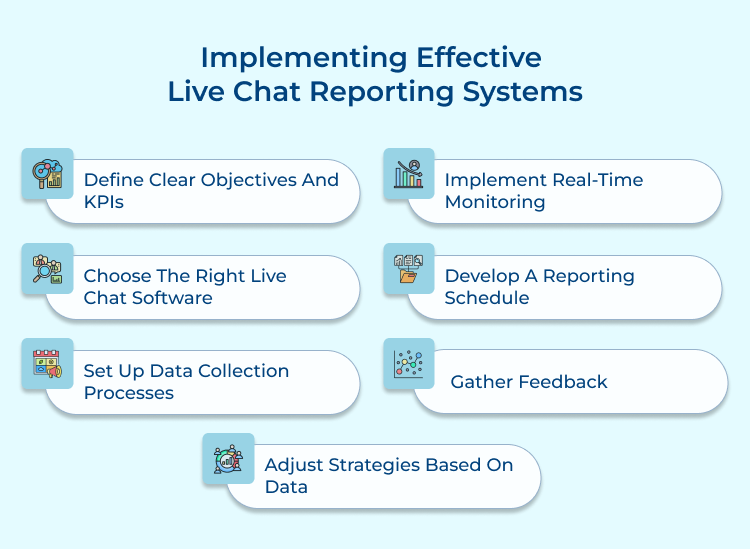
1. Define Clear Objectives and KPIs
Start by deciding what you want your chat service to achieve — better CSAT, higher conversions, or smoother operations. Once your goals are clear, choose the chat metrics that matter most, such as average response time, CSAT, first contact resolution, or chat-to-conversion rates. Make sure each KPI directly connects to your business objectives so your chat reports stay focused and meaningful.
2. Choose the Right Live Chat Software
Pick a live chat tool that offers strong reporting features, including customizable dashboards, real-time analytics and easy data exports. It should track all your chosen KPIs and integrate smoothly with your CRM. Also consider whether it can scale as your customer service reports evolve.
3. Set Up Data Collection Processes
Create consistent processes for capturing accurate data. Automate key metrics like chat volume and response times. For qualitative insights, gather customer feedback and train agents to tag as well as categorize chats correctly. Clean data leads to stronger chat reports.
4. Implement Real-Time Monitoring
Use real-time dashboards to keep track of what’s happening in your chat service at any moment. Set alerts for key thresholds so managers can address issues quickly and improve the chat experience on the spot.
5. Develop a Reporting Schedule
Set a regular reporting rhythm — daily for operational updates, weekly for team reviews and monthly or quarterly for strategic insights. Tailor customer service reports to your audience: managers may need detailed data, while executives prefer high-level summaries.
6. Gather Feedback
Pair your numbers with real feedback. Post-chat surveys reveal what customers think of the chat experience, while agent input highlights recurring issues and process gaps.
7. Adjust Strategies Based on Data
Use insights from your chat metrics to refine your strategy. Update training, tweak workflows and experiment with improvements. Keep monitoring results and continue adjusting — effective reporting is an ongoing cycle.
Identifying common challenges in live chat reporting allows organizations to develop strategies that maximize effectiveness and improve service delivery. Here are the challenges and solutions.
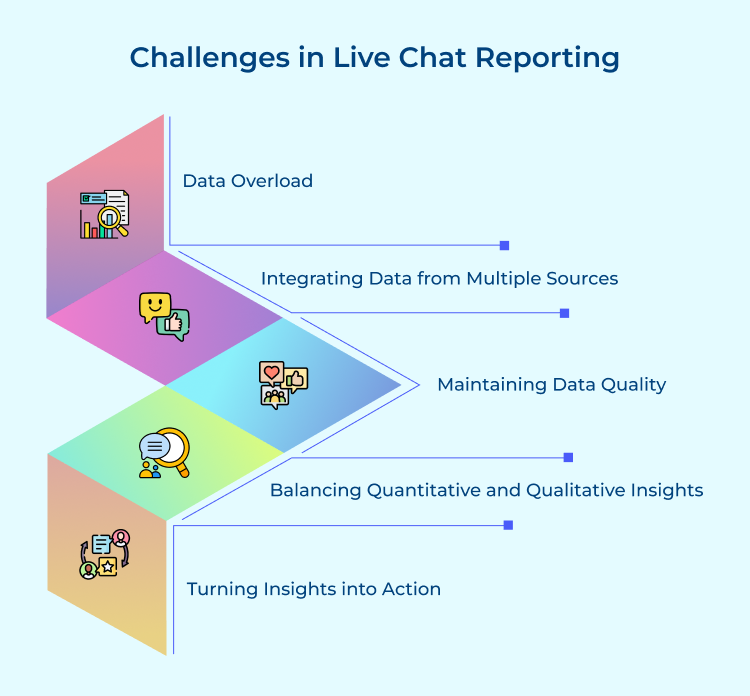
1. Data Overload
The sheer volume of data generated by live chat interactions can be overwhelming, making it difficult to identify meaningful insights.
Prioritize key metrics that align with your business objectives. Implement data visualization tools to present information in an easily digestible format. Use AI and machine learning algorithms to help identify patterns as well as anomalies in large datasets. Regularly review and refine your reporting dashboard to ensure it provides actionable insights without unnecessary clutter.
2. Integrating Data from Multiple Sources
Many organizations use various tools for customer interactions, making it challenging to create a unified view of the customer experience.
Invest in a robust Customer Data Platform (CDP) or integration middleware that can consolidate data from different sources. Ensure your live chat software has API capabilities for easy integration with other systems. Implement a unique customer identifier across all platforms to enable accurate data matching and create a comprehensive customer profile.
3. Maintaining Data Quality
Inaccurate or inconsistent data can lead to flawed insights and poor decision-making.
Implement automated data validation checks to flag inconsistencies or errors. Provide thorough training to agents on the importance of accurate data entry and proper use of chat tagging systems.
Regularly audit your data and reporting processes to identify as well as address any quality issues. Consider implementing a data governance framework to ensure consistent data management practices across the organization.
4. Balancing Quantitative and Qualitative Insights
While quantitative metrics are easy to measure, they may not capture the full context of customer interactions.
Implement a system for capturing/analyzing qualitative data, such as customer feedback and chat transcripts. Use text analytics and sentiment analysis tools to derive insights from chat conversations. Regularly conduct customer surveys to gather more detailed feedback. Combine quantitative metrics with qualitative insights in your reports to provide a more comprehensive view of customer experience.
5. Turning Insights into Action
Even with robust reporting, organizations often struggle to translate insights into tangible improvements.
Establish a clear process for reviewing reports and identifying areas for action. Create cross-functional teams responsible for analyzing reports and implementing improvements. Set up a system for tracking the impact of changes made based on reporting insights. Implement an agile approach to customer service improvements, allowing for quick iterations and adjustments based on continuous feedback.
Live chat reporting significantly transforms business operations and sales through the provision of valuable insights into customer interactions. Analyzing key metrics such as response times and customer satisfaction helps organizations identify areas for improvement while optimizing support strategies. Enhanced agent performance and proactive issue resolution foster increased customer loyalty as well as higher conversion rates.
Leveraging live chat reporting helps businesses make data-driven decisions and streamline their processes. It also improves customer experiences, leading to higher sales and long-term success.

What is chat analytics?
Chat analytics is the process of collecting, analyzing and interpreting data from live chat interactions between customers as well as support agents. It involves measuring various metrics such as response times, customer satisfaction scores and chat volumes to gain insights into customer behavior, agent performance as well as overall chat effectiveness. These insights help businesses improve their customer service strategies and operational efficiency.
How do I report a chat?
To report a chat, typically you’ll find a “Report” or “Flag” option within the chat interface or message thread. Click this option and follow the prompts to specify the reason for reporting (e.g., inappropriate content, spam, harassment). Some platforms may require you to contact customer support directly to file a report. Always review the platform’s community guidelines before reporting.
What happens when you report a messenger chat?
When you report a messenger chat, the platform’s moderation team reviews the reported content. They assess whether it violates the platform’s community guidelines or terms of service. If a violation is found, actions may include warning the user, removing the content, or suspending/banning the account. The reporting user usually remains anonymous and may receive an update on the action taken.
Can I report someone for messaging me?
Yes, you can report someone for messaging you if their behavior violates the platform’s guidelines or terms of service. This could include harassment, threats, spam, or other inappropriate content. Most messaging platforms provide options to block and report users. If you feel unsafe, it’s important to report the behavior as well as seek help if needed.
What is Livechat used for?
Livechat is a real-time communication tool used by businesses to interact with website visitors or customers. It enables instant support, answering queries, providing product information and assisting with purchases. Livechat can improve customer satisfaction, increase sales conversions, gather feedback and offer personalized assistance. It’s widely used in e-commerce, customer support and various online services.
 https://omni24.io/wp-content/uploads/2026/08/conversational-ai-ecommerce.png
1256
2400
Webvision Solution
https://omni24.io/wp-content/uploads/2023/04/Omni-Logo-1.svg
Webvision Solution2026-09-08 04:06:222026-09-08 04:06:22How Conversational AI for Ecommerce Boosts Sales in 2026
https://omni24.io/wp-content/uploads/2026/08/conversational-ai-ecommerce.png
1256
2400
Webvision Solution
https://omni24.io/wp-content/uploads/2023/04/Omni-Logo-1.svg
Webvision Solution2026-09-08 04:06:222026-09-08 04:06:22How Conversational AI for Ecommerce Boosts Sales in 2026 https://omni24.io/wp-content/uploads/2026/08/Ecommerce-Customer-Segmentation.png
1256
2400
Tushar Joshi
https://omni24.io/wp-content/uploads/2023/04/Omni-Logo-1.svg
Tushar Joshi2026-09-07 04:53:302026-09-07 04:53:30How Ecommerce Customer Segmentation Drives Higher Conversions
https://omni24.io/wp-content/uploads/2026/08/Ecommerce-Customer-Segmentation.png
1256
2400
Tushar Joshi
https://omni24.io/wp-content/uploads/2023/04/Omni-Logo-1.svg
Tushar Joshi2026-09-07 04:53:302026-09-07 04:53:30How Ecommerce Customer Segmentation Drives Higher Conversions https://omni24.io/wp-content/uploads/2026/08/Enterprise-Customer-Engagement.png
1256
2400
Tushar Joshi
https://omni24.io/wp-content/uploads/2023/04/Omni-Logo-1.svg
Tushar Joshi2026-09-02 05:29:412026-09-02 05:29:41How to Scale Enterprise Customer Engagement Strategies
https://omni24.io/wp-content/uploads/2026/08/Enterprise-Customer-Engagement.png
1256
2400
Tushar Joshi
https://omni24.io/wp-content/uploads/2023/04/Omni-Logo-1.svg
Tushar Joshi2026-09-02 05:29:412026-09-02 05:29:41How to Scale Enterprise Customer Engagement Strategies
Whether it’s about acquire, engage or support – Omni24 covers all your customer engagement needs in one complete platform.

Copyright ©2026 Veemo All rights reserved.
CA, Los Angeles, Hall Ave, 19011