Help Desk vs Knowledge Base: What’s the Difference?
Learn how help desks and knowledge bases complement each other, boosting support efficiency, reducing tickets while improving customer satisfaction.

Learn how help desks and knowledge bases complement each other, boosting support efficiency, reducing tickets while improving customer satisfaction.
Support teams often struggle: long phone queues frustrate customers while agents keep handling the same questions over and over. Stress rises when call volumes spike satisfaction drops. What if your company could cut these pain points and improve support quality?
The secret is to treat help desks and knowledge bases as different yet complementary tools. A smart knowledge base gives customers instant, self-serve answers; a help desk handles complex, personal issues.
Stats confirm the value: well-built knowledge bases can reduce support tickets by up to 40 % and lower costs by 30–40 %, while 61% of customers now prefer self-service over waiting for a live agent.
A help desk serves as the central point of contact between an organization and its customers or employees who need technical assistance. It functions as a structured support system where trained professionals receive and resolve issues through various communication channels like phone, email, chat or in-person interactions.
Help desks transform customer support by creating consistent, measurable service experiences. They establish clear processes for handling issues, which reduces response times and ensures problems don’t fall through the cracks. This systematic approach builds customer trust while providing valuable data that organizations can use to improve products and services.
Key Goals:
A well-implemented help desk serves as the backbone of customer and technical support operations. Let’s explore how these systems transform support experiences for everyone.
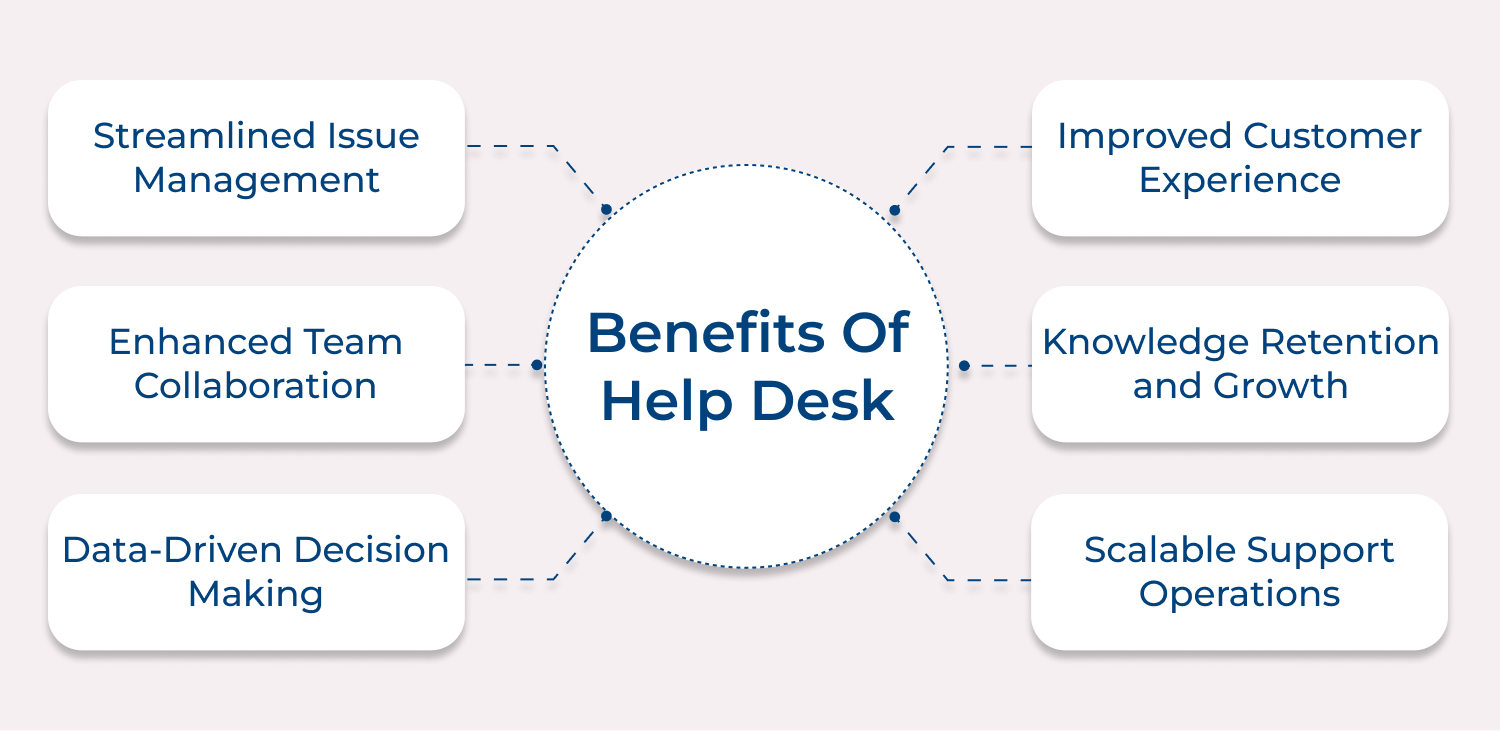
Streamlined Issue Management
A help desk brings all customer requests into one place, so nothing gets lost in emails or conversations. Each issue gets a clear ticket ID, making progress easy to track for both your team and the customer.
Enhanced Team Collaboration
Help desks make teamwork simple. Agents can loop in specialists, leave internal notes, and access full interaction histories. This removes guesswork and ensures the right person solves the right problem.
Improved Customer Experience
Structured ticket handling means customers get consistent updates and don’t have to repeat their story. That reliability builds trust and improves satisfaction.
Knowledge Retention and Growth
Every resolved ticket becomes part of a searchable knowledge base. Teams can reuse past solutions, solve issues faster and maintain quality even as staff changes.
Scalable Support Operations
Help desks grow with your business. Categorization, automation and self-service tools help teams manage rising volumes without needing massive headcount increases. This keeps support fast and efficient even during busy periods.
A knowledge base is a searchable, organized library that stores helpful information about your product or service—think guides, FAQs, tutorials and troubleshooting steps all in one place. It gives users instant access to clear answers without waiting for a support agent. This self-service model not only reduces support volume but also makes customers feel more confident and independent.
People get quick solutions at their own pace, which leads to fewer frustrations and higher satisfaction. By capturing your team’s expertise and making it easy to find, a knowledge base strengthens both customer experience as well as operational efficiency.
Key Goals:
A knowledge base acts as your organization’s central memory, holding answers to questions both common and complex in an accessible format. Let’s explore each of its benefits:
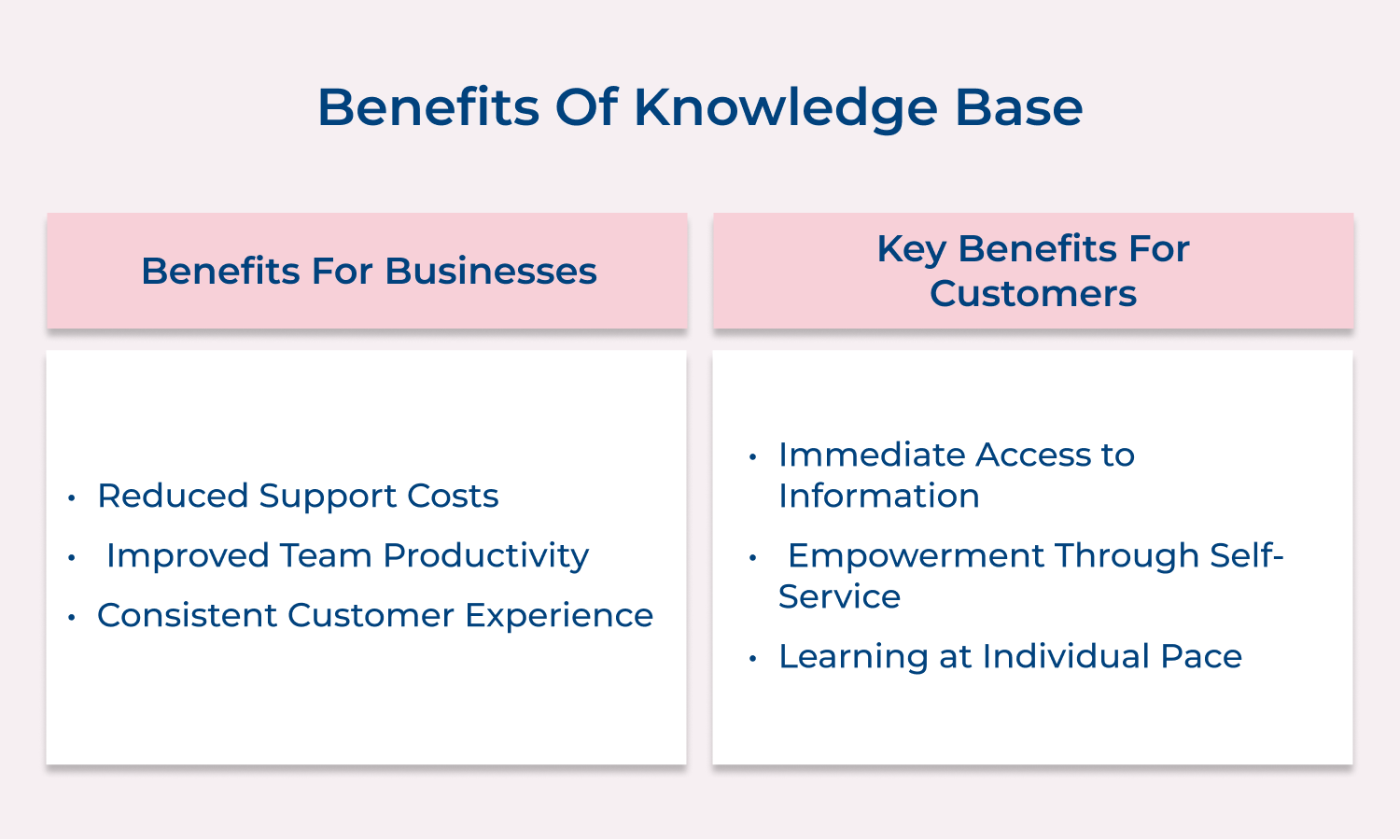
Reduced Support Costs
A solid knowledge base cuts down support expenses by reducing the number of basic questions reaching your team. When customers solve simple issues on their own, your agents can focus on more complex cases without increasing headcount. Over time, this shift leads to noticeable cost savings.
Improved Team Productivity
Support teams work faster when they have quick access to reliable information. Instead of digging through old chats or chasing other departments, agents can pull up verified answers instantly. It helps them close more tickets and spend their time on higher-value problems.
Consistent Customer Experience
A well-built knowledge base ensures customers always get accurate, consistent answers—no matter the channel or agent. That reliability builds trust and eliminates confusion from mixed messages.
Seeing knowledge bases from a customer experience perspective matters because people now expect easy, self-service options. A thoughtful knowledge base respects those preferences and supports different help-seeking styles.
Immediate Access to Information
Customers get quick answers without waiting in phone queues or refreshing their inbox for a reply. This speed matches the expectations of today’s digital users, who want support anytime—whether it’s late at night or during peak hours.
Empowerment Through Self-Service
A good knowledge base lets customers take charge of their own problem-solving. Many prefer troubleshooting on their own instead of repeating their issue to multiple agents. Solving problems independently builds confidence and strengthens trust in your product or service.
Learning at an Individual Pace
People can learn comfortably at their own speed without the pressure of a live support conversation. They can revisit guides, save helpful resources and explore related topics as needed. This flexibility supports different learning styles as well as comfort levels.
Help desks and knowledge bases both support users, but they function very differently. Let’s explore these differences to understand how each tool serves unique purposes:
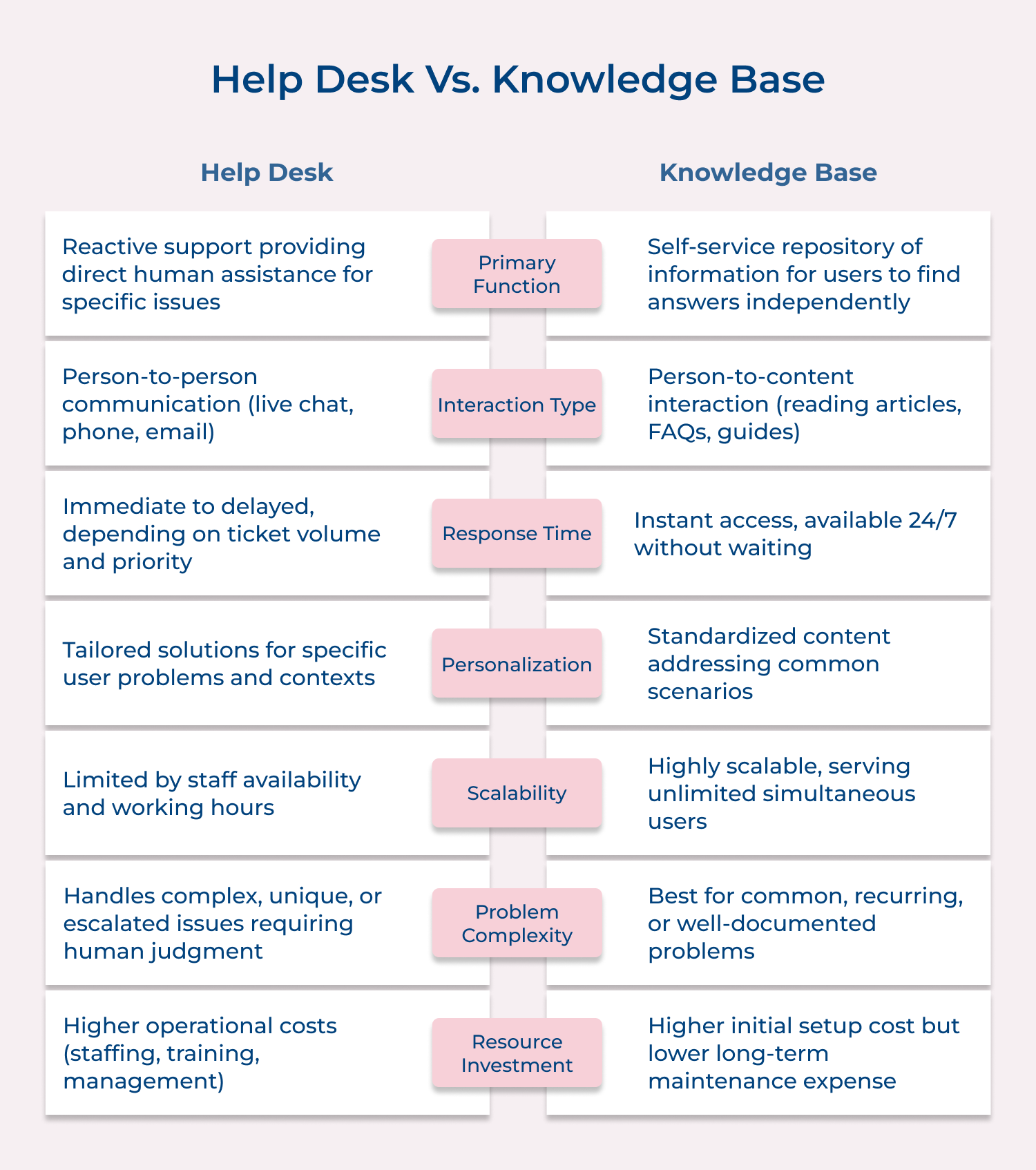
A help desk offers real-time, personalized support through direct conversations with an agent. Customers can ask follow-up questions, get tailored guidance and feel reassured through human empathy. It’s great for urgent or complex issues that need clarification.
A knowledge base gives users self-service access to pre-written articles, FAQs and guides. It’s a one-way experience where customers interpret the information themselves and apply it to their situation.
For example, if Sarah’s accounting software crashes, she can either call the help desk for step-by-step help or read a crash-recovery article in the knowledge base and fix it herself.
Key Takeaways:
A help desk focuses on resolving specific issues and requests that need immediate attention. It’s reactive, tackling problems as they arise and handling unique situations that standard solutions can’t address. Ticket tracking and escalation processes also ensure accountability as well as proper follow-up.
A knowledge base, in contrast, is proactive. It educates users, prevents common issues and provides step-by-step guidance for routine tasks. By organizing institutional knowledge, it reduces support volume and gives teams a consistent, searchable reference that customers as well as staff can rely on without needing direct assistance.
Key Takeaways:
A help desk relies on dedicated support agents who monitor and respond to incoming requests in real time. They need technical knowledge, strong communication and problem-solving skills to handle unpredictable issues, while juggling multiple tickets without compromising quality.
A knowledge base depends on content creators and subject matter experts who develop as well as organize information for easy access. Their work follows scheduled cycles, allowing deliberate, well-structured content creation rather than immediate responses.
For example, Acme Software has eight agents managing about 20 tickets daily across shifts for 24/7 coverage, while two technical writers maintain and update the knowledge base weekly.
Key consideration:
A help desk typically operates within specific hours with defined service level agreements for response times. It may offer tiered availability based on customer support plans or severity levels. Help desk access often requires authentication or verification to ensure resources are allocated to legitimate customers and to maintain proper tracking of issues.
A knowledge base remains accessible 24/7 without requiring staff presence for users to obtain information. It offers consistent access regardless of time zone, business hours, or support tier in most cases. Knowledge bases typically make most content publicly available without login requirements, maximizing accessibility for users at any stage of their customer journey.
Consideration:
A help desk tracks success through metrics like first-contact resolution, average handling time, and ticket backlog. Evaluations focus on efficiency, accuracy and customer satisfaction, with the goal of resolving issues quickly as well as correctly on the first attempt.
A knowledge base measures success using engagement metrics such as article views, search completion rates and self-service resolution. Effectiveness is judged by how easily users find and apply information without needing extra support. A strong knowledge base typically leads to fewer tickets for covered issues, empowering customers to solve problems independently while reducing the load on support teams.
Key takeaways:
A help desk incurs costs that scale relatively linearly with support volume and complexity. Adding more customers or product features typically requires proportional increases in support staff to maintain service levels. Help desk expenses primarily come from personnel salaries, training and supporting technologies needed for ticket management.
A knowledge base involves significant upfront investment in content creation but scales more efficiently as the user base grows. The same article can serve thousands of users without additional cost per view. Knowledge base expenses primarily come from content development, maintenance and the technical infrastructure to deliver information effectively.
Key insights:
A help desk acts as an operational hub, connecting directly with multiple business systems like CRM platforms, billing, development tickets and escalation workflows. It captures valuable data that informs product improvements, identifies training needs and highlights recurring issues that require permanent solutions.
A knowledge base, in contrast, serves as a reference layer supporting other systems rather than driving workflows. It integrates with search tools, customer portals and onboarding processes. Knowledge bases document organizational knowledge, preserving solutions discovered through other processes and making them easily accessible for future use by both customers as well as internal teams.
Which is better?
We’ll dive into the key features of help desk and knowledge base software, helping you determine the best fit for your business needs.
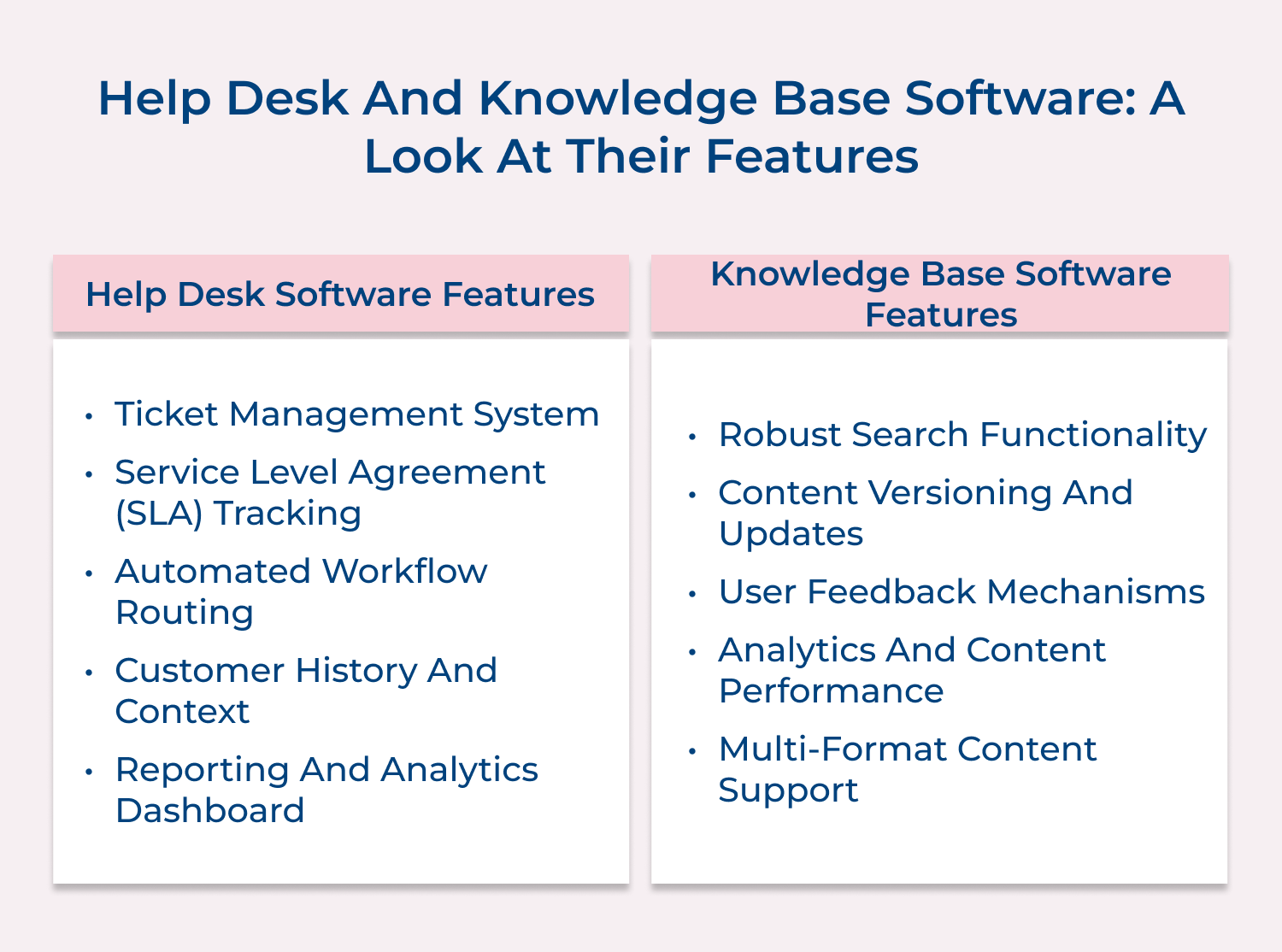
Ticket Management System
Help desk platforms centralize all support requests into trackable tickets with unique identifiers and status indicators. This prevents issues from being overlooked and enables systematic prioritization based on urgency, customer tier, or other customizable factors.
Service Level Agreement (SLA) Tracking
These systems monitor response and resolution times against predetermined service commitments. Automated alerts notify support teams when tickets approach SLA violation thresholds, ensuring timely handling of customer issues based on agreed-upon standards.
Automated Workflow Routing
Help desk software can intelligently distribute tickets to appropriate agents based on expertise, workload, or department. The automation eliminates manual assignment delays and ensures that each issue reaches the person most qualified to resolve it quickly.
Customer History and Context
Comprehensive customer interaction records provide agents with vital context about previous issues, product usage and communication preferences. A historical view enables more personalized support without requiring customers to repeat information they’ve already provided.
Reporting and Analytics Dashboard
Built-in reporting tools generate insights about support performance, common issues and team efficiency. These metrics help managers identify improvement opportunities, allocate resources effectively and demonstrate the business impact of support operations.
Robust Search Functionality
Advanced search capabilities allow users to find relevant information quickly using natural language queries, keywords, or filters. The best systems employ semantic search that understands intent rather than just matching exact terms.
Content Versioning and Updates
Knowledge base platforms maintain revision histories for all articles, tracking who made changes and when. This versioning ensures content accuracy over time and allows rollback to previous versions if needed.
User Feedback Mechanisms
Integrated rating systems and comment features let users provide immediate feedback about article helpfulness. The direct input helps content teams identify which resources need improvement and which successfully resolve customer questions.
Analytics and Content Performance
Detailed metrics show which articles receive the most traffic, which search terms lead to dead ends, and how users navigate between related topics. These insights guide content strategy and highlight information gaps requiring new documentation.
Multi-format Content Support
Knowledge base software accommodates various content types including text, images, videos, and interactive elements. This versatility addresses different learning preferences and enables more effective explanation of complex concepts through visual demonstrations.
Let’s explore the essential practices that transform ordinary documentation into an invaluable resource.
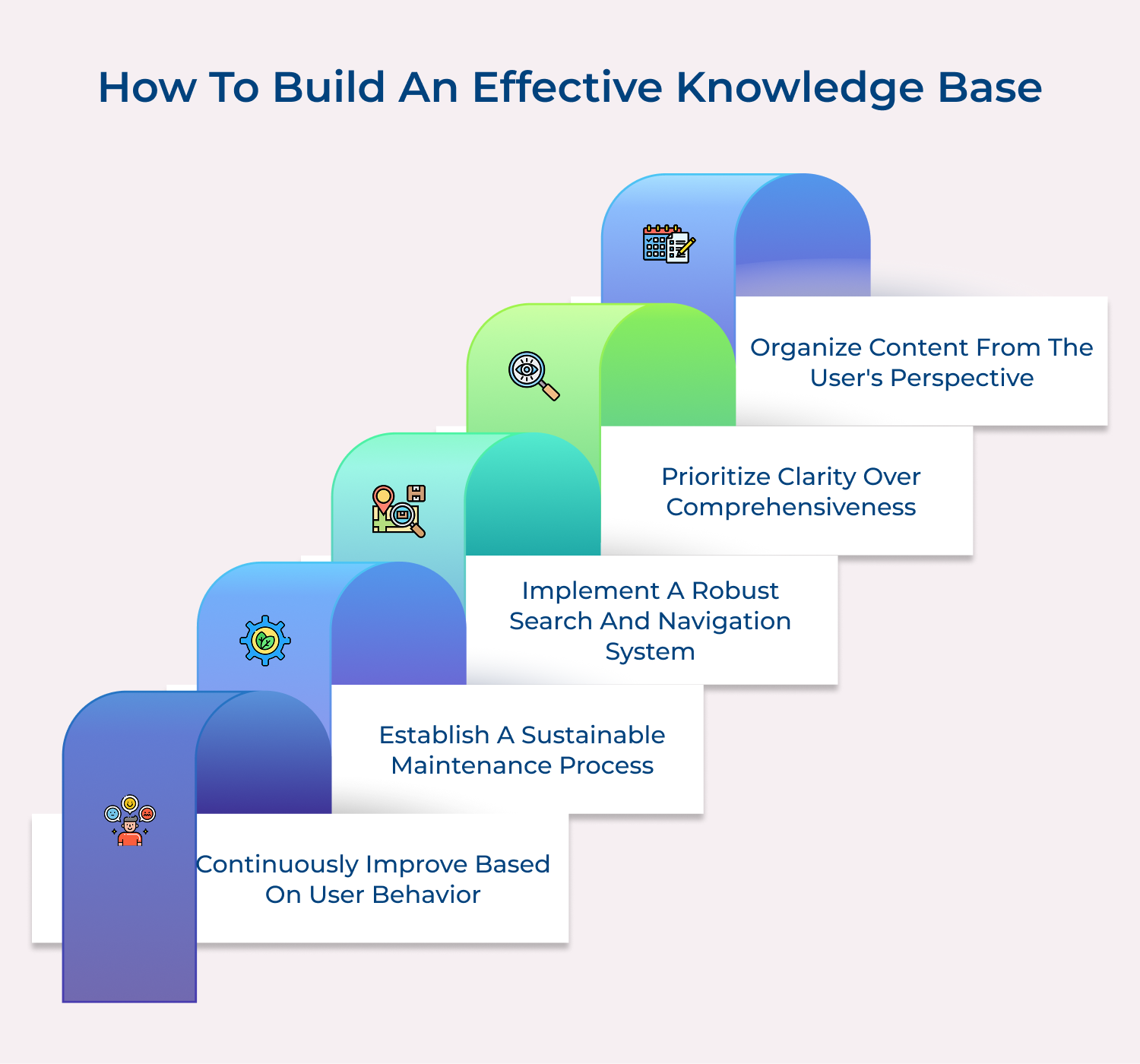
Organize Content from the User’s Perspective
Structure your knowledge base based on how customers think, not internal departments. Use user research to uncover common questions at each stage, create intuitive categories, and test them regularly as content grows.
Prioritize Clarity Over Comprehensiveness
Prioritize understandable instructions over exhaustive detail. Use simple language, break steps into manageable pieces, and add visuals like screenshots or videos for tricky processes.
Implement a Robust Search and Navigation System
Invest in search that handles synonyms, misspellings, and natural language. Offer multiple paths to the same info, use breadcrumbs, and suggest related articles.
Establish a Sustainable Maintenance Process
Assign ownership, schedule reviews and track changes. Update articles whenever products, policies, or workflows change.
Continuously Improve Based on User Behavior
Monitor search results, bounce rates and frequent support contacts to find gaps while clarifying confusing content. Add new articles that address common issues.
Creating a truly effective help desk goes beyond installing ticket management software and hiring support staff. Here’s how you create a help desk:
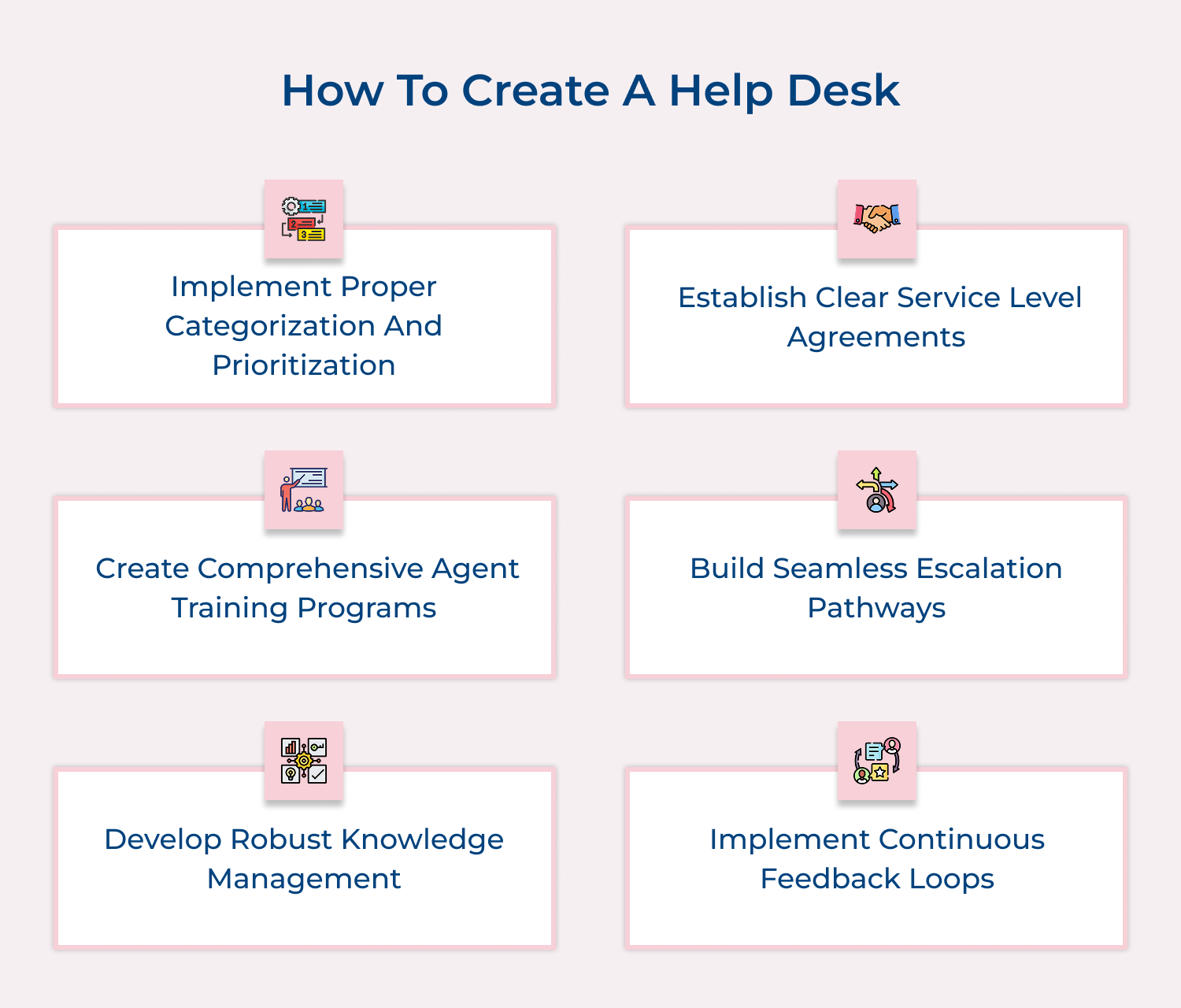
Implement Proper Categorization and Prioritization
Develop a clear system for classifying incoming requests based on urgency, complexity and business impact. This ensures critical issues receive immediate attention while routine matters follow standard processes. Proper categorization also helps with resource allocation and provides valuable data about what types of issues occur most frequently.
Establish Clear Service Level Agreements
Define specific timeframes for initial responses and issue resolution based on request categories. Make these expectations transparent to both customers and support teams. Well-defined SLAs create accountability, set appropriate customer expectations, and provide measurable standards for evaluating help desk performance over time.
Create Comprehensive Agent Training Programs
Develop structured onboarding and continuous education for support staff that covers technical knowledge, communication skills as well as emotional intelligence. Regular training keeps agents updated on new products, emerging issues, and improved support techniques. Knowledgeable, well-prepared agents resolve issues faster and deliver more satisfying customer experiences.
Build Seamless Escalation Pathways
Design clear processes for transferring complex issues to specialists or senior staff when necessary. Establish explicit criteria for when escalation should occur and ensure all contextual information travels with the ticket. Effective escalation prevents customer frustration from repeatedly explaining problems and ensures difficult issues reach those best equipped to solve them.
Develop Robust Knowledge Management
Create systems for capturing solutions to common problems and making them easily accessible to all agents. The institutional memory prevents repeatedly solving the same issues from scratch. Encourage agents to contribute to this knowledge repository by documenting new solutions while updating existing ones as products and processes evolve.
Implement Continuous Feedback Loops
Collect regular input from both customers and support agents about their experiences. Use surveys, quality monitoring, and direct conversations to identify improvement opportunities. Act on this feedback to refine processes, enhance tools, and address pain points, creating a help desk that continuously evolves to better serve both customers as well as the business.
Help desks and knowledge bases work together to create an efficient, customer-focused support system. Help desks handle complex, unique issues with personalized human attention, while knowledge bases provide consistent, self-service information that empowers users to solve common problems independently.
The most effective organizations integrate both: knowledge bases act as the first line of support, reducing routine inquiries, while help desk agents focus on challenging cases, relationship building, and feeding insights back into the knowledge base. This balance of automation and human touch improves efficiency, satisfaction as well as continuously strengthens the overall support experience.

What is the role of the knowledge base in a help desk environment?
A knowledge base serves as the help desk’s foundation of institutional memory, providing agents with consistent answers to common questions. It enables faster issue resolution by offering ready-made solutions that agents can reference or share directly with customers. The knowledge base also captures solutions to complex problems, ensuring this expertise remains accessible even when experienced staff leave the organization.
What is the difference between the help desk and the knowledge base?
The help desk provides personalized, interactive support through direct communication between humans, handling unique situations that require troubleshooting. In contrast, the knowledge base offers self-service information through pre-written content that users navigate independently. Help desks resolve specific issues reactively, while knowledge bases educate proactively and prevent problems before they require direct intervention from support staff.
How do knowledge base and help desk work together?
Knowledge bases and help desks form a seamless support ecosystem where the knowledge base handles routine questions, freeing help desk agents to focus on complex issues. Agents can quickly share knowledge base articles during support interactions, providing consistent information. The help desk identifies recurring questions that should be added to the knowledge base, while knowledge base analytics highlight content gaps where direct support is still needed.
When should a company implement a help desk versus a knowledge base?
Companies should implement a help desk first when offering complex products requiring personalized support or when customer relationships are crucial to the business model. A knowledge base makes more sense as the initial investment for companies with high-volume, repeatable questions or limited support resources. Ideally, most organizations should eventually implement both systems working in tandem to maximize efficiency and customer satisfaction.
How do you measure the effectiveness of each system?
Help desk effectiveness is measured through resolution metrics like first-contact resolution rate, average handling time, and customer satisfaction scores after interactions. Knowledge base effectiveness is evaluated through engagement metrics such as article views, search completion rates, self-service resolution percentages, and reduction in support ticket volume for documented issues. Both systems should ultimately contribute to improved overall customer experience and operational efficiency.
 https://omni24.io/wp-content/uploads/2026/08/Enterprise-Customer-Engagement.png
1256
2400
Tushar Joshi
https://omni24.io/wp-content/uploads/2023/04/Omni-Logo-1.svg
Tushar Joshi2026-09-02 05:29:412026-09-02 05:29:41How to Scale Enterprise Customer Engagement Strategies
https://omni24.io/wp-content/uploads/2026/08/Enterprise-Customer-Engagement.png
1256
2400
Tushar Joshi
https://omni24.io/wp-content/uploads/2023/04/Omni-Logo-1.svg
Tushar Joshi2026-09-02 05:29:412026-09-02 05:29:41How to Scale Enterprise Customer Engagement Strategies https://omni24.io/wp-content/uploads/2026/08/Client-vs-Customer.png
1256
2400
Tushar Joshi
https://omni24.io/wp-content/uploads/2023/04/Omni-Logo-1.svg
Tushar Joshi2026-09-01 03:57:222026-09-01 03:59:31Client vs Customer: What’s the Difference & Why Does it Matter?
https://omni24.io/wp-content/uploads/2026/08/Client-vs-Customer.png
1256
2400
Tushar Joshi
https://omni24.io/wp-content/uploads/2023/04/Omni-Logo-1.svg
Tushar Joshi2026-09-01 03:57:222026-09-01 03:59:31Client vs Customer: What’s the Difference & Why Does it Matter? https://omni24.io/wp-content/uploads/2026/08/Benefits-of-Conversational-AI.png
1256
2400
Webvision Solution
https://omni24.io/wp-content/uploads/2023/04/Omni-Logo-1.svg
Webvision Solution2026-08-31 04:29:522026-08-31 04:29:52Benefits of Conversational AI: What You Should Know
https://omni24.io/wp-content/uploads/2026/08/Benefits-of-Conversational-AI.png
1256
2400
Webvision Solution
https://omni24.io/wp-content/uploads/2023/04/Omni-Logo-1.svg
Webvision Solution2026-08-31 04:29:522026-08-31 04:29:52Benefits of Conversational AI: What You Should Know
Whether it’s about acquire, engage or support – Omni24 covers all your customer engagement needs in one complete platform.

Copyright ©2026 Veemo All rights reserved.
CA, Los Angeles, Hall Ave, 19011