How to Implement Multimodal Customer Experience (CX) Strategy
Multimodal CX lets businesses serve customers across multiple independent channels, improving flexibility, satisfaction and operational efficiency for better outcomes.
Multimodal CX lets businesses serve customers across multiple independent channels, improving flexibility, satisfaction and operational efficiency for better outcomes.
Your customers want to reach you through different channels, but handling all of them feels overwhelming. A multimodal customer-experience strategy offers a practical solution: let each channel operate independently, without requiring complex integrations or expensive unified platforms.
Today, 73% of consumers use multiple channels during their buying or support journey. Companies using robust multichannel support retain up to 89% of their customers.
By assessing your current channels, adding the right mix and training your team for consistent delivery, you can give customers flexibility while maintaining quality.
Multimodal customer experience means customers can interact with your business through different channels like phone, email, chat, or in-person visits. Each channel works independently and customers typically complete their entire interaction within one channel at a time.
This approach gives customers flexibility to choose their preferred communication method. However, it can create disconnected experiences since information doesn’t always transfer smoothly when customers switch between different channels.
Key objectives:
Multimodal customer experience offers several advantages for businesses operating in the current digital environment. Let’s explore these benefits one at a time:
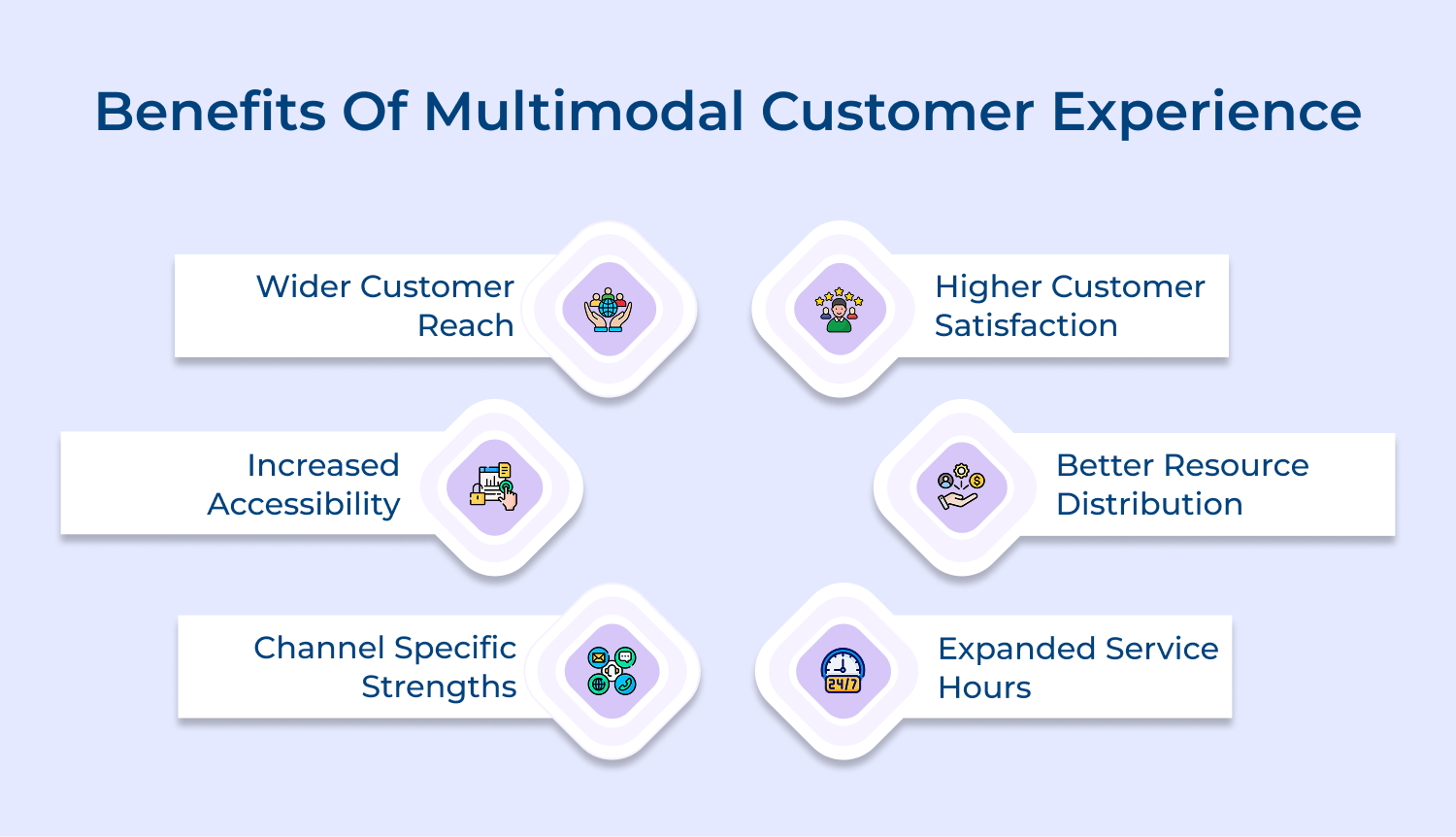
Wider Customer Reach
Meeting customers where they already are makes communication feel natural. Some love speaking over the phone, while others prefer quick chat or email. This flexibility boosts customer engagement because everyone gets to choose what feels easiest.
Increased Accessibility
Different channels support different needs. A busy professional might rely on email during work hours, while someone with hearing difficulties may prefer chat — sometimes supported by conversational AI — for a more comfortable experience.
Channel Specific Strengths
Phone calls are ideal for complex issues, chat is great for quick questions and email offers detailed written information customers can refer back to later.
Higher Customer Satisfaction
When customers get to choose how they interact, the experience feels smoother and more personal. That sense of control naturally lifts satisfaction.
Better Resource Distribution
Simple queries can go to automated tools or FAQs, freeing your team to focus on the tougher issues where human support truly matters. This also helps strengthen customer relationships.
While both involve multiple channels, they differ fundamentally in how those channels work together and share information.
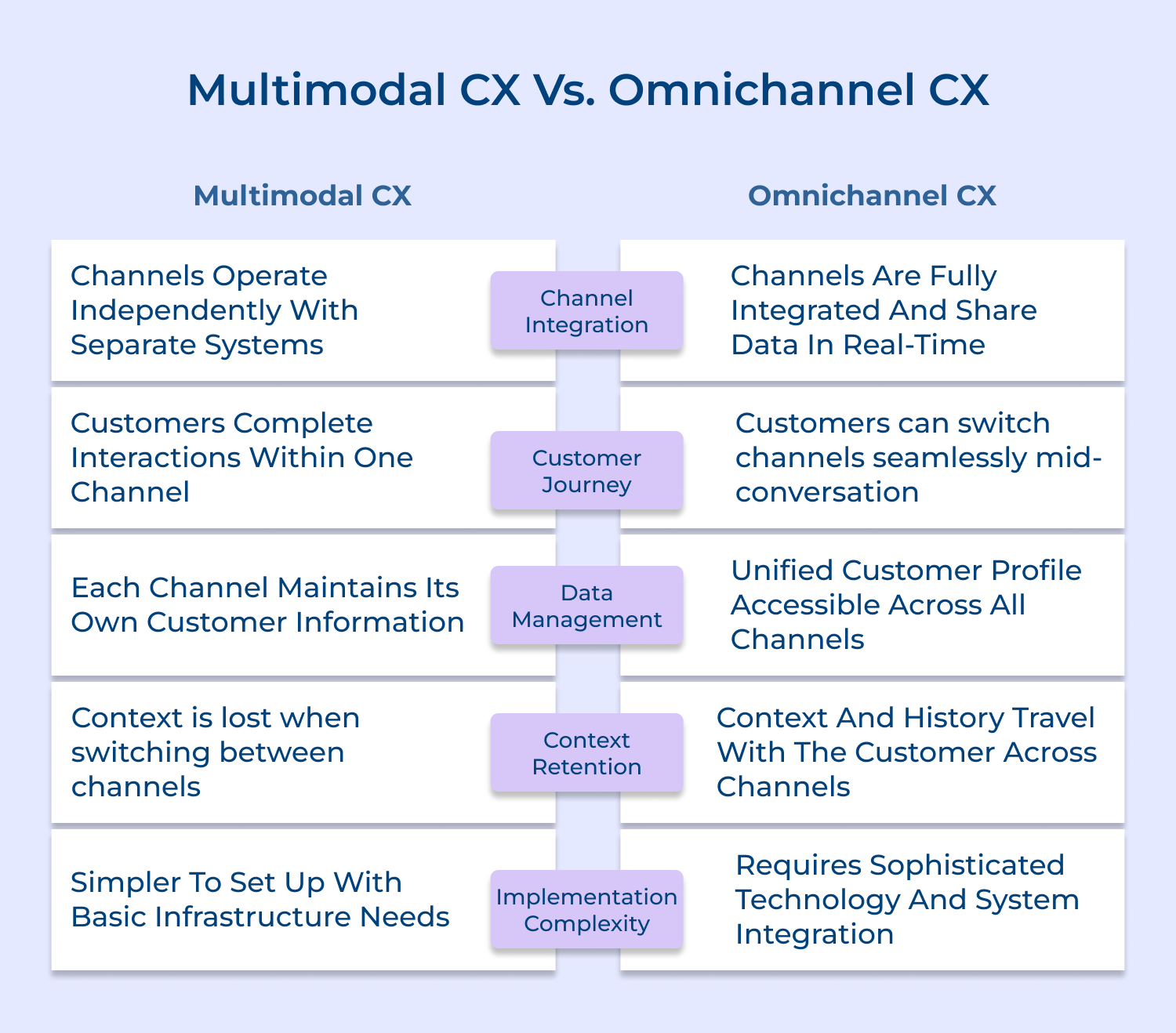
Channel Integration
In a multi-channel customer experience setup, each channel runs on its own system. Your phone team might use one tool while your email team uses another and nothing syncs automatically.
Omnichannel connects everything. No matter where a customer reaches out, the interaction instantly appears across your support ecosystem for complete visibility.
Customer Journey Continuity
Multimodal journeys often force customers to start over when switching channels. If they move from chat to phone, they usually need to repeat the entire issue.
Omnichannel fixes that—letting someone begin on email and continue by phone without re-explaining because agents see the whole thread.
Data Management Approach
In multimodal setups, every channel stores data in separate silos. Email shows past tickets, phone shows call logs, but they don’t merge.
Omnichannel builds one unified profile so agents instantly see purchase history, past interactions and preferences in one place.
Context Retention
Multimodal loses context between interactions, which means customers keep filling in the gaps.
Omnichannel carries context forward automatically, allowing agents to acknowledge previous frustrations and deliver smoother support—often improving metrics like Net Promoter Score.
Implementation Requirements
Multimodal is simpler to set up because each channel can run independently without deep connections.
Omnichannel takes more work: integrating databases, syncing platforms and ensuring real-time data flow across every touchpoint your business offers.
This guide outlines eight definitive steps to successfully implement a multimodal strategy, ensuring your brand remains relevant and resonant in the current complex marketplace.
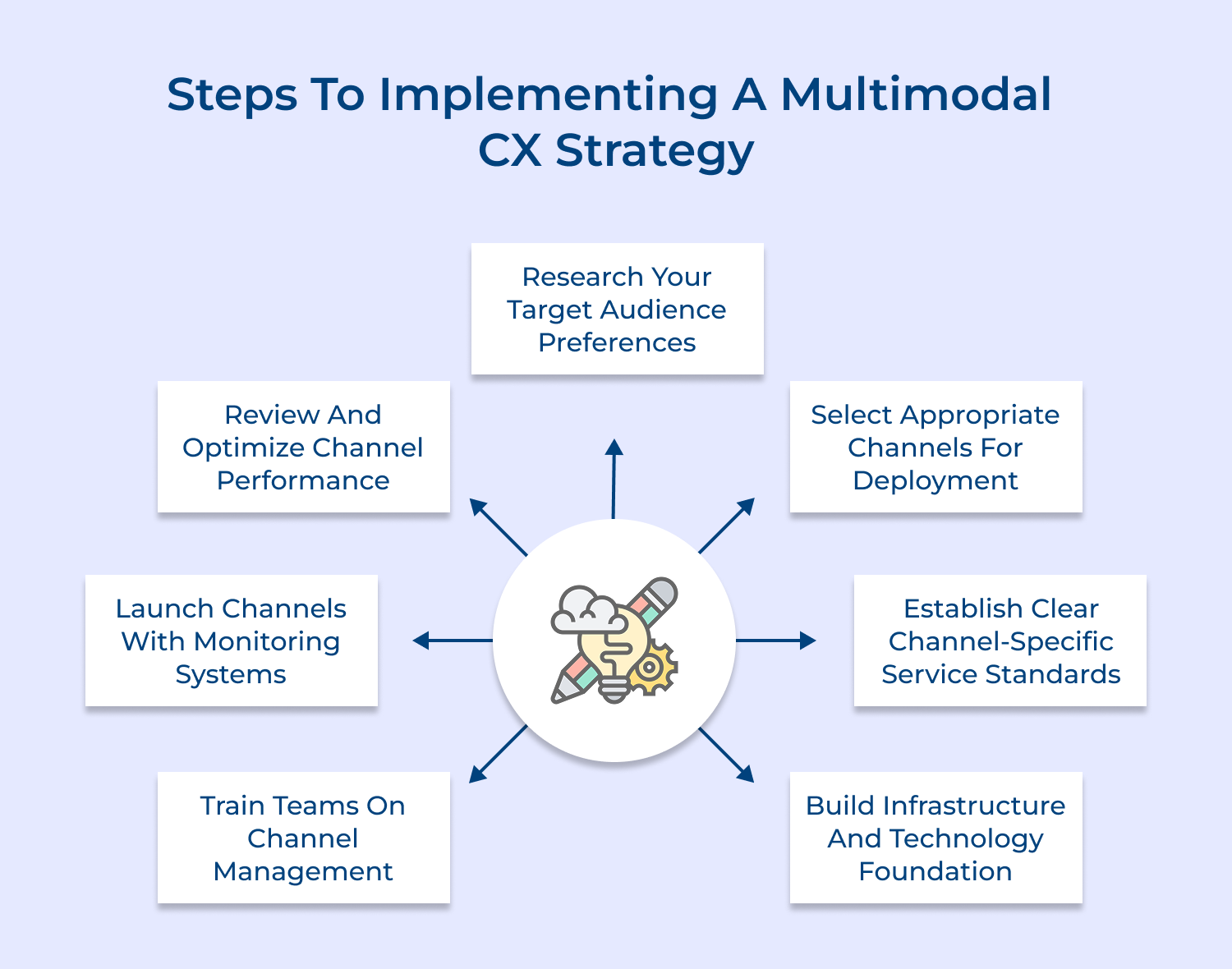
Start by reviewing all the ways customers currently contact your business. This helps you see what’s working and what needs fixing before adding new channels. Here’s a simple way to break it down:
Understanding how your customers prefer to communicate helps you invest in the right channels instead of relying on assumptions. Different groups have different habits, so this step ensures you’re aligning with real needs.
Use surveys to learn what customers actually want. Asking them removes guesswork and helps you confidently prioritize the channels they’ll use. Sample questions like:
Analyze customer segments: Look at age, location and device usage. This reveals whether your audience leans toward mobile-friendly digital channels or prefers traditional phone-based support.
Review competitor offerings: Check what channels competitors provide and how customers respond. If a competitor’s SMS support gets positive feedback, it may highlight a gap you should fill.
This step is about choosing the right communication channels based on what your research actually tells you. Adding too many channels can overwhelm your team, while too few can leave customers frustrated or heading to competitors.
Consider these factors when selecting channels for your multimodal strategy:
Start with your highest-priority channels first rather than launching everything simultaneously. Rolling out two or three well-supported channels beats offering six poorly-maintained options and you can always add more touchpoints once your team masters the initial ones.
Popular channels to consider for multimodal customer experience:
Your final channel selection should create coverage across different customer preferences and situations. Balance is more important than breadth because three channels operating excellently serve customers better than eight channels functioning inadequately.
Defining clear performance expectations for each channel gives your team direction and ensures consistent customer experiences. Set specific benchmarks for response times, quality and resolution.
For example, phone support may aim to answer within three rings, while email might commit to responding within 24 hours—creating reliable standards customers can trust.
Here are channel-specific service standards businesses should establish:
Setting up the right tech systems ensures each channel runs smoothly and securely. Without solid infrastructure, channels may fail during busy periods or put customer data at risk.
Here’s how to build it right:
For example a retail business might install Zendesk for email tickets and Twilio for SMS messaging while using a separate VoIP system for phone calls. Each platform operates independently but meets the same security standards and undergoes thorough testing before going live.
Equipping your team with the right skills ensures they handle each channel confidently and consistently. Even the best technology falls flat without well-trained agents and customers notice when someone isn’t prepared.
Create training programs that blend technical know-how with customer service best practices. Use role-plays to practice real scenarios and supervised interactions to build confidence before agents go live.
Best practices:
Launching your new channels requires going live and watching their performance closely from the very start. Early monitoring helps you spot issues fast, fix them before they escalate and ensure customers get a smooth experience right from day one.
Consider these questions before launching your multimodal channels:
Implement your launch by rolling out one or two channels initially rather than everything simultaneously. Track key metrics like response times daily during the first month while gathering customer feedback to identify pain points your testing missed.
Review your channels against the standards you established to measure performance and identify gaps. Regular evaluations are crucial because customer needs evolve and initial assumptions often change once real usage data is collected. Keeping a close eye ensures your channels remain effective, relevant and aligned with customer expectations.
Track these metrics to effectively review your multimodal strategy:
Don’t stop at just reviewing the numbers because identifying problems without taking action wastes the exercise. Use your findings to reallocate staff toward high-demand channels or invest in training where satisfaction scores lag and continuously refine based on what data reveals.
Implementing multimodal customer experience successfully requires following proven practices that maximize channel effectiveness and deliver consistent service.
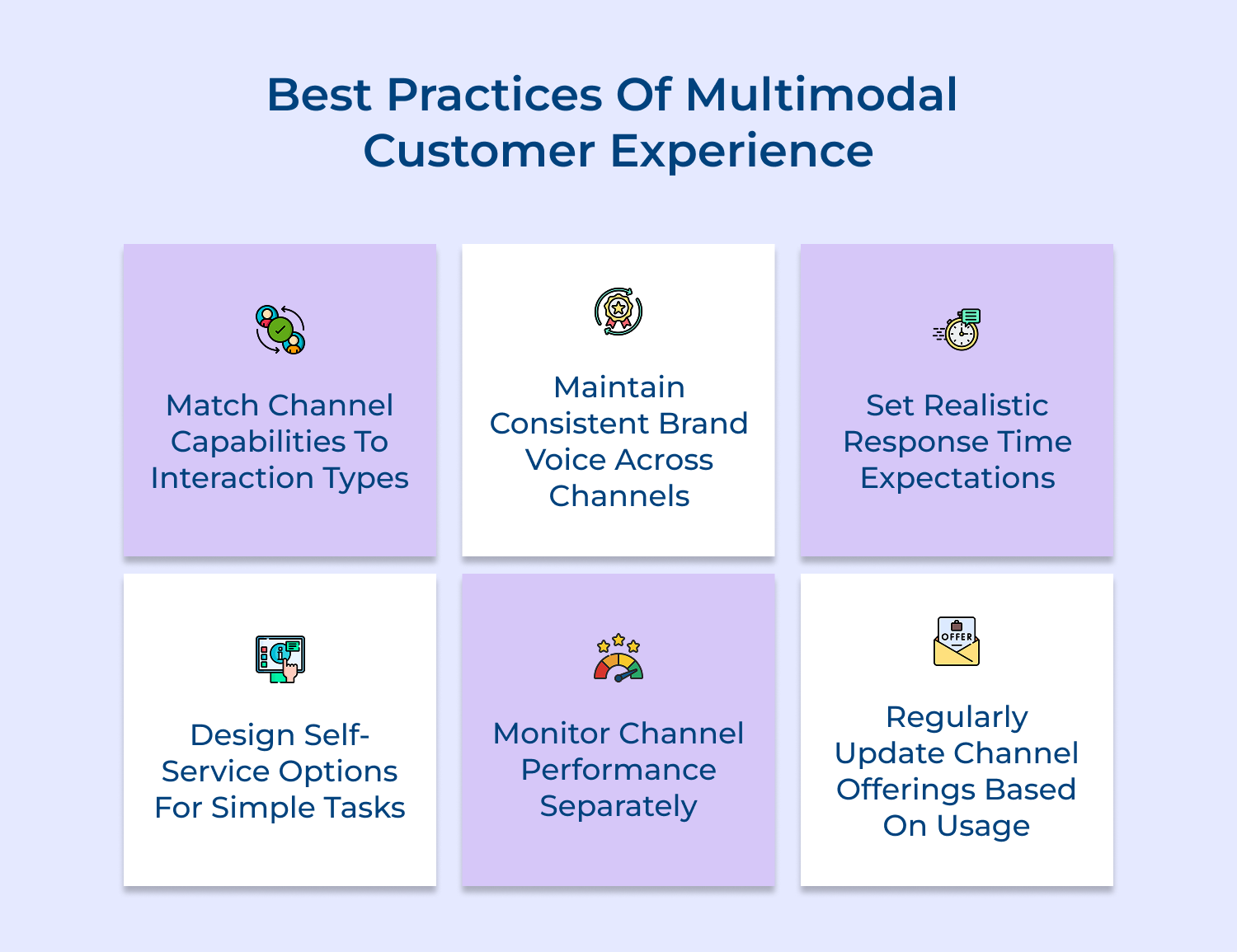
Multimodal customer experience empowers your business to connect with customers through their preferred channels while maintaining operational simplicity. By offering phone support, email, chat and self-service options independently you meet diverse needs without complex integration requirements.
Start by assessing your current channels and understanding customer preferences before gradually expanding your touchpoints. Focus on delivering excellent service within each channel rather than trying to connect everything perfectly and your customers will appreciate the flexibility you provide.

How does technology support Multimodal Customer Experience?
Technology provides the foundational platforms that make each channel operational like phone systems for voice support and ticketing software for email management. These tools handle routing, tracking and storage of customer interactions while enabling your team to respond efficiently within each separate channel.
How do you measure success in Multimodal Customer Experience?
Success measurement focuses on channel-specific metrics like response times, resolution rates and customer satisfaction scores for each individual touchpoint. You track whether customers can easily access their preferred channels and whether each channel meets the service standards you’ve established.
What industries benefit most from Multimodal Customer Experience?
Retail, banking, healthcare and hospitality industries see strong benefits because they serve diverse customer demographics with varying technology comfort levels. Any business with customers who have different preferences for how they communicate can gain advantages from offering multiple independent contact options.
How does Multimodal Customer Experience impact customer loyalty?
Giving customers choice in how they contact you creates a sense of respect for their preferences and time constraints. When people can reach you through their comfortable channel they experience less friction which increases satisfaction and makes them more likely to return.
What is the difference between Multimodal and Multichannel Customer Experience?
These terms are often used interchangeably to describe businesses offering multiple ways for customers to make contact. Both involve operating separate channels independently where customers typically complete their entire interaction within one channel without seamless transitions between touchpoints.
How long does it take to implement a Multimodal Customer Experience strategy?
Implementation timelines vary based on how many channels you’re adding and your existing infrastructure readiness. A basic rollout with two or three new channels typically takes three to six months including planning, technology setup, staff training as well as initial launch monitoring.
 https://omni24.io/wp-content/uploads/2026/09/Social-commerce-scaled.png
1340
2560
Webvision Solution
https://omni24.io/wp-content/uploads/2023/04/Omni-Logo-1.svg
Webvision Solution2026-10-23 12:18:272026-10-23 12:18:27What is Social Commerce and Why Does It Matter?
https://omni24.io/wp-content/uploads/2026/09/Social-commerce-scaled.png
1340
2560
Webvision Solution
https://omni24.io/wp-content/uploads/2023/04/Omni-Logo-1.svg
Webvision Solution2026-10-23 12:18:272026-10-23 12:18:27What is Social Commerce and Why Does It Matter? https://omni24.io/wp-content/uploads/2026/08/AI-Customer-Service-Agents.png
1256
2400
Webvision Solution
https://omni24.io/wp-content/uploads/2023/04/Omni-Logo-1.svg
Webvision Solution2026-09-21 04:48:512026-09-21 04:48:51How to Build an AI Customer Service Agents: 8 Key Steps
https://omni24.io/wp-content/uploads/2026/08/AI-Customer-Service-Agents.png
1256
2400
Webvision Solution
https://omni24.io/wp-content/uploads/2023/04/Omni-Logo-1.svg
Webvision Solution2026-09-21 04:48:512026-09-21 04:48:51How to Build an AI Customer Service Agents: 8 Key Steps https://omni24.io/wp-content/uploads/2026/08/Omnichannel-Conversational-AI.png
1256
2400
Tushar Joshi
https://omni24.io/wp-content/uploads/2023/04/Omni-Logo-1.svg
Tushar Joshi2026-09-16 03:51:072026-09-16 03:51:07How to Build Omnichannel Conversational AI Strategy
https://omni24.io/wp-content/uploads/2026/08/Omnichannel-Conversational-AI.png
1256
2400
Tushar Joshi
https://omni24.io/wp-content/uploads/2023/04/Omni-Logo-1.svg
Tushar Joshi2026-09-16 03:51:072026-09-16 03:51:07How to Build Omnichannel Conversational AI Strategy
Whether it’s about acquire, engage or support – Omni24 covers all your customer engagement needs in one complete platform.

Copyright ©2026 Veemo All rights reserved.
CA, Los Angeles, Hall Ave, 19011