How Does a CRM Ticketing System Work?
CRM ticketing systems streamline support, speed responses and help teams manage customer issues efficiently, boosting service and satisfaction.
CRM ticketing systems streamline support, speed responses and help teams manage customer issues efficiently, boosting service and satisfaction.
Is your support team closing tickets but still losing customers?
The strange part is that most teams never figure out why. 70% of businesses leverage CRM for customer service as they see it as essential for customer-centric operations.
When tickets are disconnected from customer history and deal data, your agents are essentially responding blind. Every interaction becomes a guessing game that costs you relationships and revenue.
A CRM ticket system fixes that disconnect by combining support and relationship data into one connected workflow. This guide breaks down exactly how it works and which solution fits your team best.
A CRM ticketing system is a centralized platform that connects customer relationship data with support ticket management. It lets your team track every customer issue while having full context of that customer’s history with your business.
Do you need a combined CRM ticket system? If your support team is resolving tickets without knowing who the customer is or what they’ve purchased, you’re already losing context that matters. A combined system bridges that gap by linking every ticket to a real customer profile with history.
Key Objectives:
When your CRM and ticketing system work as one, your team stops switching between tools and starts actually solving problems faster. The difference in team efficiency and customer experience is significant.
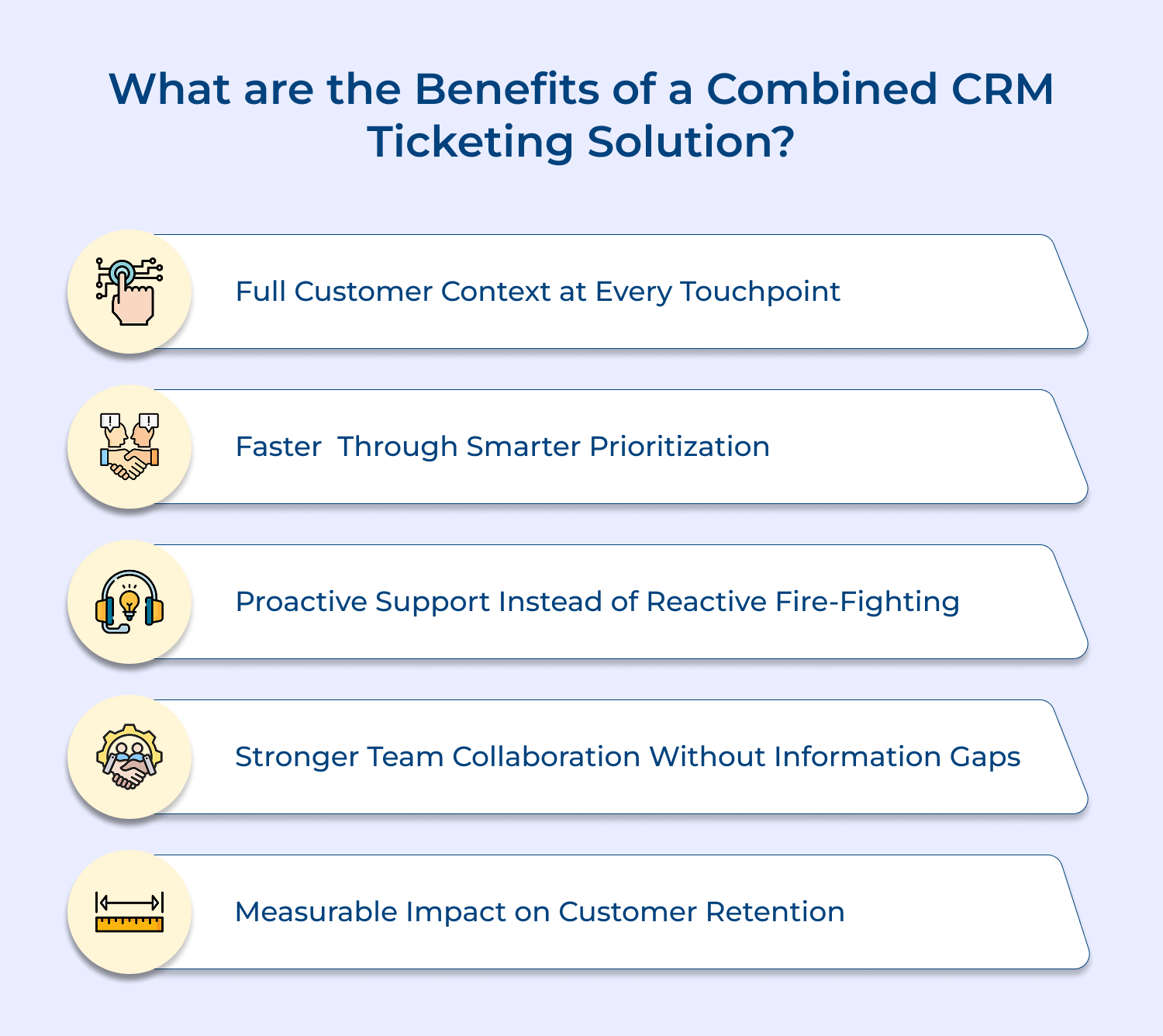
1. Full Customer Context at Every Touchpoint
When an agent opens a ticket, they instantly see the customer’s purchase history, past complaints and previous resolutions. This eliminates the frustrating back-and-forth where customers repeat their issue every single time they reach out.
2. Faster Resolution Through Smarter Prioritization
A combined system lets you prioritize tickets based on customer value, contract tier or issue urgency — all pulled directly from CRM data. Your team stops treating every ticket equally and starts resolving what matters most first.
3. Proactive Support Instead of Reactive Fire-Fighting
With CRM data feeding into your ticket system, you can spot patterns like a customer who has raised three billing issues in two months. That kind of visibility lets your team step in before the customer decides to leave.
4. Stronger Team Collaboration Without Information Gaps
Sales, support and account management teams all operate from the same customer data. This means a support agent knows about an ongoing renewal deal before responding to a frustrated customer’s ticket.
5. Measurable Impact on Customer Retention
Ticket resolution speed and quality directly influence whether a customer renews or churns. A combined system gives managers the data to connect support performance directly to revenue outcomes.
Here are the core features that separate a genuinely useful system from one that just adds complexity.
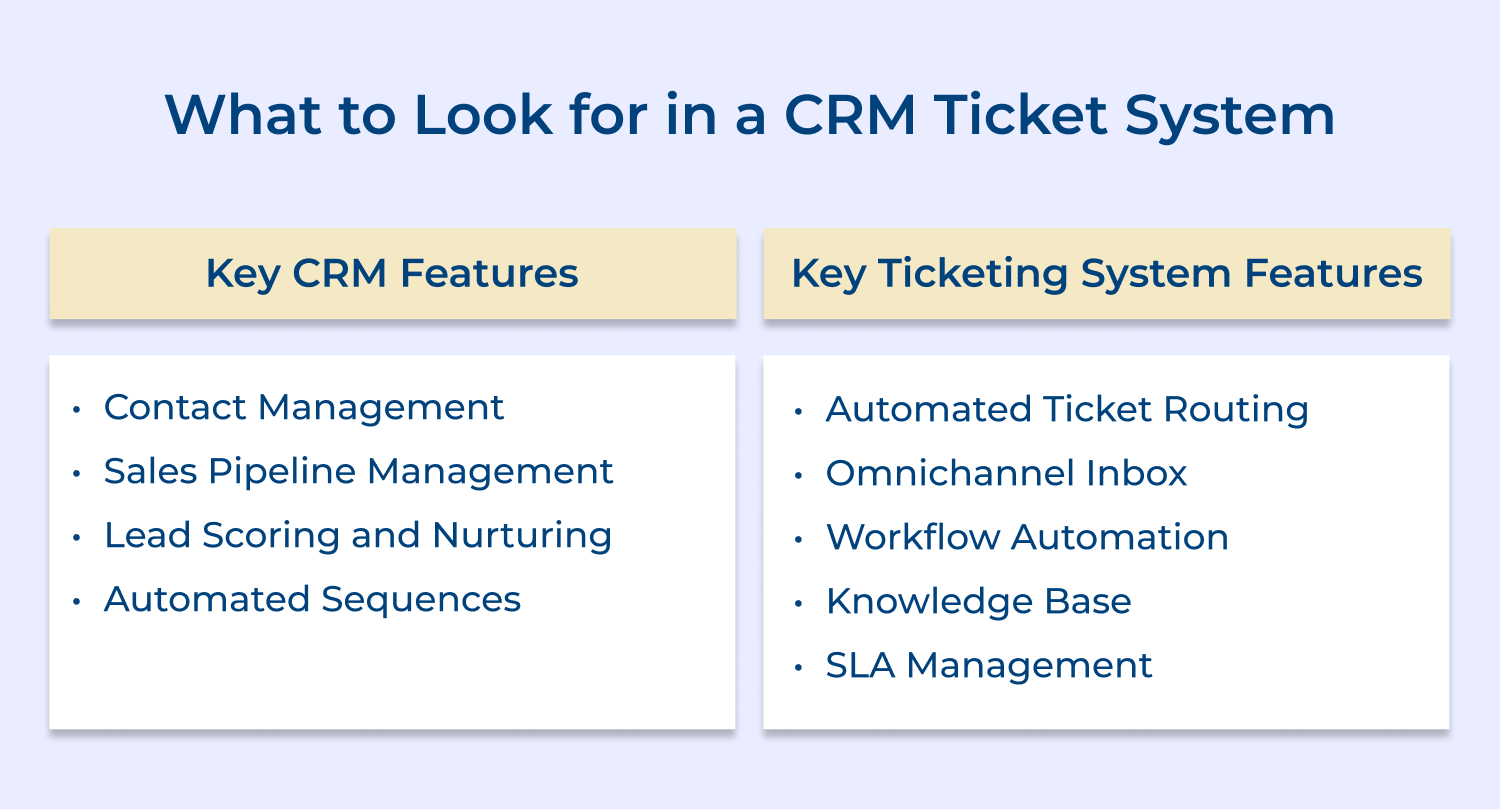
1. Contact Management
A strong contact management feature does more than store names and emails; it captures every interaction, ticket, deal touchpoint in one living profile. When your support agent opens a ticket, they should immediately see the full customer story without digging through five different tools.
Here is what a well-built contact management system should give your team:
Contact management also becomes the foundation for every other CRM function your team relies on. Without clean, connected contact data, your pipeline management, lead scoring and automation features are essentially working blind.
2. Sales Pipeline Management
Your pipeline should reflect real-time customer health and not just deal stages frozen in time. When a high-value prospect raises a support ticket during an active deal, your sales rep needs to know immediately so the relationship does not get damaged at a critical moment.
A pipeline that is disconnected from support data is a pipeline built on incomplete information. The real power comes when ticket escalations, unresolved issues and customer satisfaction signals automatically surface inside the deal view so your sales team never walks into a conversation unprepared.
3. Lead Scoring and Nurturing
Lead scoring becomes significantly more powerful when support ticket data feeds into it directly. A lead who has engaged with your content but also raised repeated pre-sales questions carries a very different score than one who has simply opened an email.
Here is what effective lead scoring inside a CRM ticket system should do:
Nurturing sequences tied to ticket behavior are where most teams leave serious pipeline value on the table. When a pre-sales ticket gets resolved, that is exactly the right moment to trigger a targeted sequence that moves the lead forward with confidence.
4. Automated Sequences
Automated sequences should not feel robotic — they should feel like a well-timed response based on what the customer actually did. When a ticket is resolved, the right system automatically triggers a follow-up sequence to check satisfaction or introduce an upsell at the right moment.
1. Automated Ticket Routing
Manually assigning tickets is one of the biggest hidden time-drains in any support team. A proper routing engine reads ticket content, customer tier and agent workload to assign the right ticket to the right person without anyone lifting a finger.
Here is what intelligent ticket routing should handle without manual intervention:
2. Omnichannel Inbox
Your customers are reaching out through email, live chat, social media and WhatsApp often about the same issue on different channels. An omnichannel inbox pulls all of these conversations into a single thread so your agent has the full picture regardless of which channel the customer used.
Here is what a well-built omnichannel inbox should handle seamlessly:
Without an omnichannel inbox, your agents end up with a fragmented view that leads to duplicate responses and missed context. The customer experience suffers most when an agent responds to an email without knowing the customer already escalated the same issue on live chat an hour ago.
3. Workflow Automation
Workflow automation is not just about saving time, it is about removing human error from repetitive processes that happen dozens of times a day. When a ticket hits a certain status or breaches a deadline, the system should automatically escalate, reassign or notify without waiting for someone to notice.
4. Knowledge Base
A knowledge base built inside your CRM ticket system does double duty: it deflects repetitive tickets and gives agents instant reference material during live conversations. The best implementations surface relevant articles automatically based on the ticket content before the agent even starts typing a response.
Here is how a properly integrated knowledge base changes daily support operations:
A knowledge base also becomes your most powerful tool for onboarding new support agents quickly. Instead of shadowing senior agents for weeks, a new hire can resolve real tickets confidently on day one when the right documentation surfaces automatically in context.
5. SLA Management
SLA management is where most teams either build customer trust or quietly destroy it over time. Your system needs to track response/resolution deadlines per customer tier and automatically escalate tickets approaching a breach before it actually happens.
The deeper value of SLA management is not just meeting deadlines it is using breach data to fix the root causes of recurring delays. Teams that review SLA reports regularly find that the same ticket categories breach repeatedly and that insight alone is enough to redesign a broken workflow.
Here is a step-by-step breakdown of the entire lifecycle — from the first customer touchpoint to final closure.
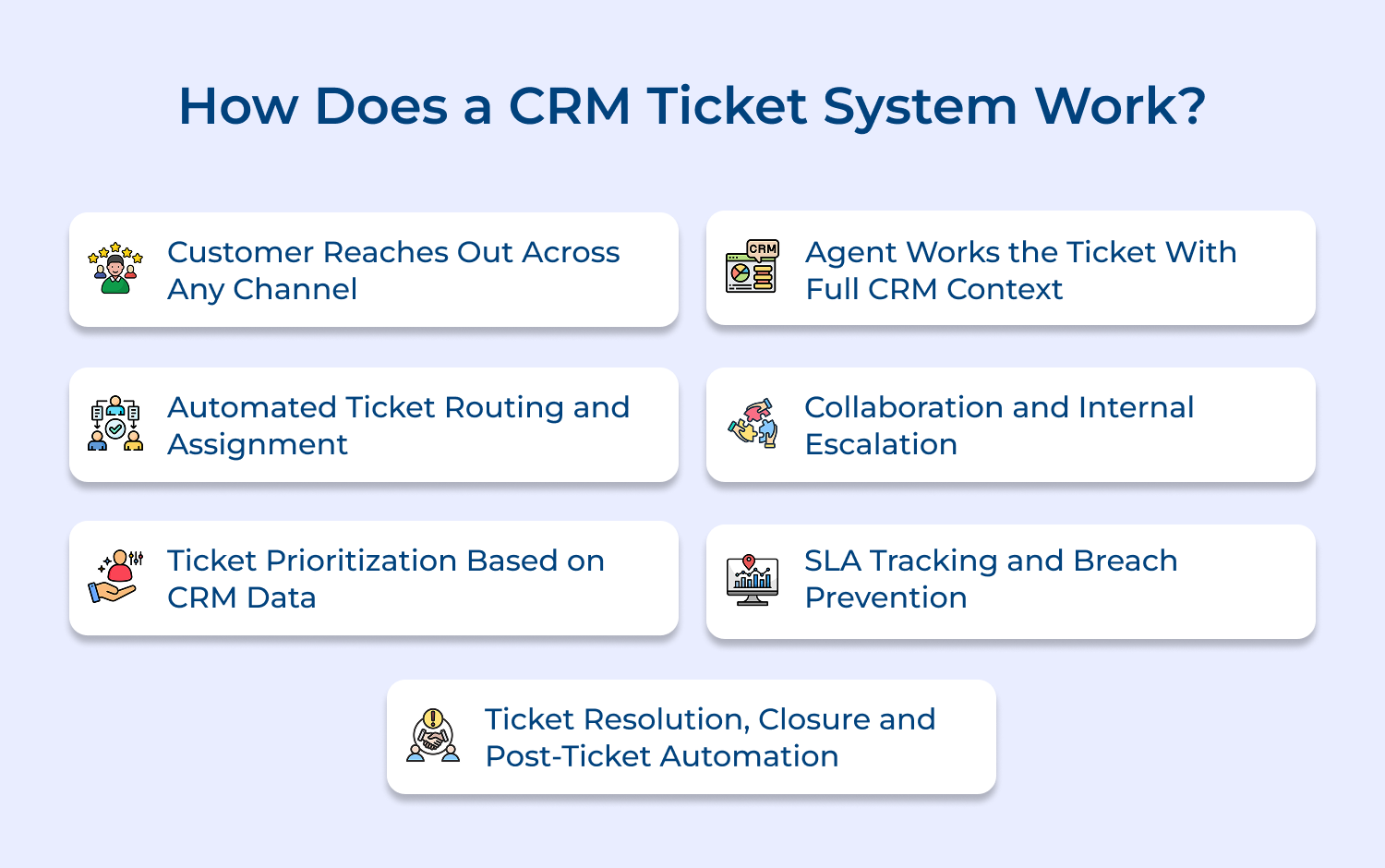
The process starts when a customer contacts your business through email, live chat, social media or a web form. The system instantly creates a structured ticket while simultaneously matching it to the customer’s existing CRM record.
What makes this step powerful is the CRM layer activating in the background before any agent opens the ticket. The agent sees a complete business relationship — not just an incoming message from an unknown contact.
Here is what the system captures and links automatically at ticket creation:
A standalone tool creates a ticket — a CRM ticket system creates a ticket with complete relationship context attached from the very first second. That single difference changes how every agent responds from the moment they open their queue.
Here is why that combined context changes the outcome at intake:
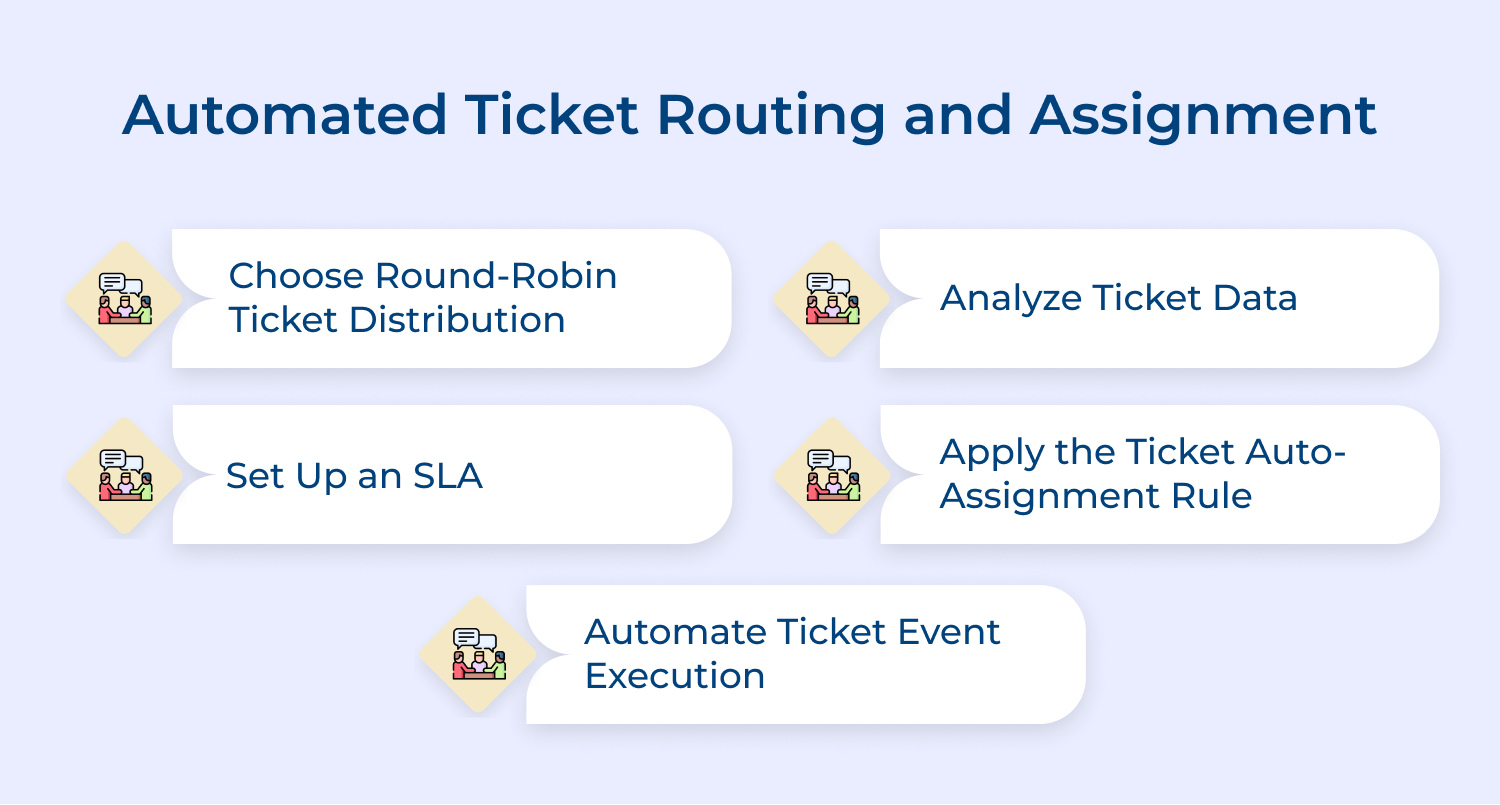
Once a ticket is created, the system evaluates it against pre-configured routing rules and assigns the right agent within seconds. The routing engine processes issue type, agent availability and skill tags simultaneously — all without any manual intervention.
What most teams miss is that routing without CRM data is essentially routing blind. Knowing a ticket belongs to an $80K renewal account should change where it goes and a CRM ticket system makes that happen automatically.
Teams that invest time mapping CRM tiers into routing rules upfront save weeks of reactive firefighting later. Getting routing right in the first 30 days has the single biggest impact on resolution speed.
Here is a quick implementation checklist before going live with routing:
Prioritization in a CRM ticket system goes beyond labeling a ticket as high, medium or low manually. The system reads live account data contract value, deal stage and churn risk score to calculate priority automatically.
Ask yourself these questions to check if your prioritization is truly CRM-driven:
The CRM advantage here is that priority reflects business reality and not just issue severity. A minor billing question from a $100K account deserves faster attention than a complex issue from a trial user and the system enforces that consistently.
Here is how to build a CRM-informed prioritization matrix inside your system:
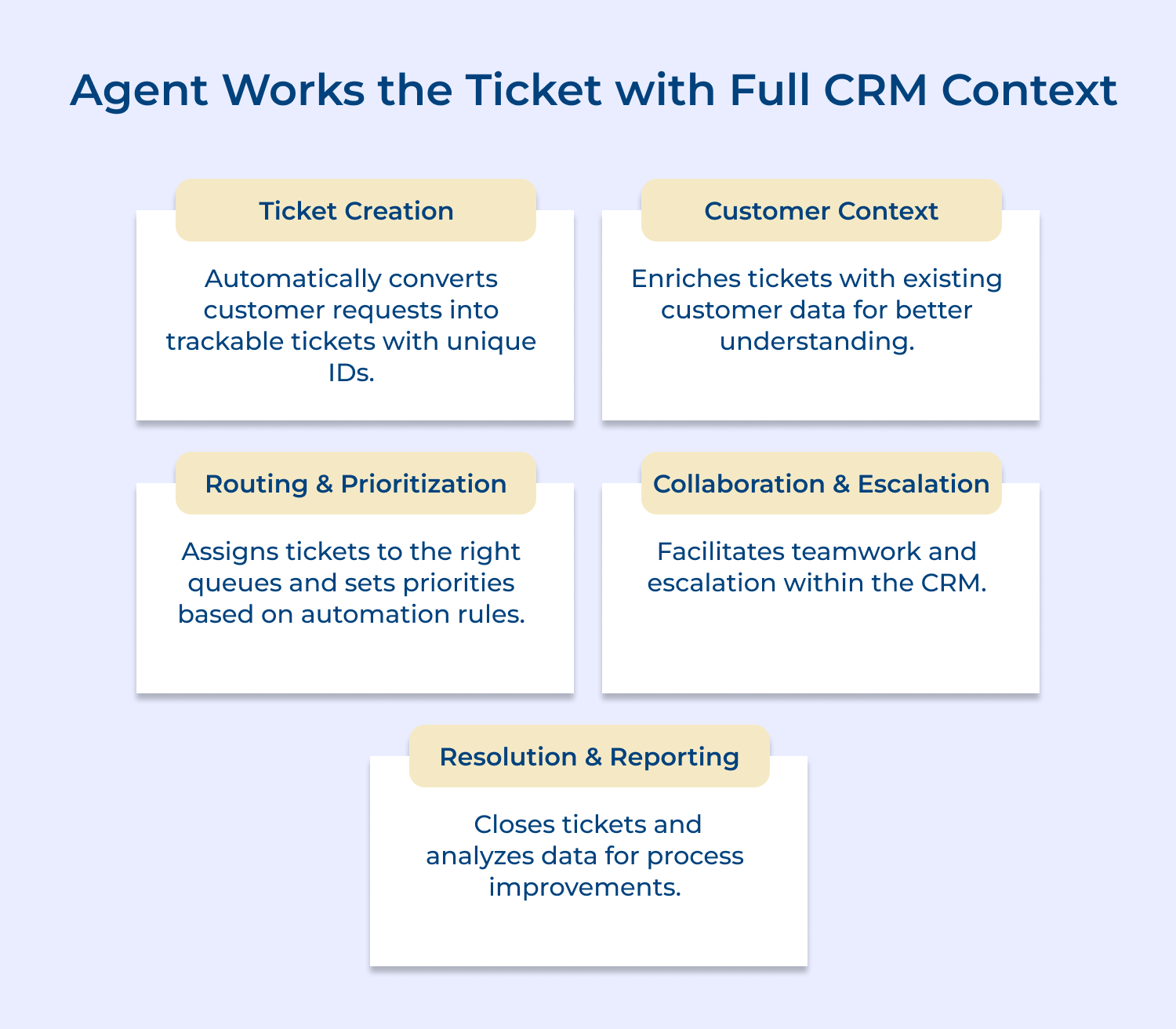
When an agent opens a ticket, they see the customer’s full relationship history alongside the issue, not just the complaint in isolation. Purchase records, open deals, previous escalations and account health scores are all visible in one single workspace.
Resolution quality improves significantly when agents have this combined view available before typing a single word. Responses become more personalized and commitments automatically align with what the sales team has already promised.
Here is a practical agent workflow to implement from day one:
Here is what a well-structured agent workspace should surface from the CRM automatically? Full deal history, renewal dates and account health scores alongside the open ticket. Previous ticket records with resolution notes and the handling agent’s internal comments
A CRM ticket system turns escalation from a chaotic handoff into a structured cross-functional workflow. Support agents, account managers and technical staff all work inside the same ticket thread — each seeing identical CRM context without duplicating effort.
Here is how effective internal collaboration works inside a combined CRM ticket system:
The real value surfaces when a ticket touches a commercially sensitive account mid-renewal. The system ensures the account manager is looped in before any agent response goes out to the customer.
Here is what cross-team alignment looks like in a real escalation scenario:
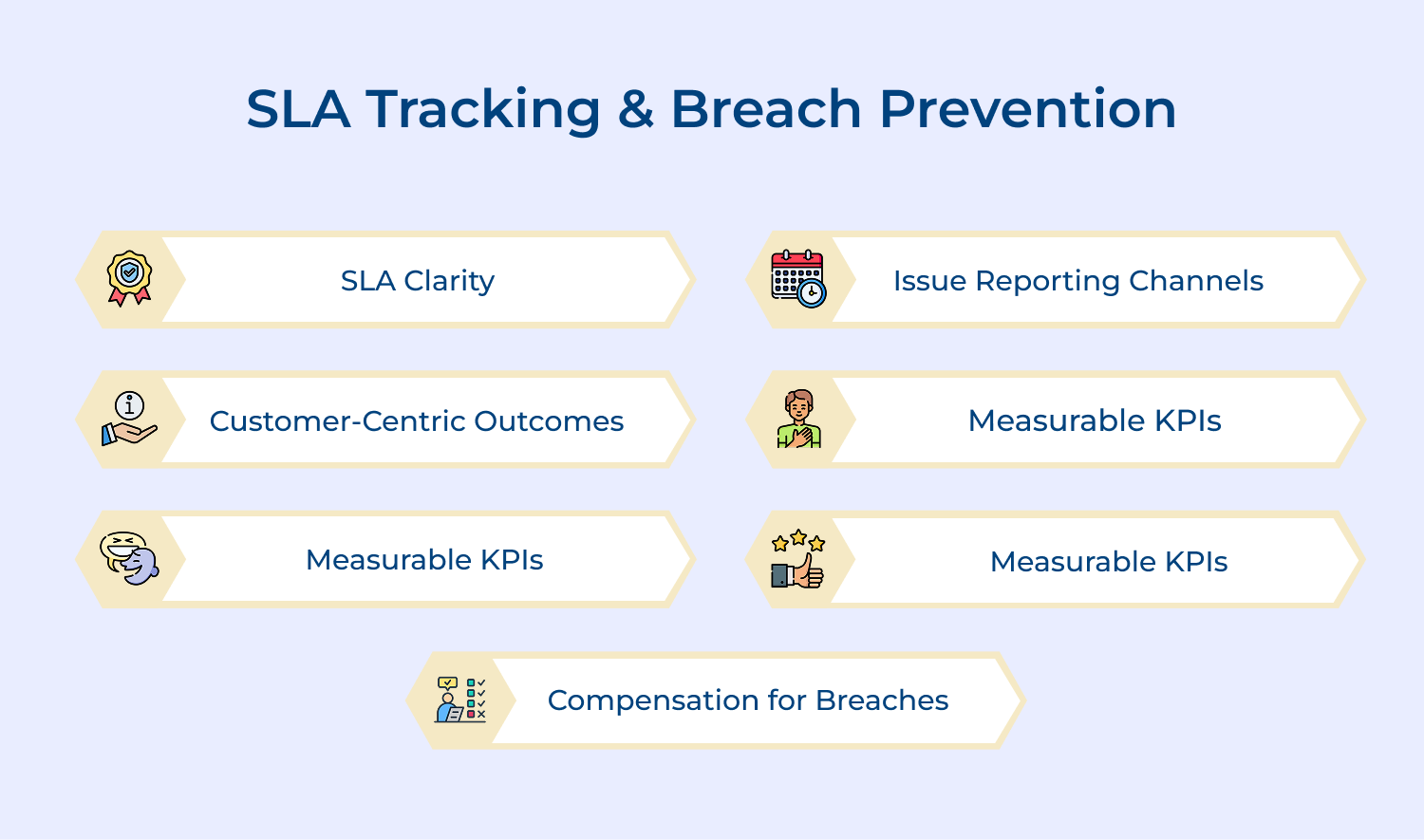
SLA management in a CRM ticket system is tiered and intelligent — based directly on the customer’s contract level stored in the CRM. A Tier 1 enterprise account operates under a two-hour response SLA while a standard account gets an eight-hour window automatically.
Check if your current SLA setup is truly connected to your CRM account data:
The deeper operational value is in breach prevention rather than breach reporting after the fact. A properly configured CRM ticket system escalates before the clock runs out — making SLA failures genuinely preventable rather than reactively logged.
Closing a ticket in a CRM ticket system is not the end of the workflow — it is the beginning of the next relationship touchpoint. The moment a ticket is marked resolved, the CRM record updates and a chain of downstream actions fires automatically.
What separates high-performing teams is what they do with closure data over time. Resolution patterns logged against CRM profiles reveal which customer segments face recurring issues driving proactive fixes before the next ticket wave arrives.
Here is what should happen automatically the moment a ticket is closed:
A customer whose issue was resolved and whose account manager followed up proactively is significantly more likely to renew. The CRM made that coordinated response possible without anyone having to manually remember to do it.
Here is how to build a high-impact post-ticket automation workflow connected to your CRM:
In this article, we unveil the top five CRM ticket system solutions that can elevate your customer support strategy to new heights, providing both efficiency and satisfaction for your team and your clients.
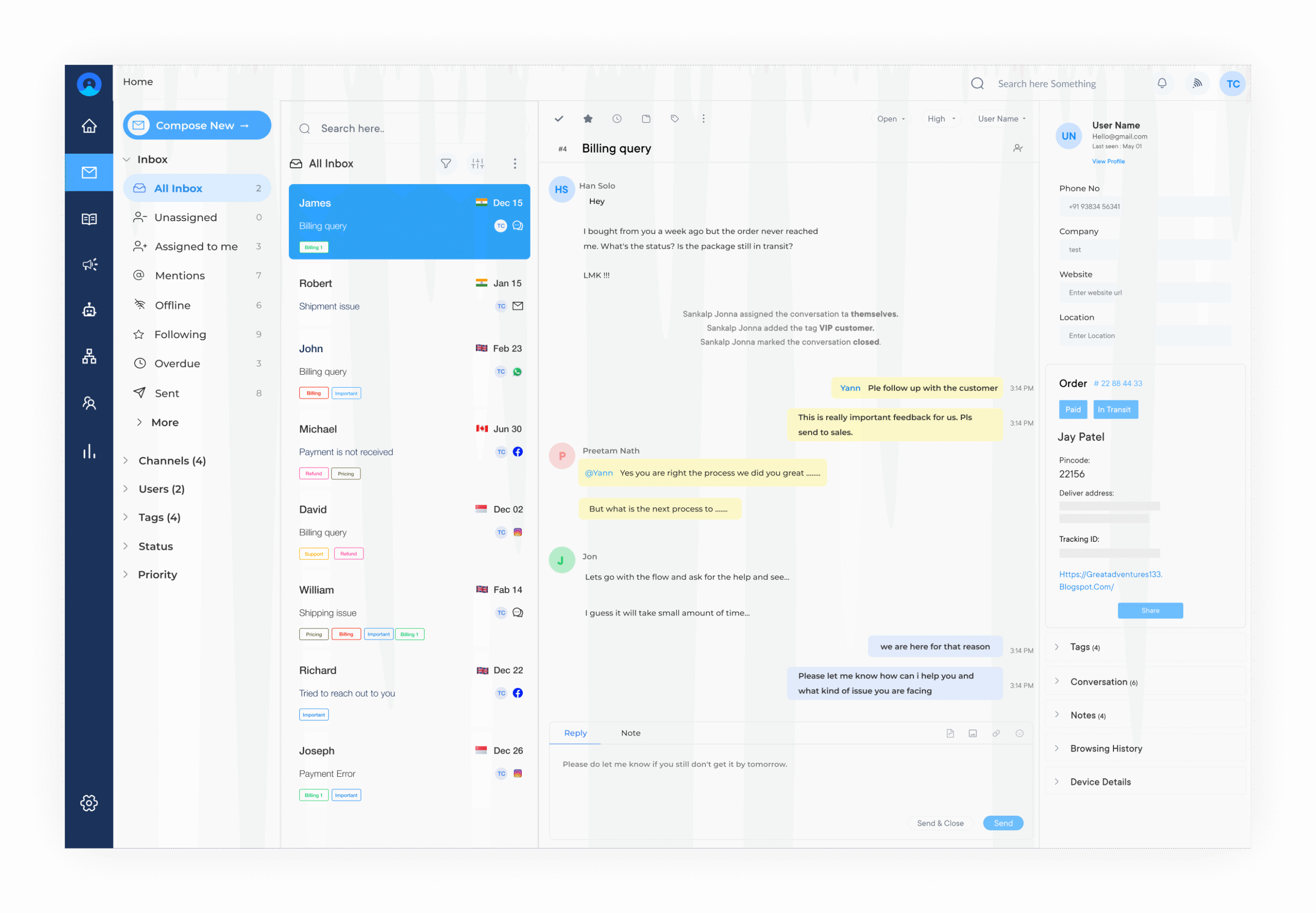
Omni24 is a customer service platform with a built-in CRM that connects every support ticket to complete customer history, interaction timeline and basic relationship context without needing any CRM integration immediately. Teams can manage customer inquiries across every channel while having full visibility into who the customer is and what their relationship with the business looks like.
Key Features:
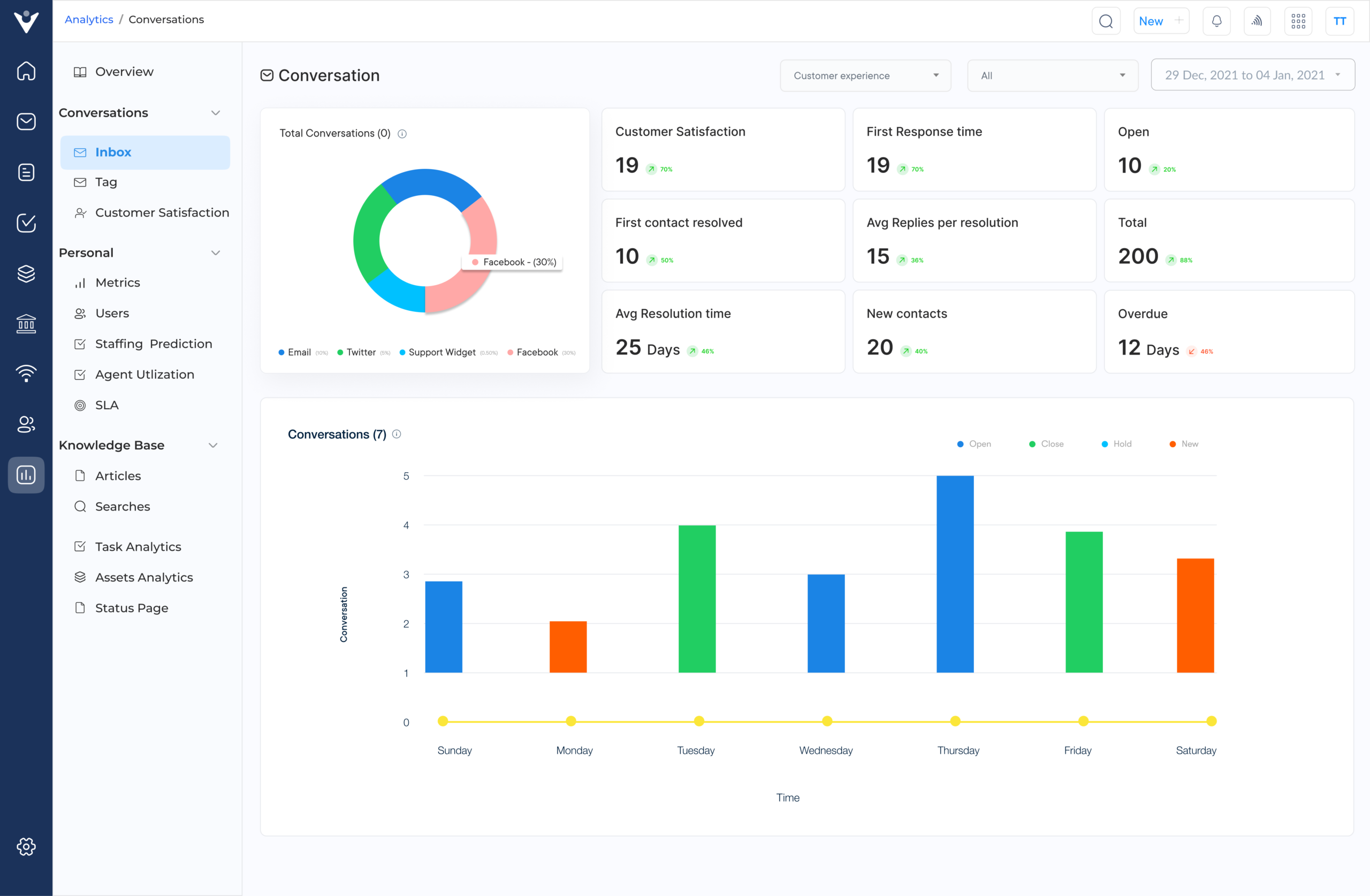
Veemo Support is a help desk and customer support platform with basic built-in CRM functionality that lets teams manage tickets while maintaining enough customer context to deliver personalized support. It captures contact details, ticket history and interaction data against every customer record making it a solid choice for teams that need structured support without investing in a separate CRM tool.
Key Features:
Reporting and Analytics: Delivers team performance reports and ticket trend data to help managers identify bottlenecks, improve workflows.
Help Scout is a customer support platform that keeps full customer conversation history and profile data alongside every ticket giving agents relationship context without needing a separate CRM. It works best for teams that want a clean, focused support experience with enough customer data built in to personalize every response.
Pros:
Cons:
Freshdesk is a full-featured ticketing platform that connects naturally with Freshsales CRM giving teams a combined view of customer support history and active deals inside one ecosystem. Even without the CRM integration, Freshdesk’s contact profiles and ticket history provide enough relationship context for most mid-sized support teams.
Pros:
Cons:
Zoho Desk integrates deeply with Zoho CRM surfacing deal history, contact records and account health scores directly inside the ticket view without any manual switching. Even as a standalone tool, Zoho Desk builds a strong customer context layer through its ticket history and contact management features.
Pros:
Cons:
Managing customer inquiries without full relationship context is where most support teams silently lose retention battles. Omni24 solves this by combining ticketing and CRM into one connected workflow.
Every resolved ticket, every interaction and every customer signal feeds back into a living CRM profile that your team actually uses. That is the operational foundation that turns good support into a genuine revenue-protecting function.

Do you need a combined CRM ticket system?
If your support team is resolving tickets without knowing a customer’s deal history or account value, you are already making uninformed decisions. A combined system gives every agent the relationship context needed to resolve issues and protect revenue simultaneously.
Can I set a workflow in a CRM ticketing system?
Yes — most CRM ticketing systems let you build rule-based workflows that automate ticket assignment, escalation and follow-ups based on customer data. The real value comes when those workflows are triggered by CRM signals like account tier or deal stage.
How long does it take to implement a CRM ticketing system?
A basic implementation typically takes one to two weeks but a properly configured system with CRM data mapping and routing logic takes four to six weeks. Teams that rush implementation without mapping their workflows first spend months fixing avoidable gaps later.
What features should CRM ticketing systems include?
At minimum, look for omnichannel inbox, automated routing, SLA management, workflow automation and native CRM contact linking. The features that matter most are the ones that connect ticket data directly to customer relationship and account health information.
Can CRM ticketing systems integrate with other tools?
Most platforms integrate with tools like Slack, Salesforce, HubSpot and billing systems through native connectors or APIs. The integration that delivers the most value is always the one connecting your ticket data directly to your sales pipeline and customer records.
 https://omni24.io/wp-content/uploads/2026/08/AI-Customer-Service-Agents.png
1256
2400
Webvision Solution
https://omni24.io/wp-content/uploads/2023/04/Omni-Logo-1.svg
Webvision Solution2026-09-21 04:48:512026-09-21 04:48:51How to Build an AI Customer Service Agents: 8 Key Steps
https://omni24.io/wp-content/uploads/2026/08/AI-Customer-Service-Agents.png
1256
2400
Webvision Solution
https://omni24.io/wp-content/uploads/2023/04/Omni-Logo-1.svg
Webvision Solution2026-09-21 04:48:512026-09-21 04:48:51How to Build an AI Customer Service Agents: 8 Key Steps https://omni24.io/wp-content/uploads/2026/08/Omnichannel-Conversational-AI.png
1256
2400
Tushar Joshi
https://omni24.io/wp-content/uploads/2023/04/Omni-Logo-1.svg
Tushar Joshi2026-09-16 03:51:072026-09-16 03:51:07How to Build Omnichannel Conversational AI Strategy
https://omni24.io/wp-content/uploads/2026/08/Omnichannel-Conversational-AI.png
1256
2400
Tushar Joshi
https://omni24.io/wp-content/uploads/2023/04/Omni-Logo-1.svg
Tushar Joshi2026-09-16 03:51:072026-09-16 03:51:07How to Build Omnichannel Conversational AI Strategy https://omni24.io/wp-content/uploads/2026/08/Customer-Service-Teams.png
1256
2400
Tushar Joshi
https://omni24.io/wp-content/uploads/2023/04/Omni-Logo-1.svg
Tushar Joshi2026-09-15 04:01:522026-09-15 04:02:16How to Build Customer Service Teams: 6 Key Steps
https://omni24.io/wp-content/uploads/2026/08/Customer-Service-Teams.png
1256
2400
Tushar Joshi
https://omni24.io/wp-content/uploads/2023/04/Omni-Logo-1.svg
Tushar Joshi2026-09-15 04:01:522026-09-15 04:02:16How to Build Customer Service Teams: 6 Key Steps
Whether it’s about acquire, engage or support – Omni24 covers all your customer engagement needs in one complete platform.

Copyright ©2026 Veemo All rights reserved.
CA, Los Angeles, Hall Ave, 19011