How to Manage Multiple Email Accounts: 6 Key Strategies
Manage multiple email accounts effectively to stay organized, boost productivity, avoid missed messages and ensure smooth communication.
Manage multiple email accounts effectively to stay organized, boost productivity, avoid missed messages and ensure smooth communication.
Managing multiple email accounts can be a daunting task, especially in the modern business environment. With teams often juggling various accounts for different purposes, efficient email management becomes crucial for productivity and communication.
Streamlining email workflows not only reduces the risk of missing important messages but also encourages collaboration among team members. Recent studies show the average person manages nearly 2 email accounts, making efficient management more crucial.
Adopting effective strategies can transform email chaos into a well-organized system, allowing businesses to respond to clients swiftly and maintain a professional image.
Explore practical tips and best practices for managing multiple email accounts seamlessly, ensuring an efficient experience.
Managing multiple email accounts involves organizing and overseeing various email addresses from different platforms or domains. Such practice is essential for individuals and businesses alike, enabling efficient communication. With the increasing reliance on email for both personal and professional purposes, managing multiple accounts effectively can lead to better productivity.
The significance of managing multiple email accounts lies in improved time management and enhanced communication. It allows users to segregate personal & professional correspondence, reducing distractions and ensuring focus on key tasks.
Key objectives:
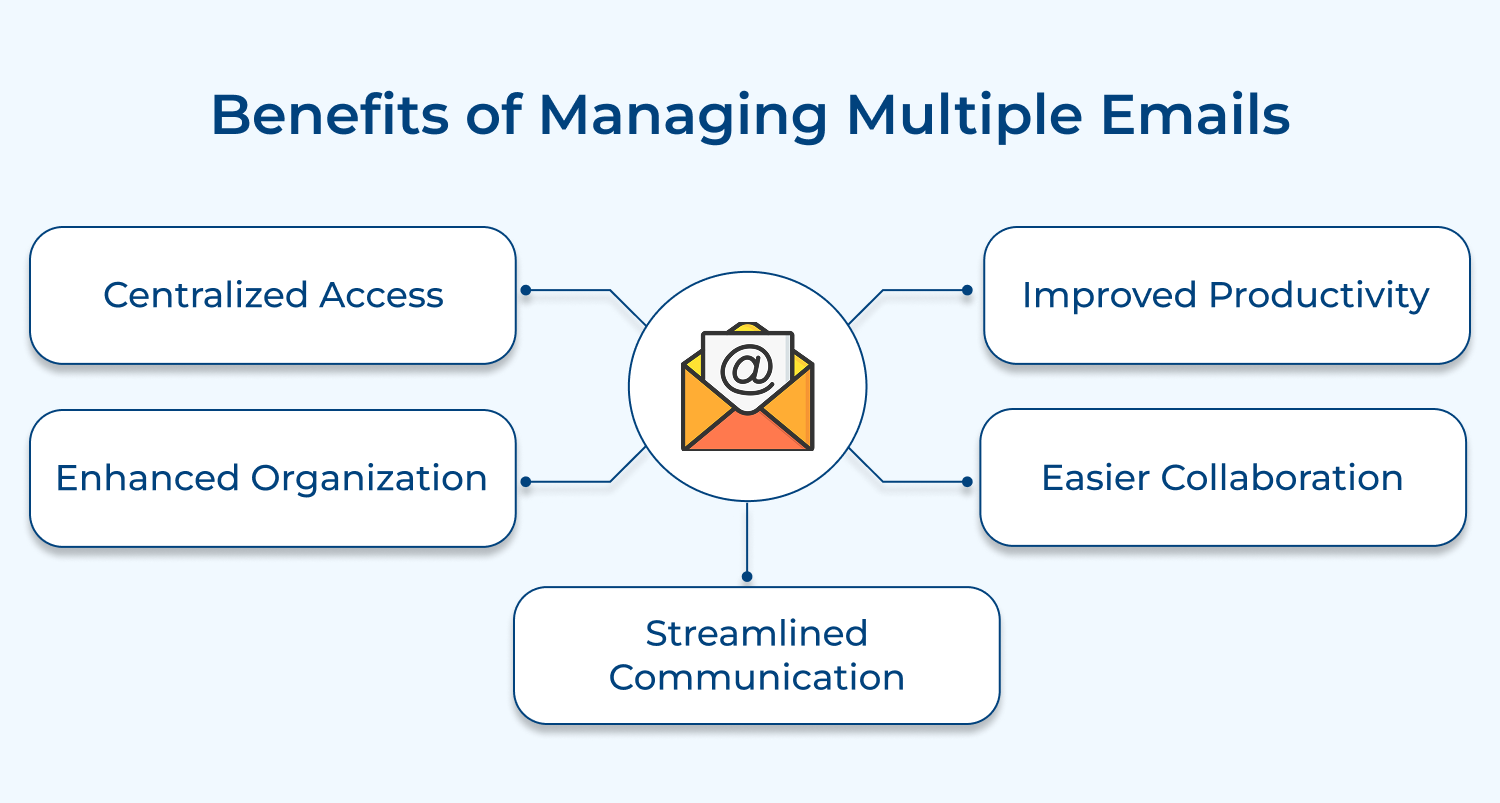
Consolidating multiple email accounts into a single platform can enhance efficiency and organization. Here are the key benefits of this approach:
1. Centralized Access
Managing multiple email accounts in one place allows users to access all their messages without switching between different platforms. The centralization simplifies the process of checking emails, making it easier to stay organized and ensuring that important communications are not missed.
2. Improved Productivity
With a unified inbox, users can streamline their workflow and reduce the time spent managing emails. This efficiency translates into better time management, allowing individuals to focus on more critical tasks rather than juggling multiple accounts throughout the day.
3. Enhanced Organization
Combining email accounts helps in organizing messages effectively. Users can create folders, labels, or tags to categorize emails, making it easier to retrieve information. A well-structured inbox ensures that important messages are prioritized and easily accessible.
4. Easier Collaboration
For teams, managing multiple email accounts in one platform enhances collaboration. Team members can easily share information as well as access shared email threads, ensuring everyone stays on the same page and improving overall communication within the organization.
5. Streamlined Communication
A single interface allows for seamless communication across different email addresses. Users can send and receive messages from multiple accounts without the hassle of logging in and out. It enhances collaboration and responsiveness with clients, colleagues, or customers.
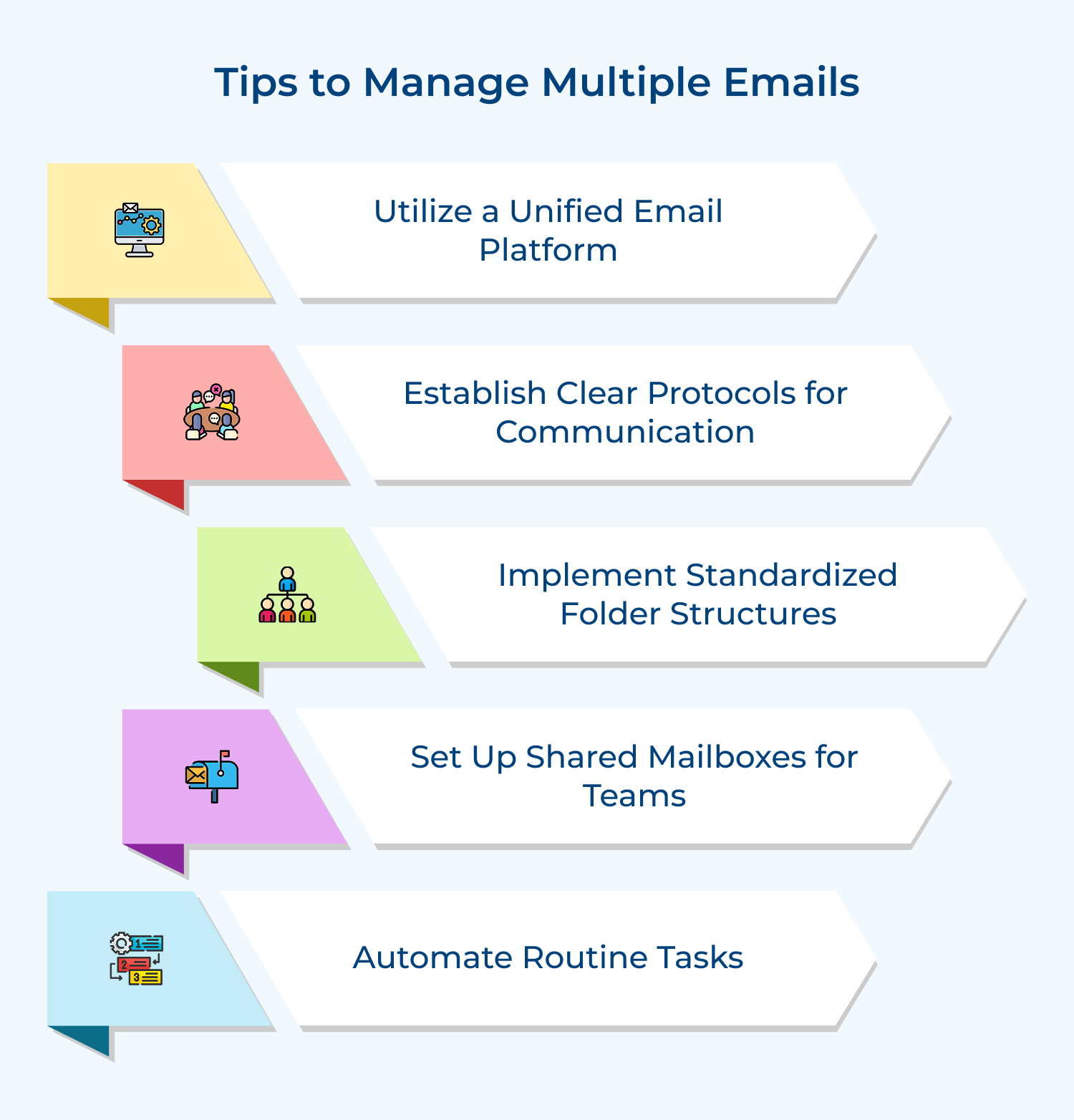
Managing multiple email accounts efficiently is essential for productivity. Here are some effective tips to simplify inbox organization and boost productivity:
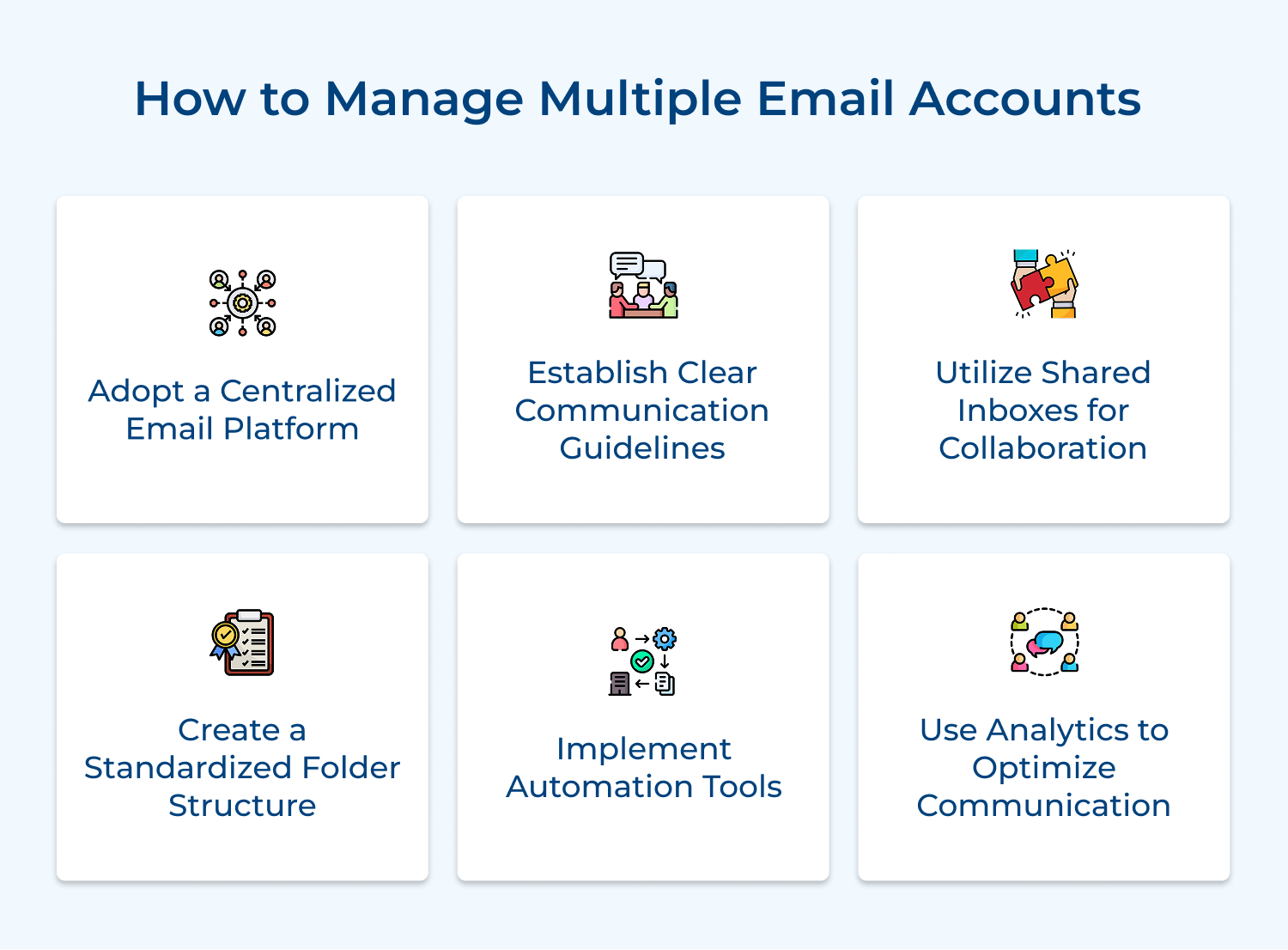
A centralized email platform consolidates multiple accounts into one interface, reducing the need to switch between different accounts or applications. It streamlines email management, saves time and ensures no important messages are missed.
Use email clients like Microsoft Outlook, Gmail, or Thunderbird that support multiple account integration. Set up each account within the platform, ensuring proper configuration for sending and receiving emails.
Pro Tips:
1. Choose a platform with strong security features and multi-factor authentication to protect all your email accounts.
2. Set up account-specific signatures to maintain distinct identities when replying from different email addresses.
3. Regularly review account settings to ensure optimal performance and security across all integrated accounts.
Clear communication guidelines ensure consistency in email management across multiple accounts. They help maintain professionalism, set expectations for response times, and define which accounts should be used for specific purposes.
Guidelines also assist in prioritizing emails, managing workload, and maintaining a healthy work-life balance when dealing with multiple accounts. Develop a set of rules for each email account, specifying its purpose, target audience, and response time expectations.
Pro Tips:
1. Create an email charter that outlines best practices for using each account and share it with relevant stakeholders.
2. Implement a triage system to categorize emails by urgency and importance across all accounts.
3. Set up auto-responders for each account to manage expectations about response times during busy periods or vacations.
Shared inboxes facilitate team collaboration on email management, particularly useful for customer service, sales, or project-specific email accounts.
They allow multiple team members to access and respond to emails from a single account, ensuring timely responses. Shared inboxes also provide transparency and help balance workload among team members.
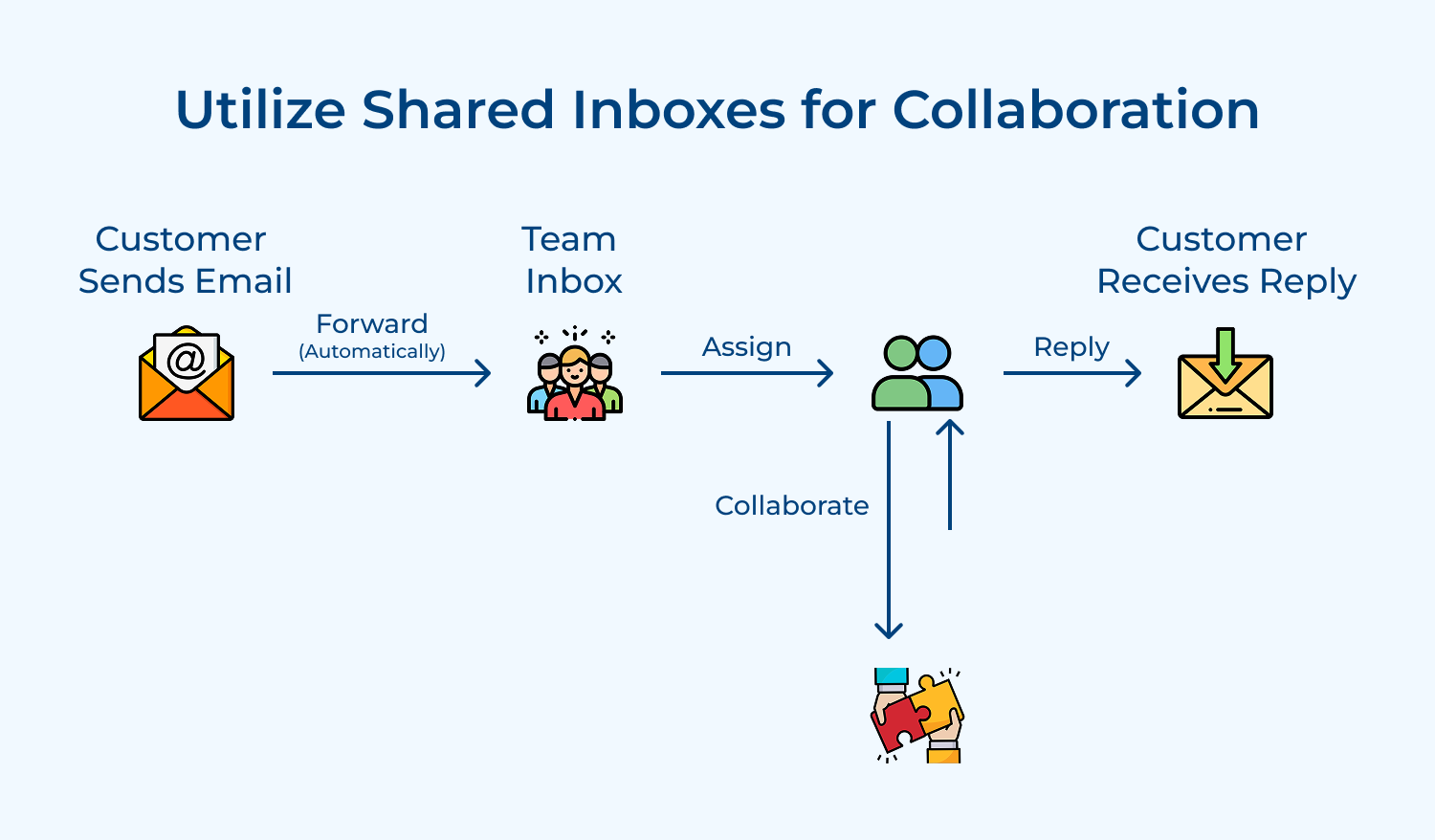
Implement shared inbox tools like Front, Hiver, or features within Gmail or Outlook. You can assign team members to specific shared inboxes based on their roles. Make use of features like assignment, internal notes, and status updates to coordinate responses. n.
Pro Tips:
1. Establish clear roles and responsibilities for each team member accessing the shared inbox to avoid confusion.
2. Use tagging or labeling systems within the shared inbox to categorize and prioritize incoming emails effectively.
3. Regularly review shared inbox performance metrics to identify areas for improvement in team collaboration and response times.
Having a standardized folder structure across multiple email accounts helps organize emails consistently, making it easier to manage information. It reduces clutter in the inbox, improves productivity by streamlining email filing and ensures important emails are properly archived.
A consistent structure also facilitates easier transitions between accounts and supports effective team collaboration. Design a folder hierarchy that works across all accounts, such as main categories (e.g., Projects, Clients, Personal) with subfolders as needed.
Pro Tips:
1. Create a template folder structure that can be easily replicated across new email accounts or for new team members.
2. Use rules or filters to automatically sort incoming emails into appropriate folders, reducing manual organization time.
3. Conduct periodic reviews of your folder structure to archive old emails and adjust categories as needed.
Automation tools help manage the high volume of emails across multiple accounts by reducing manual tasks. They can also respond to emails automatically, saving time and ensuring consistent handling of routine communications.
Automation also helps in maintaining organization, reducing human error, and allowing focus on more important or complex emails. Utilize built-in features like rules in Outlook or filters in Gmail to automatically sort and label incoming emails. Implement third-party tools like Zapier or IFTTT to create advanced workflows between your email and other applications.
Pro Tips:
1. Set up rules to automatically forward specific types of emails between accounts to ensure they reach the right inbox.
2. Use email templates and text expansion tools to quickly respond to common inquiries across multiple accounts.
3. Implement a system to automatically archive or delete old emails based on predefined criteria to maintain inbox organization.
Email analytics provide insights into communication patterns, response times and email volume across multiple accounts. This data helps identify areas for improvement, optimize workload distribution and enhance overall email management efficiency.
Analytics can reveal trends in customer communication, peak email times, and the effectiveness of different email strategies. Implement email analytics tools that can aggregate data from multiple accounts. Track metrics like response times, email volume by account or time period, and most frequent contacts.
Pro Tips:
1. Set up weekly or monthly analytics reports to track key performance indicators across all email accounts.
2. Use heatmaps or time analysis tools to identify peak email times and adjust resources accordingly.
3. Conduct A/B testing on email templates or subject lines using analytics to improve open and response rates.
Effectively managing multiple email accounts can enhance productivity and communication. Here are the best practices to streamline the process:
Juggling multiple email accounts can be daunting for businesses. Here are the key challenges organizations face in this process:
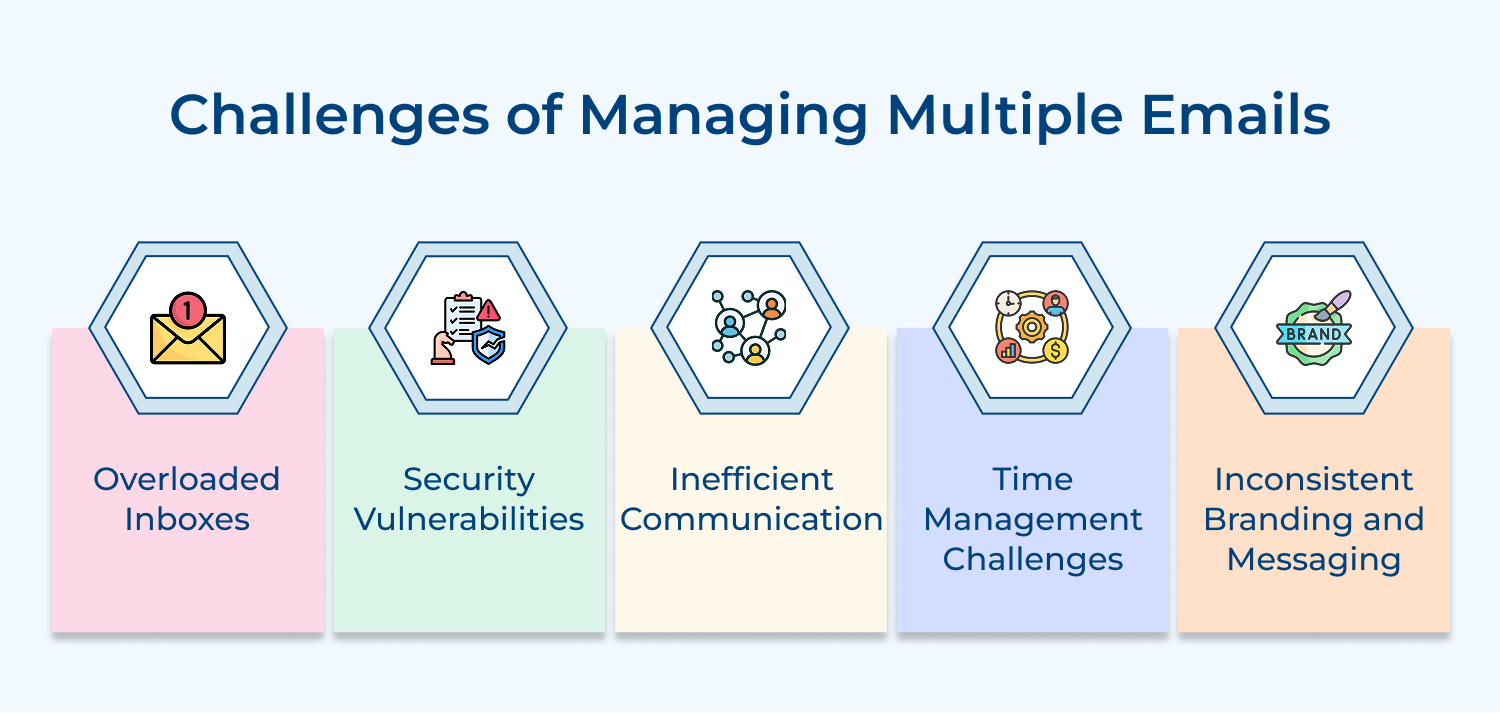
1. Overloaded Inboxes
Managing multiple email accounts can result in overloaded inboxes, making it challenging for employees to prioritize tasks and respond promptly. This clutter can lead to missed deadlines and important communications.
Solution: Implement a unified email management system that consolidates all accounts. Utilize folders and tags to categorize emails based on urgency and project, enabling quick access to critical information.
2. Security Vulnerabilities
Having multiple email accounts increases the risk of security breaches, particularly if employees use weak passwords or fail to update them regularly. This can expose sensitive company information.
Solution: Establish a robust security protocol that includes strong, unique passwords for each account and mandatory two-factor authentication. Conduct regular training sessions on recognizing phishing attempts and safeguarding email accounts to enhance overall security.
3. Inefficient Communication
Multiple accounts can lead to fragmented communication, causing confusion among team members about which account to use for specific discussions. Important messages may be overlooked.
Solution: Standardize communication practices by defining specific purposes for each email account. Create shared inboxes for team projects, ensuring all relevant members have access to necessary communications and fostering collaboration.
4. Time Management Challenges
Frequent switching between different email accounts can disrupt workflow and lead to inefficiencies, as employees may struggle to focus on their primary tasks.
Solution: Encourage a structured approach by scheduling dedicated times to check each account rather than continuously monitoring emails. This method helps maintain focus and improves productivity by reducing distractions.
5. Inconsistent Branding and Messaging
Using multiple email accounts can lead to inconsistent messaging and branding, negatively impacting the company’s professional image. Employees may use varied tones and styles.
Solution: Develop clear guidelines outlining how each account should be used, including templates for standard responses. Regular training on branding consistency helps ensure that all communications reflect the company’s values and voice.
Effectively managing multiple email accounts is vital for any business aiming to enhance communication and streamline workflows. Shared inboxes promote collaboration, allowing teams to access and respond to customer inquiries collectively, ensuring no message goes unnoticed. Transparency fosters accountability and speeds up response times, improving customer satisfaction.
Shared inboxes enable better organization of communications, allowing team members to categorize and prioritize emails effectively. Implementing unified platforms and establishing clear protocols helps maintain a consistent brand voice while safeguarding sensitive information. Mastering email management empowers teams to focus on strategic initiatives, driving success in a competitive landscape.

Why do people use multiple email accounts?
People often use multiple email accounts to separate personal and professional communications, maintain privacy, organize different types of messages (e.g., newsletters, social media notifications), or access different services. Having dedicated accounts for specific purposes can help compartmentalize and manage email more effectively.
What are the possible drawbacks of having more than one email account?
Possible drawbacks of maintaining multiple email accounts include the time & effort required to monitor and manage them, potential confusion or missed messages if not checked regularly, and an increased risk of security breaches if strong, unique passwords are not used for each account.
What options are there to make managing email accounts more effective?
To make managing multiple email accounts more efficient, consider using an email client that supports multiple accounts, setting up email forwarding to consolidate messages, using filters and labels to automatically organize emails, and establishing a regular schedule for checking messages across all accounts.
What is the best way to manage multiple email accounts?
The best way to manage multiple email accounts depends on individual needs and preferences. Some effective strategies include using a unified inbox to view all messages in one place, setting up distinct notification sounds or alerts for each account, and regularly reviewing and updating account settings and security measures.
 https://omni24.io/wp-content/uploads/2026/09/Social-commerce-scaled.png
1340
2560
Webvision Solution
https://omni24.io/wp-content/uploads/2023/04/Omni-Logo-1.svg
Webvision Solution2026-10-23 12:18:272026-10-23 12:18:27What is Social Commerce and Why Does It Matter?
https://omni24.io/wp-content/uploads/2026/09/Social-commerce-scaled.png
1340
2560
Webvision Solution
https://omni24.io/wp-content/uploads/2023/04/Omni-Logo-1.svg
Webvision Solution2026-10-23 12:18:272026-10-23 12:18:27What is Social Commerce and Why Does It Matter? https://omni24.io/wp-content/uploads/2026/08/AI-Customer-Service-Agents.png
1256
2400
Webvision Solution
https://omni24.io/wp-content/uploads/2023/04/Omni-Logo-1.svg
Webvision Solution2026-09-21 04:48:512026-09-21 04:48:51How to Build an AI Customer Service Agents: 8 Key Steps
https://omni24.io/wp-content/uploads/2026/08/AI-Customer-Service-Agents.png
1256
2400
Webvision Solution
https://omni24.io/wp-content/uploads/2023/04/Omni-Logo-1.svg
Webvision Solution2026-09-21 04:48:512026-09-21 04:48:51How to Build an AI Customer Service Agents: 8 Key Steps https://omni24.io/wp-content/uploads/2026/08/Omnichannel-Conversational-AI.png
1256
2400
Tushar Joshi
https://omni24.io/wp-content/uploads/2023/04/Omni-Logo-1.svg
Tushar Joshi2026-09-16 03:51:072026-09-16 03:51:07How to Build Omnichannel Conversational AI Strategy
https://omni24.io/wp-content/uploads/2026/08/Omnichannel-Conversational-AI.png
1256
2400
Tushar Joshi
https://omni24.io/wp-content/uploads/2023/04/Omni-Logo-1.svg
Tushar Joshi2026-09-16 03:51:072026-09-16 03:51:07How to Build Omnichannel Conversational AI Strategy
Whether it’s about acquire, engage or support – Omni24 covers all your customer engagement needs in one complete platform.

Copyright ©2026 Veemo All rights reserved.
CA, Los Angeles, Hall Ave, 19011