Top 10 Customer Service KPIs & Metrices You Need to Track
Customer service KPIs track metrics tied directly to satisfaction, issue resolution and overall customer experience.

Customer service KPIs track metrics tied directly to satisfaction, issue resolution and overall customer experience.
Customer support is an essential aspect of any business, as it directly impacts customer satisfaction and retention. Measuring customer service performance will be difficult without proper Key Performance Indicators (KPIs) in place.
Customer service KPIs and metrics provide valuable insights into how well your team is meeting customer needs and resolving issues. It is crucial to leverage the right KPIs and metrics. These metrics provide valuable insights into the effectiveness of your support team, allowing you to make data-driven decisions.
Let us explore the key customer support KPIs & metrics you should be measuring and how they can help you deliver exceptional service.
A customer support KPI or metric is essentially your way of measuring how well your support team performs for customers. Think of it like a report card that shows specific numbers about response times and satisfaction levels. These measurements help you understand whether customers are getting the help they need quickly and effectively.
Customer support metrics work by tracking specific activities and outcomes in your support system every day. Your helpdesk software automatically collects data when agents respond to tickets and when customers rate their experience. The system then calculates averages and percentages to show patterns over time.
Key Objectives:
Customer support KPI metrics help businesses analyze customer relations by considering their overall journey. When a business knows how to analyze customer data, it can get better insights into customer preferences.
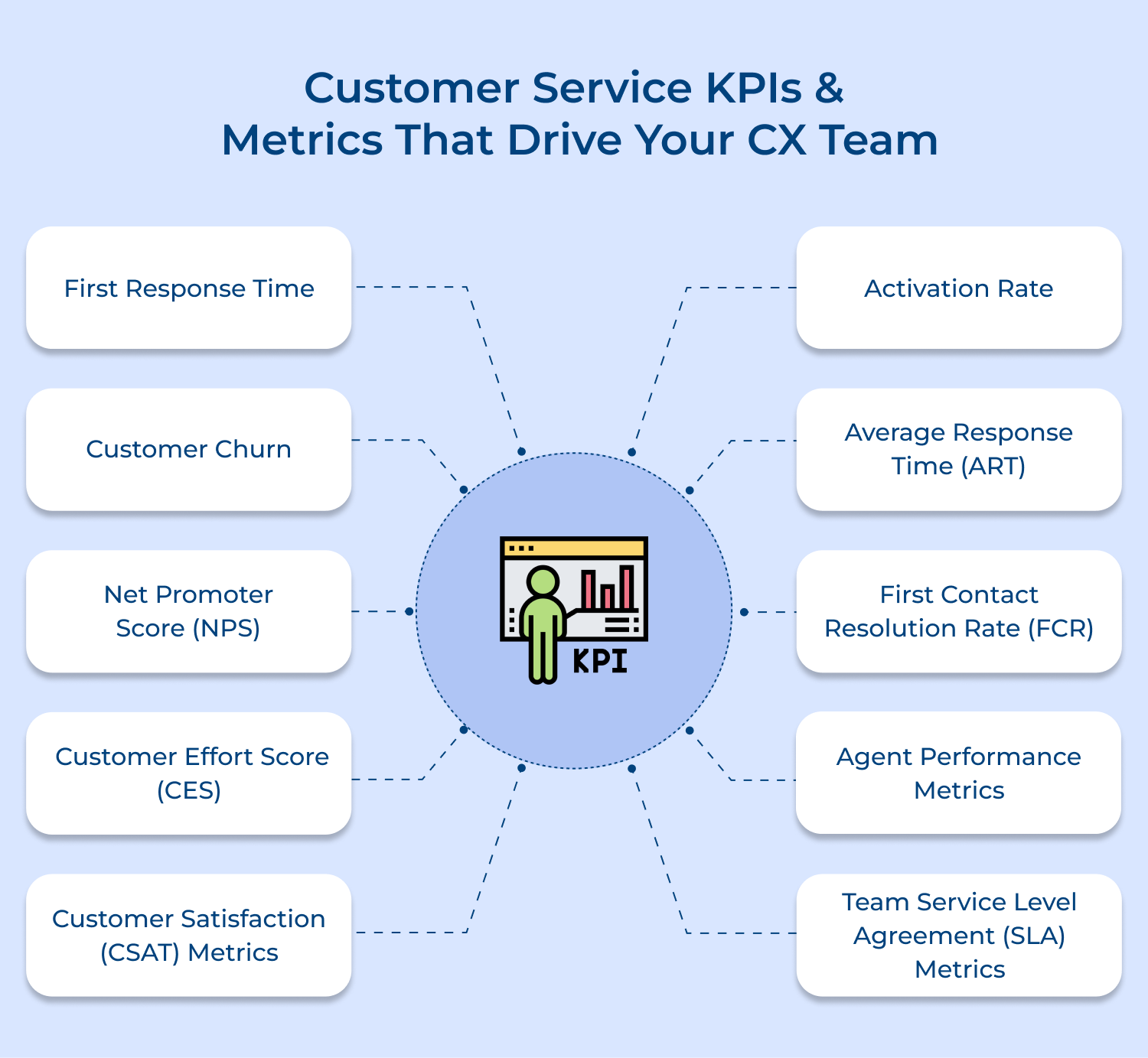
First response time (FRT) is all about how long it takes a customer service representative to respond to a support ticket once a customer submits it.
The customer service KPI indicates how well your agents can handle multiple tickets at once as well as their efficiency in managing fluctuating ticket volumes.
To calculate this metric, add all the time your support reps took to respond to tickets and divide that by the total number of tickets.
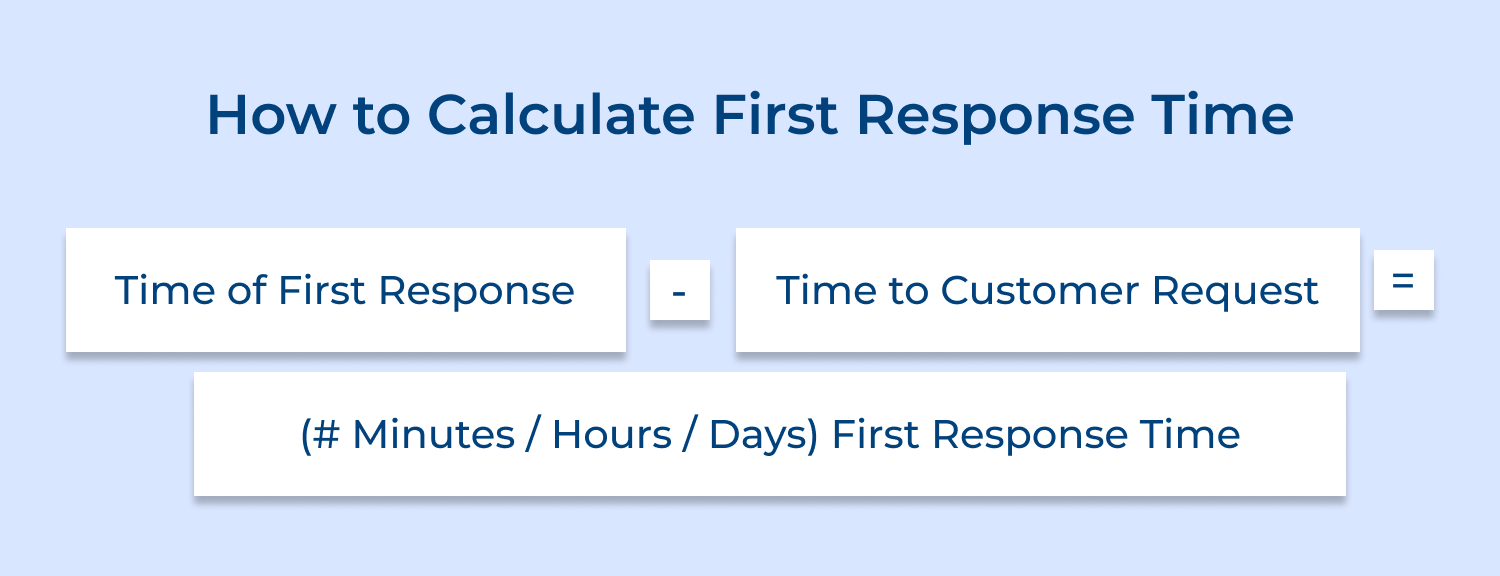
For example, let’s say employee A took 20 seconds to respond to a ticket, employee B took 15 seconds and employee C took 30 seconds. The first response time would be 65 seconds divided by three, or 21.67 seconds.
A great way to get an insight into the quality and experience you are providing to your customers is by asking them how they feel about your product/services. E.g.
Are your products living up to their expectations?
Is your support measuring up to their expectations?
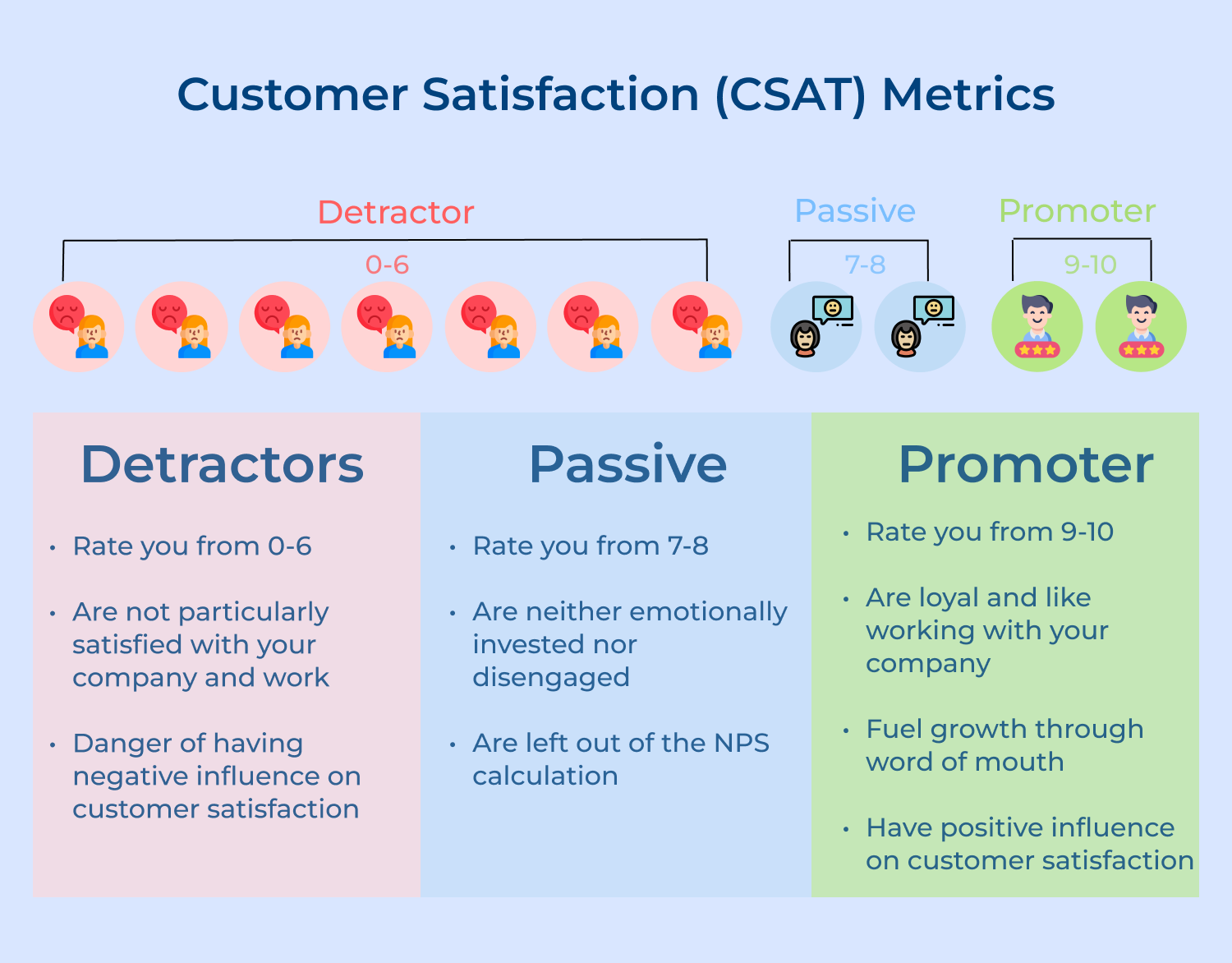
Customer satisfaction metrics just help you do that. The CSM is a way to ask customer feedback on a scale of 1 to 10 and depending on the score you receive you can measure your performance.
Pro tips
NPS helps to understand the overall health of your customer service – How satisfied consumers are with your product/services and how likely they are going to recommend it to others?
NPS surveys can be sent across any communication platform like email, live chat messages, web pages, etc. NPS lets you collect customer feedback across customer journeys and helps to predict the next move your customer is likely to take.
How does NPS work?
You can find out your NPS with the help of the key question with an index on a scale from 1 to 10. “How likely is it that you would refer to the brand?”
Customer responses can be categorized into three categories:
How to calculate NPS score?
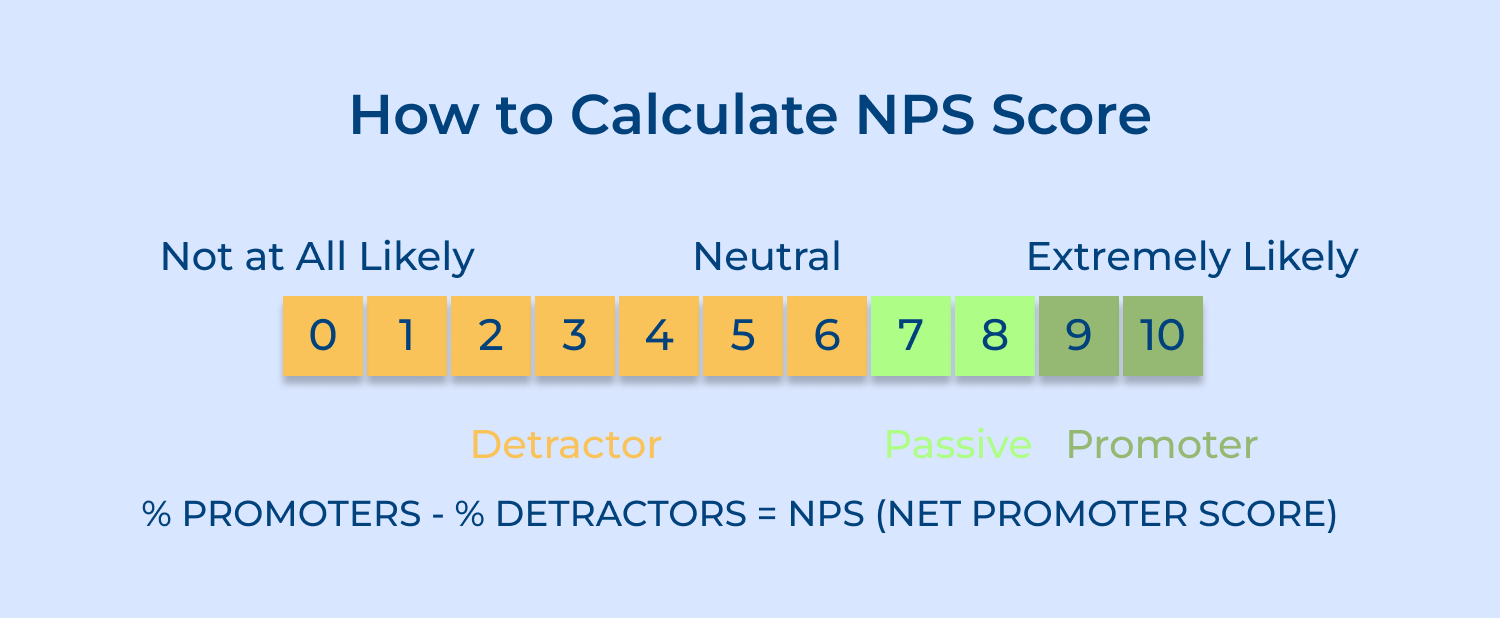
It is calculated by taking the percentage of promoters (9-10) out of the total respondents and subtracting it from the detractors (0-6).
Pro tips
Customer Effort Score (CES) is a customer experience metric that measures how easy it is for a customer to do business with you via a CES survey. The goal of CES is to create effortless experiences for your customers.
You can ask customers to evaluate their experience with your products and services.
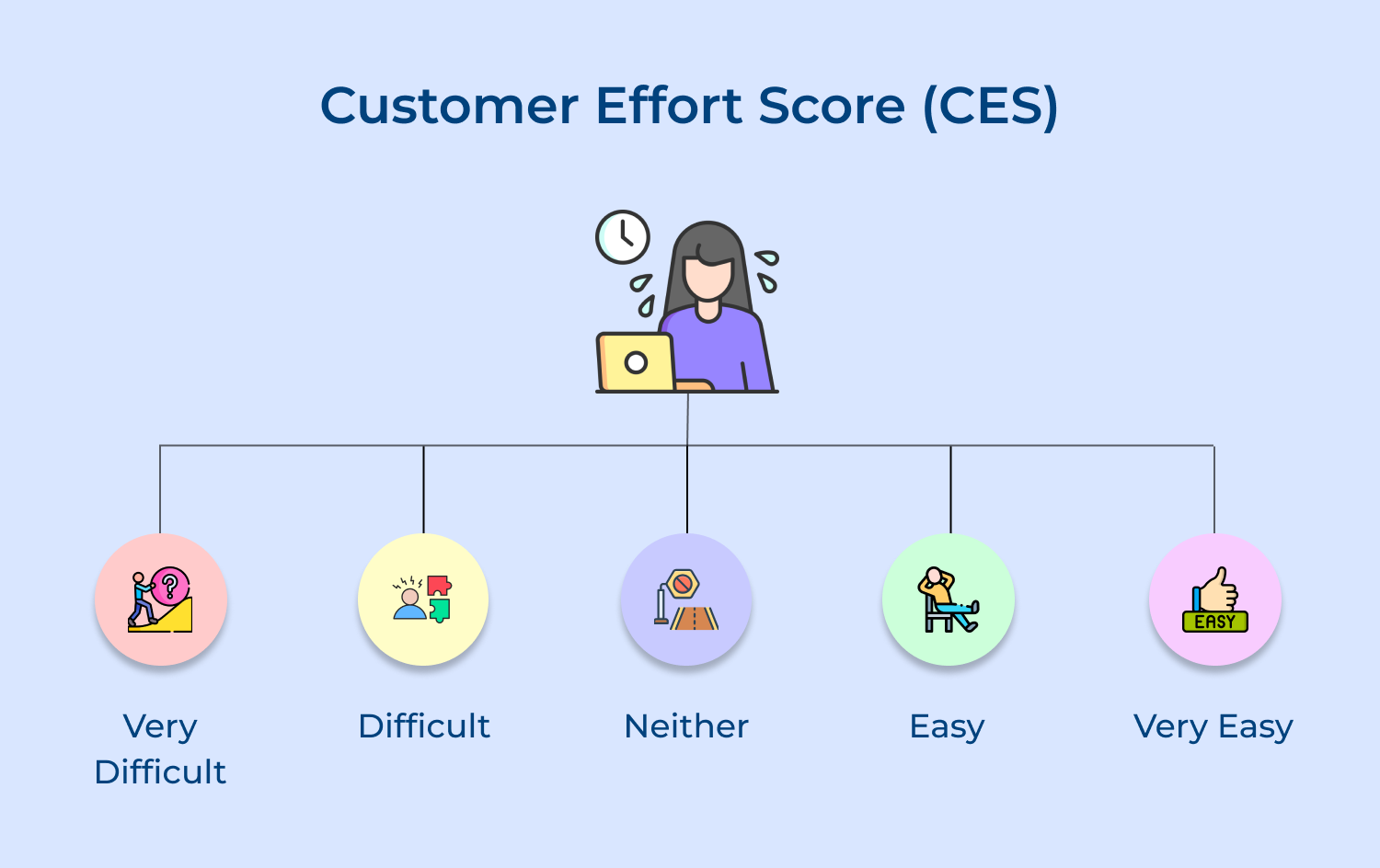
The customers will rate you on a scale of 1-5 based on how much effort it takes to complete a transaction, resolve a support issue and otherwise interact with your company/product online or in person.
Pro tips
The activation rate support KRI is defined as “when a visitor or prospect takes a specific action to become an active user”.
Activation can be anything that includes customer interactions with your brand, such as time on a website, pages viewed, downloads, subscriptions, or even trial signups.
How to calculate the Activation Rate?
(#) of user sessions / (#) activities completed by users = (%) Activation Rate
Pro tips
59% of customers are likely to buy when brands answer their queries in under a minute.
Getting connected to an agent immediately definitely helps to improve the customer experience.
Measure the average response time during a selected period and segment them based on low, medium and high priority. It will give you an insight into your agent’s actual performance and ensure you don’t lose on your valuable clients.
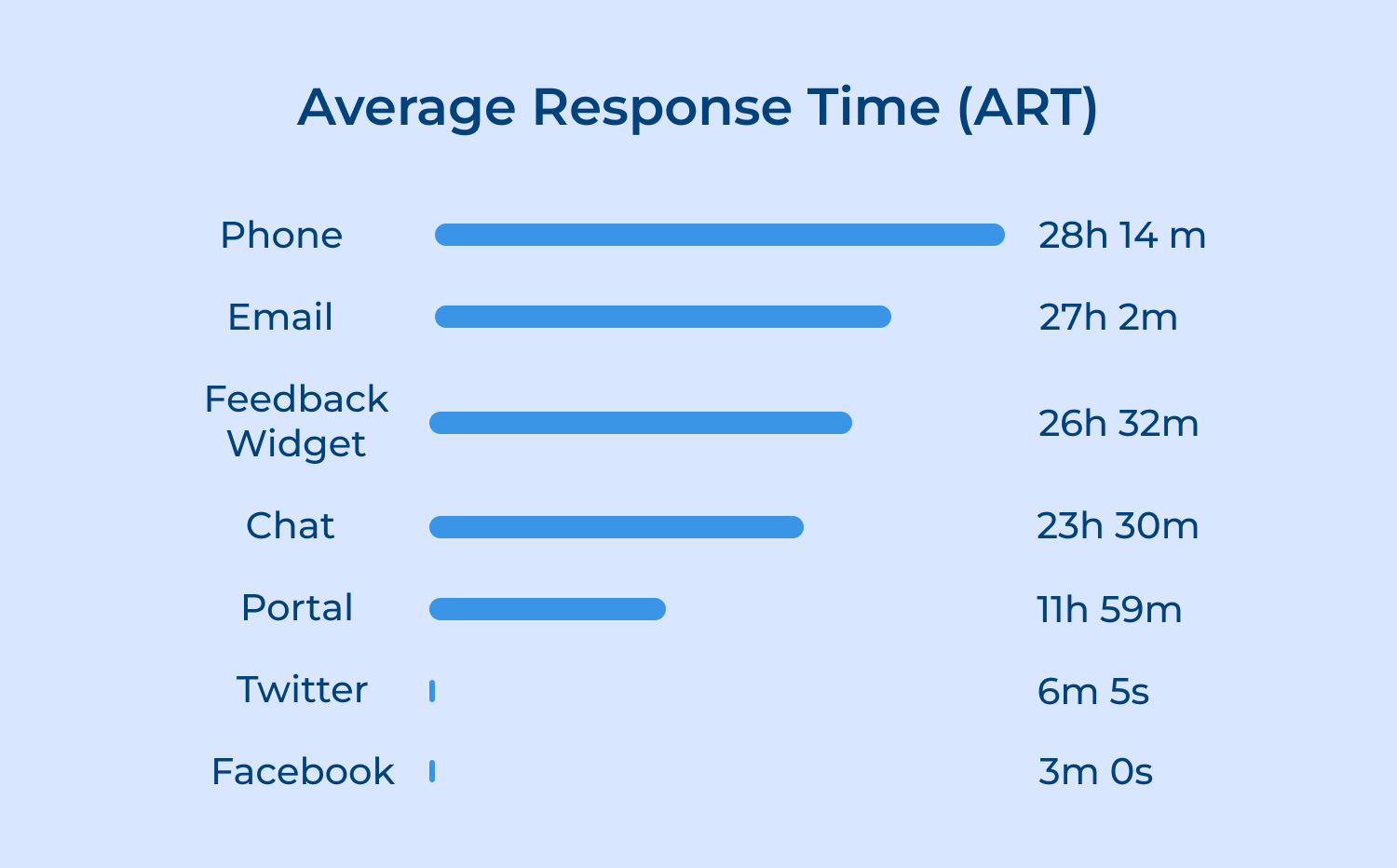
The total number of responses sent in that selected time period.
Average response time = Total time taken to respond during the selected time period/number of responses in the selected time period.
Pro tip
First Contact Resolution measures the percentage of customer issues resolved during the initial contact with the support team. It reflects the ability of customer service representatives to address client’s problems effectively without the need for additional follow-up or escalations.
First Contact Resolution Formula = (number of support issues resolved on first contact) / (total number of FCR-eligible support issues)
Pro tips
Customer churn rate is the percentage of customers who stop doing business with your company over time. There are several ways of calculating churn rate:
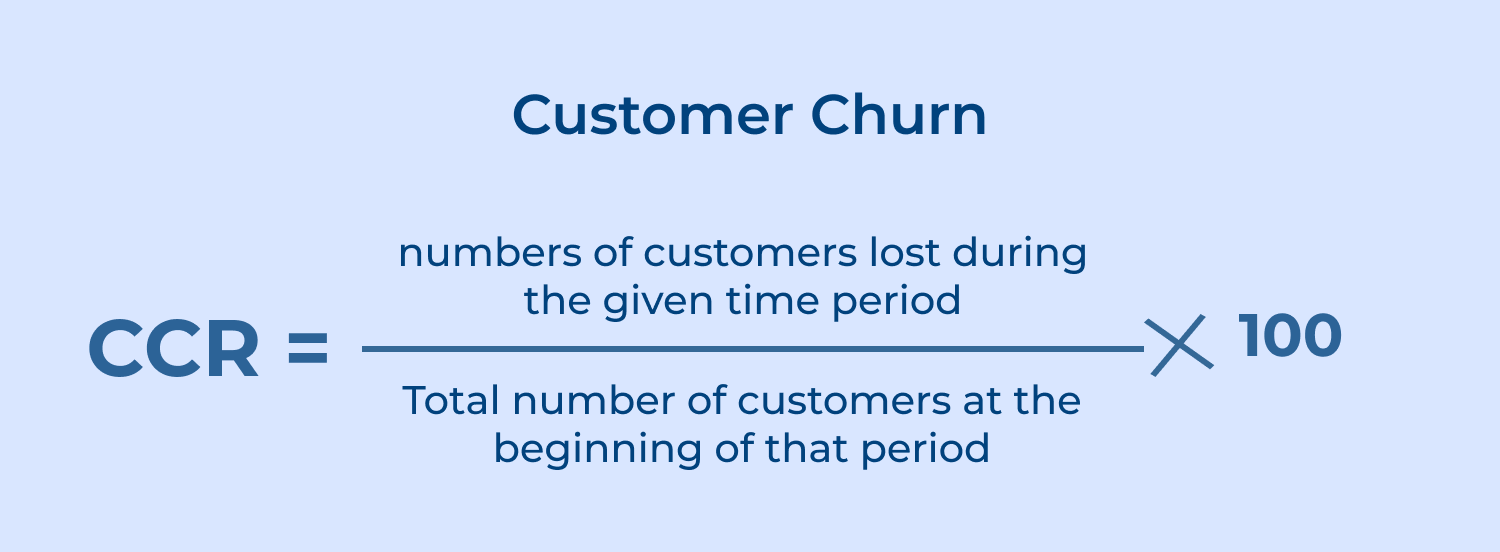
Customer churn rate = (Customers lost during a period / Total number of customers at the start of a period) x 100
The well-known customer service KPI measures the efficiency of the support team or agents in handling customer queries. Measuring the metric helps businesses identify high-performing agents, areas for improvement and training needs.
Agent utilization rate indicates the percentage of time the agent is busy taking up customer calls for support and providing effective resolution for their issues.
Pro tips
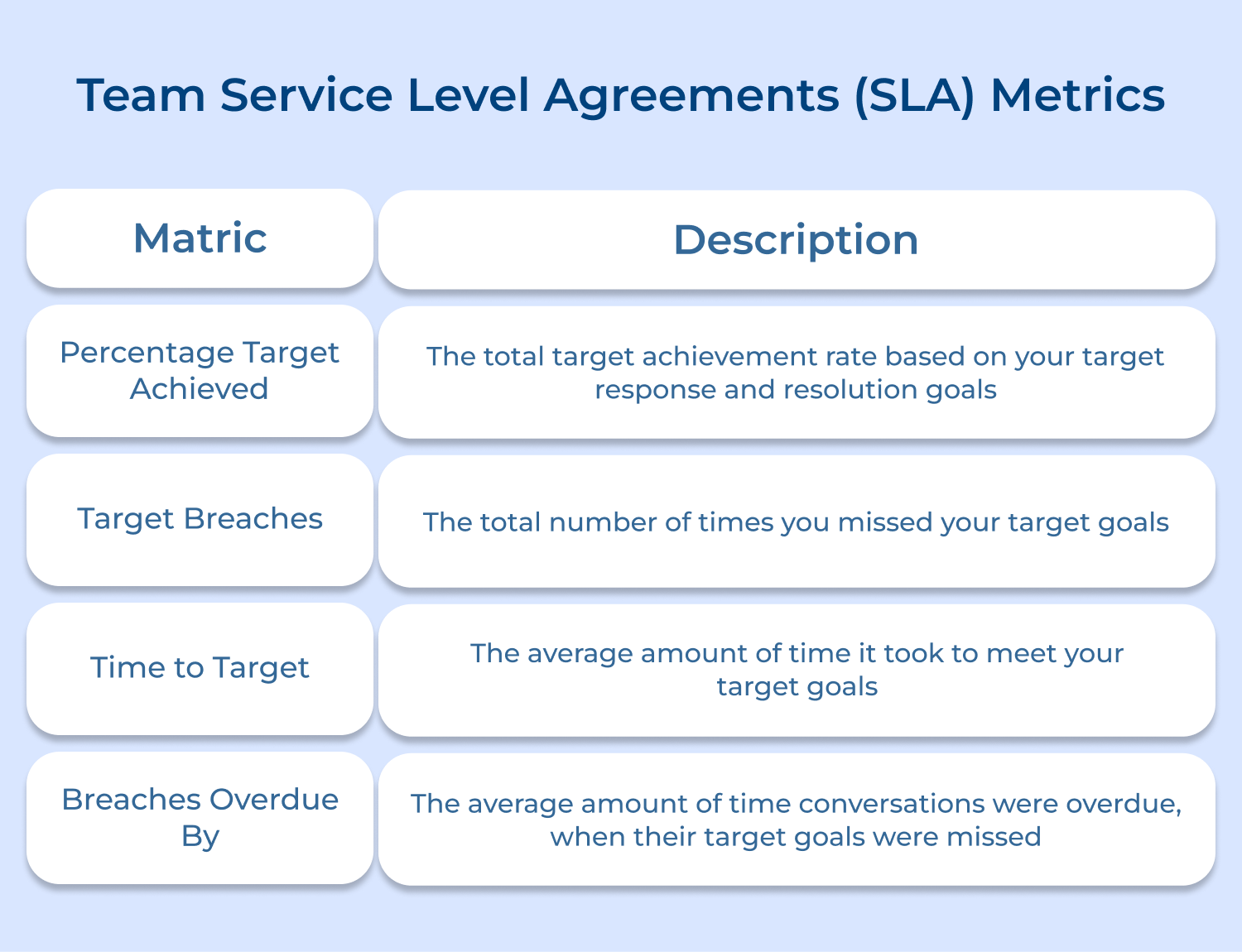
An SLA helps you set a benchmark for your team so that you can fully optimize your current resources. It is a contract between your support team and customers to deliver services upon the agreed terms.
SLA mainly includes the measure of response and resolution time that your support team is supposed to deliver. Using SLA metrics you can highlight the tickets that fail to meet service level targets.
Pro tips
Interpreting and analyzing these metrics can be a complex task. Here are 10 best practices for interpreting and analyzing customer service metrics to help you navigate the process.
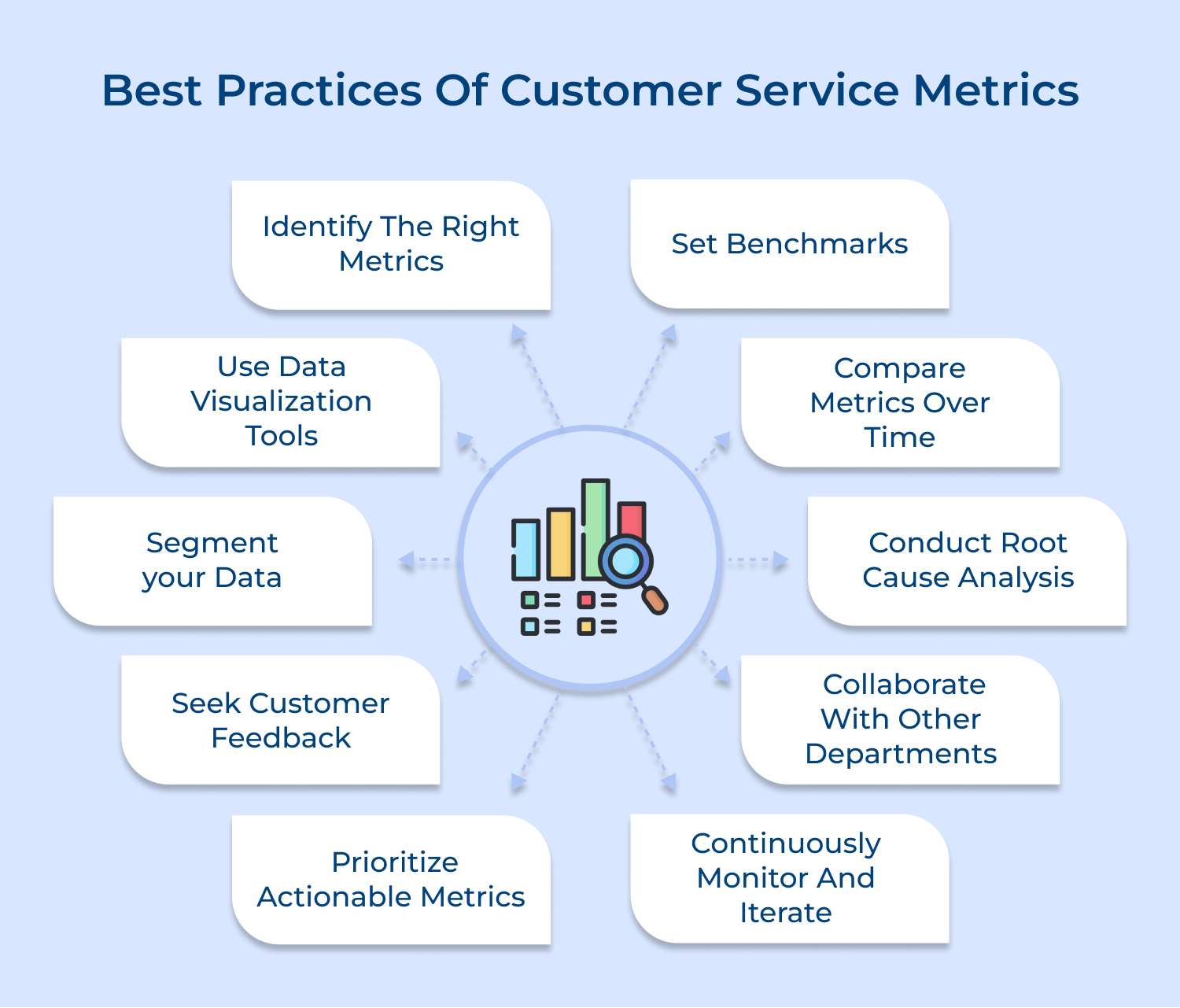
1. Identify the right metrics: Start by defining the key metrics that are most relevant to your business. These could include metrics like customer satisfaction scores, response time, resolution rate and customer retention.
2. Set benchmarks: Establish benchmarks for each metric to serve as a comparison point. These benchmarks can be based on industry standards, previous performance, or your competitors’ performance.
3. Use data visualization tools: Utilize data visualization tools to present your metrics in a clear and easily understandable way. Visualizations such as charts, graphs and dashboards can help you identify trends.
4. Segment your data: Break down your metrics by different customer segments to gain deeper insights. Analyzing data at this level can help you target specific groups with tailored customer service initiatives.
5. Conduct root cause analysis: If you notice a decline in a specific metric, dig deeper to understand the underlying causes. Conduct root cause analysis to identify any underlying issues or trends that may be impacting customer service performance.
6. Seek customer feedback: Metrics alone may not provide a complete picture of customer satisfaction. Complement your data analysis with customer feedback, such as surveys or feedback forms, to gain qualitative insights and understand the “why” behind the numbers.
7. Collaborate with other departments: Customer service metrics can provide valuable insights to other departments such as product development or marketing. Collaborate with other teams to share your findings and contribute to overall business improvement.
Measuring customer service with key performance indicators gives you real-time visibility on what’s going on in terms of your support operations. Customer service metrics not only help you score your agent’s performance but also help you to be sensitive towards customer service processes and implement strategies that scale your business.
Continuously monitoring and striving to improve these metrics can lead to streamlined support processes as well as a more effective support team. Whether you are a small business or a large organization, implementing a customer support metrics dashboard can streamline your support operations and enhance customer satisfaction.
Read more: Poor metrics usually come from hidden workflow issues—discover key customer service challenges that affect support performance.

Why are customer support metrics and KPIs important?
Customer support metrics and KPIs serve as your operational compass, providing measurable insights into service quality, team performance, and customer satisfaction levels. They enable data-driven decision making, help identify improvement opportunities, justify resource allocation, track progress toward business goals, and demonstrate the support team’s tangible impact on overall customer retention and company revenue growth.
What are some common customer support metrics and KPIs?
Essential metrics include First Response Time, Resolution Time, Customer Satisfaction Score (CSAT), Net Promoter Score (NPS), Ticket Volume, First Contact Resolution Rate, Agent Utilization Rate, Customer Effort Score (CES), Escalation Rate, and Cost Per Ticket. These metrics provide comprehensive coverage across efficiency, quality, productivity, and customer experience dimensions for complete performance assessment.
How should I choose the right customer support metrics and KPIs for my business?
Carefully align metrics with your specific business objectives and customer expectations. Consider industry standards, company size, support channels, and available resources. Start with fundamental metrics like response time and satisfaction scores, then gradually add specialized ones based on identified pain points. Ensure selected metrics are actionable, measurable, and directly relevant to your strategic goals and customer experience priorities.
How often should I track customer support metrics and KPIs?
Track real-time metrics like queue length and response times continuously for immediate operational decisions. Monitor weekly metrics such as resolution rates and agent performance for tactical adjustments. Review monthly and quarterly trends for strategic planning purposes. Critical metrics should have daily dashboards for quick monitoring, while comprehensive performance analysis typically occurs monthly or quarterly depending on business needs.
What tools can I use to track customer support metrics and KPIs?
Popular comprehensive platforms include Zendesk, Freshdesk, ServiceNow, Help Scout, Intercom, and Salesforce Service Cloud for complete tracking capabilities. Advanced analytics tools like Google Analytics, Tableau, and Power BI provide deeper insights. Many platforms offer built-in reporting dashboards, automated alerts, and seamless integration capabilities with CRM systems for holistic customer journey insights and comprehensive performance monitoring.
How can you improve customer support metrics and KPIs?
Implement comprehensive agent training programs focusing on soft skills and product knowledge, streamline processes through intelligent automation, create detailed self-service knowledge bases, optimize ticket routing systems for efficiency, and establish clear escalation procedures. Regularly analyze performance data to identify bottlenecks, actively gather customer feedback for actionable insights, invest in modern tools and technologies, and foster a culture of continuous improvement within teams.
How often should you review customer support metrics and KPIs?
Conduct daily operational reviews for immediate issue resolution and team coordination, weekly performance assessments for individual agent management and coaching opportunities, and monthly strategic evaluations for comprehensive process improvements. Quarterly reviews should thoroughly assess goal alignment and metric relevance to business objectives. Annual comprehensive reviews help evaluate overall strategy effectiveness and determine whether current metrics still appropriately serve evolving business objectives.
 https://omni24.io/wp-content/uploads/2026/08/Enterprise-Customer-Engagement.png
1256
2400
Tushar Joshi
https://omni24.io/wp-content/uploads/2023/04/Omni-Logo-1.svg
Tushar Joshi2026-09-02 05:29:412026-09-02 05:29:41How to Scale Enterprise Customer Engagement Strategies
https://omni24.io/wp-content/uploads/2026/08/Enterprise-Customer-Engagement.png
1256
2400
Tushar Joshi
https://omni24.io/wp-content/uploads/2023/04/Omni-Logo-1.svg
Tushar Joshi2026-09-02 05:29:412026-09-02 05:29:41How to Scale Enterprise Customer Engagement Strategies https://omni24.io/wp-content/uploads/2026/08/Client-vs-Customer.png
1256
2400
Tushar Joshi
https://omni24.io/wp-content/uploads/2023/04/Omni-Logo-1.svg
Tushar Joshi2026-09-01 03:57:222026-09-01 03:59:31Client vs Customer: What’s the Difference & Why Does it Matter?
https://omni24.io/wp-content/uploads/2026/08/Client-vs-Customer.png
1256
2400
Tushar Joshi
https://omni24.io/wp-content/uploads/2023/04/Omni-Logo-1.svg
Tushar Joshi2026-09-01 03:57:222026-09-01 03:59:31Client vs Customer: What’s the Difference & Why Does it Matter? https://omni24.io/wp-content/uploads/2026/08/Benefits-of-Conversational-AI.png
1256
2400
Webvision Solution
https://omni24.io/wp-content/uploads/2023/04/Omni-Logo-1.svg
Webvision Solution2026-08-31 04:29:522026-08-31 04:29:52Benefits of Conversational AI: What You Should Know
https://omni24.io/wp-content/uploads/2026/08/Benefits-of-Conversational-AI.png
1256
2400
Webvision Solution
https://omni24.io/wp-content/uploads/2023/04/Omni-Logo-1.svg
Webvision Solution2026-08-31 04:29:522026-08-31 04:29:52Benefits of Conversational AI: What You Should Know
Whether it’s about acquire, engage or support – Omni24 covers all your customer engagement needs in one complete platform.

Copyright ©2026 Veemo All rights reserved.
CA, Los Angeles, Hall Ave, 19011