How CRM Technology Enhances Customer Relationships?
CRM technology centralizes customer data, automates tasks and provides insights. It helps businesses improve relationships, efficiency and long-term growth.

CRM technology centralizes customer data, automates tasks and provides insights. It helps businesses improve relationships, efficiency and long-term growth.
Many businesses struggle to manage customer relationships and deliver personalized experiences, which leads to missed opportunities as well as lower satisfaction.
A CRM system fixes that by centralizing customer data so every interaction, preference and purchase history is easy to access.
Modern CRM tools boost customer retention by about 27% and improve lead conversion significantly, while most companies report better customer satisfaction after adoption. By using CRM to tailor communication and anticipate needs, businesses build stronger relationships, enhance satisfaction while driving growth.
Customer Relationship Management (CRM) technology is a comprehensive software solution that helps organizations manage, analyze and improve their interactions with customers throughout the entire customer lifecycle. It serves as a centralized platform that combines customer data, sales tracking, marketing automation and service management into one integrated system.
In an era where customer experience is a key differentiator, CRM systems enable organizations to deliver personalized interactions at scale. These platforms help businesses maintain a competitive edge by providing real-time insights into customer behavior, preferences and needs.
Key objectives:
CRM technology makes it easier to stay on top of customer relationships as your business grows. Let’s explore how it benefits your company:
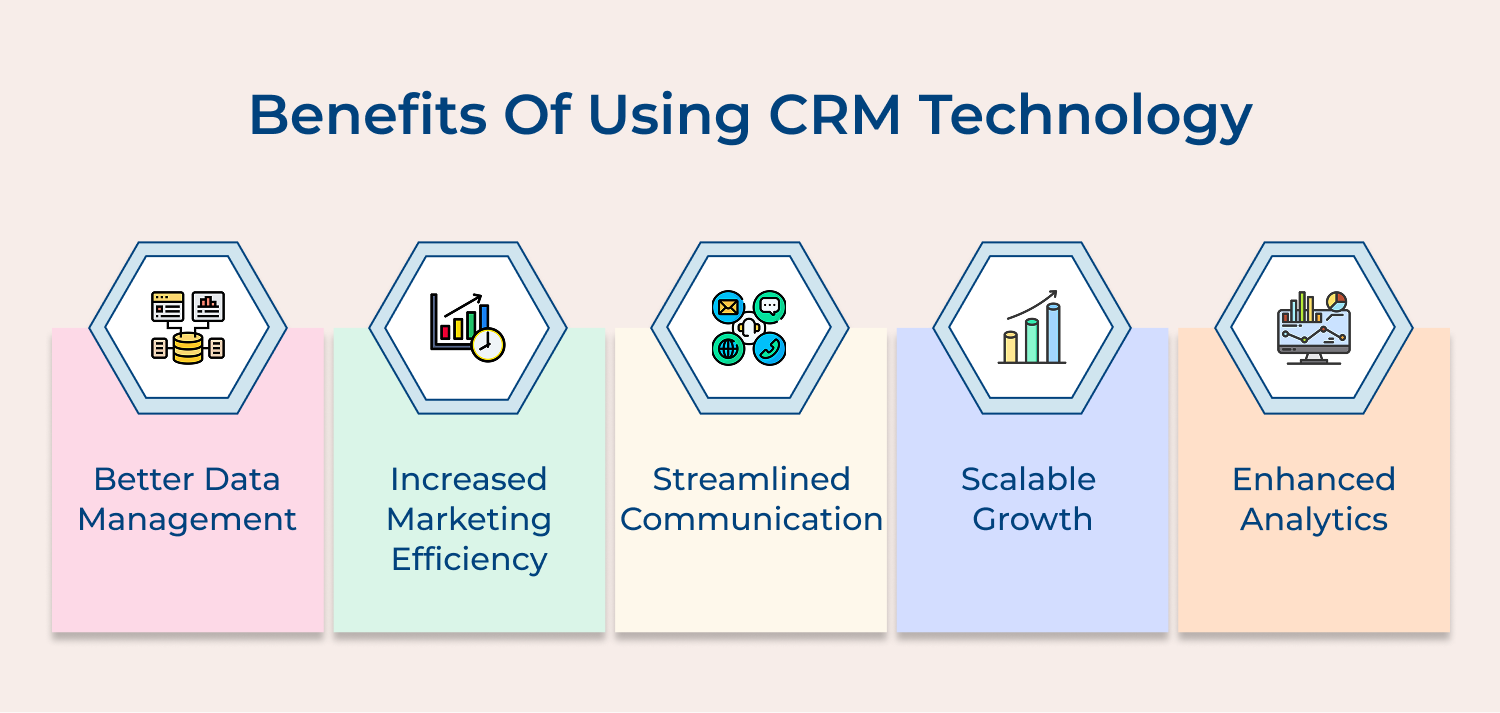
Better Data Management
CRM platforms centralized customer data in one secure location, eliminating information silos and reducing data duplication. This ensures all departments work with accurate, up-to-date information, leading to more informed business decisions.
Increased Marketing Efficiency
Marketing teams can segment audiences precisely, create targeted campaigns and track their effectiveness in real-time. CRM systems enable automated marketing workflows, personalized communication and detailed analytics for measuring campaign ROI.
Streamlined Communication
Internal communication improves as teams can share notes, updates and customer interactions seamlessly. The collaboration provides consistent messaging across all customer touchpoints and reduces miscommunication between departments.
Scalable Growth
CRM technology adapts to growing business needs, handling increasing customer volumes without compromising service quality. It provides scalable solutions for managing relationships as your customer base expands.
Enhanced Analytics
Advanced reporting and analytics tools provide valuable insights into customer behavior, sales trends as well as business performance. These insights help organizations make data-driven decisions and identify areas for improvement.
CRM technology comes in different forms, each designed to support specific business goals and customer needs. Understanding these CRM types helps you choose the right approach.
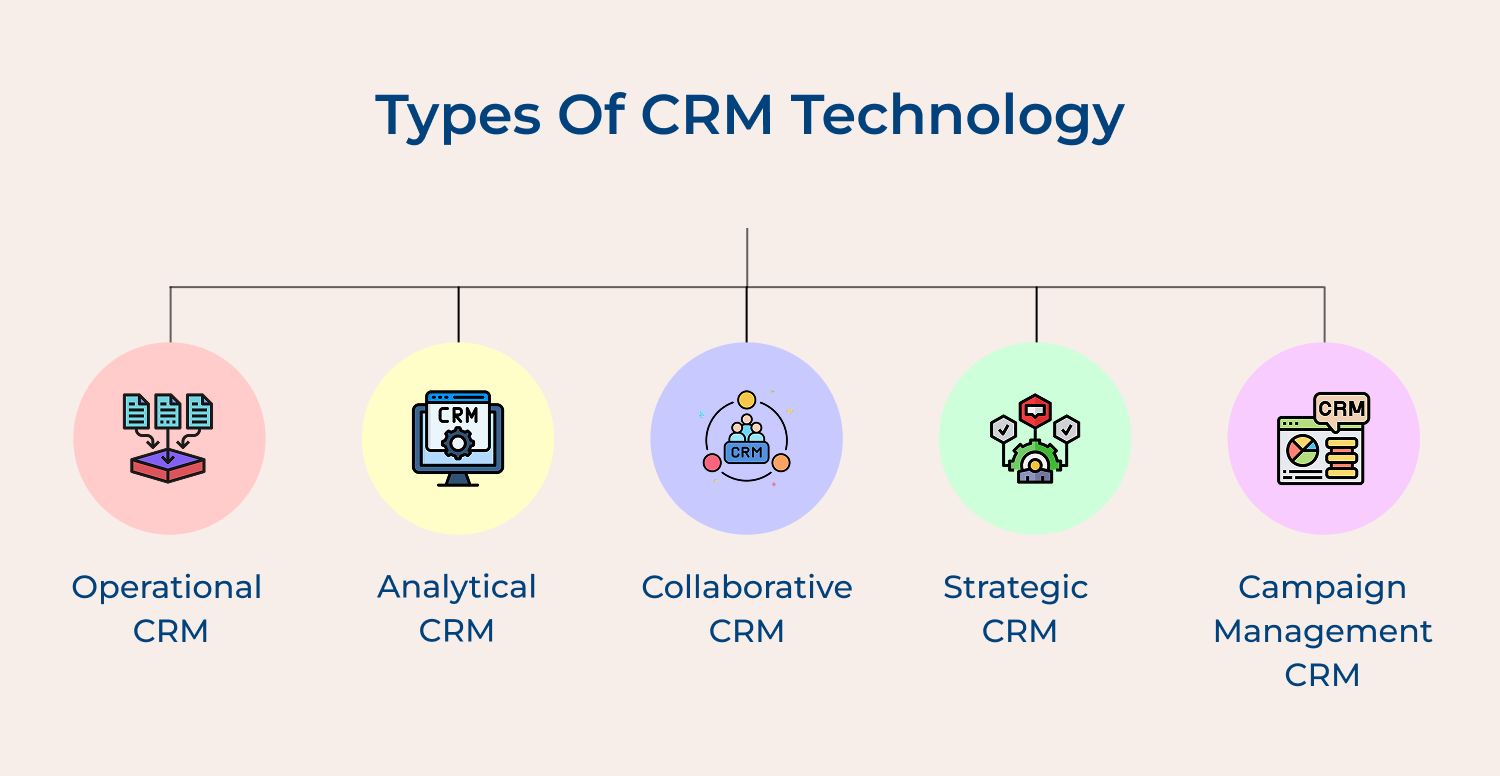
Operational CRM
A fundamental system designed to streamline business processes, including sales automation, marketing automation and service automation. Daily customer interactions are managed effectively while maintaining detailed records of every customer touchpoint and transaction.
Analytical CRM
Advanced data analysis tools work to uncover valuable insights about customer behavior, preferences and trends. Data mining and pattern recognition capabilities empower businesses to make informed decisions about sales strategies, marketing campaigns as well as service improvements.
Collaborative CRM
Seamless communication and data sharing across different departments form the core of collaborative CRM. Customer information flows freely between sales, marketing and support teams, creating a unified approach to customer relationship management.
Strategic CRM
Long-term value-based relationships emerge through strategic analysis of customer data. Organizations gain deep understanding of customer needs and adapt business processes to better serve specific customer segments while improving retention rates.
Campaign Management CRM
Marketing teams leverage campaign management CRM to plan, execute and track initiatives across multiple channels. Targeted campaigns receive precise monitoring, allowing performance measurement and strategic adjustments based on real-time data.
CRM technology helps businesses understand customers better and respond to them more personally. Centralizing data and tracking interactions turns everyday touchpoints into stronger relationships.
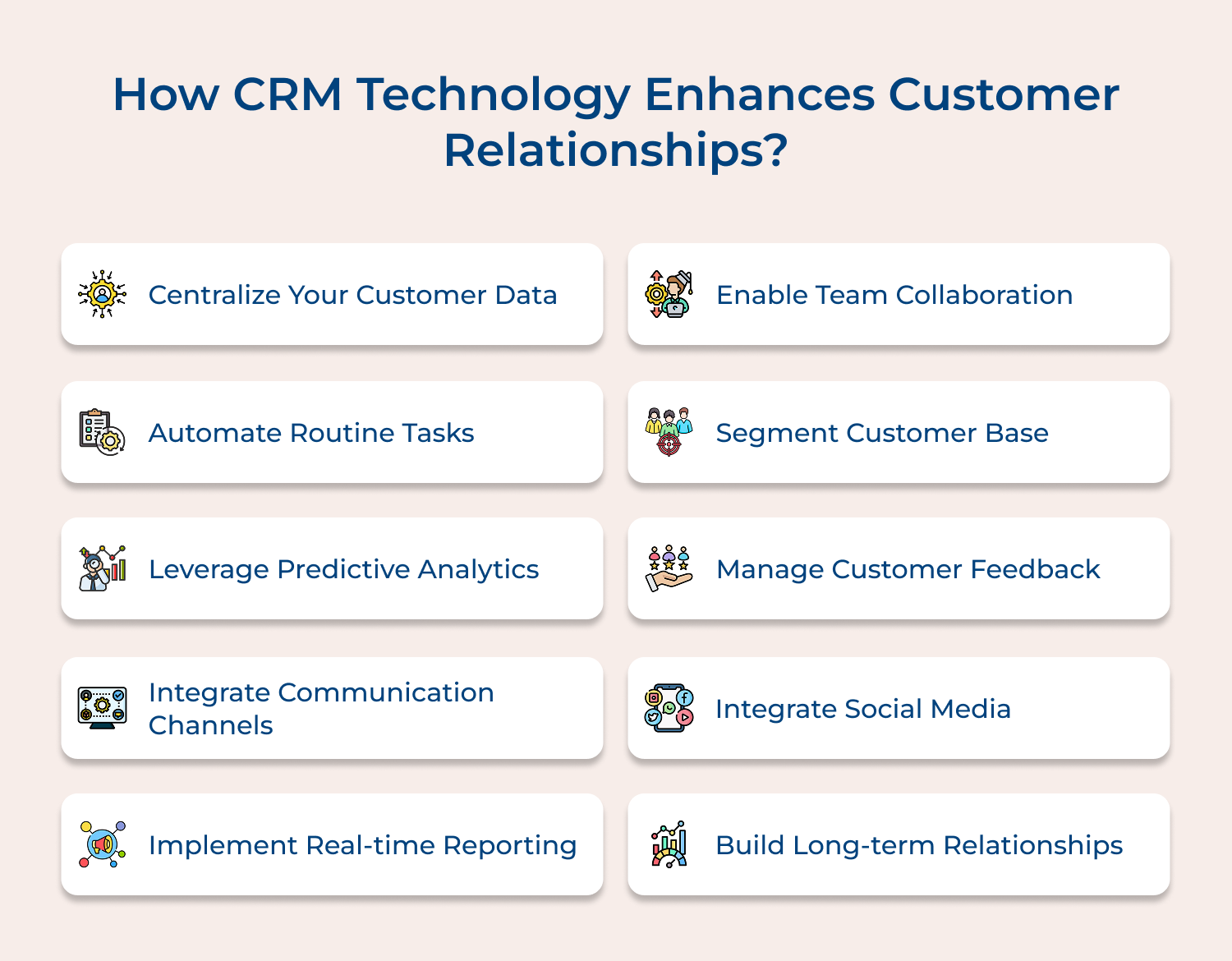
A unified digital system brings all customer information into one place, from contact details and past interactions to purchase history as well as preferences. When data is scattered, teams deliver inconsistent service and miss valuable opportunities.
Centralization fixes this by giving everyone access to accurate, real-time insights. By standardizing data entry and building complete customer profiles, teams can
Actionable Tips:
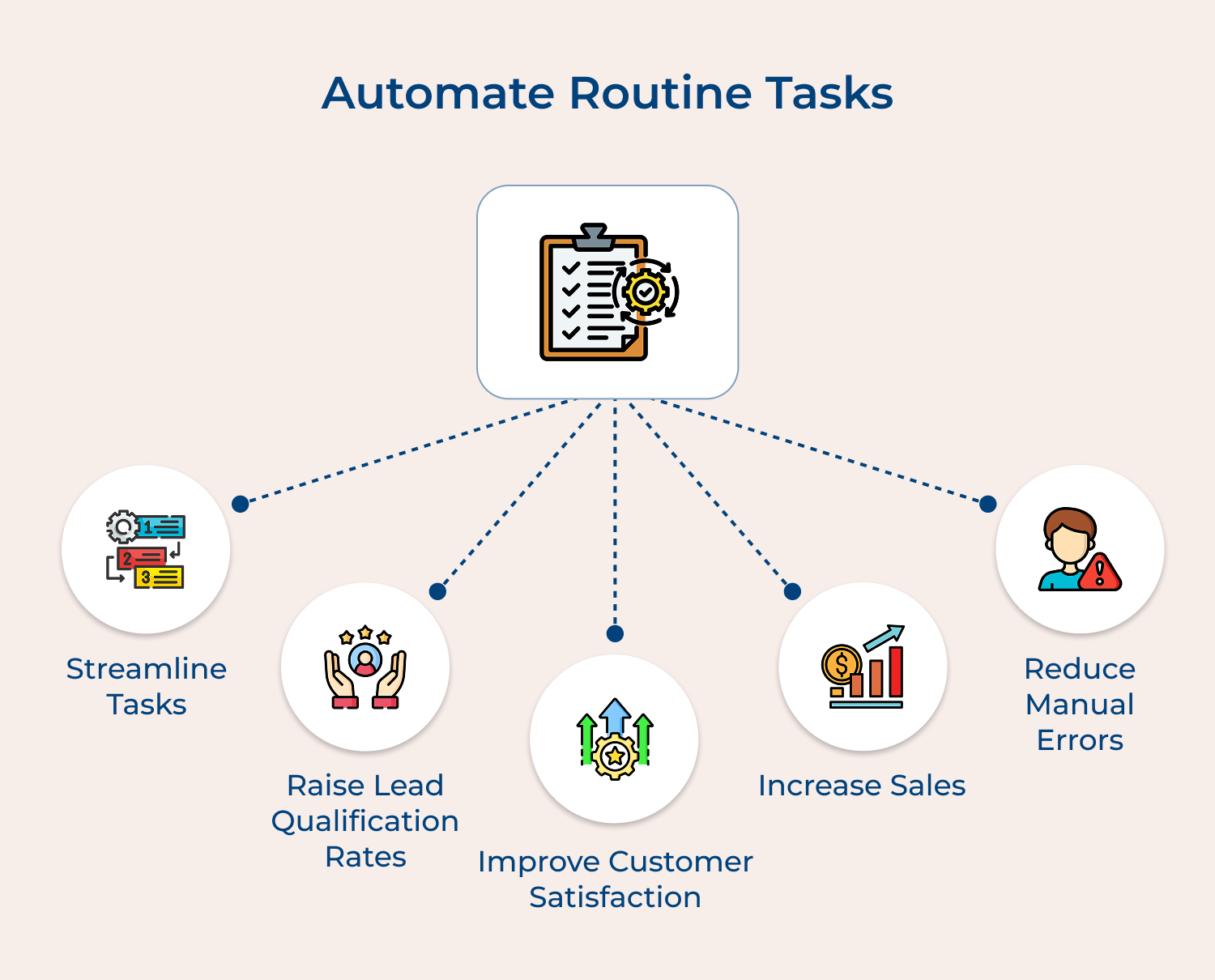
Automation streamlines repetitive customer service tasks like welcome emails, reminders, follow-ups and support ticket routing, cutting down manual work while keeping communication consistent. Handling these tasks manually wastes time that could go toward complex issues. Automated workflows ensure timely follow-ups, reduce errors and speed up responses, boosting efficiency as well as customer satisfaction.
Set up email sequences for onboarding or post-purchase follow-ups, route support tickets automatically based on urgency and schedule check-ins throughout the customer journey to keep interactions personalized.
Actionable Tips:
Predictive analytics uses historical data and AI to anticipate customer needs, flag potential issues and suggest personalized actions based on behavior patterns. Today’s customers expect businesses to be proactive, not reactive.
By predicting churn, spotting upsell opportunities and tailoring interactions, companies can boost retention. Track purchase patterns to foresee reorder or upgrade needs while identifying at-risk customers and trigger timely interventions. Offer personalized product recommendations based on similar profiles and past behavior, creating a more thoughtful customer experience.
Actionable Tips:
A collaborative CRM connects all customer communication channels—email, phone, chat, social media and in-person—into a single platform, ensuring consistent service no matter how customers reach out. Lost information and repeated requests frustrate customers, but unified profiles as well as full conversation histories keep interactions smooth.
Automated workflows handle channel switching seamlessly, maintaining context and continuity. This approach allows teams to deliver personalized, efficient and consistent experiences across every touchpoint, strengthening customer satisfaction as well as loyalty.
Actionable Tips:
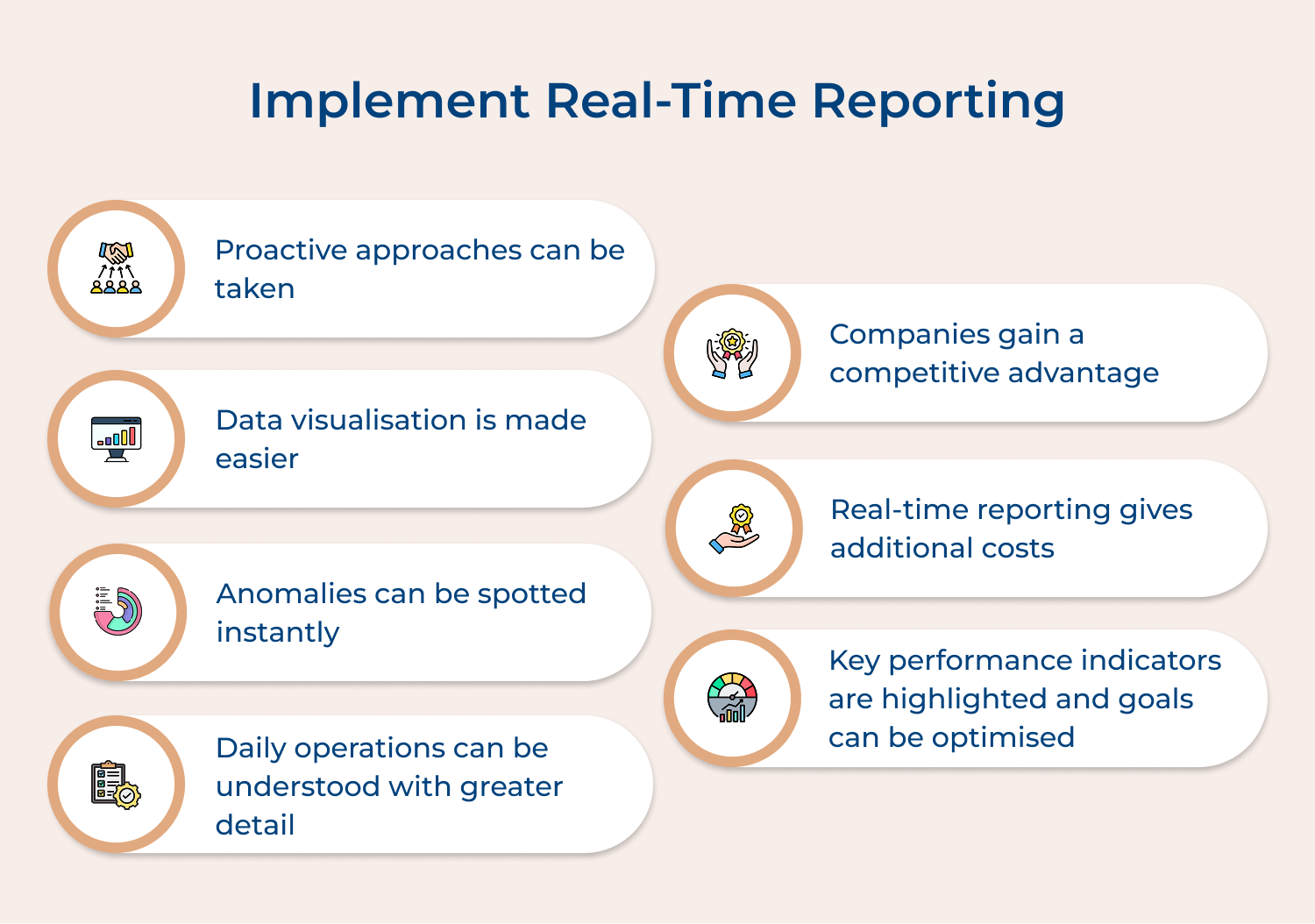
Live dashboards give teams instant access to key metrics, customer interactions and service quality data, providing immediate insight into performance. Rapidly changing business conditions demand quick responses and real-time reporting helps managers spot issues, identify trends, all while making data-driven decisions fast.
Role-specific dashboards display the most relevant KPIs, while automated alerts highlight significant changes. Teams can use real-time data to adjust staffing, refine service strategies and optimize resources, ensuring customer needs are met efficiently as well as service levels remain consistently high.
Actionable Tips:
Collaborative CRM tools connect teams across departments, allowing seamless information sharing and coordination so everyone has access to the same customer data. Ineffective communication often causes inconsistent service and slow problem resolution, but integrated tools keep handoffs smooth, prevent silos as well as help teams work together efficiently.
Shared customer notes, real-time updates and clear task tracking ensure everyone stays aligned. A centralized knowledge base for common issues lets team members access and update solutions, enabling faster resolution while delivering high-quality customer experiences.
Actionable Tips:
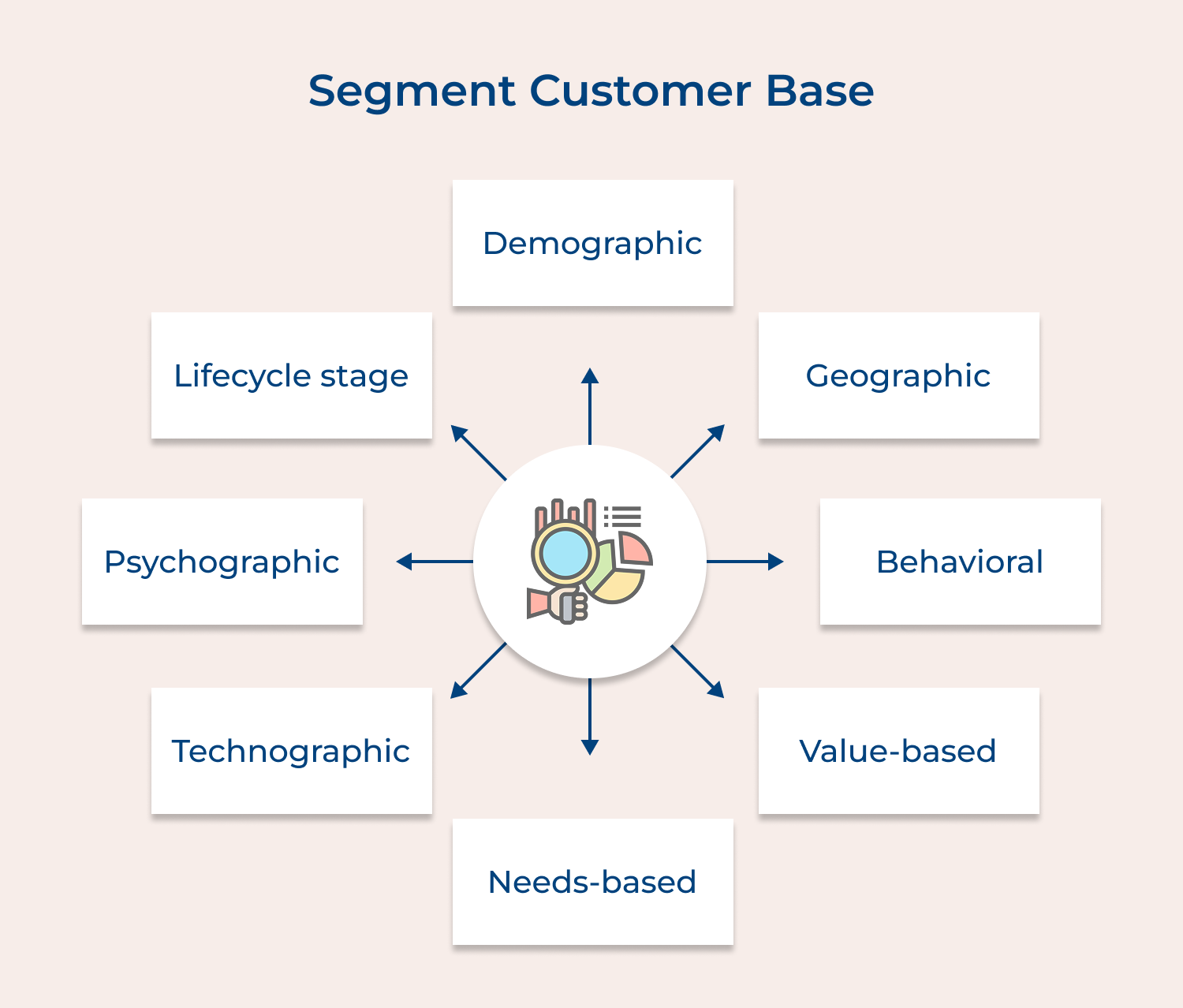
Customer segmentation groups customers based on shared traits, behaviors and preferences, allowing businesses to tailor communication as well as service strategies to each group’s needs.
Different segments have unique expectations, so segmentation ensures messaging is relevant, resources are used efficiently and services are targeted effectively. This approach boosts engagement along with marketing impact.
Build detailed segment profiles, create campaigns strategies for each group and customize communication frequency based on segment characteristics to deliver meaningful experiences.
Actionable Tips:
Feedback management systems collect, analyze and act on customer input from different sources, making sure every voice is heard. Customer feedback highlights service gaps, improves products and boosts satisfaction, but only when managed systematically.
Regular surveys at key touchpoints, automated feedback collection and trend analysis help turn insights into action. Closed-loop processes ensure teams follow up on customer input, driving continuous improvements in products, services and overall experience, while showing customers their opinions truly matter.
Actionable Tips:
Social CRM tools integrate social media monitoring, engagement, and analysis directly into the CRM system, letting teams track as well as respond to interactions while keeping service consistent across platforms.
Social media is now a key customer service channel and integration ensures quick responses, consistent messaging along with insights into customer sentiment.
Monitoring brand mentions, setting response protocols, tracking engagement trends and analyzing sentiment helps protect your brand. Social data can also enhance customer profiles and guide smarter strategies, creating more meaningful, timely interactions with your audience.
Actionable Tips:
Relationship management focuses on building long-term customer connections through personalized engagement, loyalty programs and proactive communication. Retaining existing customers costs far less than acquiring new ones, and strong relationships boost loyalty, encourage repeat business, and turn satisfied customers into brand advocates.
Personalized loyalty programs, targeted retention strategies for each stage of the customer lifecycle and regular, meaningful communication help maintain engagement without overwhelming customers. Celebrating milestones and creating special opportunities further strengthens bonds. Thus, driving higher customer lifetime value and supporting sustainable business growth.
Actionable Tips:
Companies using CRM tools are 86% more likely to exceed their sales goals and many report boosts in customer satisfaction as well as revenue thanks to these core features.
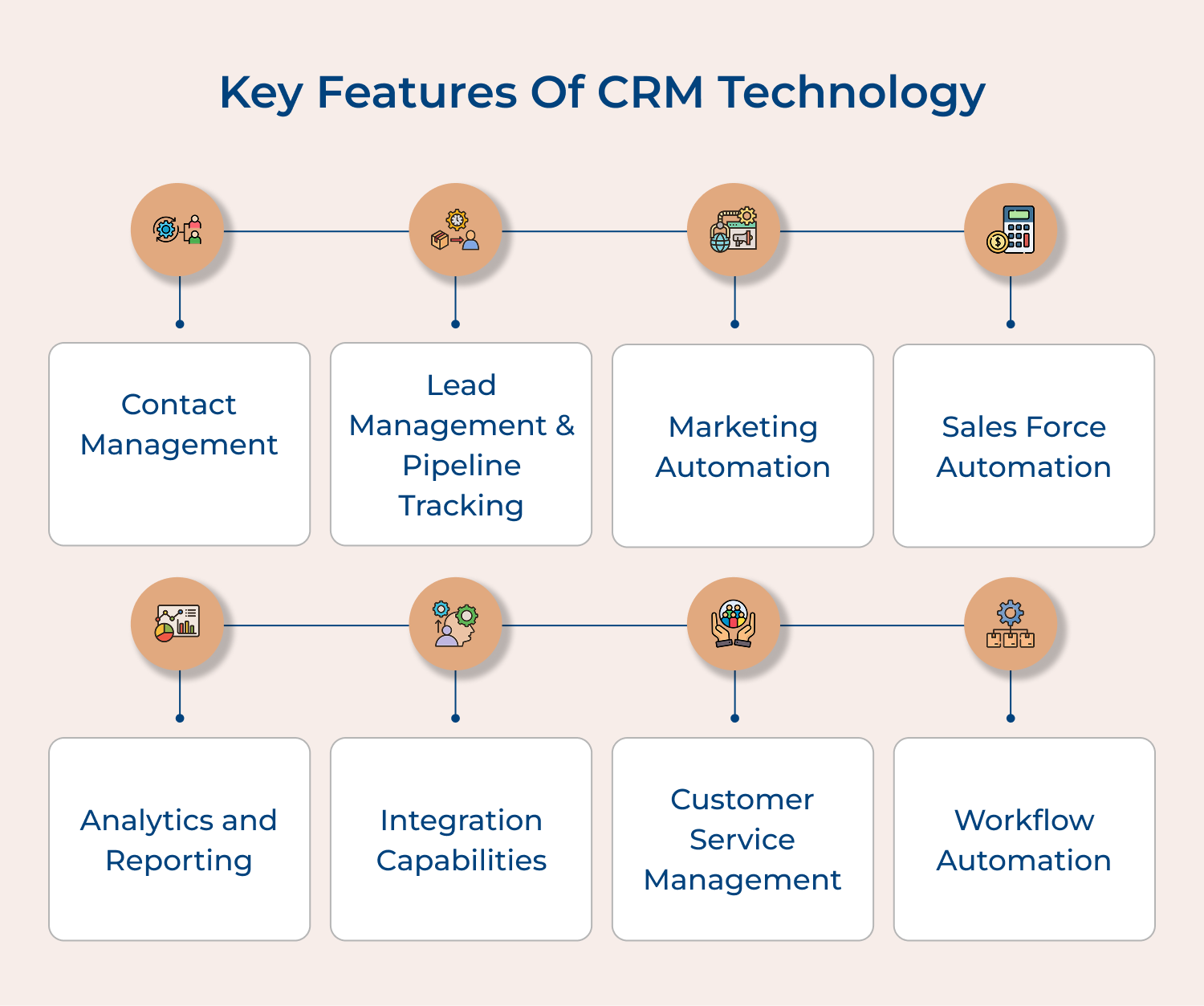
A robust contact management system serves as the foundation of any CRM platform, allowing businesses to store and organize comprehensive customer information in a centralized database. Users can access contact details, interaction history, purchase records and communication preferences. Staff members easily update and access customer profiles, ensuring teams always have current information at their fingertips.
Lead management features help organizations capture, track and nurture potential customers throughout the sales cycle. Organizations implement lead scoring, qualification processes and automated follow-up mechanisms. Real-time pipeline tracking provides visibility into sales opportunities, empowering teams to monitor deal progress, identify bottlenecks and forecast revenue accurately.
CRM’s marketing automation capabilities streamline campaign management and execution through intelligent task automation. Companies can create targeted email campaigns, schedule social media posts, track campaign performance and segment audiences based on various criteria. Personalized marketing messages reach customers at scale while measuring ROI for different marketing initiatives.
Sales force automation optimizes processes through automated quote generation, order processing and follow-up reminders. Mobile access to customer data empowers sales teams, along with territory management, quota tracking and sales forecasting tools. Reduced administrative work allows sales representatives to focus on relationship building.
Modern CRM systems deliver powerful analytics tools that transform raw data into actionable insights. Customizable dashboards, real-time reporting and predictive analytics capabilities drive success. Organizations track key performance indicators, analyze customer patterns, measure campaign effectiveness and generate detailed reports for strategic decisions.
CRM platforms connect seamlessly with email clients, accounting software and social media platforms. Data flows consistently across all business processes, eliminating duplicate entries and creating a unified view of customer interactions across channels as well as touchpoints. Multiple systems work together harmoniously through robust integration features.
Customer service features enable multi-channel support delivery with enhanced efficiency. Sophisticated ticket management, SLA tracking and knowledge base tools streamline operations. Smart routing systems direct inquiries to appropriate team members while maintaining service quality standards while monitoring resolution times.
Advanced workflow automation streamlines standard operating procedures across organizations. Automated approval processes, task assignments and notification systems enhance productivity. Standardized business processes reduce human error and improve operational efficiency throughout departments, creating seamless workflows.
Implementing a CRM system can be challenging, with obstacles like user adoption, data quality, and process alignment. Addressing these issues early ensures smooth deployment.
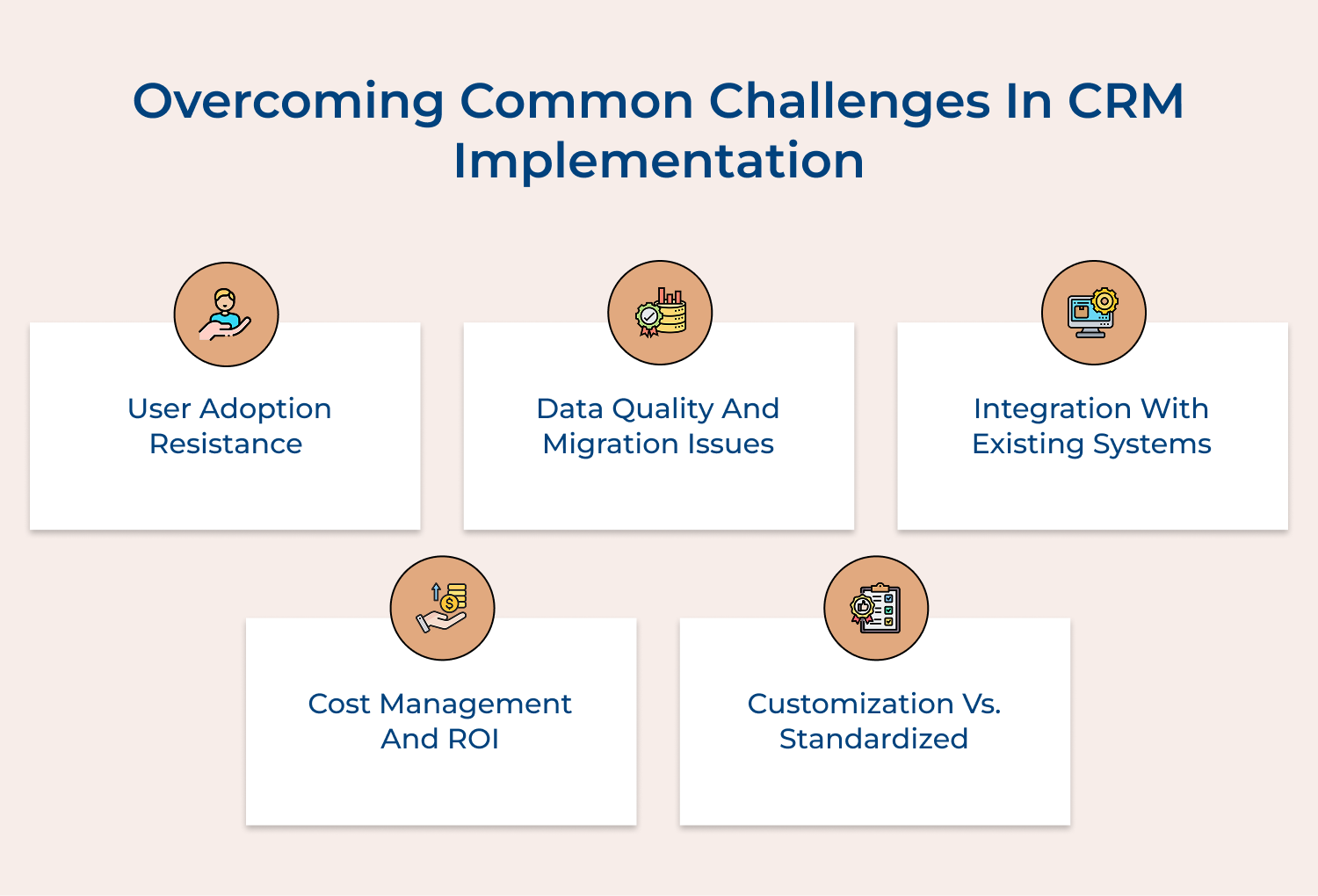
1. User Adoption Resistance
Challenge: Employees often resist adopting new CRM systems, preferring familiar workflows and viewing the new system as unnecessary or complicated.
Solution:
Implementation Tips:
Challenge: Poor data quality, duplicate records and inconsistent formatting often plague CRM implementations, leading to unreliable information as well as reduced system effectiveness.
Solution:
Implementation Tips:
Challenge: Connecting CRM with existing business systems often creates technical hurdles and data synchronization issues.
Solution:
Implementation Tips:
Challenge: CRM implementations often exceed budgets and struggle to demonstrate clear return on investment.
Solution:
Implementation Tips:
Challenge: Finding the right balance between customizing the CRM to meet specific needs while maintaining system stability and upgradeability.
Solution:
Implementation Tips:
CRM technology plays a crucial role in strengthening customer relationships and optimizing business operations. It provides powerful tools for managing data, automating processes and delivering personalized experiences.
The right CRM system can significantly enhance customer satisfaction, drive sales and support informed decision-making. For businesses aiming to stay competitive in today’s fast-paced market, adopting CRM is essential. Integrating CRM solutions helps build stronger connections with customers, enabling businesses to thrive and position themselves for long-term success.

How long does it typically take to implement a CRM system?
The implementation timeline varies depending on your organization’s size and needs. A basic setup for a small business can take 2-4 weeks, while enterprise-level implementations might take 3-6 months or longer. This includes system configuration, data migration, integration with existing tools, user training and initial testing phases to ensure everything works properly.
How can I ensure successful user adoption of the CRM?
Success depends on proper training, clear communication of benefits and visible management support. Focus on showing how the CRM makes users’ jobs easier, provide comprehensive training materials, identify department champions and establish clear usage guidelines. Regular feedback sessions and continuous support help maintain consistent adoption rates.
Can CRM systems integrate with my existing business tools?
Most modern CRM systems offer extensive integration capabilities with common business tools like email platforms, accounting software, marketing automation tools and customer service systems. APIs and pre-built connectors make integration possible with most popular business applications, though some customization may be required for specialized tools.
How secure is my customer data in a CRM system?
Modern CRM systems employ robust security measures including data encryption, role-based access controls, regular security audits and compliance with major data protection regulations. Cloud-based systems often provide better security than in-house solutions with regular updates and dedicated security teams monitoring for potential threats.
What kind of ROI can I expect from a CRM implementation?
Organizations typically see ROI through increased sales efficiency, better customer retention and improved marketing effectiveness. Studies show average returns of $8.71 for every dollar spent on CRM. However, actual ROI varies by industry and implementation quality with benefits usually becoming apparent within 6-12 months of proper implementation.
How can I migrate my existing customer data into a new CRM?
Data migration requires careful planning as well as typically involves data cleaning, formatting, and validation steps. Most CRM systems provide import tools for common file formats like CSV or Excel. It’s crucial to map data fields correctly, remove duplicates and verify data quality before as well as after migration.
 https://omni24.io/wp-content/uploads/2026/09/Social-commerce-scaled.png
1340
2560
Webvision Solution
https://omni24.io/wp-content/uploads/2023/04/Omni-Logo-1.svg
Webvision Solution2026-10-23 12:18:272026-10-23 12:18:27What is Social Commerce and Why Does It Matter?
https://omni24.io/wp-content/uploads/2026/09/Social-commerce-scaled.png
1340
2560
Webvision Solution
https://omni24.io/wp-content/uploads/2023/04/Omni-Logo-1.svg
Webvision Solution2026-10-23 12:18:272026-10-23 12:18:27What is Social Commerce and Why Does It Matter? https://omni24.io/wp-content/uploads/2026/08/AI-Customer-Service-Agents.png
1256
2400
Webvision Solution
https://omni24.io/wp-content/uploads/2023/04/Omni-Logo-1.svg
Webvision Solution2026-09-21 04:48:512026-09-21 04:48:51How to Build an AI Customer Service Agents: 8 Key Steps
https://omni24.io/wp-content/uploads/2026/08/AI-Customer-Service-Agents.png
1256
2400
Webvision Solution
https://omni24.io/wp-content/uploads/2023/04/Omni-Logo-1.svg
Webvision Solution2026-09-21 04:48:512026-09-21 04:48:51How to Build an AI Customer Service Agents: 8 Key Steps https://omni24.io/wp-content/uploads/2026/08/Omnichannel-Conversational-AI.png
1256
2400
Tushar Joshi
https://omni24.io/wp-content/uploads/2023/04/Omni-Logo-1.svg
Tushar Joshi2026-09-16 03:51:072026-09-16 03:51:07How to Build Omnichannel Conversational AI Strategy
https://omni24.io/wp-content/uploads/2026/08/Omnichannel-Conversational-AI.png
1256
2400
Tushar Joshi
https://omni24.io/wp-content/uploads/2023/04/Omni-Logo-1.svg
Tushar Joshi2026-09-16 03:51:072026-09-16 03:51:07How to Build Omnichannel Conversational AI Strategy
Whether it’s about acquire, engage or support – Omni24 covers all your customer engagement needs in one complete platform.

Copyright ©2026 Veemo All rights reserved.
CA, Los Angeles, Hall Ave, 19011