8 Best Knowledge Management System Examples of 2026
Discover top knowledge management system examples that improve collaboration, speed up decisions, enhance customer loyalty and streamline business operations.

Discover top knowledge management system examples that improve collaboration, speed up decisions, enhance customer loyalty and streamline business operations.
Many organizations struggle with scattered information across teams—causing duplicate work, slower responses and inconsistent customer experiences. Employees spend too much time searching for answers, while critical insights stay locked in people’s heads.
As businesses grow, the problem worsens: onboarding becomes harder, customer service suffers and knowledge disappears when employees leave. That’s where a knowledge management system helps. It organizes, stores and shares information so everyone stays aligned.
By exploring different types and real-world knowledge management system examples, you can find the best one for your business while building a culture of knowledge sharing that fuels long-term success.
A knowledge management system is a digital platform that captures, organizes and shares information across an organization. It transforms scattered information into accessible knowledge that teams can use to make better decisions and solve problems faster.
Knowledge management systems revolutionize customer service by giving support agents instant access to accurate information and proven solutions. When customers call with questions, agents can quickly find the right answers instead of putting people on hold or transferring calls. This creates smoother conversations and helps customers feel confident that they’re getting reliable help from knowledgeable representatives.
Key Principles:
39% of organisations say better business execution (e.g., faster decision-making, speed to market) came via KM initiatives. Let’s explore its benefits:
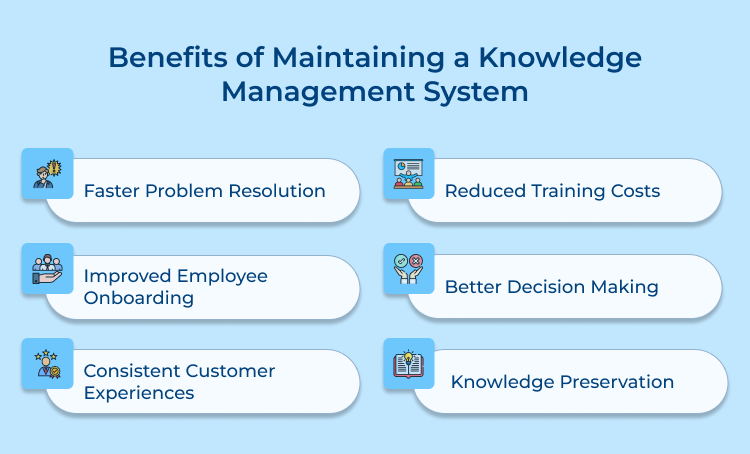
Faster Problem Resolution
A knowledge management system helps employees instantly find proven solutions to complex issues instead of reinventing the wheel. This speeds up problem-solving, boosts efficiency and helps teams stay focused on achieving project goals.
Improved Employee Onboarding
New hires ramp up faster with easy access to training materials and company processes. They spend less time asking repetitive questions and more time learning independently, making onboarding smoother as well as more cost-effective.
Consistent Customer Experiences
When everyone uses the same verified information, customer support stays consistent across teams. Customers get clear, accurate answers every time – building trust and long-term customer loyalty.
Reduced Training Costs
Knowledge is documented and always available, reducing the need for repetitive, instructor-led sessions. Employees can learn at their own pace, saving both time and training expenses as the company scales.
Better Decision Making
Access to past project insights and data helps leaders make smarter decisions. Teams learn from past wins and missteps, avoiding repeated errors while improving overall performance.
Knowledge Preservation
Even when key employees leave, their expertise remains accessible. It ensures business continuity and protects years of hard-earned organizational knowledge.
Deploying a KMS can reduce onboarding time (and thus ramp-up cost). Different organizations need different approaches to managing their knowledge. Let’s explore all the types:
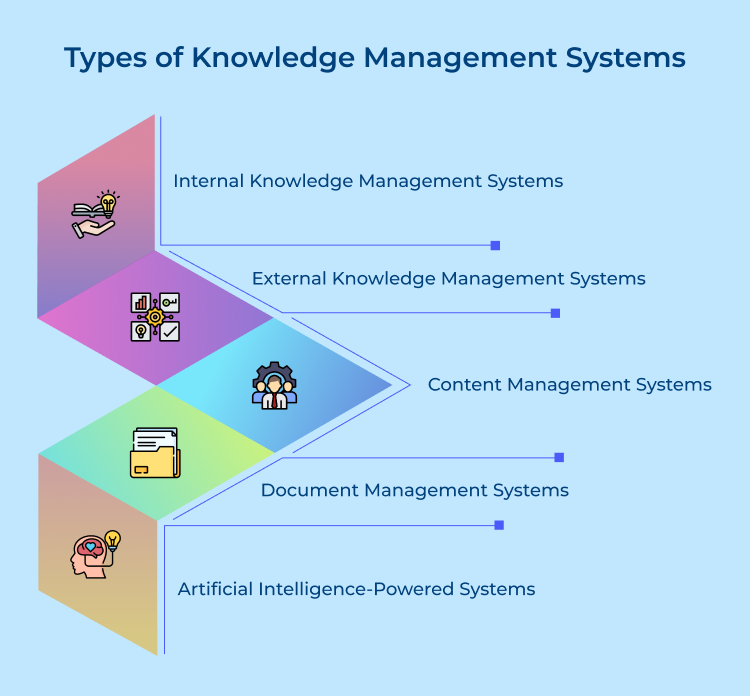
These systems focus exclusively on capturing and sharing knowledge within an organization’s boundaries. Think of them as private libraries where employees store procedures, best practices and institutional wisdom that shouldn’t be shared with outsiders.
Key characteristics that make internal systems effective:
Internal systems excel at preserving company-specific processes and maintaining competitive advantages through protected information. They create secure environments where teams can document sensitive strategies, client relationships and proprietary methods without worrying about external access.
External systems serve customers, partners and the general public by providing accessible information about products, services as well as support topics. These platforms act as bridges between organizations and their external stakeholders.
Essential features that drive external system success:
Companies use external systems to reduce support tickets while empowering customers to find answers independently. This approach builds stronger relationships by demonstrating transparency and commitment to customer success through readily available resources.
Content Management Systems organize and publish information with sophisticated editorial workflows that ensure quality as well as consistency. These platforms treat knowledge like published content that requires careful curation and regular updates.
Unlike simple document repositories, Content Management Systems provide version control, approval processes and publication scheduling that maintain information accuracy. They work particularly well for organizations that need to manage large volumes of frequently updated content.
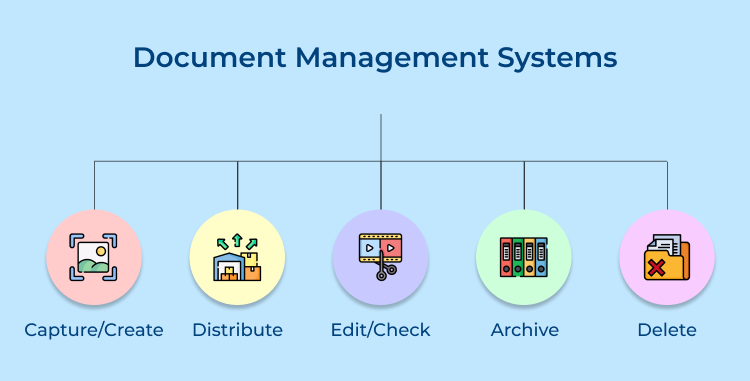
Document Management Systems excel at organizing, storing and retrieving files while maintaining detailed records of changes. These systems treat knowledge as collections of documents that need careful organization and security controls.
Understanding document management through focused questions helps clarify implementation:
Organizations choose Document Management Systems when they need robust file handling capabilities, audit trails and integration with existing document creation tools. These platforms work especially well for industries with strict compliance requirements or complex approval processes.
AI-powered systems use machine learning to automatically categorize content, suggest relevant information and even generate responses to common questions. These intelligent platforms learn from user behavior to continuously improve their recommendations and search results.
Modern AI systems can analyze patterns in how people use knowledge to surface insights that might otherwise remain hidden. They excel at connecting related information across different departments and identifying knowledge gaps that need attention.
Explore cutting-edge knowledge management system examples that are poised to lead the pack in 2026, each demonstrating distinct use cases that cater to a range of business needs.
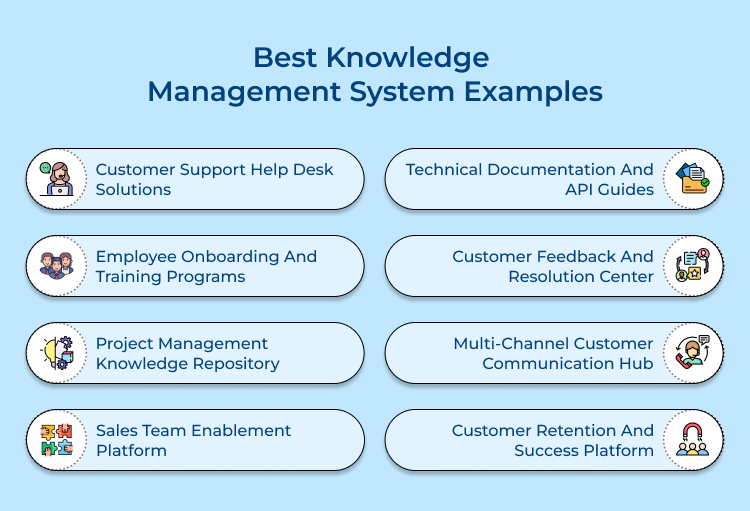
Modern customer support teams handle hundreds of inquiries daily across multiple channels. A centralized knowledge management system becomes essential for maintaining consistent service quality while reducing response times and agent workload.
Customers can find instant answers to common questions without contacting support agents. This reduces ticket volume while providing 24/7 assistance that matches customer preferences for immediate problem resolution.
Support agents access relevant solutions instantly when handling complex customer issues. This integration prevents information silos and ensures consistent troubleshooting approaches across all support interactions.
New support staff can quickly learn product knowledge and problem-solving techniques through structured training content. Experienced agents also benefit from updated procedures and advanced troubleshooting methods.
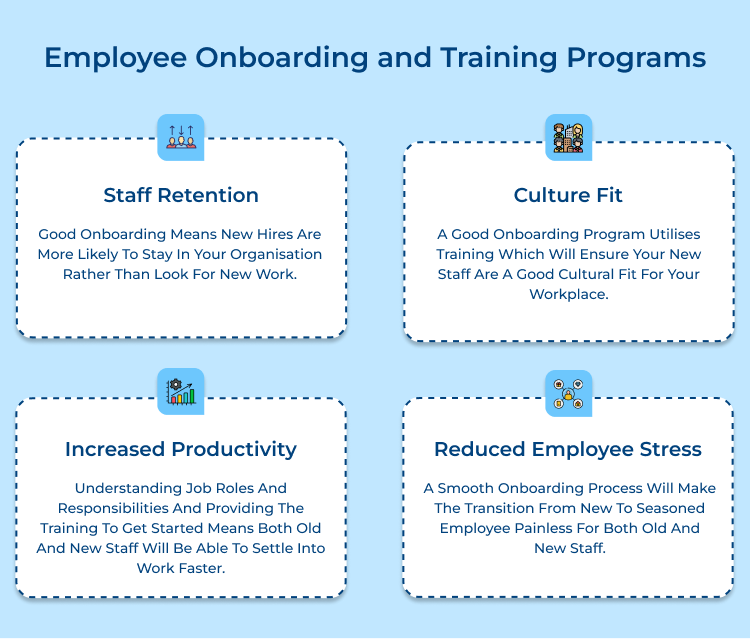
Organizations invest significant resources in hiring new talent but often struggle with inconsistent onboarding experiences. A knowledge management system standardizes training processes while ensuring every new employee receives comprehensive preparation for their role.
Knowledge management systems transform employee onboarding through these key improvements:
Remote onboarding presents unique difficulties in maintaining personal connections and ensuring engagement. Knowledge management systems address this by providing interactive content and virtual collaboration tools that replicate in-person training experiences.
Project teams often repeat mistakes from previous initiatives because lessons learned remain trapped in individual memories. A centralized knowledge repository transforms organizational experience into actionable guidance for future projects.
Essential questions to evaluate before implementing project knowledge management:
These questions help organizations identify specific knowledge gaps and design systems that address real workflow challenges rather than creating additional administrative burden.
How does a knowledge management system change project planning? Instead of starting from scratch, project managers can access proven templates that include timeline estimates, resource requirements and risk mitigation strategies from similar successful initiatives.

Sales teams face increasing pressure to close deals faster while maintaining relationship quality. A knowledge management system becomes crucial for providing instant access to product information, competitive insights and proven sales strategies that help representatives respond confidently to customer needs.
A comprehensive sales enablement knowledge management system stores these four critical elements:
When prospects raise concerns about pricing or features, sales representatives can instantly access tested responses that address specific objections while maintaining conversational flow.
For example, if a customer says “your solution seems expensive,” the system provides multiple response options that redirect focus to value proposition and return on investment calculations.
Development teams require immediate access to accurate technical information to build integrations and troubleshoot issues effectively. Knowledge management systems support technical documentation through these three essential approaches:
Technical documentation systems work best when they evolve with the development team’s actual workflow patterns rather than forcing artificial organizational structures.
Customer complaints provide valuable insights but often remain scattered across different departments without systematic analysis. A knowledge management system transforms feedback into actionable intelligence that improves service quality while preventing recurring issues from damaging customer relationships.
Knowledge management systems work for customer feedback by creating structured workflows that capture complaint details, track resolution progress and analyze patterns that reveal systemic problems requiring attention. The systematic approach ensures no customer concern disappears into departmental silos while building institutional knowledge about service improvement opportunities.
Best practices:
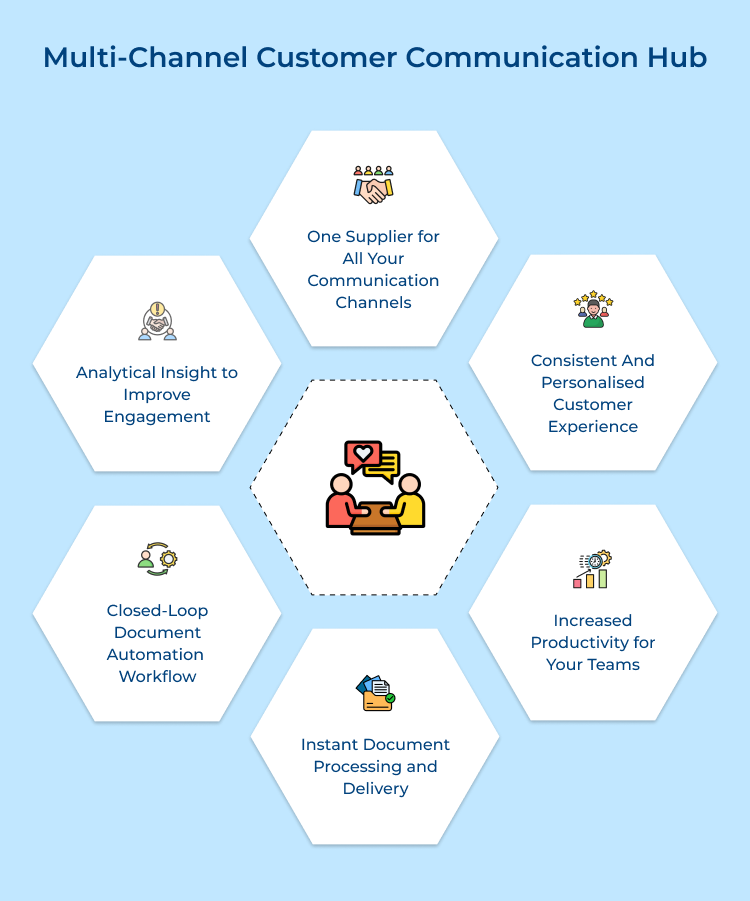
Customer conversations happen across email, chat, phone and social media platforms simultaneously. A knowledge management system becomes essential for maintaining consistent messaging and response quality across all communication channels.
How does a knowledge management system transform chat support efficiency? When a customer asks “Can I return this product after 30 days?”. The system instantly provides the representative with approved response scripts that include return policy details and next steps. This eliminates guesswork while ensuring every customer receives accurate information regardless of which agent handles their inquiry.
Knowledge management systems revolutionize email support by providing templates that balance efficiency with personal touch. Representatives access standardized formats while following personalization guidelines that incorporate customer names and purchase history to create responses that feel individually crafted rather than automated.
Pro Tips:
Customer success teams need systematic ways to monitor account health and identify at-risk customers before they churn. A knowledge management system becomes crucial for centralizing customer data, success strategies and intervention techniques that help teams proactively manage relationships while maximizing customer lifetime value.
Knowledge management systems enhance customer retention and success through these strategic approaches:
Leading companies have transformed their operations by implementing sophisticated knowledge management systems that capture institutional wisdom and make it accessible.
Amazon
Amazon’s knowledge management system centralizes customer service protocols, product details and operational guides across its global network.
Support agents can instantly access accurate information, ensuring consistent service quality worldwide. This approach reduces training time, speeds up resolutions and helps Amazon scale customer support efficiently while maintaining high standards.
Airbnb
Airbnb’s knowledge system powers help centers for hosts and guests, covering topics like bookings, payments, property management, etc.
By capturing best practices from experienced hosts, it improves guest satisfaction and reduces support ticket volumes. The platform empowers users to find answers independently and fosters a community that continuously enhances shared knowledge.
Spotify
Spotify uses knowledge management to organize technical documentation, APIs and developer resources across teams.
Engineers can easily share solutions and maintain consistency across projects, reducing downtime as well as duplication. The streamlined access to information accelerates innovation and keeps Spotify’s complex music platform running smoothly.
Netflix
Netflix’s system captures data on algorithms, user behavior and technical insights that power its recommendation engine.
Teams build on past research to refine personalization and optimize streaming performance globally. It ensures a continuously improving viewing experience driven by shared knowledge and data insights.
Microsoft
Microsoft integrates knowledge management across its product ecosystem to provide unified technical documentation, troubleshooting guides and best practices.
This system improves customer self-service, reduces support costs and accelerates issue resolution. It turns technical expertise into accessible, reusable knowledge for millions of global users.
Knowledge management systems transform scattered organizational wisdom into accessible resources that drive better decision-making and improved performance. These platforms break down information silos while creating sustainable frameworks for capturing, sharing and applying collective knowledge across teams.
Modern businesses that embrace knowledge management gain competitive advantages through faster problem resolution, consistent customer experiences and reduced operational costs. The investment in these systems pays dividends by preserving institutional memory and empowering employees with the information they need to excel.

How to build an effective Knowledge Management system?
Building an effective knowledge management system starts with understanding your organization’s specific information needs and workflow patterns. Begin by identifying what knowledge currently exists in silos, then create user-friendly processes for capturing and organizing that information. Success depends on choosing the right technology platform while establishing clear governance rules and encouraging active participation from all team members.
What are the types of knowledge management systems?
Knowledge management systems fall into several categories based on their primary functions and target audiences. Internal systems focus on employee knowledge sharing while external systems serve customers and partners. Content management systems emphasize editorial workflows, document management systems organize files with version control and AI-powered systems use machine learning to automatically categorize while suggesting relevant information.
What are examples of knowledge management tools?
Popular knowledge management tools include Confluence for team collaboration, Omni24 for document management and Zendesk for customer support knowledge bases. Other examples include Notion for flexible content organization, Guru for sales enablement and ServiceNow for enterprise knowledge management. Each tool serves different organizational needs, from simple wikis to complex enterprise platforms with advanced search and analytics capabilities.
How does a knowledge management system work?
Knowledge management systems work by creating structured repositories where information can be stored, categorized and easily retrieved when needed. Users contribute content through various input methods, while the system organizes information using tags, categories and search algorithms. The platform then provides multiple access points including search functions, browse capabilities and automated recommendations that help users find relevant information quickly.
What are the 5 components of a knowledge management system?
The five essential components include a content repository for storing information, search/retrieval mechanisms for finding relevant knowledge, collaboration tools for sharing and discussing content, workflow management for content approval, as well as analytics capabilities for measuring system usage. These components work together to create a comprehensive platform that captures organizational knowledge and makes it accessible to those who need it.
 https://omni24.io/wp-content/uploads/2026/08/AI-Customer-Service-Agents.png
1256
2400
Webvision Solution
https://omni24.io/wp-content/uploads/2023/04/Omni-Logo-1.svg
Webvision Solution2026-09-21 04:48:512026-09-21 04:48:51How to Build an AI Customer Service Agents: 8 Key Steps
https://omni24.io/wp-content/uploads/2026/08/AI-Customer-Service-Agents.png
1256
2400
Webvision Solution
https://omni24.io/wp-content/uploads/2023/04/Omni-Logo-1.svg
Webvision Solution2026-09-21 04:48:512026-09-21 04:48:51How to Build an AI Customer Service Agents: 8 Key Steps https://omni24.io/wp-content/uploads/2026/08/Omnichannel-Conversational-AI.png
1256
2400
Tushar Joshi
https://omni24.io/wp-content/uploads/2023/04/Omni-Logo-1.svg
Tushar Joshi2026-09-16 03:51:072026-09-16 03:51:07How to Build Omnichannel Conversational AI Strategy
https://omni24.io/wp-content/uploads/2026/08/Omnichannel-Conversational-AI.png
1256
2400
Tushar Joshi
https://omni24.io/wp-content/uploads/2023/04/Omni-Logo-1.svg
Tushar Joshi2026-09-16 03:51:072026-09-16 03:51:07How to Build Omnichannel Conversational AI Strategy https://omni24.io/wp-content/uploads/2026/08/Customer-Service-Teams.png
1256
2400
Tushar Joshi
https://omni24.io/wp-content/uploads/2023/04/Omni-Logo-1.svg
Tushar Joshi2026-09-15 04:01:522026-09-15 04:02:16How to Build Customer Service Teams: 6 Key Steps
https://omni24.io/wp-content/uploads/2026/08/Customer-Service-Teams.png
1256
2400
Tushar Joshi
https://omni24.io/wp-content/uploads/2023/04/Omni-Logo-1.svg
Tushar Joshi2026-09-15 04:01:522026-09-15 04:02:16How to Build Customer Service Teams: 6 Key Steps
Whether it’s about acquire, engage or support – Omni24 covers all your customer engagement needs in one complete platform.

Copyright ©2026 Veemo All rights reserved.
CA, Los Angeles, Hall Ave, 19011